HOW-TO GUIDE · BILLS
How to match bills to bank payments,
so every expense is counted once.
To match a bill to its bank payment, record the bill when it arrives, then apply the payment from the bank statement to that bill instead of categorizing it as an expense. The payment clears Accounts Payable and the expense stays counted once, by the bill. In ZeraBooks AI bookkeeping, the matching payments are offered for you.
7-day trial · card required, nothing charged for 7 days · General Ledger and Converter from $79/month billed annually

WHY IT MATTERS
Why matching beats categorizing the payment
A $1,236.40 packaging bill shows up twice in your records: once as the bill, once as the ACH debit on the bank statement. If the bill is entered as an expense and the bank line is also categorized as packaging, the books say you spent $2,472.80. That is the most common way small business books overstate costs.
Matching fixes it. The bill puts the expense on the books and a liability in Accounts Payable. The bank payment then clears that liability instead of creating a second expense. The P&L shows $1,236.40 once, and the balance sheet shows nothing owed.
Try it on your own documents. One-week free trial, both apps included.
STEP BY STEP
Matching a bill in ZeraBooks
The example is Northwest Packaging Supply’s bill NWP-26-0409 for $1,236.40 in the fictional Harbor Point books, paid by ACH from the chequing account on April 14, 2026.
Step 1 of 5
Upload the bill
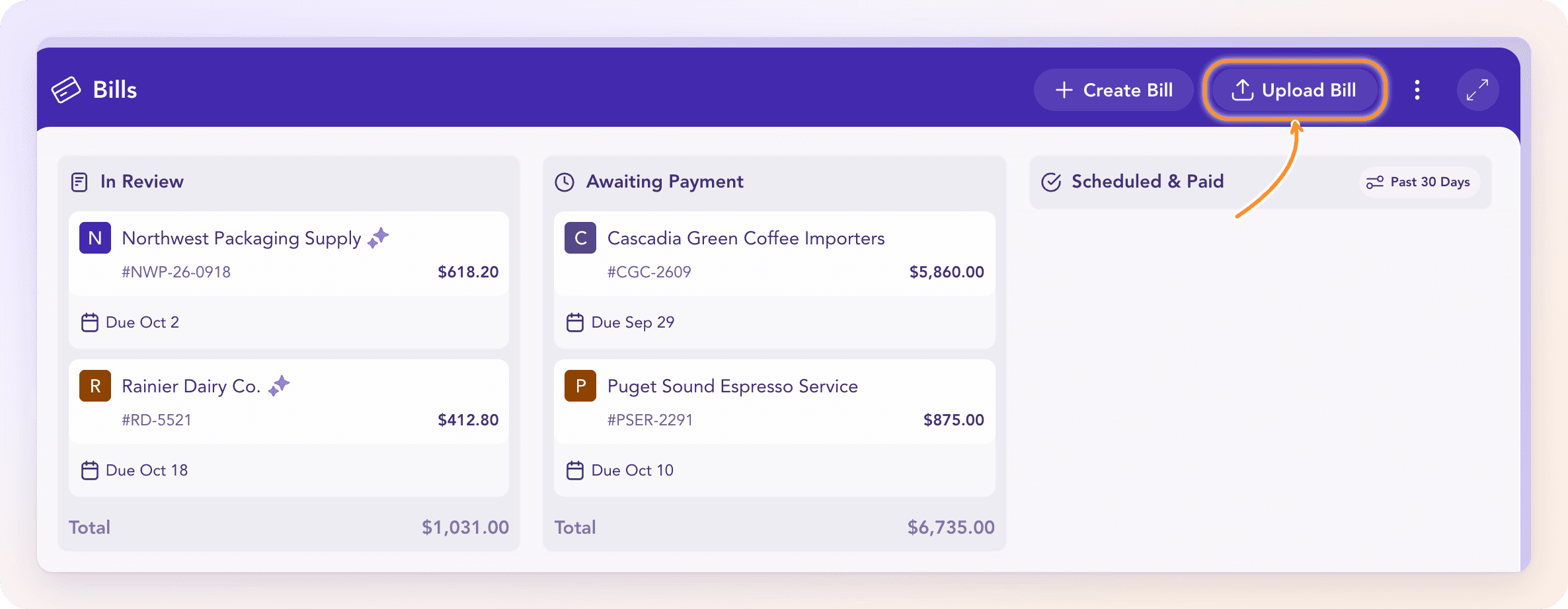
Go to Bills & Invoices, then Bills, and click Upload Bill, or drop the file anywhere on the page. PDFs and phone photos both work, up to 14 MB each. ZeraBooks reads the vendor, bill number, dates, every line and a category for each line. Uploading the same bill twice is refused, which is the other half of not double counting.
Step 2 of 5
Check it and approve it
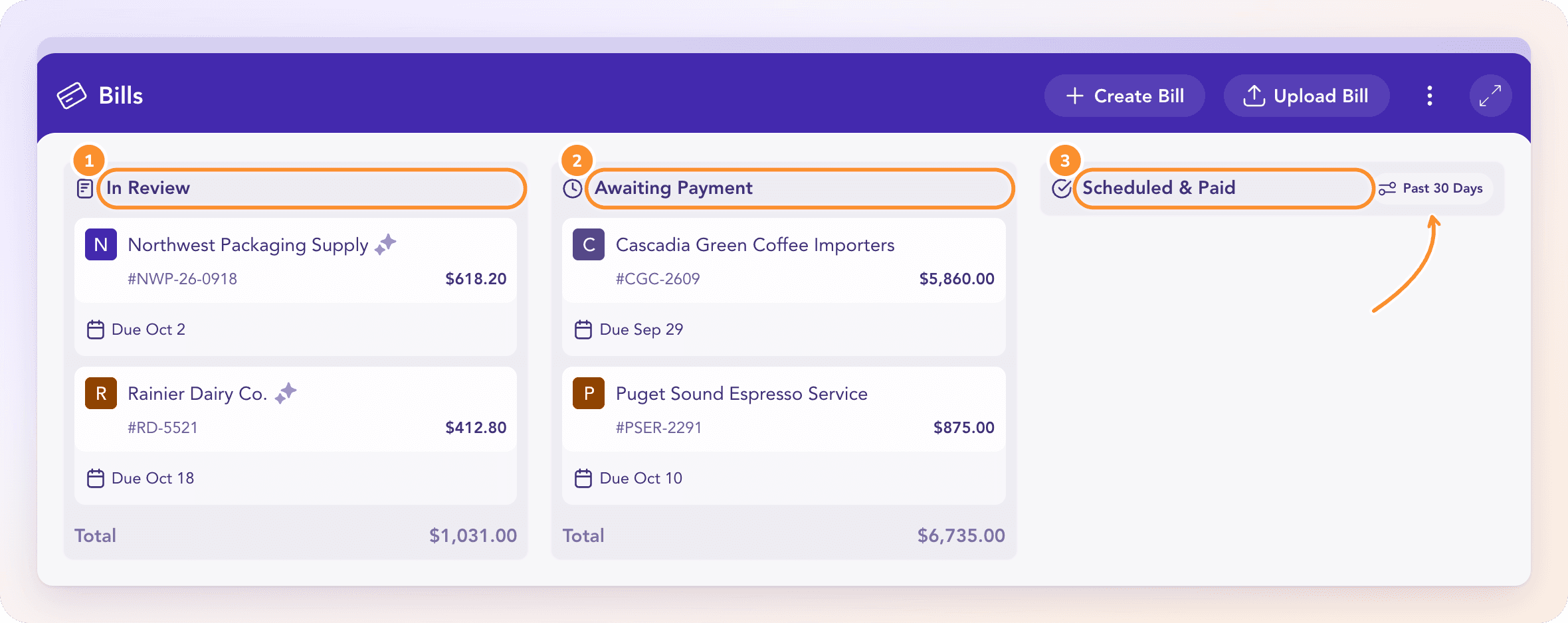
The bill waits in In Review until it passes its checks or you approve it, then moves to Awaiting Payment. That is the moment the expense and the amount owed land in the books.
Step 3 of 5
Pay the vendor the way you always do
ZeraBooks doesn’t pay bills or move money. Pay from your bank or card as usual. Nothing more happens in the books until the statement with the payment is uploaded.
Step 4 of 5
Upload the statement, then open the bill
Once the April statement is in, open the bill and click the Outstanding amount. The Settlement panel lists bank and card lines that could be the payment, each with a reason: it clears the bill exactly, it’s linked to the same vendor, or the bank description quotes the bill number.
Tip If nothing is offered, the payment is probably on a statement you haven’t uploaded yet.
Step 5 of 5
Apply the payment
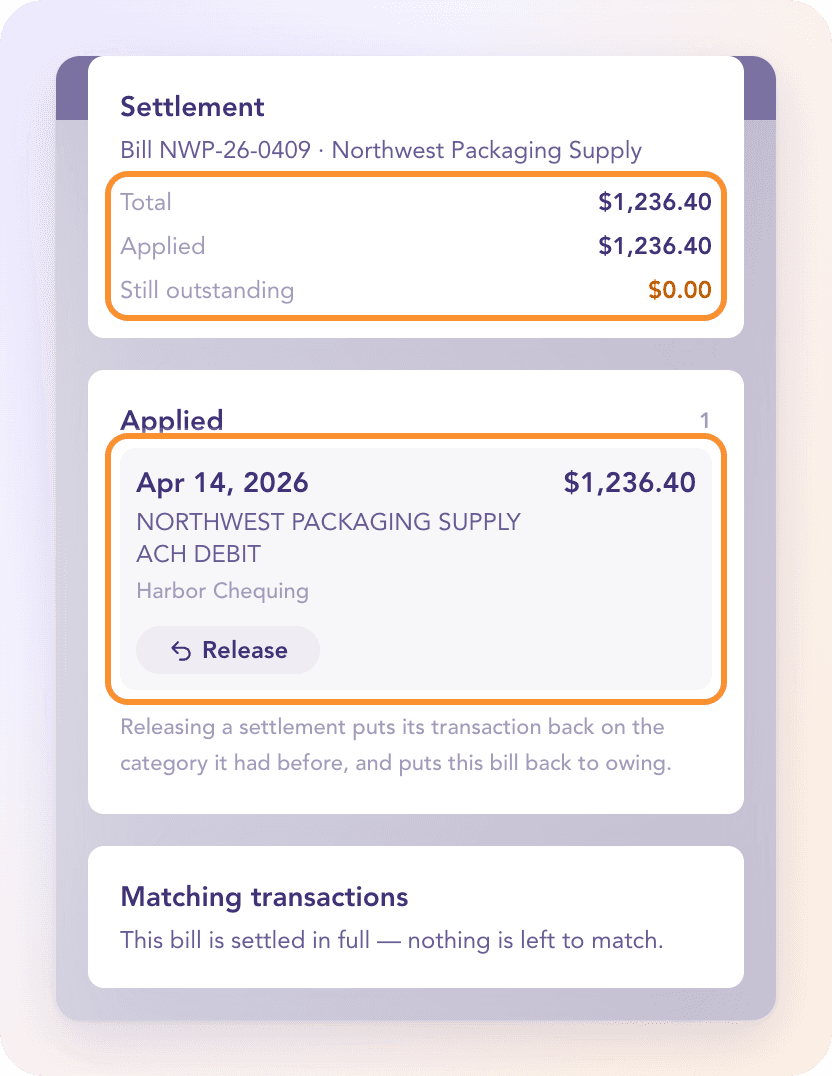
Click Apply on the right line. Here the April 14 ACH debit of $1,236.40 settles the bill to $0.00 and it moves to Scheduled & Paid. If a line is offered that isn’t the payment, Not this payment stops it being offered for this bill again.
WHEN IT DOESN’T CLEAR EXACTLY
Partial payments, fees and credits
Most bills clear to zero. These are the cases that don’t, and what to choose.
| What happened | What to choose | Result |
|---|---|---|
| You paid part of the bill | Apply as partial | The bill shows Part paid and waits for the next payment |
| The vendor took a small discount or the bank kept a fee | Apply and post difference | The gap goes to your settlement account and the bill closes at zero |
| One payment covered several bills | Split the payment across the bills | Each bill clears by its own share |
| The vendor sent a credit note | Apply credit on the next bill | Both are reduced through Accounts Payable; no money moves |
| The bill is in another currency | This settled the bill… | Enter both amounts; the difference posts to exchange gain or loss |
MATCHED THE WRONG ONE?
Release puts everything back
Under Applied, Release undoes the match. The bill is owed again and the bank line goes back to the category it had before. The same matching runs for customer invoices and deposits; see bank reconciliation software for how matched lines feed the monthly reconciliation.
Full Help Center articleShould I categorize a bill payment as an expense?
Not if the bill is already recorded. The bill is the expense. The payment only clears what you owed, so it belongs against Accounts Payable. Categorizing both counts the cost twice.
Can ZeraBooks pay my bills?
No. ZeraBooks has no bill pay, ACH or card payments. You pay as usual and match the payment when the statement is uploaded.
What if I already categorized the payment as an expense?
Apply it to the bill anyway. Applying moves the bank line onto Accounts Payable, so the expense is counted once, by the bill.
Does this work with a bank feed?
ZeraBooks has no bank feeds. Payments come from the statements you upload, and each statement is proven against its printed balances first, so the line you match is a line the bank actually printed.

ONE-WEEK FREE TRIAL
See it on your own books.
Free for one week.
General Ledger and Converter, both included. $79 a month billed annually or $149 monthly after the trial.