GUIDE · CREDIT CARD STATEMENTS
Credit card statement to Excel,
with the new balance proven.
To convert a credit card statement to Excel, upload the PDF to the ZeraBooks bank statement converter, confirm that the previous balance plus charges, fees and interest, minus payments and credits, equals the printed new balance, then download Excel. Charges come out as negative amounts and payments as positive, and each cardholder can get their own tab.
7-day trial · card required, nothing charged for 7 days · 1,000 pages a month from $79/month billed annually
CARD VS BANK
How is a credit card statement different from a bank statement?
A bank balance is money you have. A card balance is money you owe. Almost every difference that trips up a conversion comes from that.
| On the statement | Bank statement | Credit card statement |
|---|---|---|
| Balance names | Opening and closing balance | Previous balance and new balance |
| A purchase | Shown as money out, lowering the balance | Shown as a positive charge, raising what you owe |
| A payment or refund | Shown as money in | Shown with a minus sign, CR, or in its own payments and credits block |
| Dates that matter | Statement period, usually a calendar month | Closing date, which ends the billing cycle, and a payment due date some weeks later |
| Extra blocks | Checks paid, daily balances | Fees and interest charged with year-to-date totals, an interest rate table, a minimum payment warning |
| Several people | Rare: one account, one owner | Common: employee and additional cards printed in their own sections under one account |
Federal rules (Regulation Z) make U.S. card issuers group fees and interest under their own headings with totals for the cycle and the year to date, and set the due date at least 21 days after the statement is sent. The year-to-date totals and the rate table are not transactions and should not end up as rows in your spreadsheet.
Try it on your own documents. One-week free trial, both apps included.
READING A CARD STATEMENT
Which lines on a card statement cause problems in Excel?
A plain copy of the PDF table into a spreadsheet usually gets the purchases right and the rest wrong. These are the lines to look at first.
Payments and credits printed as negatives
Card statements treat a payment as reducing the debt, so it prints as a minus. In bookkeeping terms the payment is money coming into the card account. ZeraBooks Convert flips the signs so a card file reads the same way as a checking file: a charge is money out, written as a minus, and a payment or refund is money in.
Refunds mixed in with payments
Many issuers print refunds and payments in one “Payments, Credits and Adjustments” block. A refund is a credit against an expense; a payment is a transfer from your bank account. Convert marks the first Credit and the second Payment in the Type column so you can tell them apart.
Interest and fees in their own block
Interest charged and fees such as a late fee or a foreign transaction fee sit in separate blocks, often at the end of the statement. They are real charges and belong in the file with Type set to Interest or Fee. The year-to-date totals printed beside them are not.
Foreign currency purchases
A purchase made in another currency usually prints with an extra line under it showing the foreign amount and the exchange rate. That line is detail, not a second charge, and Convert leaves it out. The foreign transaction fee, when the card charges one, is its own line.
Employee and additional cards
Each cardholder’s charges print under their name and card ending, often with a subtotal. Convert assigns every charge to its cardholder and checks each subtotal. Payments, interest and fees belong to the account, not a person, so they show “Account” in the Cardholder column.
Two dates per line
Many issuers print a transaction date and a posting date. Convert’s Date column is the transaction date, the day the purchase was made.
BY ISSUER
How do Amex, Chase, Capital One, Citi and Bank of America lay out card statements?
Layouts change over time and business cards differ from personal ones, so treat these as things to look for on your own PDF. Convert reads the layout from the statement itself; nothing needs to be set per issuer.
American Express
The billing period rarely starts on the 1st; a cycle from the 15th to the 14th is common. Employee cards appear on the main account’s statement, each card member’s charges listed under their name, and a New Charges summary gives each card member’s total. Our guide to American Express expense categorization covers where each Amex charge goes once it is in a spreadsheet.
Chase
Ink business card statements list each card’s transactions under the cardholder, with a subtotal line such as “TRANSACTIONS THIS CYCLE (CARD 1234) $812.40”. Card statements sit in the same “Statements & documents” menu as checking. A Chase merchant services statement is a card processing statement, not a card statement.
Capital One
Spark business card statements can print each cardholder’s own payments, credits and adjustments block just before that cardholder’s transactions, so a refund belongs to the person it is printed under. Payment lines read like “CAPITAL ONE MOBILE PYMT”. Card statements are on the card’s own page, apart from bank statements.
Citi
Store and co-branded cards issued by Citi, such as the Costco card, are Citi accounts, and their statements come from Citi’s site rather than the store’s. Check the account summary for the previous and new balance and the fees and interest totals before converting.
Bank of America
Business card statements are in “Statements & Documents”, chosen with the account and year dropdowns. If a month seems to be missing, it is usually the year dropdown. The PDF carries the previous and new balance the check below needs.
STEP BY STEP
How do you convert a credit card statement to Excel?
The same steps work for a checking account; the general walkthrough is how to convert a bank statement to Excel. Need the PDF first? See how to download your statements from each bank and card issuer.
- 1
Download the PDF, not the activity CSV
Issuers also offer a transaction CSV, but it usually has no previous or new balance, so nothing can be checked. Convert reads PDFs, including scanned ones.
- 2
Upload it to Bank & Credit Cards
Click Upload statements or drop the PDF on the page. It is listed under Credit Card Statements, with “+n” on the tile when one PDF holds more than one account.
- 3
Read the proof
Usually under a minute. The card line reads “Previous balance … in charges and payments = new balance …”, and when every cardholder ties, “Cardholders · all n match their printed totals ✓”. The full rule is in How Convert proves a statement.
- 4
Fix a line if it doesn’t tie
A difference equal to one line’s amount usually means that line was missed; add it with Add a missing transaction. A difference of twice a line’s amount means it was read in the wrong direction.
- 5
Download as Excel
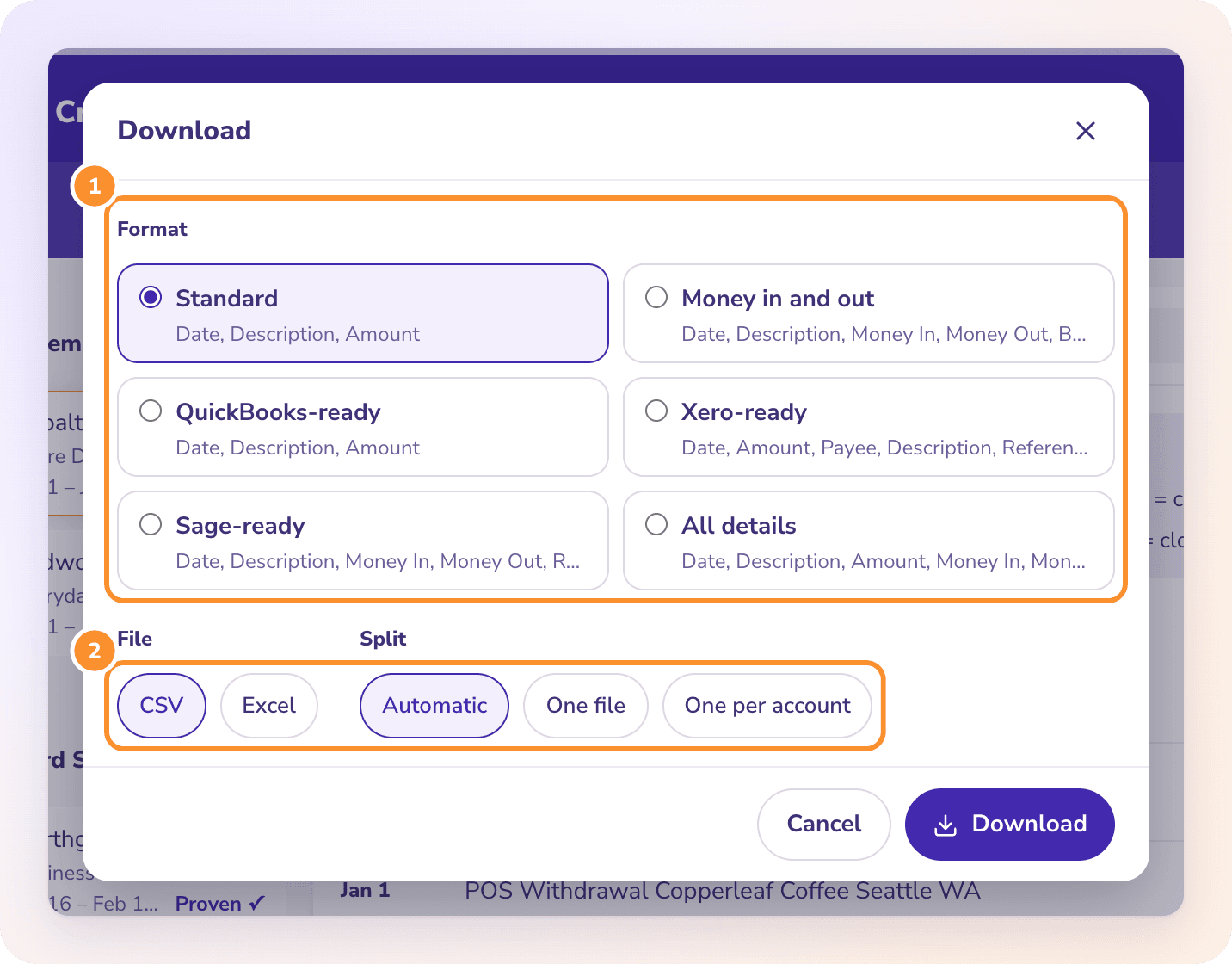
Click Download, choose a format such as Standard or Money in and out, pick Excel, and choose One per cardholder if each person needs their own tab.
WHAT YOU GET
What do the Excel columns look like for a credit card statement?
Rows from a fictional business card statement with two cardholders, downloaded in the Standard format with one file for the whole card, so a Cardholder column is added. The Type column comes from the All details format, shown here for reading.
| Date | Description | Amount | Cardholder | Type |
|---|---|---|---|---|
| 03/02/2026 | OFFICE DEPOT #1123 | -184.37 | J SMITH | Charge |
| 03/05/2026 | AUTOPAY PAYMENT - THANK YOU | 2,450.00 | Account | Payment |
| 03/09/2026 | DELTA AIR LINES | -612.40 | M LOPEZ | Charge |
| 03/10/2026 | HOTEL LUTETIA PARIS | -281.05 | M LOPEZ | Charge |
| 03/10/2026 | FOREIGN TRANSACTION FEE | -8.43 | Account | Fee |
| 03/12/2026 | DELTA AIR LINES REFUND | 120.00 | M LOPEZ | Credit |
| 03/14/2026 | INTEREST CHARGE ON PURCHASES | -21.16 | Account | Interest |
The hotel charge printed with a second line, “EUR 258.00 @ 1.08934”, which is not in the file because it is not a separate charge. Dates are MM/DD/YYYY in every ready-made format. Money in and out writes the same rows as two positive columns, and QuickBooks-ready uses Date, Description and Amount. The All details format adds Account, Account Last 4, Cardholder, Type and Source File on every row; see Choose a download format.
CHECK THE RESULT
How do you check that the Excel file matches the card statement?
Rebuild the account summary from the rows. Every card statement prints these lines near the top, under names like Account Summary. These are the totals from the same fictional statement.
| Account summary line | Printed amount | In the Excel Amount column |
|---|---|---|
| Previous balance | 3,912.55 | Not a row |
| Less payments | 2,450.00 | 2,450.00 (Type: Payment) |
| Less other credits | 120.00 | 120.00 (Type: Credit) |
| Plus purchases | 6,204.88 | Sum of Charge rows: -6,204.88 |
| Plus fees charged | 8.43 | -8.43 (Type: Fee) |
| Plus interest charged | 21.16 | -21.16 (Type: Interest) |
| New balance | 7,577.02 | Sum of all rows: -3,664.47 |
The rule: previous balance + purchases + fees + interest − payments − credits = new balance. Because charges are negative in the file, the Amount column should total the previous balance minus the new balance: 3,912.55 − 7,577.02 = −3,664.47. If your issuer prints balance transfers or cash advances, add them with the purchases. Then check each cardholder: the sum of their Charge rows should match the subtotal printed under their name. Convert runs both checks before you download and marks the statement Proven only when every figure matches to the cent.
Can I convert an Amex statement with employee cards to Excel?
Yes. Each charge is assigned to the card member it is printed under and checked against that member’s printed total. Choose One per cardholder when you download to get a tab for each person. To sort the charges into expense accounts afterwards, see our guide to American Express expense categorization.
Why are the charges negative in my Excel file?
ZeraBooks writes every statement from the business’s side: money out is a minus. A card charge is money out, even though the card statement prints it as a positive amount added to what you owe. If you want positive numbers only, download the Money in and out format, which puts charges in Money Out and payments in Money In.
Should I use the card issuer’s CSV download instead of converting the PDF?
An issuer’s CSV gives you the transactions but usually leaves out the previous and new balance, so you can’t tell whether a line is missing. Convert only accepts PDFs; it proves the rows against the balances printed on the PDF before you download.
Is the payment to the credit card company an expense?
No. A card payment moves money from your bank account to the card, so it is a transfer, not an expense. The charges are the expenses. Counting both is the most common double count in small business books, and checking it is part of a month-end close checklist.
Can I put a whole year of card statements in one workbook?
Yes. Upload the statements, tick each one in the list and click Download n together. One file puts every row on one sheet with an Account column; One per account gives each card its own tab. The list shows statements uploaded in the last 30 days.
Does ZeraBooks connect to my card account or make .qbo files?
No. There is no connection to any bank or card issuer and no .qbo or IIF file. You upload the PDF and download Excel or CSV, including a QuickBooks-ready CSV for QuickBooks Online’s bank upload.
How much does it cost to convert card statements?
1,000 pages a month are included in the ZeraBooks subscription, $79 a month billed annually or $149 monthly, after a 7-day trial. A page from a document that couldn’t be read doesn’t count. See ZeraBooks pricing for the larger page plans.
ONE-WEEK FREE TRIAL
Upload one card statement.
See whether it ties before you open Excel.
Then 1,000 pages a month from $79 a month billed annually. If the card belongs in your books rather than a spreadsheet, AI bookkeeping in the ZeraBooks General Ledger is part of the same subscription.
Last updated October 14, 2026 · Written by Damin Mutti, founder of ZeraBooks