Every month proven against the bank. Nothing to tick off.
Bank reconciliation software checks that your books match your bank. ZeraBooks reconciles every account month by month as soon as a statement is uploaded: the statement must add up, follow the previous statement, and agree with the ledger. When a month doesn’t tie, AI re-reads the statement and proposes the fix for you to apply.
7-day free trial · card required, nothing charged for 7 days · then $79/month billed annually or $149 monthly
Tied, signed off and closed.
DEFINITION
What is a bank reconciliation?
Bank reconciliation is the process of comparing a business’s accounting records with its bank statement for the same period, explaining every difference, and correcting the books so the ledger balance for the account matches the closing balance the bank printed.
HOW A MONTH TIES
The three checks behind every reconciled month
Every statement prints an opening and a closing balance. If every transaction between them is in your books, the numbers must agree.
1
The statement adds up
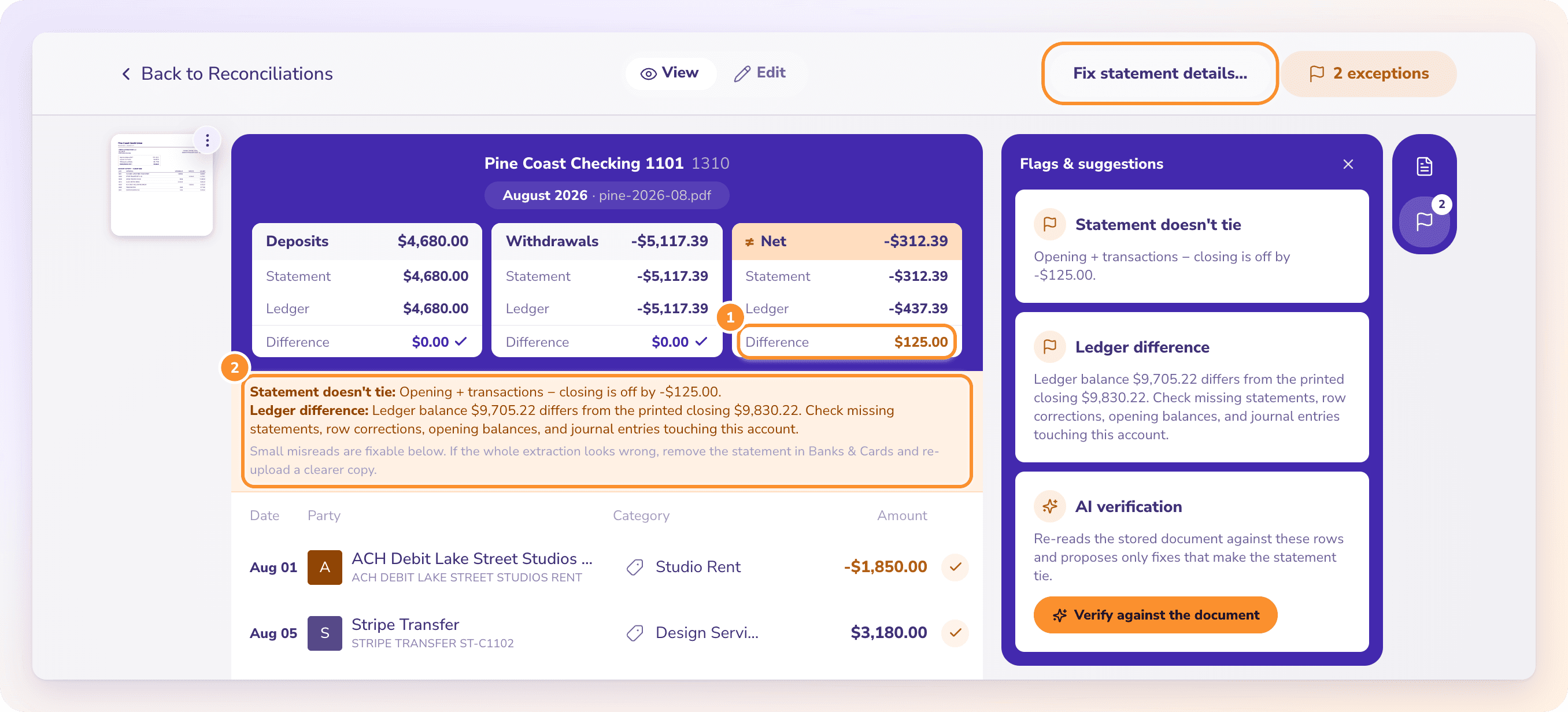
Opening balance plus every transaction on the statement equals the closing balance printed on it.
2
The chain holds
This statement’s opening balance matches the previous statement’s closing balance, so nothing went missing between statements.
3
The ledger agrees
The ledger balance for the account equals the closing balance printed on the statement.
Try it on your own documents. One-week free trial, both apps included.
Reconciliation that runs itself, and shows its work.
THE TIMELINE
Every account, every month, at a glance.
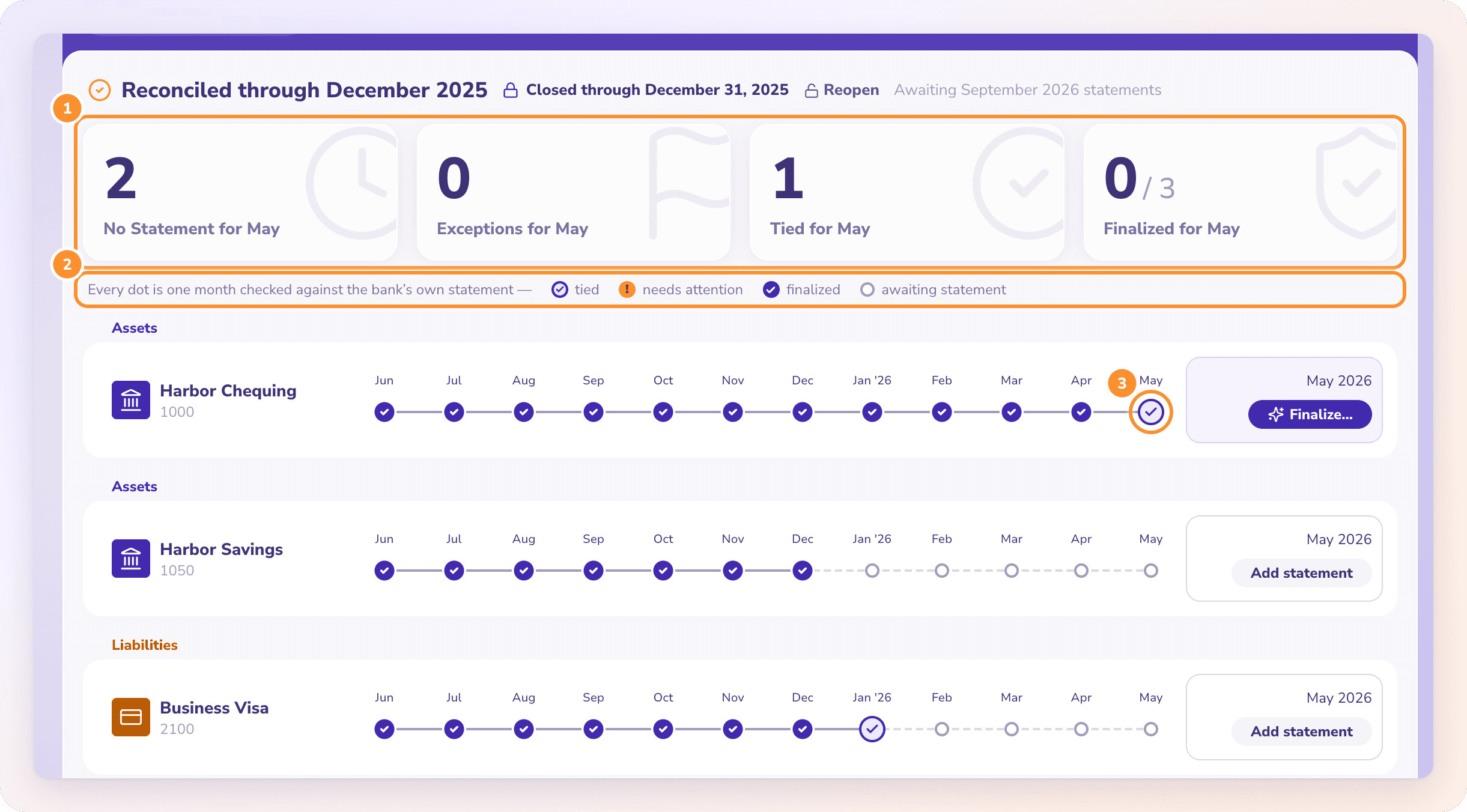
Reconciliation runs as soon as a statement is uploaded. Each account gets one row and each month one dot: tied, needs a look, not covered by any statement, finalized, or reopened because its numbers changed after sign-off. Bank accounts and credit cards both reconcile, month by month.
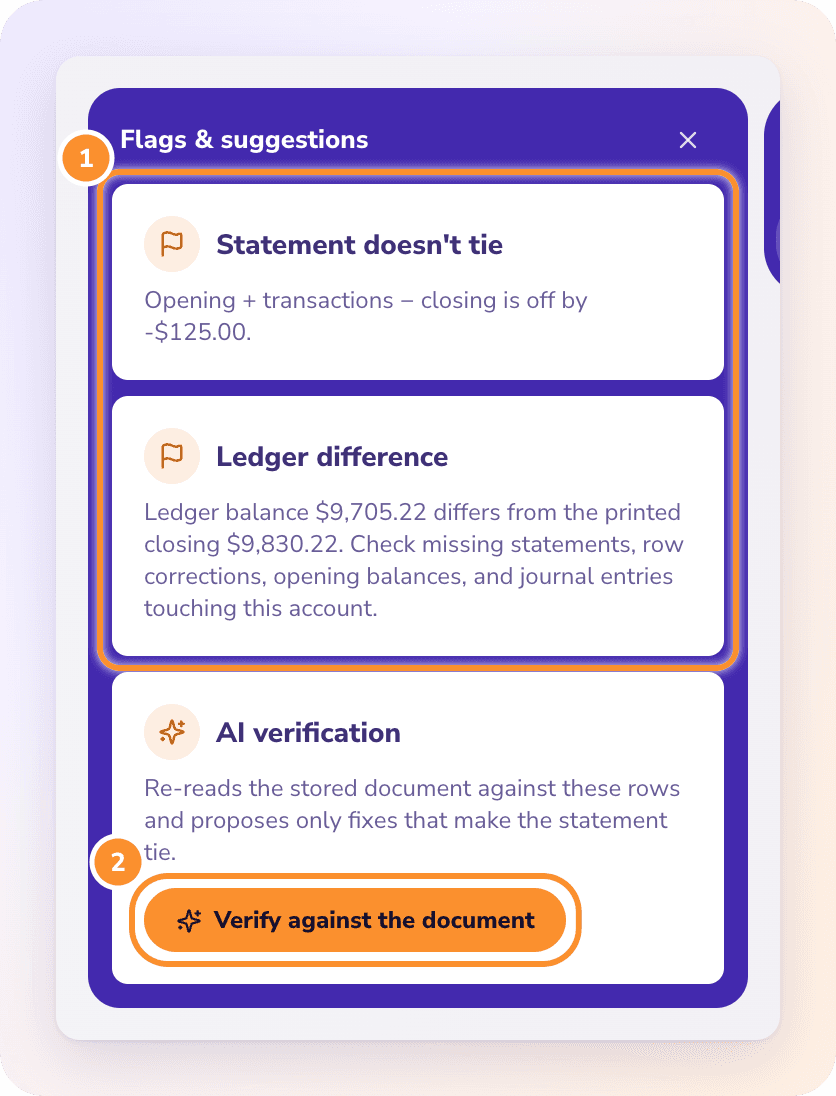
A month that doesn’t tie opens on three tiles comparing the statement and the ledger: deposits, withdrawals and net (payments, charges and net for a card). Flags name the cause: a statement that doesn’t add up, a chain break, a ledger difference, a coverage gap, or a payment that may be counted twice.
Click Verify against the document and ZeraBooks transcribes the original statement line by line and compares it with your rows. It proposes only fixes that make the statement tie, each quoting the line it’s based on: a missed or phantom line, a flipped sign, or a misread amount, date or balance. You apply them with one click.
Sign off each month that ties, then close the books through it so nothing reconciled can change by accident. If a finalized month’s numbers change later, it’s marked reopened for review. With Autopilot on, tied months can be signed off and closed for you.
What is the best accounting software for bank reconciliation?+
Look for software that proves each month against the statement’s own printed balances, flags missing statements, and locks a period once it’s signed off. ZeraBooks does all three automatically as statements are uploaded, and uses AI to re-read a statement when a month doesn’t tie.
Can AI do bank reconciliations?+
AI can do the slow part: reading the statement, spotting a missed, duplicated or misread line and proposing the fix. In ZeraBooks the arithmetic is done by the ledger, not the AI, and fixes are only proposed when they make the statement tie. You apply them and sign off the month.
How often should I reconcile my bank accounts?+
Every month, when each statement arrives. In ZeraBooks reconciliation happens automatically on upload, so the only work is reviewing months that don’t tie and signing off the ones that do.
Does ZeraBooks connect to my bank feed?+
No. ZeraBooks reconciles from the statements you upload as PDF or CSV. That is what makes the proof possible: each statement carries the bank’s own printed opening and closing balances.
Can I reconcile credit cards too?+
Yes. Credit cards reconcile month by month like bank accounts, with payments, charges and net compared between the statement and the ledger.
What happens if a statement is missing?+
The month shows a coverage gap, and the next statement shows a chain break because its opening balance doesn’t meet the last closing balance. Upload the missing statement and both clear.