GUIDE · BROKERAGE STATEMENTS
Brokerage statement to Excel:
positions, transactions and dividends, checked.
To convert a brokerage statement to Excel, take the PDF from your broker’s documents page and turn three parts into rows: positions, cash activity and the account summary. ZeraBooks Convert, the investment statement converter, reads all three from any broker’s PDF and checks the cash and values against the statement to the cent.
7-day trial · card required, nothing charged for 7 days · 1,000 pages a month from $79/month billed annually
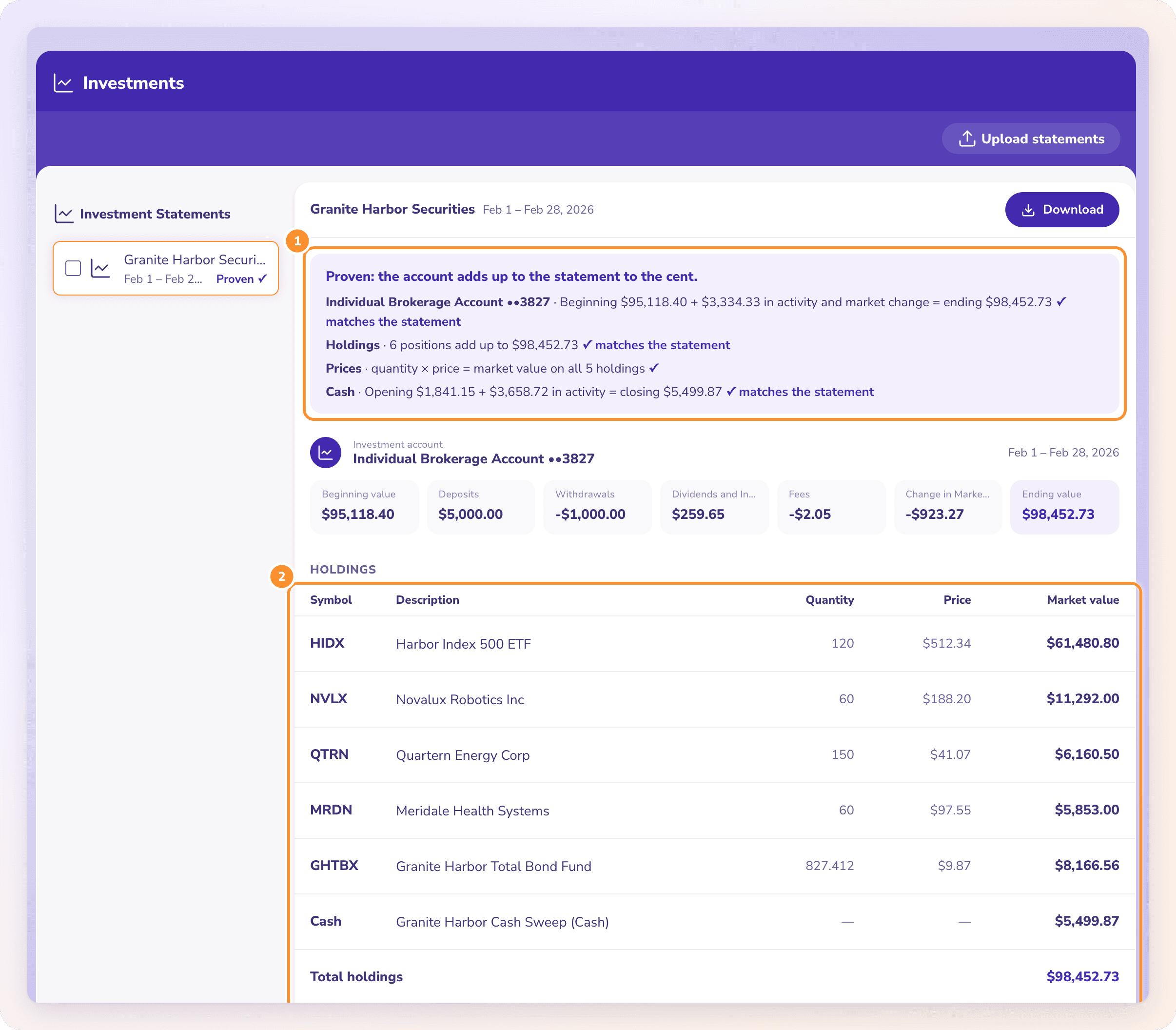
HOW IT IS LAID OUT
What is on a brokerage statement, and which parts become rows?
Schwab, Fidelity, Vanguard and most other brokers print the same four kinds of information, under their own section names and in their own order.
| Part of the statement | What it holds | In the spreadsheet |
|---|---|---|
| Account summary | Beginning value, deposits, withdrawals, income, fees, change in value, ending value | One row per account and period |
| Positions or holdings | Each security with quantity, price and market value, plus cash | One row per position |
| Activity or transactions | Buys, sells, dividends, interest, reinvestments, fees, transfers | One row per transaction, signed by cash direction |
| Income summary | Dividends and interest for the period and the year so far | Used to check the activity rows, not new rows |
| Messages and disclosures | Legal text, tax notes, broker notices | Not rows |
A statement with a brokerage account and an IRA in one PDF has these parts once per account. ZeraBooks Convert gives each account its own section and its own checks.
Try it on your own documents. One-week free trial, both apps included.
WORKED EXAMPLE
What does a converted month of brokerage activity look like?
A fictional taxable brokerage account for September 2026, with cash at 1,250.00 at the start of the month. The activity section becomes one dated list:
| Date | Description | Type | Amount |
|---|---|---|---|
| 09/02/2026 | Electronic deposit from checking | Deposit | 2,000.00 |
| 09/03/2026 | Bought 10 shares, total market index fund | Buy | -2,684.00 |
| 09/12/2026 | Cash dividend, technology stock | Dividend | 18.72 |
| 09/26/2026 | Dividend, international index fund | Dividend | 42.15 |
| 09/26/2026 | Reinvestment, international index fund | Reinvest | -42.15 |
| 09/28/2026 | Sold 5 shares, bond index fund | Sell | 506.00 |
| 09/30/2026 | Advisory fee | Fee | -25.00 |
| Opening cash 1,250.00 + rows | 1,065.72 |
The proof: 1,250.00 + 2,000.00 − 2,684.00 + 18.72 + 42.15 − 42.15 + 506.00 − 25.00 = 1,065.72, the closing cash the statement printed. The reinvested dividend shows twice on purpose: income in, then a buy out. Drop either row and the dividend total or the cash stops matching.
WHAT TRIPS PEOPLE UP
Which brokerage transactions are hard to get right in Excel?
Reinvested dividends
Income and a purchase on the same day for the same amount. Count both, or your income total is short and your share count is wrong.
Sells are not income
The cash from a sale is the sale price, not the gain. The gain needs the cost basis, which comes from the broker’s tax documents, not the monthly statement.
Pending and settled dates
A trade made on the 30th may settle in the next month. Use the date the statement prints in the activity section and stay consistent.
Transfers between your own accounts
Money moved from checking is a transfer, not income. When you combine it with bank statements, match it to the withdrawal on the other side. Our guide to combine bank statements shows the Account column that makes this easy.
Positions that don’t add up
Quantity times price should equal market value for every position. A line that doesn’t is usually a misread digit or a price rounded on the page.
A YEAR OF STATEMENTS
How do you use twelve brokerage statements at tax time?
A spreadsheet of the year is the quickest way to check the broker’s forms before your accountant sees them.
- 1
Download every monthly or quarterly PDF
From the broker’s statements or documents page, for each account.
- 2
Convert them together
In ZeraBooks Convert, upload them on the Investments page, tick them and download them together as one Excel workbook with Summary, Holdings and Activity sheets.
- 3
Total income by type
Filter the Activity sheet to dividends and to interest and add them up for the year.
- 4
Compare with the tax form
Those totals should be close to the broker’s year-end tax form. A gap usually means a missing month, a reclassified dividend or a late correction from the broker.
- 5
Leave cost basis to the broker
Gains and losses come from the broker’s tax documents. Convert reads what the statement prints and is not a cost-basis calculator.
Can I export Schwab, Fidelity or Vanguard statements to Excel?
Check your broker’s transaction history page: many offer a download of recent activity, without positions or a balance to check against. For a full statement with positions, values and cash that you can prove, convert the statement PDF. ZeraBooks Convert reads brokerage and retirement statements from any broker, PDFs up to 50 MB each.
What is the difference between this and the investment statement converter page?
This guide explains a brokerage statement and what to do with it in Excel. The investment statement converter page shows how ZeraBooks Convert reads one: the four checks, the three sheets and the steps.
Can it read the balance sheet of a fund or company too?
Those are financial statements, not brokerage statements. See financial statements to Excel for balance sheets, income statements and cash flow statements.
How much does it cost?
Convert comes with the ZeraBooks subscription: 1,000 pages a month for $79 a month billed annually or $149 monthly, after a 7-day trial. See ZeraBooks pricing for larger plans and the bank statement converter for every document type.
Does ZeraBooks connect to my brokerage account?
No. ZeraBooks never asks for your broker sign-in. Download the PDF and upload it.
ONE-WEEK FREE TRIAL
Convert a year of brokerage statements.
Try it for 7 days.
Positions, activity and values in one workbook, checked to the cent. Want the account in your books too? AI bookkeeping in the ZeraBooks General Ledger is in the same subscription.
Last updated October 20, 2026 · Written by Damin Mutti, founder of ZeraBooks