General Ledger + Converter in one subscription.

See pricing
Skip to content
  1. Home
  2. Bank statement converter
  3. Dext review

REVIEW · DEXT

Dext review:
built for receipts, not statements.

Dext Prepare’s U.S. Business plan cost $302.50 billed annually ($25.21 a month) for 5 users and 250 documents on October 22, 2026, and bank statement extraction past 10 free sheets is $13 a month or $0.32 a document. For bank statements, ZeraBooks is the better choice: the ZeraBooks bank statement converter splits combined PDFs by account, proves each one to the cent and includes an AI general ledger.

We make ZeraBooks · 7-day trial · 1,000 pages a month from $79/month billed annually

Statements in, proven to the cent.

DEXT PRICING

How much does Dext Prepare cost?

Dext Prepare is the capture product on Dext’s U.S. pricing page. These are the prices it and the extraction page showed on October 22, 2026, in U.S. dollars before tax. The plan is set with a slider; the row below is its default setting. When you compare, add the statement extraction you will actually use to the plan price, since statements are metered separately from receipts.

What you buyWhat you getPrice
Business plan (default)5 users, 250 documents a month, capture, extraction, storage and an accounting software connection$302.50 billed annually (shown as $25.21 a month)
Included extraction credits10 sheets of bank statement extraction, 5 line item documents, 5 supplier statementsIncluded
Bank Statement Extraction add-on50 statement documents a month; unused ones don’t roll over$13 a month, or $156 billed annually
Bank statements, pay as you goEach document past the allowance$0.32 a document
Line Item Extraction add-onEvery line of an invoice, not just totalsFrom $20.50 a month, or $0.50 a document
AI Assist add-onDext’s AI features$10.50 a month until January 31, 2027
Accountant plansEssentials and Advanced, priced per client, 10-client minimum, 13% off annuallyNot shown on the page

Dext says annual billing is up to 20% cheaper than paying monthly, and gives a 14-day trial with no card. Past the 250 documents, uploads still go in but aren’t read until the next bill date or an upgrade. More than five businesses on one account moves to bespoke pricing.

We set you up and catch up your past months for free. Then ZeraBooks keeps your books done.

ZERABOOKS, ON THE SAME JOB

What does ZeraBooks do with three supplier invoices for Copperline Cafe?

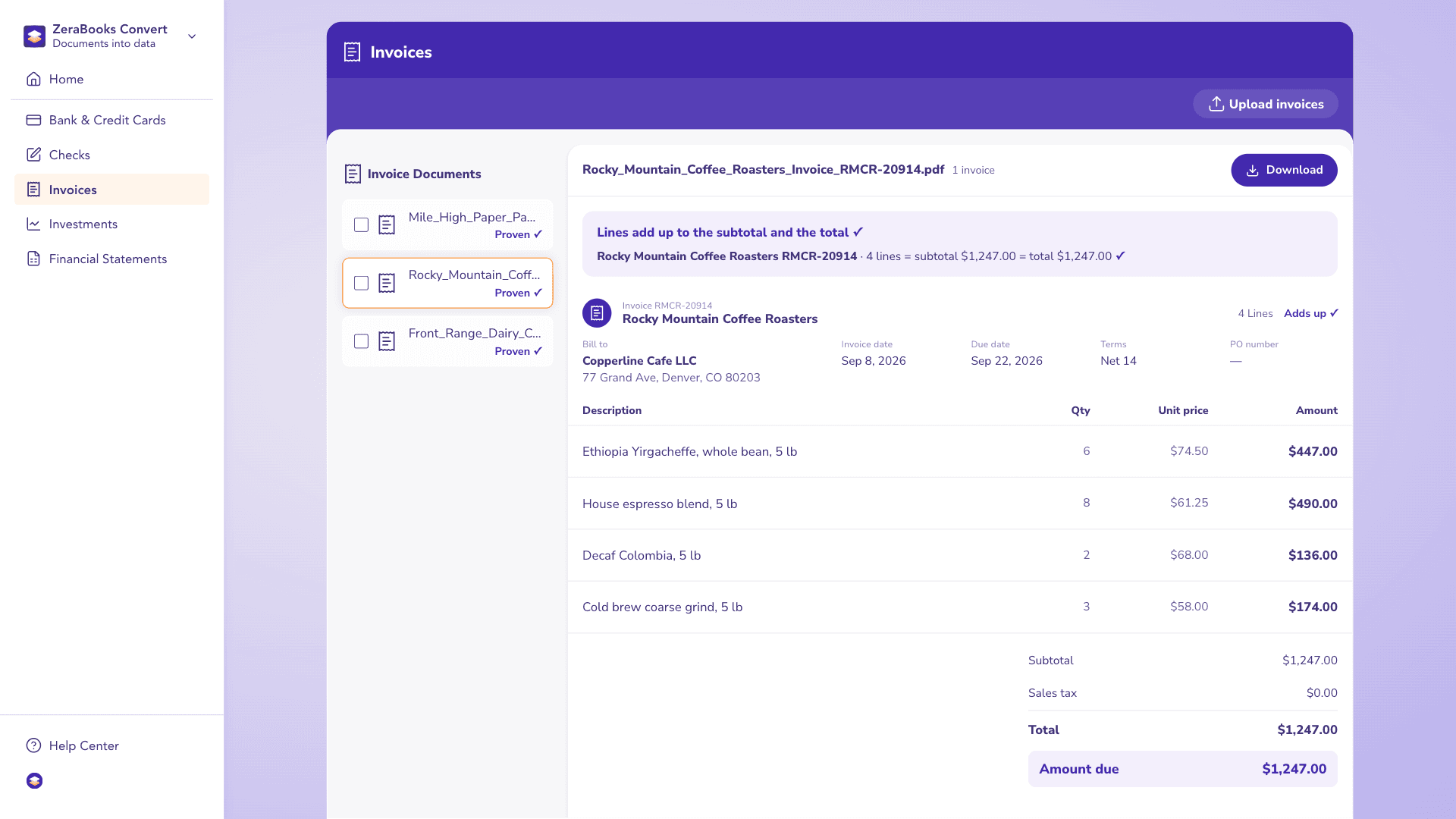
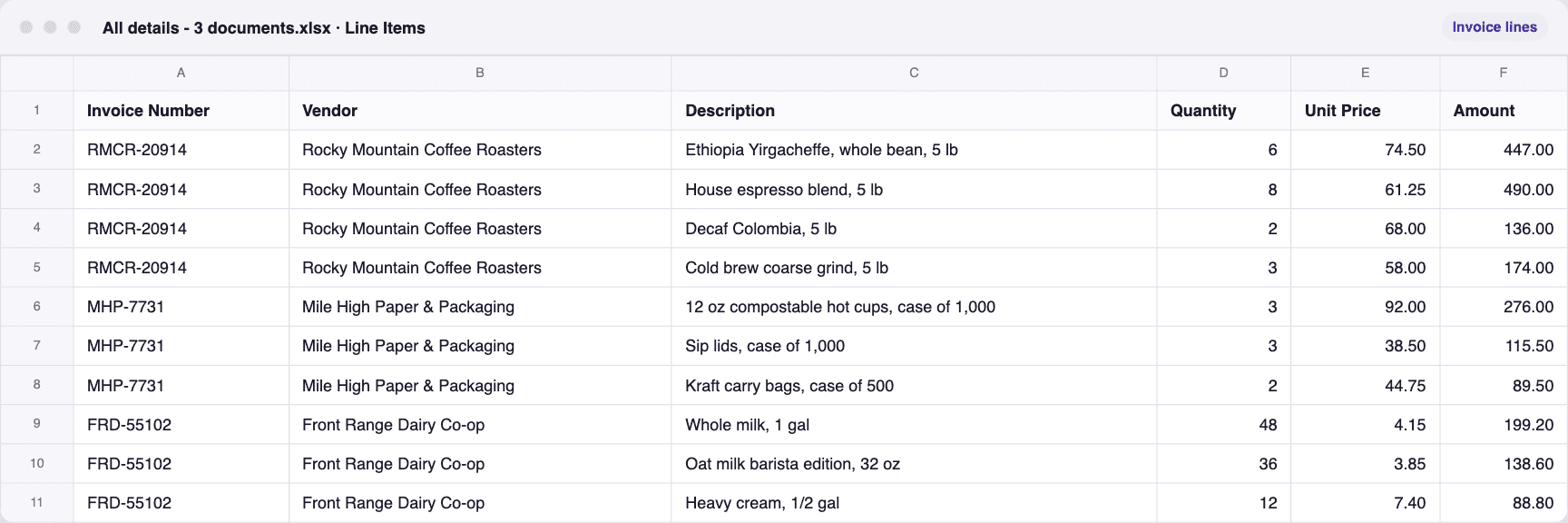
Here is ZeraBooks Convert on the same job: three fictional supplier invoices for Copperline Cafe, uploaded together. Every line is read and checked against the subtotal and the total, then all three download as one workbook, All details - 3 documents.xlsx, with 10 invoice lines.

A real run in ZeraBooks Convert on three sample supplier invoices for Copperline Cafe. Fictional sample documents.

An invoice, checked in Convert

ZeraBooks Convert with three sample supplier invoices for Copperline Cafe, each marked Proven.

The workbook that downloaded

The file downloaded from ZeraBooks Convert for three sample supplier invoices for Copperline Cafe, opened: every row in one sheet.

WHAT DEXT IS

What Dext is built for.

Dext was called Receipt Bank until it renamed itself, and receipts are still its core. IRIS Software Group agreed to buy it in December 2024.

CAPTURE

Receipts from anywhere.

A client photographs a receipt with the Dext app, forwards an invoice to a dedicated email address, sends it on WhatsApp or drops it in on a desktop. Dext reads the supplier, date, amount, tax and currency, and says it gets over 99% of those fields right.
PUBLISHING

Straight into the books.

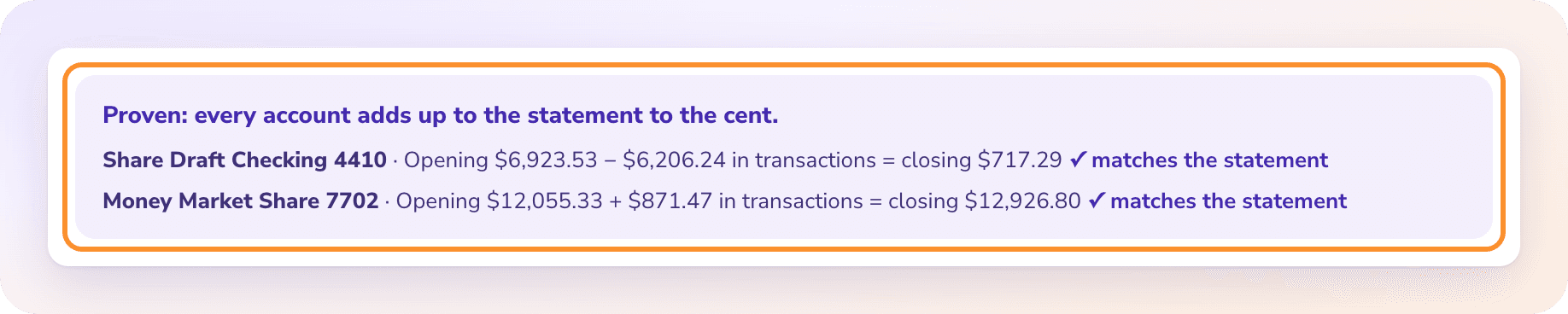
Dext connects to more than 36 accounting platforms and publishes the data straight into Xero or QuickBooks. With ZeraBooks, the statements can stay in one place instead: the ZeraBooks general ledger comes with the subscription, and every statement is proven before it reaches the books.

The statement proof: every account adds up to the statement to the cent, with the opening balance, transactions and closing balance for each account.

BANK STATEMENTS IN DEXT

How do you upload a bank statement to Dext?

From Dext’s help article, checked October 22, 2026. Only Admin users can do this.

  1. 1

    Add the account by hand

    Go to Bank > Accounts, select Add bank account, choose Manually and select Continue. Pick the bank, then enter the account name, account number and currency. An account synced from your accounting software can’t be used for statement extraction.

  2. 2

    Upload the statement

    Select Add Documents at the top left, switch to the Bank tab, choose the matching account and drop in the file. It must be a PDF or TIFF of 50MB and 300 pages or less, scanned at 200dpi or more, holding one statement for one account.

  3. 3

    Wait for extraction

    The statement sits under Bank > Statements > Collected while it is read, then moves to Processed. Digital PDFs usually take minutes; scans can take up to 24 hours. Dext says about three in four are done within 4 hours.

  4. 4

    Export the rows

    From the Bank workspace, export the transactions or the processed statement as CSV. A statement counts against your allowance once extracted, even if you delete it; rejected statements aren’t charged.

  5. 5

    If your bank isn’t listed

    Select Request your bank, enter its name, upload a sample statement and submit. Dext reviews it and replies by email. It says it supports more than 500 banking institutions.

THE LIMITS

Where Dext falls short for bank statements

None of these matter much if statements are an occasional extra. They add up when statements are most of the work.

  • One account per file

    A combined PDF with checking and savings, or a year of statements in one file, has to be split before upload. ZeraBooks Convert takes the whole PDF and splits it by account itself.

  • A small allowance, then a meter

    The Business plan includes 10 sheets of bank statement extraction a month. After that it is a 50-document bundle or 32 cents a document, and unused bundle documents don’t carry over.

  • Scans can be slow

    A scanned statement can take up to 24 hours. When a client hands over a box of paper statements in tax season, that wait matters. ZeraBooks usually reads a statement in under a minute.

  • Banks on a list

    Statements from a bank outside Dext’s list need a request and a sample first. ZeraBooks reads any bank’s layout without a template.

  • No published balance proof

    Dext’s statement help doesn’t describe adding the rows up against the printed opening and closing balances. ZeraBooks does that for every account, to the cent; see how to do a bank reconciliation for why that sum matters.

WORKED EXAMPLE

What would Dext cost a small business for a year?

Ridgeback Landscaping is a fictional business with 3 users, about 200 receipts and bills a month, and 4 bank and card statements a month of 5 pages each. Dext counts its free allowance in sheets and its add-on in documents, so the total depends on how a sheet is counted:

LineIf a sheet is a pageIf a sheet is a statement
Business plan, billed annually302.50302.50
Statement pages or statements a month20 pages4 statements
Free allowance a month1010
Bank Statement Extraction bundle, billed annually156.000.00
Total for the year (USD)458.50302.50

That is 38.21 or 25.21 a month, for receipts and statements together. ZeraBooks costs $948 a year, reads the same 20 statement pages out of 1,000, proves each one against its printed balances, and includes the General Ledger with Autopilot and Ask Zera. Ask Dext how sheets are counted before you buy.

SIDE BY SIDE

Dext vs ZeraBooks Convert for bank statements

Dext facts from its U.S. pricing pages and help center, read on October 22, 2026.

FeatureOur pickZeraBooks ConvertDext
Built forStatements, checks and other financial documents to Excel or CSVReceipts, bills and invoices into accounting software; statements as an add-on
Price$149 a month, or $79 a month billed annually, for 1,000 pages$302.50 a year for 5 users and 250 documents; statement extraction from $13 a month past 10 free sheets
Several accounts in one PDFYes, split by account and cardholderNo. One statement for one account per file
Longest file500 pages, 50 MB300 pages, 50MB
TurnaroundUsually under a minuteMinutes for digital PDFs, up to 24 hours for scans
Check against printed balancesEvery account, to the centNot described for statements
Statement downloadExcel or CSV, including QuickBooks-ready, Xero-ready and Sage-ready CSVCSV export
Bookkeeping includedThe ZeraBooks AI General Ledger with Autopilot and Ask Zera; a done-for-you service if you want itPublishes documents into your accounting software

Competitor facts from their public pages, checked October 22, 2026: Dext U.S. pricing · Dext extraction pricing · Dext: how to upload bank statements · Dext: the Bank workspace · Dext for accountants. Prices and features change; check each vendor before you buy.

THE VERDICT

Dext or ZeraBooks for bank statements?

  • ZeraBooks Convert: the better pick for statements

    Catch-up work, a year of statements in one PDF, scans that can’t wait a day, or files that have to tie before anyone uses them. ZeraBooks reads statements, cards, checks, invoices, brokerage statements and financial statements, proves every account to the cent, and downloads QuickBooks-, Xero- or Sage-ready files. The AI General Ledger comes in the same plan, and accounting firms get custom builds at no charge.

    From $79/mo billed annuallyBalance proofAny bank

  • Dext

    A receipt and bill capture tool that publishes into Xero or QuickBooks. Bank statements are an add-on, one account per file, and scans can take up to 24 hours.

    $302.50/yr Business planReceiptsPublishes to Xero, QuickBooks

  • Still comparing?

    The best bank statement converter roundup compares four converters on price, output files and the checks they run.

MORE REVIEWS AND COMPARISONS

Other tools we have reviewed

QUESTIONS

Dext review: common questions

Ask Damin directly
Is Dext good for bank statements?

It handles them, as an add-on to receipt capture. You add each account by hand with its currency, upload one statement per file, and export CSV once it is processed. Scans can take up to 24 hours. For statement-heavy work, ZeraBooks is quicker: it usually reads a statement in under a minute and proves it against the printed balances. For Dext against other capture tools, see Dext vs Hubdoc and the AutoEntry review.

How much is Dext in 2026?

Dext’s U.S. Business plan showed $302.50 billed annually ($25.21 a month) for 5 users and 250 documents a month on October 22, 2026. Bank statement extraction past the free 10 sheets is $13 a month for 50 documents or $0.32 each.

Does Dext have a free trial?

Yes. Dext offers a 14-day free trial and says no card is needed to start. ZeraBooks offers 7 days with 1,000 pages; a card is taken at checkout and nothing is charged for 7 days.

Who owns Dext?

IRIS Software Group announced a definitive agreement to acquire Dext Software Ltd on December 3, 2024. Dext was formerly called Receipt Bank.

Can ZeraBooks replace Dext?

For bank statements, yes, and it adds the check Dext doesn’t describe: every account proven against its printed opening and closing balances. You can also keep the whole ledger in ZeraBooks, where Autopilot categorizes and reconciles, or have our team do the books for you. See ZeraBooks pricing.

Damin Mutti, founder of ZeraBooks

About the author

Damin Mutti

Founder of ZeraBooks, Vancouver

Damin founded ZeraBooks in 2025 and still talks to the bookkeepers, firms and owners who use it every week. He writes about what he sees in their statements and ledgers, and every page here is checked against the live product before it goes up.

FREE SETUP + CATCH-UP

Statements are the job?
Try the converter built for them.

Upload a combined PDF and watch it split by account and tie to the cent. Seven days, then $79 a month billed annually. ZeraBooks also covers the next step: AI bookkeeping on a general ledger. Moving only the statements? See ZeraBooks as a Dext alternative.

Book a call with Damin

Our founder. 30 minutes on Google Meet. Pick a time on the next screen.

About: Have us do your books