ZERABOOKS VS DEXT
Dext alternative:
bank statements on a converter built for them.
ZeraBooks is the Dext alternative for bank statement work. In Dext, statement extraction is an add-on to a receipts product: one account per file, scans can take up to 24 hours, and the result is a CSV. The ZeraBooks bank statement converter reads multi-account PDFs, proves every account against its printed balances and includes an AI general ledger.
7-day trial · card required, nothing charged for 7 days · 1,000 pages a month from $79/month billed annually
WHY PEOPLE LOOK
Why look for a Dext alternative for bank statements?
Dext was built to capture receipts and invoices, and it does that job well. Bank statements came later, as Bank Statement Extraction: a separate allowance with its own bundles, sold from $13.00 a month on top of a Dext plan. Every page of a processed statement counts against it, and unused pages don’t roll over.
The workflow is shaped around one account at a time. Before the first upload, an Admin adds the bank account by hand, because accounts synced from QuickBooks or Xero can’t be used. Each file must hold one statement for one account. Dext says digital PDFs typically take minutes and scans can take up to 24 hours. The result is a CSV export; Dext doesn’t publish statements to your accounting software.
None of that is a flaw for a business with one account and a few receipts a week. It starts to hurt when statements are the main job: a bookkeeper catching up a year for a new client, or a firm with combined statements that hold checking and savings in one PDF.
Try it on your own documents. One-week free trial, both apps included.
SIDE BY SIDE
ZeraBooks Convert vs Dext Bank Statement Extraction
Dext facts from its U.S. pricing pages and help center, checked November 5, 2026, in U.S. dollars excluding tax.
| Feature | Our pickZeraBooks Convert | Dext |
|---|---|---|
| What you pay for statements | 1,000 pages a month for $149, or $79 a month billed annually. Statements are the product, not an add-on. | A Dext plan (Business: $25.21 a month billed annually, 250 documents, 5 users), plus Bank Statement Extraction from $13.00 a month for 50 or $0.32 each pay as you go |
| What counts | Each page of a PDF that is read. A document that can’t be read uses no pages. | Every page of a processed statement, including pages with no transactions such as cheque images, even if you delete it later |
| Accounts per file | Any number: Convert splits a combined statement by account and cardholder | One statement for one account per file |
| Before the first upload | Nothing to set up. Upload the PDF. | An Admin adds the bank account manually; synced accounts can’t be used |
| Time to read | Usually under a minute, digital or scanned | Digital PDFs typically minutes; scans up to 24 hours, about 75% within 4 hours |
| Files | PDF up to 50 MB and 500 pages | PDF or TIFF up to 50MB and 300 pages, scans at 200dpi or more |
| Check against the statement | Every account proven to the cent against its printed opening and closing balances, with the difference shown when it doesn’t tie | Report mistake sends a statement back for reprocessing at no charge |
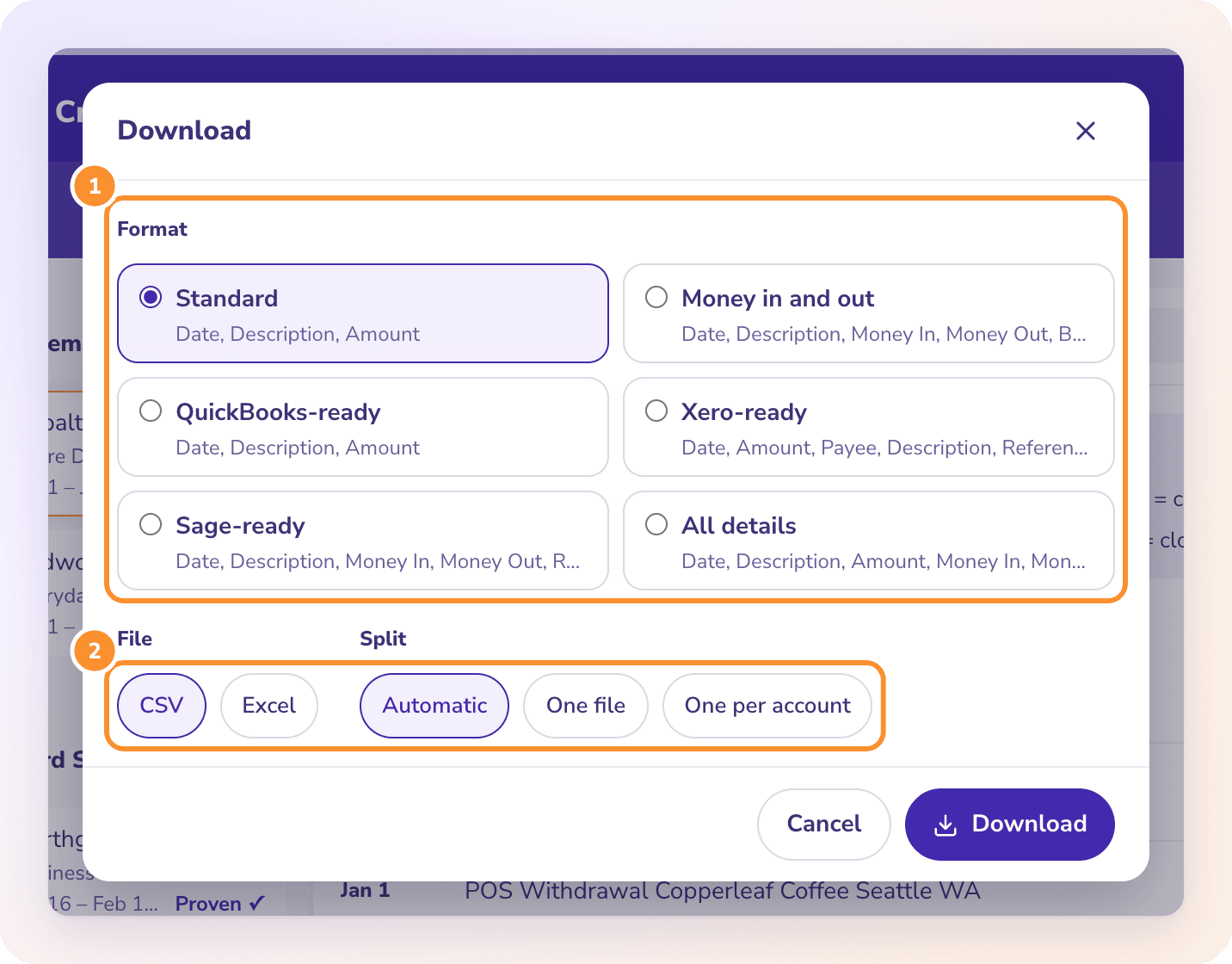
| What you download | Excel or CSV: Standard, Money in and out, QuickBooks-ready, Xero-ready, Sage-ready or All details | CSV export; statements can’t be published to accounting software |
Competitor facts from their public pages, checked November 5, 2026: Dext U.S. pricing · Dext bank statement extraction pricing · Dext: How to upload bank statements. Prices and features change; check each vendor before you buy.
ZERABOOKS ON A REAL BATCH
What does a batch of statements look like in ZeraBooks?
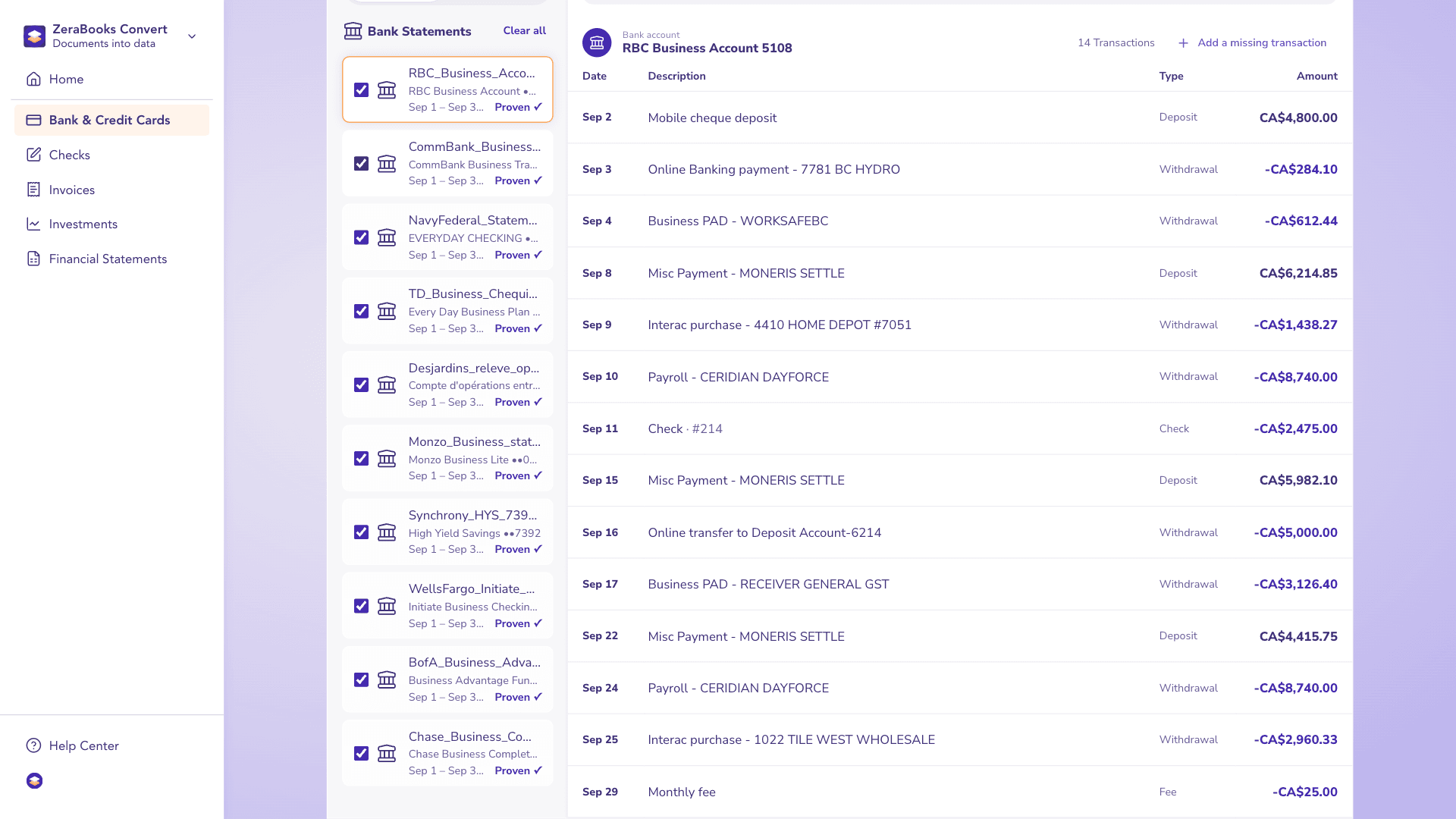
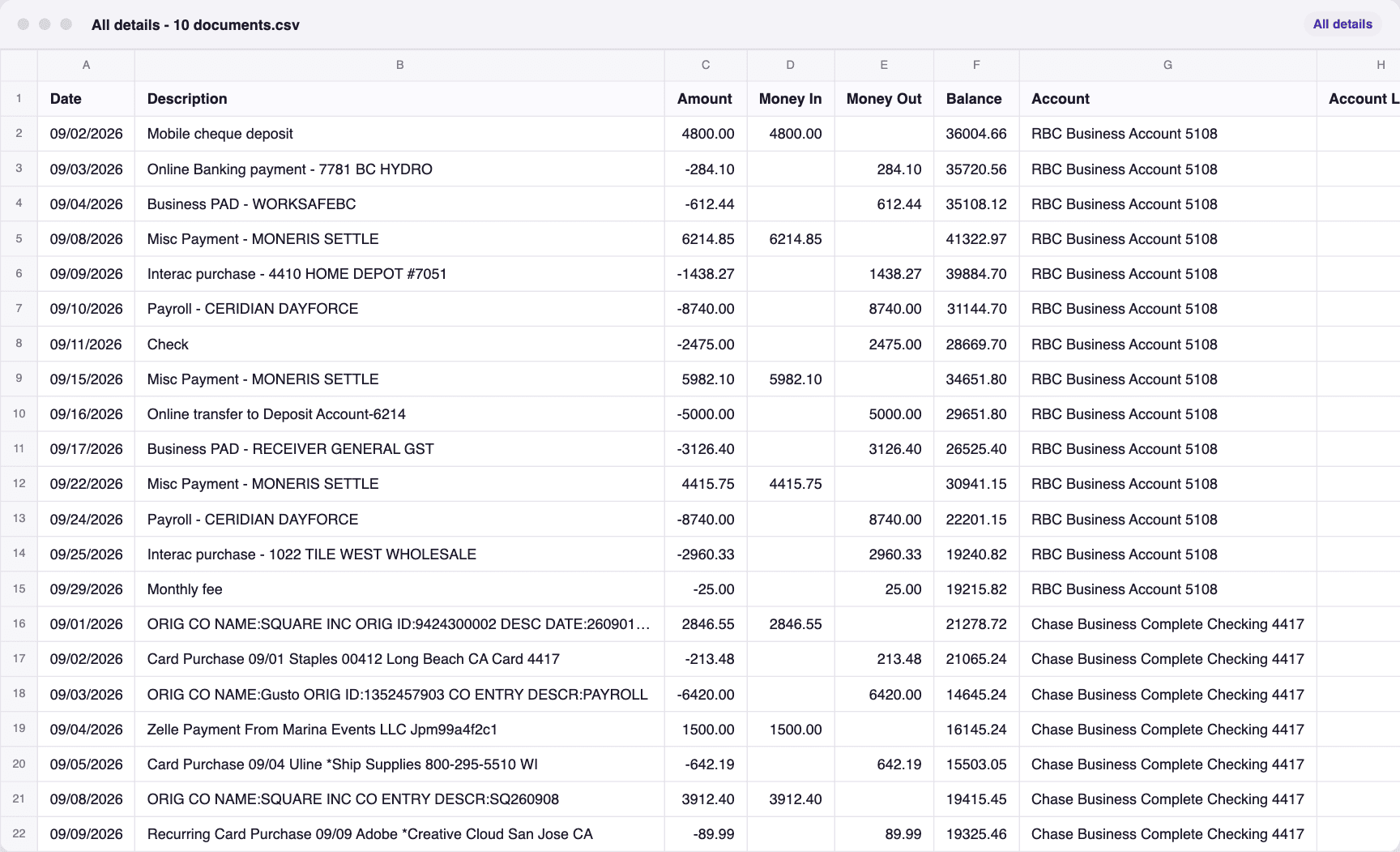
A real run in ZeraBooks Convert: 10 sample statements from 10 different banks, fictional and each already proven to the cent against its printed balances. They are ticked together and downloaded once as All details - 10 documents.csv, 140 transactions in one sheet with the account and source file on every row. In Dext, the same batch means 10 bank accounts set up first and 10 separate exports.
10 statements, ticked in Convert
The one file that downloaded
MOVING OVER
How do you move bank statement work from Dext to ZeraBooks?
You don’t have to leave Dext to try this. Keep it for receipts if it suits you, and move the statements.
- 1
Get the original PDFs
Use the statements you downloaded from the bank. If they only live in Dext now, open Bank, then Statements, then Processed, and use the download icon beside each statement to save the original file.
- 2
Upload them together
Drop the PDFs on Bank & Credit Cards in ZeraBooks Convert. A combined PDF with checking and savings can go in as it is; Convert splits it by account.
- 3
Read the proof
Proven means every account adds up to the balances the bank printed. Needs a look names the account and the gap, so you know which line to check. Steps are in How Convert proves a statement.
- 4
Download for your ledger
Pick QuickBooks-ready, Xero-ready or Sage-ready, or Excel for a spreadsheet. Tick several statements to get one file with an Account column. Want the books themselves done? The subscription includes AI bookkeeping.
PRICE OF A STATEMENT PAGE
What does a bank statement page cost in ZeraBooks vs Dext?
Unit prices as published, in U.S. dollars. Dext prices bank statement extraction per document and counts every page of a processed statement; ZeraBooks prices per page and includes the converter in its one subscription.
Neither tool carries unused monthly pages into the next month. A full year of Dext’s pricing for a small business is worked out in our Dext review. Published prices, checked November 5, 2026: Dext bank statement extraction pricing.
HONEST LIMITS
What doesn’t ZeraBooks do that Dext users might expect?
Worth knowing before you move anything.
No bank feeds
ZeraBooks never connects to your bank or asks for a bank sign-in. You download the statement PDF and upload it.
No push into QuickBooks or Xero
Convert makes a file in the columns QuickBooks Online, Xero or Sage import. You upload that file there yourself. There is no .qbo or IIF file.
PDFs only
TIFF files and photos are refused. Save or print them to PDF first; a scanned PDF is fine.
Fixed formats
You pick one of the ready-made formats. You can’t design your own columns, though All details carries every value Convert reads.
THE VERDICT
Why ZeraBooks is the better Dext alternative for statements
ZeraBooks is built around the statement. It reads every account in the PDF, checks each one against the opening and closing balances the bank printed, and tells you to the cent where a gap is before any file is made. A batch of statements from different banks goes in at once and comes out as one sheet.
The same subscription covers checks, invoices, brokerage and financial statements, and the ZeraBooks General Ledger, where Autopilot categorizes and reconciles. It is used by teams at one of the 20 largest U.S. accounting firms. If you would rather hand the books over, our team runs a done-for-you bookkeeping service, and firms get custom builds at no charge. Plans start at 1,000 pages a month for $79 billed annually.
Comparing Dext with something else? Dext vs Hubdoc covers the two receipt tools on statements, and the Hubdoc alternative and AutoEntry alternative pages cover their neighbours. For four converters ranked on price and the balance check, see the best bank statement converter.
MORE REVIEWS AND COMPARISONS
Other tools we have reviewed
- DocuClipper alternativeZeraBooks and DocuClipper side by side: price, files and proof.
- MoneyThumb alternativeZeraBooks and MoneyThumb side by side: pages versus statements, QBO files.
- ProperSoft alternativeZeraBooks and ProperConvert side by side: web versus desktop.
- RazorExtract vs ZeraBooksRazorExtract and the ZeraBooks converter, side by side.
- Dext vs AutoEntry for multi-currency statementsHow each handles statements in more than one currency.
- Hubdoc alternativeAny bank, up to 500 pages, with the balance column kept.
Is there a cheaper alternative to Dext for bank statements?
For statement volume, yes. ZeraBooks is $79 a month billed annually for 1,000 pages, about $0.08 a page, with no separate add-on. Dext charges a plan plus Bank Statement Extraction from $13.00 a month for 50 documents, or $0.32 each pay as you go. Prices checked November 2026.
Can Dext read a statement with two accounts in one PDF?
Dext’s help center asks for one statement covering a single bank account per file. ZeraBooks Convert takes the combined PDF as it is, splits the transactions by account and proves each account against its own printed balances.
How long does Dext take to extract a bank statement?
Dext says digital PDFs from online banking typically take minutes, scans can take up to 24 hours, and around 75% of statements are extracted within 4 hours. ZeraBooks Convert usually reads a statement in under a minute, scanned or digital.
Can I keep Dext for receipts and use ZeraBooks for statements?
Yes. Upload the statement PDFs to ZeraBooks, download the file your ledger imports, and leave receipt capture where it is.
Does ZeraBooks publish statements to QuickBooks or Xero?
No. Neither does Dext for statements. ZeraBooks makes QuickBooks-ready, Xero-ready and Sage-ready files from statements already proven against their printed balances, and you import the file. See PDF to QuickBooks.
Is there a free trial?
Yes. ZeraBooks has a 7-day trial with 1,000 pages; a card is needed at checkout and nothing is charged for 7 days. Dext offers a 14-day trial without a card.
ONE-WEEK FREE TRIAL
Upload a month of statements.
See which ones tie before you export.
Then 1,000 pages a month from $79 a month billed annually; see ZeraBooks pricing. Firms with heavy statement volume can talk to us about Enterprise.
Last updated November 5, 2026 · Written by Damin Mutti, founder of ZeraBooks