How to convert a QBO file to CSV, tag by tag, with the balance still checked.
A .qbo file is OFX text, so converting it to CSV means pulling each STMTTRN record into a row: DTPOSTED becomes the date, NAME the description, TRNAMT the amount, and FITID an ID column. GnuCash does it free. With the PDF statement instead, the ZeraBooks bank statement converter gives you a checked CSV directly.
7-day trial · card required, nothing charged for 7 days · 1,000 pages a month from $79/month billed annually
FIELD BY FIELD
Which QBO tags become CSV columns?
A .qbo is QuickBooks’ flavour of OFX, laid out in what is an OFX file. Each transaction is one STMTTRN record. This is how its tags map to a CSV, and what has to change on the way.
QBO tag
CSV column
What to do
DTPOSTED (20260902)
Date
Rewrite as 09/02/2026; drop any time and time zone after the eight digits
NAME
Description
Copy as is; it is 32 characters at most
MEMO
Description (added) or Memo
Join to NAME, or keep as its own column
TRNAMT (-1318.40)
Amount
Keep the sign: negative is money out
TRNTYPE
Type
Optional; a label only, never use it to set the sign
CHECKNUM
Check Number
Copy when present; blank on most rows
FITID
ID
Keep it: it is the only reliable way to spot duplicates later
ACCTID (once per file)
Account
Repeat on every row if you combine several accounts
LEDGERBAL › BALAMT
Not a row
Use it to check the total, as in the worked example
INTU.BID, SONRS, header lines
Nothing
Only QuickBooks needs them
Try it on your own documents. One-week free trial, both apps included.
Larkspur Dental Studio is a fictional practice. Its bank’s .qbo download for September 1 to 15, 2026, opened in a text editor, looks like this. Header and sign-on lines are shortened.
Line in the file
What it means
OFXHEADER:100 · DATA:OFXSGML · VERSION:102 …
OFX 1.x header. This style isn’t XML, which decides which tools can read it.
<SONRS> … <INTU.BID>(bank’s Intuit ID) </SONRS>
Sign-on block with the bank code QuickBooks checks.
The same four transactions after conversion. The columns are Date, Description, Amount, Type, Check Number and ID.
Date
Description
Amount
Type
Check Number
ID
09/02/2026
BRIGHTLINE DENTAL SUPPLY
-1318.40
DEBIT
0902A17
09/05/2026
ACH DEPOSIT NORTHSHORE CLAIMS
6250.00
CREDIT
0905C03
09/10/2026
CHECK 1187
-2100.00
CHECK
1187
0910K01
09/15/2026
MONTHLY SERVICE FEE
-25.00
SRVCHG
0915S02
Net change
2806.60
The check: money in 6,250.00, money out 1,318.40 + 2,100.00 + 25.00 = 3,443.40, net 2,806.60. A .qbo carries only the closing balance, so the opening is implied: 18,440.25 − 2,806.60 = 15,633.65. Larkspur’s August statement closes at 15,633.65, so nothing is missing. If the two didn’t match, a transaction fell between downloads.
WHAT GETS LOST
What do you lose converting QBO to CSV?
A CSV keeps the transactions. It drops the parts that only make sense to QuickBooks, and a few that are worth keeping by hand.
The duplicate check
QuickBooks skips a transaction whose FITID it has seen. A CSV has no such rule, so keep FITID as a column or software importing the CSV will guess at duplicates from date and amount.
The balance
LEDGERBAL and AVAILBAL aren’t rows. Write the closing balance down before you throw the .qbo away; it is your only proof the CSV is complete.
The account details
The routing and account number appear once per file. Add an Account column before you stack files from several accounts.
Time and time zone
DTPOSTED can carry a time and an offset. Most bank files use a plain date, but a converter that shifts to local time can move a transaction to the day before.
Intuit’s tags
INTU.BID and the sign-on block mean nothing outside QuickBooks and are dropped. That is fine; you can’t rebuild a .qbo from the CSV without them anyway.
FREE ROUTES
How can you convert QBO to CSV for free?
A .qbo is OFX inside, so tools that read OFX handle it. Checked against each tool’s own documentation on October 22, 2026:
Route
Reads
How
Excel Power Query
Only files whose first line is <?xml
Data › Get Data › From File › From XML; walk down to the STMTTRN table. A 1.x file like the sample above won’t load.
GnuCash (free desktop accounting)
OFX 1.x and 2.x
Rename a copy to .ofx, use File › Import › Import OFX/QFX transactions into an account, then File › Export › Export Transactions to CSV
ofxtools (Python library)
OFX 1.x and 2.x, ignoring Intuit’s tags
A short script on Python 3.10 or later; treat the .qbo as an OFX file
A text editor, by hand
Anything
For a handful of lines, copy the four values from each STMTTRN into a sheet
Each route needs the clean-up in the mapping table: dates rewritten, FITID kept, the total checked against LEDGERBAL. The Excel steps in full are in our OFX to Excel guide.
THE SIMPLER SOURCE
Why convert the PDF statement instead of the QBO file?
A .qbo is built for one job, importing into QuickBooks Desktop. As a source for a spreadsheet it is awkward: it has to be parsed, its dates rewritten, and it can’t prove itself complete because it has no opening balance. Banks also tend to limit how far back a Web Connect download goes.
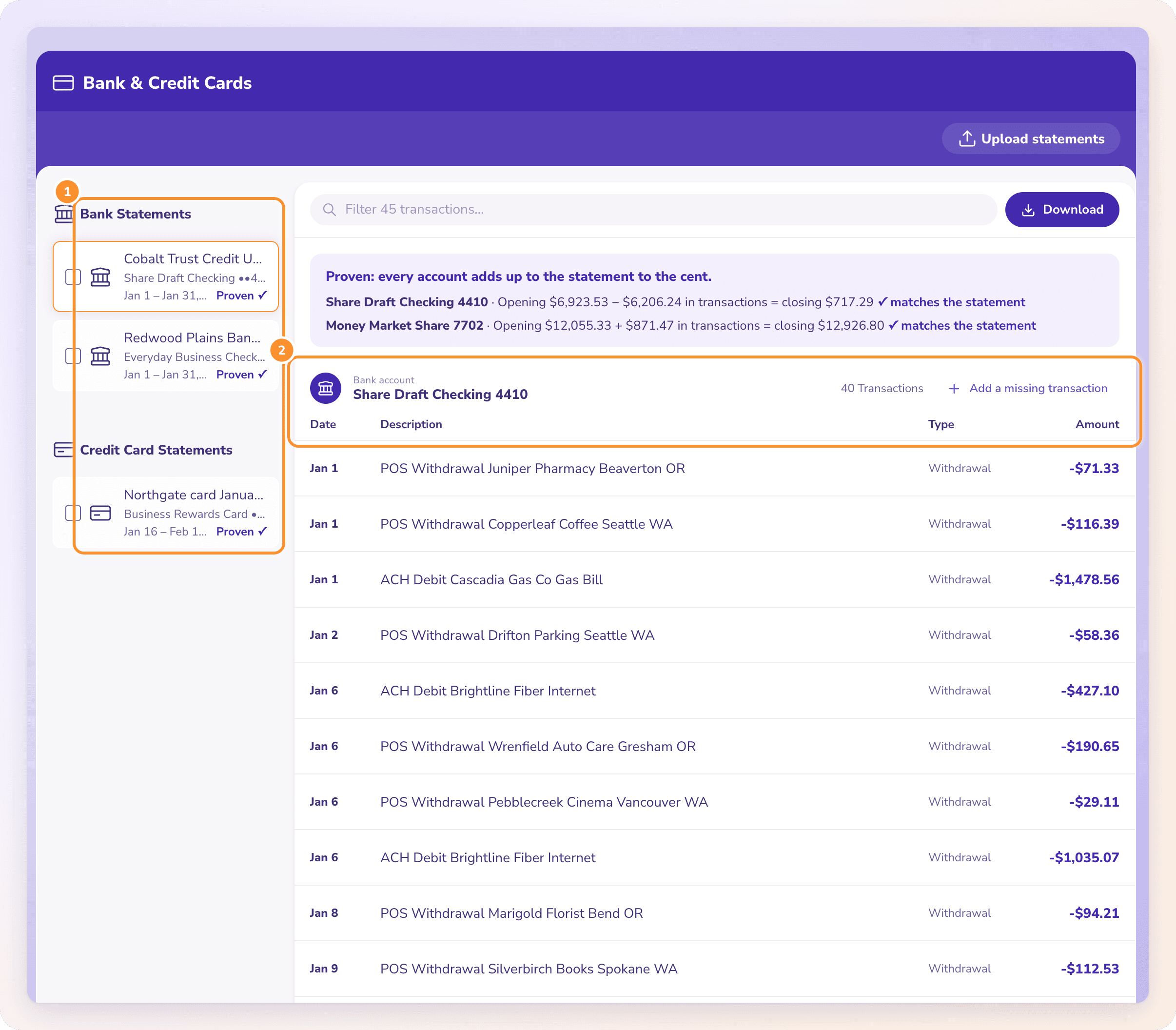
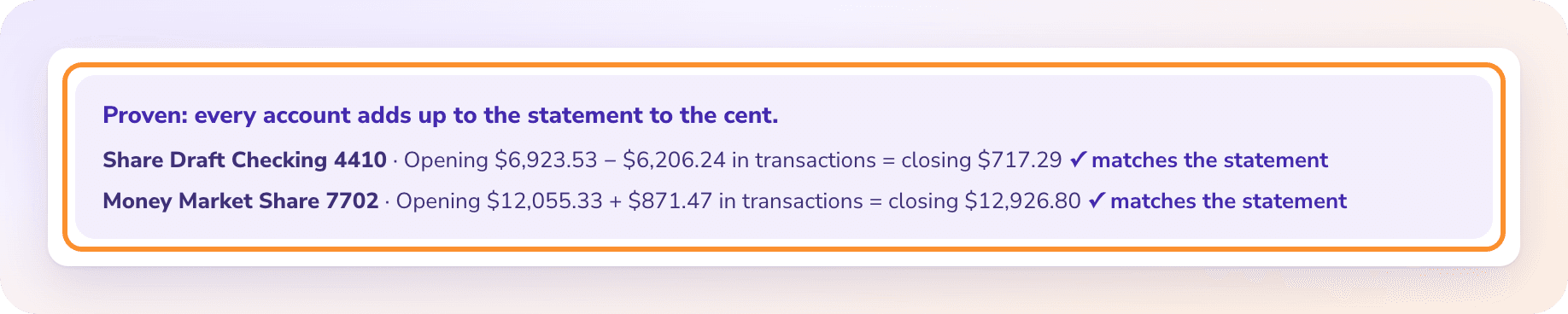
The PDF statement for the same month has none of those problems. It prints the opening and the closing balance, it exists for older months, and it reads as rows directly. ZeraBooks Convert reads it and checks every account against both printed balances, to the cent, before you download, so the 15,633.65 check above is done for you. If the CSV is headed for QuickBooks Online, choose QuickBooks-ready; for your own records, All details adds the balance, account and check number on every row. More on the CSV side in convert a bank statement to CSV.
WITH ZERABOOKS
From the PDF to a CSV you can trust.
ZeraBooks Convert reads PDF statements. It doesn’t read or make QBO, QFX, OFX or QIF files, and it doesn’t connect to QuickBooks.
CHECKED FIRST
Every account proven to the cent.
Opening balance plus the transactions has to equal the closing balance for every account on the statement. One that doesn’t tie is flagged for review, with the difference shown, before anything is downloaded.
Download Excel or CSV as Standard, QuickBooks-ready, Xero-ready, Sage-ready, Money in and out, or All details, with US dates. Several accounts in one PDF can come out as one file per account. Headed for QuickBooks? See PDF to QuickBooks.
In QuickBooks Desktop, a .qbo imports through Web Connect. To read it yourself, open it in Notepad or TextEdit: you will see the tags and values. Excel opens it only if the file is XML; a file whose first line is OFXHEADER:100 isn’t.
Is a QBO file the same as OFX?+
Inside, yes. A .qbo is an OFX file with Intuit’s tags added, mainly INTU.BID. Tools that read OFX usually read a .qbo too, sometimes after you rename a copy to .ofx. A .qfx file works the same way; see QFX to CSV.
Can I convert QBO to Excel instead of CSV?+
Yes, the same way. Once the transactions are in a sheet, save as .xlsx. If the file is XML, Excel’s From XML import reads it directly; if not, convert it with GnuCash first.
Why doesn’t my QBO file show an opening balance?+
The format doesn’t have one. A .qbo carries the transactions and the balance at the end of the period. Subtract the net of the transactions from that balance to get the implied opening, and compare it with your last statement.
Can ZeraBooks convert a QBO file to CSV?+
No. ZeraBooks Convert reads PDF statements only and doesn’t read or make QBO, QFX, OFX or QIF files. If you have the PDF statement for the same period, Convert turns it into CSV or Excel and checks it against the printed balances. Going the other way is covered in how to convert CSV to QBO format.
How do I combine several QBO files into one CSV?+
Convert each file, add an Account column if they cover different accounts, stack them, then remove duplicates on the ID (FITID) column. Overlapping downloads share FITIDs, so de-duplicating on amount would delete genuine repeats.
ZeraBooks Convert reads the statement, proves every account against its printed balances and downloads CSV or Excel in the format you need. 7-day trial, then $79 a month billed annually; see ZeraBooks pricing.