EXPLAINER · BANK STATEMENT OCR
Bank statement OCR:
what it gets wrong, and how ZeraBooks checks it.
Bank statement OCR turns a statement’s page image into text, but the costly mistakes are in the layout: lost minus signs, missing years, wrapped lines counted twice and balance lines read as transactions. ZeraBooks reads scanned and digital PDFs with an AI model, then checks every account against the opening, running and closing balances the bank printed.
7-day trial · card required, nothing charged for 7 days · 1,000 pages a month from $79/month billed annually

SCANNED OR DIGITAL
Does a bank statement need OCR?
Only if it is a picture. A statement you download from online banking is a digital PDF: the text is already inside the file, so nothing needs recognizing. A statement that went through a scanner or a phone camera is an image, and OCR (optical character recognition) is what turns those pixels back into letters and digits. A quick way to tell the two apart is on our page about scanned bank statement to Excel.
Either way, getting the characters right is only half of it. A bank statement is a table with rules: which column means money out, which line is a balance and not a transaction, which year a “12/28” belongs to. A digital PDF copied into Excel breaks those rules just as easily as a scan does. That is why the mistakes below happen to both.
ZeraBooks Convert reads every page as an image with an AI model, so a scan and a download go through the same way. On a digital PDF it also checks each account number against the text the file carries and corrects a one-digit misread. A scan has no text to check against, so the balance checks further down carry the weight.
We set you up and catch up your past months for free. Then ZeraBooks keeps your books done.
WHERE IT GOES WRONG
What does OCR get wrong on a bank statement?
Plain OCR and PDF-to-Excel tools return what is on the page, cell by cell. These are the layout mistakes that follow, and what ZeraBooks does about each. Single misread digits, such as a 3 read as an 8, are covered in OCR accounting software.
| What happens | Example | What ZeraBooks does |
|---|---|---|
| A minus sign, CR or trailing minus is dropped | 125.00- becomes 125.00, money out turned into money in | Reads the amount with its printed sign, then checks the direction against the running balance |
| The year is missing | 12/28 on a statement for Dec 15 to Jan 14 lands in the wrong year | Takes the year from the statement period, so December dates on a January statement get the prior year |
| A wrapped description becomes a row | An ACH company ID on a second line pastes as a row with no amount | Joins wrapped lines into one description |
| A balance line is read as a transaction | “Balance Forward 4,210.55” added to the deposits | Never counts opening, closing or brought-forward lines as money in or out |
| A recap table doubles the checks | A checks-paid summary repeats checks already in the dated list | Drops the repeat only when the account then ties to its printed balance |
| An empty column reads as $0.00 | A Credits and Debits layout prints $0.00 in the unused column | Drops a $0.00 line that sits beside the same line with a real amount |
| A row lands on the wrong account | Checking and savings in one PDF, a transfer filed under savings | Moves the run of rows only when both accounts then tie |
| Headers and footers read as rows | “Continued on next page” and repeated column headers | Skips them: they are never transactions |
Each fix in the right-hand column is either a reading rule or a repair that is applied only when the statement’s own printed balances agree. A guess that doesn’t make the account tie is never kept.
THE CHECKS
How does ZeraBooks check OCR output against the printed balances?
A bank statement carries its own answer key. ZeraBooks uses every part of it.
- 1
The account total
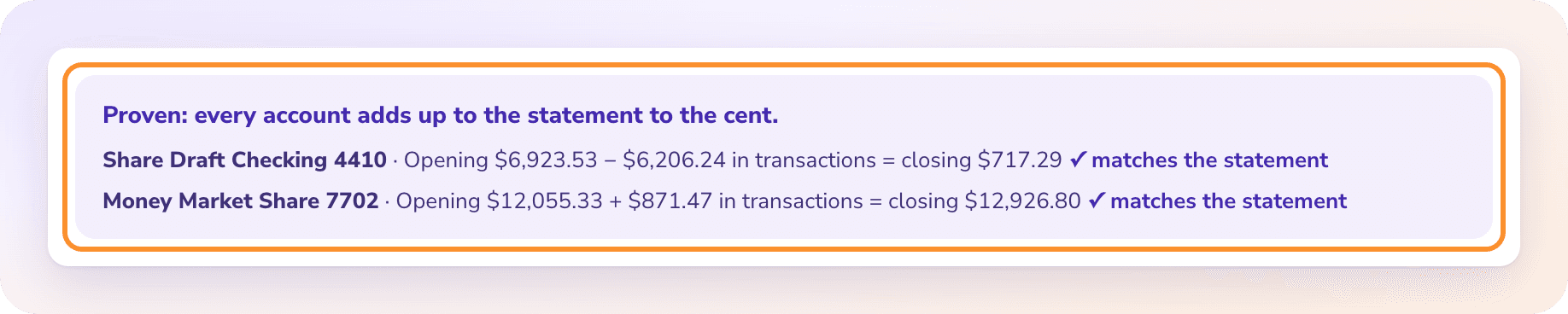
For each account, the opening balance plus every row read must equal the closing balance printed on the statement, to the cent. For a card, the previous balance plus charges minus payments must equal the new balance.
- 2
The running balance
Where a line prints its own balance, the change from the line before is that line’s amount. If it equals the amount read with the opposite sign, the sign was misread, and it is turned only if the account then ties.
- 3
The subtotals
A card statement that prints a total for each cardholder has each cardholder checked against it. Groups of rows that don’t reach their printed subtotal are found again by their arithmetic.
- 4
The verdict
Proven means every account and cardholder tied and nothing is left to review. Otherwise the statement shows Needs a look, with the account and the difference, before you download.
WORKED EXAMPLE
How does a running balance catch a lost minus sign?
A fictional March checking statement prints a balance on every line. The reader missed the trailing minus on a card purchase, so 84.20 went in as money in.
| Line | Printed balance | Amount as first read | Change in balance | Amount kept |
|---|---|---|---|---|
| Opening balance | 5,000.00 | |||
| 03/02 Deposit | 6,500.00 | 1,500.00 | +1,500.00 | 1,500.00 |
| 03/05 Card purchase, printed 84.20- | 6,415.80 | 84.20 | −84.20 | −84.20 |
| 03/09 ACH payment, printed 1,250.00- | 5,165.80 | −1,250.00 | −1,250.00 | −1,250.00 |
| Opening plus rows | 5,334.20 | 5,165.80 | ||
| Closing balance printed | 5,165.80 | off by 168.40 | ties |
The first read was off by 168.40, exactly twice 84.20, the tell-tale sign of one line read the wrong way round. The printed balance fell from 6,500.00 to 6,415.80, so the line is money out. With the sign turned, 5,000.00 + 1,500.00 − 84.20 − 1,250.00 = 5,165.80, and the account ties. On a statement without running balances, the same 168.40 gap shows on screen and you correct the row yourself; see Fix a statement.
OCR TOOL OR CONVERTER
A general OCR or PDF-to-Excel tool vs ZeraBooks Convert
What you get back from the same statement. “A general tool” means OCR software or a PDF-to-Excel converter that copies the tables it finds.
| Feature | ZeraBooks Convert | A general OCR or PDF-to-Excel tool |
|---|---|---|
| Output | One row per transaction: Date, Description, Amount, and more in All details | The cells as printed, one table per section or page |
| Signs | Money out negative, whatever the bank printed | As printed, often positive in every section |
| Dates | MM/DD/YYYY, year from the statement period | As printed, often without a year |
| Balance lines and recaps | Left out of the rows | Copied in with the transactions |
| Several accounts in one PDF | Split by account and cardholder | One long table |
| Checked against the statement | Every account, to the cent, before download | No: you add it up yourself |
Competitor facts from their public pages, checked November 5, 2026: ZeraBooks: How Convert proves a statement · ZeraBooks: Choose a download format. Prices and features change; check each vendor before you buy.
HONEST LIMITS
What can’t a balance check catch?
The proof checks amounts. A few things sit outside it.
Dates and descriptions
A wrong date or payee name doesn’t change any total, so the proof can’t see it. Glance at the rows you care about.
Statements with no balances
If the bank prints no opening or closing balance for an account, there is nothing to prove it against. That statement stays at Needs a look, even when every line is right.
Two errors that cancel
A deposit 50.00 too high and a payment 50.00 too high leave the total unchanged. It is rare, and it is why a quick look at the largest rows is still worth it.
Pages too faint to read
A scan that can’t be read shows Couldn’t read and uses no pages. Rescan it or download a fresh copy; see When a document can’t be read.
How do I find the line OCR got wrong?
Read the size of the difference against the printed balance; why a converted statement doesn’t add up shows how.
What is bank statement OCR?
Optical character recognition applied to a bank statement: software that turns a scanned or photographed page into text and numbers. A statement downloaded from online banking already contains its text, so it needs no OCR, but it still needs its table read correctly.
How accurate is OCR on bank statements?
It depends on the scan and the layout, which is why ZeraBooks doesn’t ask you to trust a percentage. Every account is checked against the balances the bank printed, and a statement is marked Proven only when it ties to the cent.
Can OCR read a scanned bank statement into Excel?
Yes. Upload the scanned PDF to the ZeraBooks bank statement converter, check the proof and download Excel. PDFs up to 50 MB and 500 pages; 1,000 pages a month from $79 billed annually.
Do I need to run OCR before uploading to ZeraBooks?
No. ZeraBooks reads the page images itself. Running your own OCR first does no harm, but it doesn’t replace the balance check.
Why does my OCR output have more rows than the statement?
Usually wrapped descriptions read as extra rows, balance lines read as transactions, or a recap table that repeats the checks. Each one adds rows without adding transactions, and the totals stop matching the statement.
Does ZeraBooks work on photos of statements?
Save the photos as one PDF first: Convert accepts PDFs only. Flat, well-lit photos without shadows read best.
Also published on

FREE SETUP + CATCH-UP
Upload the statement your OCR mangled.
See where it ties and where it doesn’t.
Then 1,000 pages a month from $79 a month billed annually. Need a spreadsheet next? See how to convert a bank statement to Excel. The subscription also includes AI bookkeeping.