How to reconcile a bank account in QuickBooks Online, from the statement to a $0.00 difference.
In QuickBooks Online, go to All apps, then Accounting, then Reconcile. Pick the account, enter the statement’s ending balance and date, select Start reconciling, and tick every transaction on the statement until Difference reads $0.00. Then select Finish now. ZeraBooks reconciliation software skips the ticking and proves each month against the printed balances.
7-day trial · card required, nothing charged for 7 days · then $79/month billed annually or $149 monthly
Tied, signed off and closed.
STEP BY STEP
How do you reconcile a bank account in QuickBooks Online?
Menu names from Intuit’s reconcile article, updated August 5, 2026, checked October 2026. Have the bank statement PDF open before you start.
1
Open Reconcile
Go to All apps, then Accounting, then Reconcile. The first time you use it, select Get started.
2
Choose the account
Pick the bank account from the Account dropdown. Read the Last statement ending date: the statement you reconcile now should begin the day after it.
3
Enter the statement figures
Type the Ending balance and Ending date exactly as printed on the statement. Check that the beginning balance QuickBooks shows equals the statement’s beginning balance before going further.
4
Start reconciling
Select Start reconciling. QuickBooks lists every payment and deposit in the register up to the ending date.
5
Tick what the bank shows
Work down the statement and tick the matching line in QuickBooks for each one. The Cleared balance updates as you go. Leave anything the bank hasn’t processed yet unticked.
6
Bring the Difference to $0.00
Add missing fees or interest, correct wrong amounts, and use Edit info if the ending balance or date was typed wrong.
7
Finish and keep the report
When Difference reads $0.00, select Finish now, then Done. QuickBooks saves a reconciliation report you can open later from History by account on the Reconcile page.
Try it on your own documents. One-week free trial, both apps included.
What does a QuickBooks Online reconciliation look like with real numbers?
Copperline Plumbing is a fictional plumbing company. Its September 2026 checking statement (account ending 4418) opens at 12,480.60, shows 21,355.00 in deposits and 19,912.45 in payments, and closes at 13,923.15. The first pass in QuickBooks doesn’t tie:
Line
First pass
Check 1087 fixed
Fee added
Beginning balance
12,480.60
12,480.60
12,480.60
Deposits ticked
21,355.00
21,355.00
21,355.00
Payments ticked
−19,905.45
−19,887.45
−19,912.45
Cleared balance
13,930.15
13,948.15
13,923.15
Statement ending balance
13,923.15
13,923.15
13,923.15
Cleared balance over the statement
7.00
25.00
0.00
Two errors were hiding behind one small number. Check 1087 was entered as 864.00 but the bank paid 846.00, which overstated payments by 18.00. The 25.00 monthly service fee was never entered, which understated them by 25.00. Together they left a 7.00 gap that matched nothing on the statement. Fixing the check first exposed the fee exactly. Check 1092 for 2,140.00 and a 3,600.00 deposit made on September 30 aren’t on the statement, so they stay unticked and the register reads 13,923.15 − 2,140.00 + 3,600.00 = 15,383.15.
WHEN IT WON’T TIE
Why is my QuickBooks reconciliation difference not zero?
Look at the size of the difference first. It usually points at the cause:
What you see
Likely cause
What to do
Difference equals one line on the statement
A fee, interest or deposit never entered
Enter it dated as on the statement, then tick it
Difference divides evenly by 9
Two digits swapped, like 864.00 for 846.00
Compare amounts line by line for that figure
Difference is twice a line’s amount
A payment entered as a deposit, or the reverse
Open the transaction and flip it
Difference equals a line you already ticked
The same transaction is in QuickBooks twice
Untick and remove the copy that isn’t from the bank
Beginning balance doesn’t match the statement
A past reconciled transaction was changed or deleted
Fix the beginning balance first (see below)
Small gap that matches nothing
Two errors partly cancelling, as in Copperline’s month
Fix the obvious one and look at the new difference
Intuit’s guidance is to check manually entered transactions for errors or duplicates. QuickBooks will let you finish with a difference, but that posts an adjusting entry for the gap, and Intuit suggests talking to your accountant first. The usual culprit is a payment typed in by hand that also came in from the bank, so search for the difference amount before anything else.
THE FIRST RECONCILIATION
How do you reconcile an account in QuickBooks Online for the first time?
The first reconciliation fails more often than any other, almost always because of the opening balance. Intuit’s fix (article updated August 24, 2026):
1
Find the opening balance entry
Go to All apps, then Accounting, then Chart of accounts. Find the bank account and select View Register. Look for the entry with Opening balance equity in the Account column and note its date and amount.
2
Compare it with the statement
The opening balance should equal the bank balance on that same date. If it doesn’t, open the entry, change the amount in the Deposit column, and select Save.
3
Check the reconcile marks
In the register, only the opening balance entry should show R in the checkmark column. Everything else should be blank or C. Clear any stray R on another transaction and save.
4
Then reconcile the first statement
Start from the statement that begins the day after the opening balance date. Once the opening entry is right, the beginning balance on the Reconcile screen matches the statement.
AN OLD MONTH CHANGED
What if the beginning balance in QuickBooks is wrong?
If last month ended at 12,480.60 and this month’s Reconcile screen starts somewhere else, a transaction from a reconciled month was edited, deleted or unticked since. Don’t fix it by changing this month. Intuit’s article on beginning balance issues (updated September 1, 2026) has you open Reconcile, choose the account, and select We can help you fix it on the alert that reads Your account isn’t ready to reconcile yet.
That opens a list of the changed transactions. For each one, Review in tray shows the details, and View History shows who changed what. Work through them until Total discrepancy difference reads $0.00. Deleted or voided items show up in the Audit log under Settings. You need admin access to edit reconciliations.
How ZeraBooks reconciles without ticking anything.
ZeraBooks is its own AI-native general ledger, not a QuickBooks add-on. It has no bank feed and doesn’t sync with QuickBooks. You upload each statement and it does the proof.
ON UPLOAD
Three checks against the printed statement.
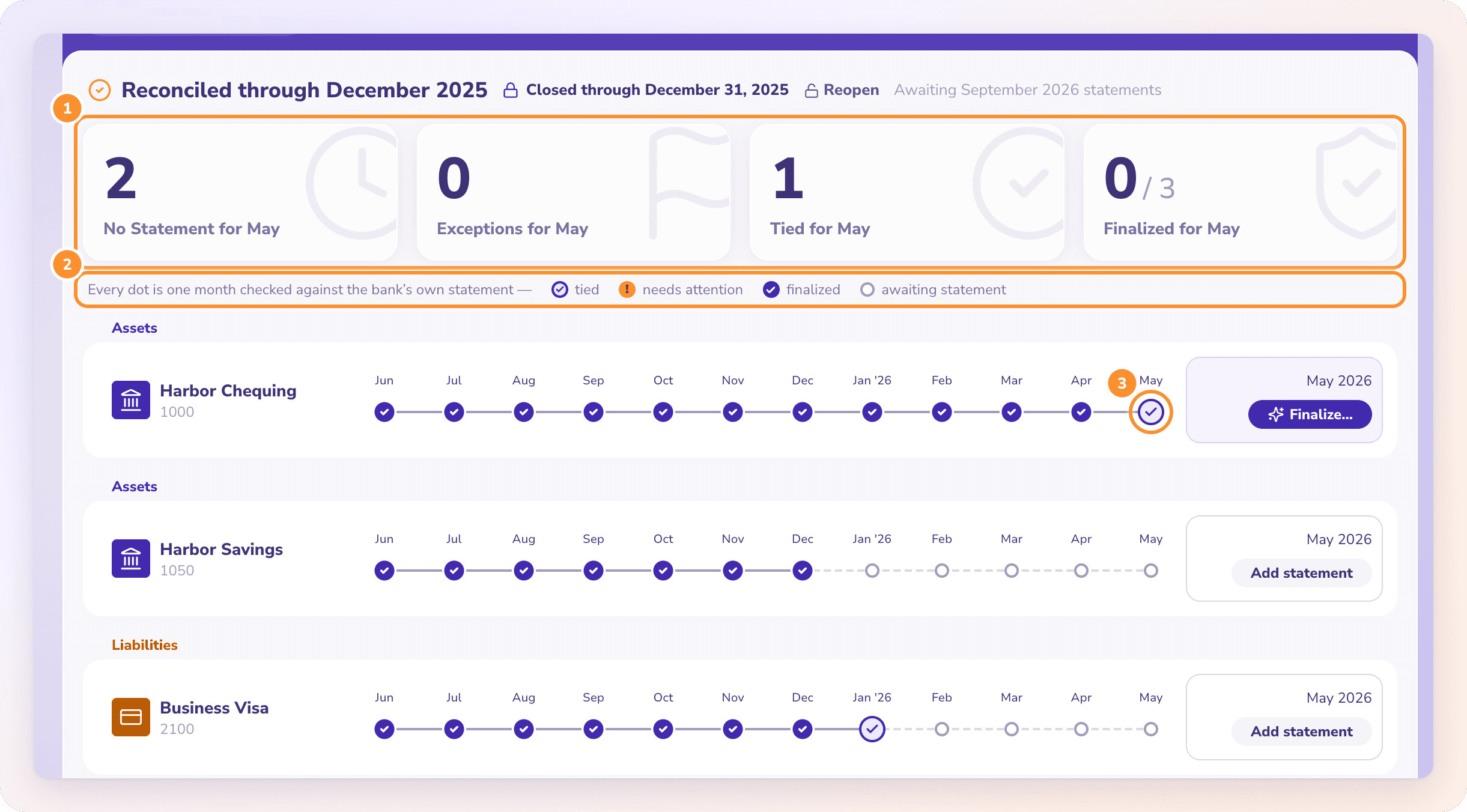
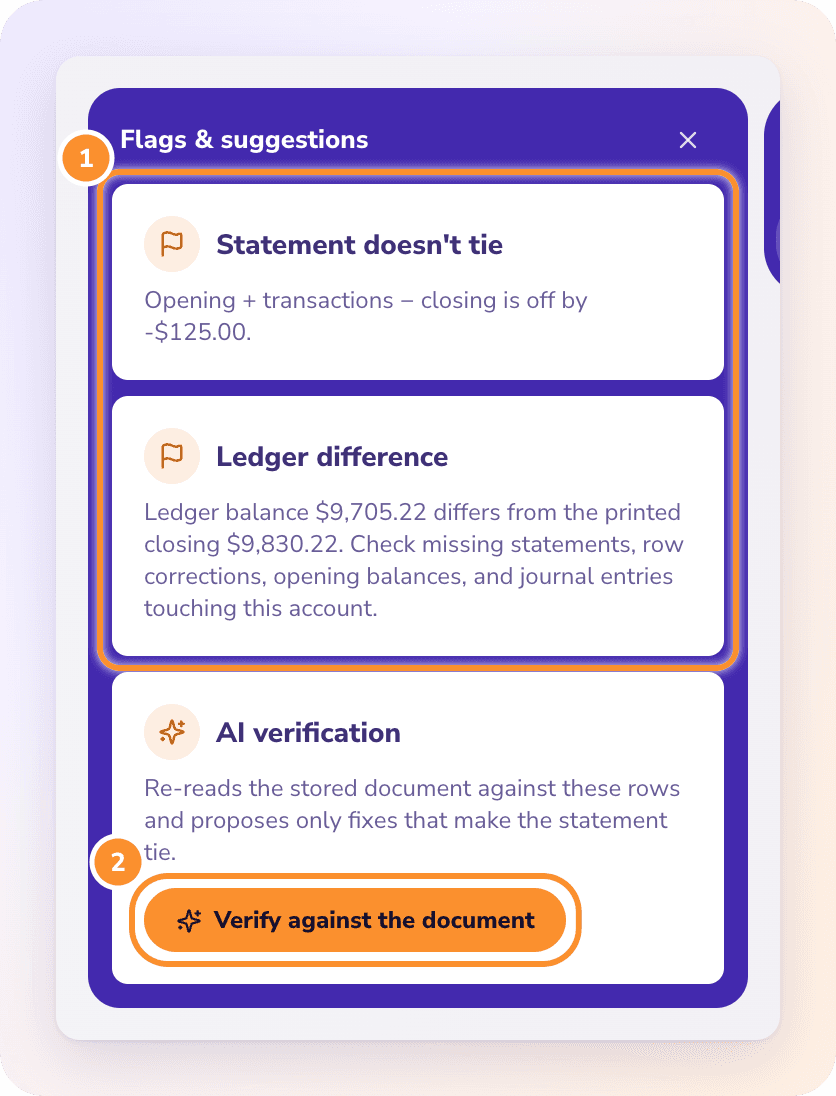
The moment a statement lands, ZeraBooks checks that it adds up from its opening to its closing balance, that its opening balance meets last month’s closing, and that the ledger agrees with the closing balance. The second check is the one QuickBooks leaves to you: a changed old month or a missing statement shows up straight away, as a flagged month or an orange triangle on the timeline. The ideas behind it are in how to do a bank reconciliation.
Copperline’s swapped digits and missing fee are the kind of thing Verify against the document is for. It re-reads the original statement and proposes only fixes that make the month tie, each quoting the line it relies on. You apply them, finalize the month and close it. Leaving QuickBooks? ZeraBooks brings over your closing balances, unpaid invoices and bills, and uncleared checks and deposits from the day your old books close; see the QuickBooks alternative.
Under All apps, then Accounting, then Reconcile, as of Intuit’s help article updated August 5, 2026. The reconciliation reports you finished are on the same page under History by account.
What ending balance do I enter in QuickBooks?+
The closing or ending balance printed on the bank statement, with the statement’s end date. Not the balance in your online banking today, which includes later activity.
Should I tick transactions that aren’t on the statement yet?+
No. A check the bank hasn’t paid or a deposit it hasn’t recorded stays unticked. It carries into next month’s reconciliation, where you tick it once it appears on that statement.
Can I finish a QuickBooks reconciliation that doesn’t balance?+
QuickBooks allows it and posts an adjusting entry for the difference. That entry hides the real error, so find the cause first. Intuit suggests talking to your accountant before you accept a difference. Reconciling with AI shows how a misread line is found against the statement.
My bank feed is missing months. How do I reconcile them?+
You still need the statements. The ZeraBooks bank statement converter turns each PDF into a QuickBooks-ready CSV, checked against the printed balances, that you import into QuickBooks yourself. ZeraBooks doesn’t connect to QuickBooks or make .qbo files.
Is ZeraBooks easier than reconciling in QuickBooks?+
For most small businesses, yes: there is no tick-off. Each month is proven against the bank’s printed balances when the statement is uploaded, and only months that don’t tie need you. ZeraBooks is $79 a month billed annually or $149 monthly after a 7-day trial.
Upload one statement and watch it tie. Nothing to tick.
ZeraBooks proves every month against the bank’s printed opening and closing balances, to the cent. Try it for 7 days, then $79 a month billed annually.