Dext vs AutoEntry for statements in more than one currency.
For multi-currency statements, ZeraBooks is the simpler choice: the ZeraBooks bank statement converter splits a mixed PDF by account and proves each one against its printed balances. Dext and AutoEntry both work one foreign-currency account at a time. Dext wants one account per file; AutoEntry charges 3 credits a page and its QuickBooks Desktop export is USD only.
Read on each vendor’s own help center and pricing page on October 22, 2026. Where neither help center covers a case, the cell says so rather than guessing.
Feature
Our pickZeraBooks Convert
Dext
AutoEntry
Owned by
ZeraBooks
IRIS Software Group (agreement announced December 2024)
Sage (“AutoEntry by Sage”)
Where the account currency is set
Nothing to set. Each account in the PDF is read against its own printed balances
Typed in when you add the bank account by hand
Confirmed in a pop-up when you download a .qbo file
Two accounts in one PDF
Yes, split by account
No. One statement for one account per file
Not covered in its help
Exchange rates
None applied. Amounts stay as printed
For receipts and invoices: the rate on the document’s date, from Fixer. Not described for statement lines
For invoices: the rate on the invoice date. Not described for statement lines
Statement pricing
1,000 pages for $149 a month, or $79 billed annually
10 free sheets on the $302.50-a-year Business plan, then $13 a month for 50 or $0.32 each
3 credits a page; 50 credits for $13 a month, up to 2,500 for $469
Reconciling a foreign account
Each account proven to the cent against its printed balances
Bank reconciliation check for Xero clients toggles native and base currency; base figures are a guide only
Not covered in its help
Competitor facts from their public pages, checked October 22, 2026: Dext: how to upload bank statements · Dext: how foreign currency amounts are converted · Dext: bank reconciliation check · Dext U.S. pricing · AutoEntry pricing · AutoEntry: upload a bank statement · AutoEntry: import to QuickBooks Online · AutoEntry: import to QuickBooks Desktop · AutoEntry: currency conversion and selection. Prices and features change; check each vendor before you buy.
We set you up and catch up your past months for free. Then ZeraBooks keeps your books done.
What does ZeraBooks do with 3 statements from Monzo, RBC and CommBank?
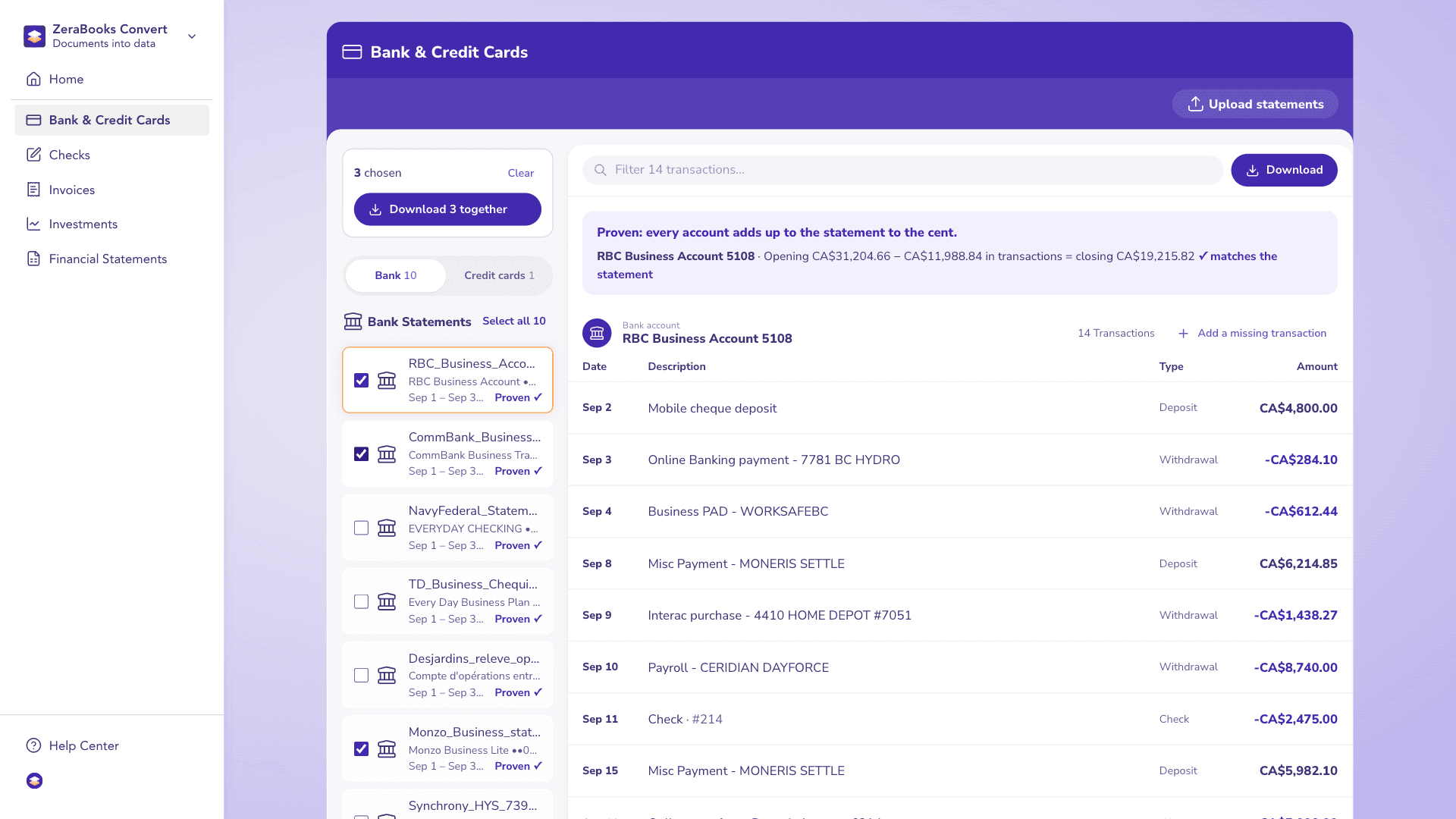
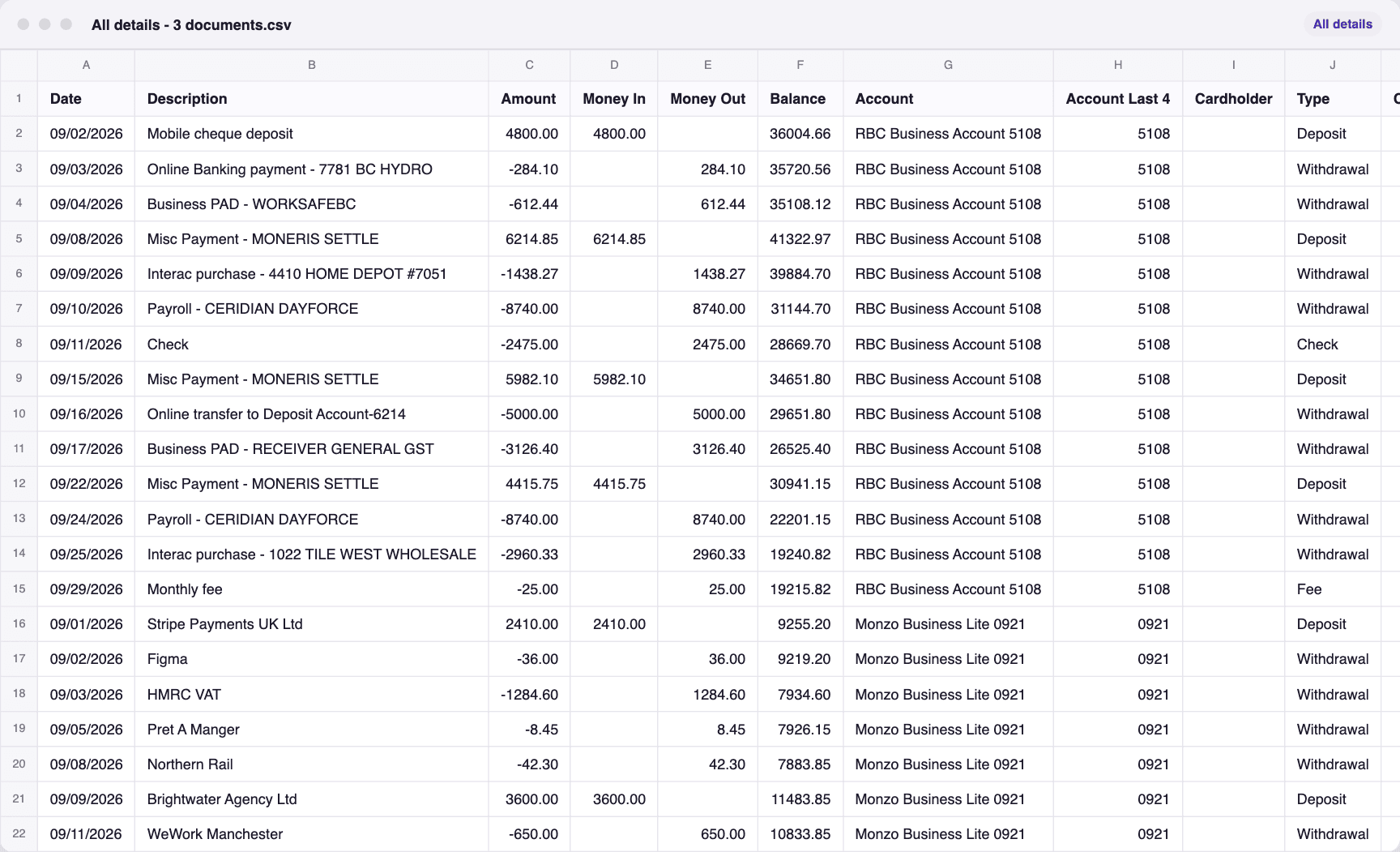
Here is ZeraBooks Convert on the same job: 3 sample statements from Monzo, RBC and CommBank, fictional and each already proven to the cent against its printed balances. Tick them, download once, and you get All details - 3 documents.csv: 40 transactions in one sheet, with the account and source file on every row.
A real run in ZeraBooks Convert on 3 sample statements from Monzo, RBC and CommBank. Fictional sample documents.
The statements, ticked in Convert
The one file that downloaded
IN DEXT
How do you set up a foreign-currency bank account in Dext?
Dext ties the currency to the bank account, so the account comes first. Only Admin users can do this.
1
Check your base currency
Go to Business settings > Business profile and look at Base currency. Changing it later only affects new documents, so set it before the first upload.
2
Add the account by hand
Go to Bank > Accounts, select Add bank account, choose Manually and select Continue. Pick the bank, then enter the account name, account number and the account’s currency, for example EUR.
3
Split mixed statements
If the bank sends one PDF covering a USD and a EUR account, cut it into one file per account. Dext wants one statement for a single account in each file.
4
Upload each file to its account
Select Add Documents, switch to the Bank tab, choose the matching account and drop in the file. It shows under Bank > Statements > Collected, then Processed.
5
Export and check
Export the CSV from the Bank workspace. For Xero clients on a Practice plan with the Data Health add-on, the bank reconciliation check can show totals in the native or base currency.
IN AUTOENTRY
How do you export a foreign-currency statement from AutoEntry?
AutoEntry asks about currency at the export, not the upload. These are its QuickBooks Online steps.
1
Upload to the Bank Statements folder
Upload the PDF and choose the Bank Statements folder. Track it in the Activity tab; it lands in the Bank Statements Inbox when done.
2
Download as .qbo
Open the statement in the Bank Statements Inbox, download it and choose “QuickBooks Online - Web Connect File (.qbo)”.
3
Confirm the currency
In the pop-up, the account number fills in on its own. Check the currency is right; the other fields are for QuickBooks Desktop.
4
Import into QuickBooks Online
In QuickBooks Online, go to Banking, click File Upload at the top right, choose the file, click Next, check the account, click Next and then Let’s Go.
5
For QuickBooks Desktop or Xero
QuickBooks Desktop takes the .qbo through File > Utilities > Import > Web Connect Files, but AutoEntry says USD is the only supported currency there. For Xero, pick the Xero download and use Import a Statement on the bank account.
WORKED EXAMPLE
What does a two-currency client cost each month?
Harbor & Pine Imports is a fictional importer. Its bank sends one monthly PDF: a USD checking account on 4 pages and a EUR account on 2. USD: 48,210.75 + 22,400.00 − 19,865.30 = 50,745.45 closing. EUR: 12,400.00 + 3,150.00 − 2,870.50 = 12,679.50 closing.
Dext
AutoEntry
ZeraBooks Convert
Files to upload
2 (split by account first)
1
1
Accounts to set up
2, each with its currency
Currency confirmed at export
None
What the month uses
6 pages or 2 statements, inside the 10 free sheets
6 pages × 3 credits = 18 credits
6 of 1,000 pages
Cost of that usage
Included in the Business plan
18 × $0.26 = $4.68 on Bronze, 32 credits left
Included in the plan
Checked against both closing balances
Not described
Not described
Yes, 50,745.45 and 12,679.50
One client like this is cheap anywhere. The differences show at volume and in the work around it: splitting PDFs for Dext, paying for blank and summary pages on AutoEntry, which charges every uploaded page, and checking each account’s closing balance yourself where the tool doesn’t.
WHY AMOUNTS DIFFER
Why does a converted amount not match the bank?
Dext and AutoEntry convert receipts and invoices at the rate for the document’s date. The bank or card uses its own rate and may add a fee. An illustration with a made-up rate:
Step
Amount
Supplier invoice, dated March 3
EUR 250.00
Converted at the document-date rate (1.0800, illustrative)
USD 270.00
Card charge on the statement, rate plus a 1% fee (270.00 × 1.01)
USD 272.70
Difference to explain
USD 2.70
Dext’s own help says the converted amount may differ from the bank statement for exactly these reasons. The bank statement is the record of what left the account, so match to it and book the difference as a bank fee or exchange difference, as your accountant prefers.
WITH ZERABOOKS
How ZeraBooks Convert handles a mixed-currency PDF.
ZeraBooks Convert reads statements; it doesn’t convert currencies. That keeps the file honest to the bank.
ONE UPLOAD
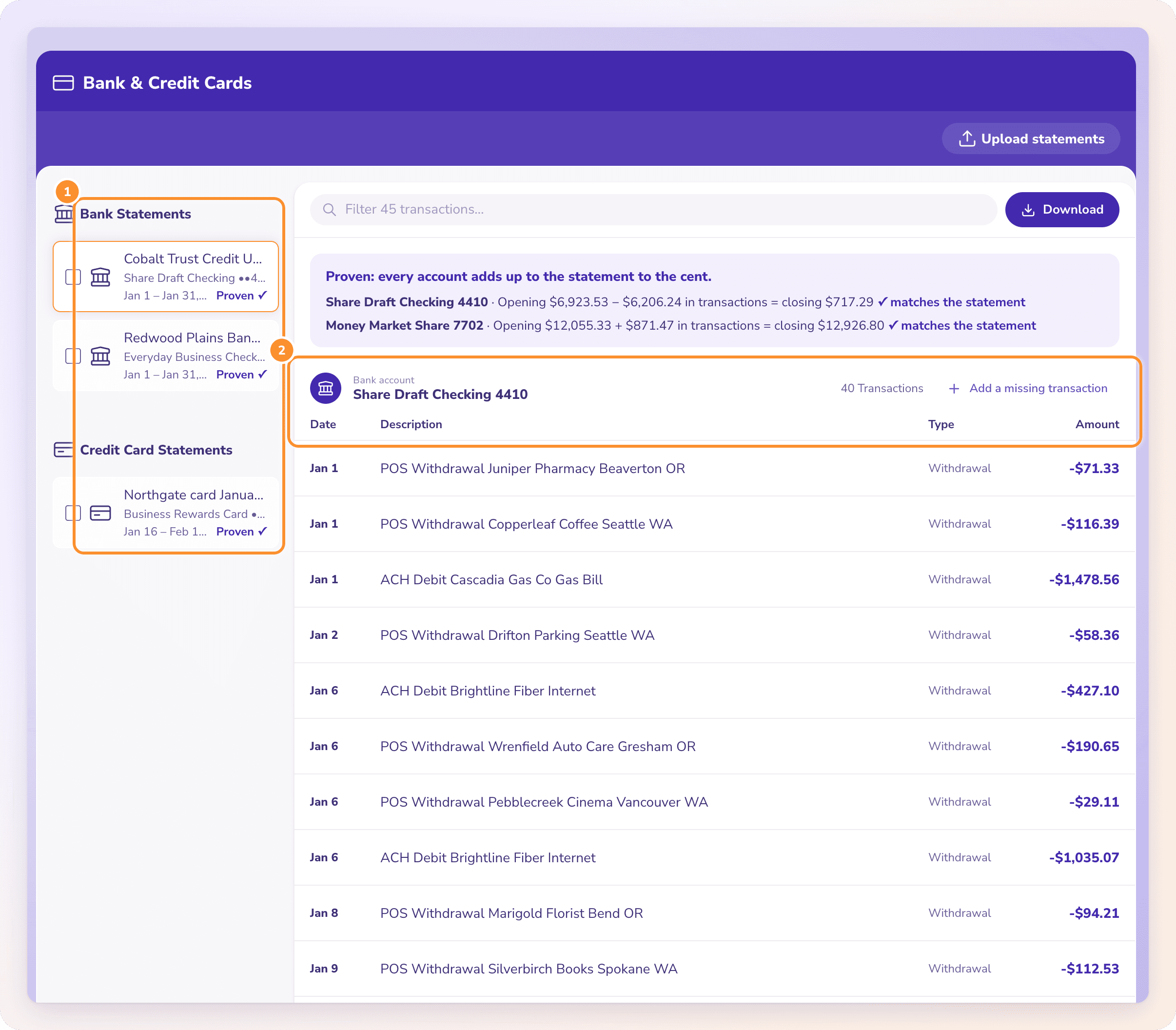
Every account in the PDF, split out.
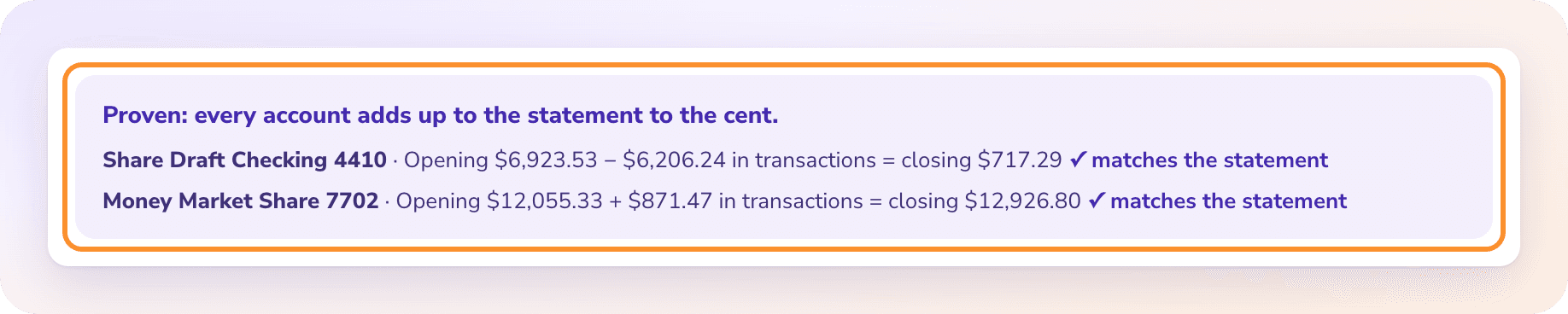
Upload the whole PDF. Convert finds each account on it, gives each its own group of transactions and proves each against the balances printed for it. Download with Split set to One per account and each currency lands in its own file, ready for the matching bank account in your software. Going to Xero? See bank statement to Xero.
Amounts come out as plain numbers, exactly as the statement printed them, with no currency sign and no conversion. Your accounting software or accountant applies the rates. For QuickBooks Online, the steps are on how to import a PDF bank statement into QuickBooks.
Does Dext support multi-currency bank statements?+
Dext lets you add a bank account in any currency by hand and upload statements to it, one account per file. It converts receipts and invoices to your base currency at the document date’s rate. Its help doesn’t describe converting statement lines.
Does AutoEntry support foreign-currency bank statements?+
It extracts them at 3 credits a page, and you confirm the currency when downloading a .qbo file for QuickBooks Online. For QuickBooks Desktop, AutoEntry’s help says USD is the only supported currency. Excel, CSV and Xero downloads are also offered.
Which is cheaper for statements, Dext or AutoEntry?+
For a few pages a month, both are cheap: Dext includes 10 free sheets on its Business plan, and AutoEntry’s 50-credit plan is $13 a month, about 16 statement pages. At volume, AutoEntry’s 3 credits a page adds up; Dext’s add-on is $0.32 a statement document. Prices checked October 22, 2026. ZeraBooks includes 1,000 pages a month for $79 billed annually, with every statement proven.
Does ZeraBooks convert currencies?+
No. ZeraBooks Convert keeps every amount as the statement printed it and applies no exchange rate. It splits a PDF with several accounts by account and proves each one against its printed balances. For reconciling foreign accounts in the books, see multi-currency bank reconciliation.
What if my bank puts two currencies on one statement?+
Neither Dext’s nor AutoEntry’s help covers that case. Dext’s one-account-per-file rule means splitting it first. ZeraBooks Convert takes the whole PDF and splits it by account. Comparing more tools? See the best bank statement converter roundup.
Damin founded ZeraBooks in 2025 and still talks to the bookkeepers, firms and owners who use it every week. He writes about what he sees in their statements and ledgers, and every page here is checked against the live product before it goes up.
Upload the mixed PDF as it came. Every account split and proven.
Seven days with 1,000 pages, then $79 a month billed annually; see ZeraBooks pricing. The same subscription includes AI bookkeeping, so proven statements can go straight into a general ledger.