GUIDE · RESTAURANT BOOKKEEPING
Restaurant bank accounts and daily deposits,
kept straight every month.
A restaurant keeps its bank accounts straight by giving each account one job, matching every daily deposit to the sales day it came from, and reconciling each account to its statement every month. The ZeraBooks general ledger reads each account’s statements, pairs the transfers and proves every month against the printed balances. It does not connect to your POS or your bank.
7-day trial · card required, nothing charged for 7 days · then $79/month billed annually or $149 monthly
THE SETUP
Which bank accounts does a restaurant need?
None of these is required. A common setup gives each account one job, so its balance means one thing at a glance.
Operating checking
Card and cash deposits land here, and food, supplies, rent and utilities are paid from here. It is the busiest account, often hundreds of lines a month.
Payroll account
Funded by one transfer before each pay run, so paychecks and payroll taxes clear from their own account and a short balance shows up before payday, not after.
Sales tax savings
Sales tax collected is moved here each week. It is the state’s money, and keeping it apart stops it being spent on a slow month’s food order.
Business credit card
For online supplies and equipment. Paid from operating checking, which is a transfer between your own accounts, not an expense. Our guide to American Express expense categorization shows where each charge goes.
Try it on your own documents. One-week free trial, both apps included.
WORKED EXAMPLE
Example: one week of deposits on a restaurant’s checking statement
A fictional 60-seat restaurant, first week of March. Card batches settle a business day or so after the sales day, so Friday to Sunday all land on Monday.
| Bank date | Statement line | Amount | What it really is | Where it goes in ZeraBooks |
|---|---|---|---|---|
| Mon Mar 2 | MERCHANT DEPOSIT | 2,918.45 | Card sales from Friday Feb 27 | Food and beverage sales |
| Mon Mar 2 | MERCHANT DEPOSIT | 3,412.60 | Card sales from Saturday Feb 28 | Food and beverage sales |
| Mon Mar 2 | MERCHANT DEPOSIT | 2,240.15 | Card sales from Sunday Mar 1 | Food and beverage sales |
| Mon Mar 2 | COUNTER DEPOSIT | 1,185.00 | Weekend cash, counted Sunday night | Matched to the Pay In you recorded from the cash count |
| Tue Mar 3 | MERCHANT DEPOSIT | 1,066.30 | Card sales from Monday Mar 2 | Food and beverage sales |
| Wed Mar 4 | DELIVERY APP PAYOUT | 842.10 | Last week’s delivery orders, after the app’s commission | Delivery sales |
| Wed Mar 4 | ONLINE TRANSFER TO CHK 4410 | (4,200.00) | Funding this week’s payroll | Transfer to Payroll 4410, paired with that account’s statement |
| Thu Mar 5 | ONLINE TRANSFER TO SAV 7781 | (1,350.00) | Last week’s sales tax set aside | Transfer to Tax savings 7781 |
| Fri Mar 6 | MERCHANT FEES | (389.27) | February card processing fees, charged monthly | Card processing fees |
If your processor takes its fees out of each deposit instead of charging them monthly, the deposits are smaller than the sales. Add one journal entry a month from the processor’s statement: debit card processing fees, credit sales, for the total fees. Delivery app commissions work the same way.
MATCHING DEPOSITS
How do you match daily deposits to sales?
Deposits rarely equal the day’s sales report, and the reasons are almost always the same handful.
Compare by sales day, not bank date
Keep each day’s sales report from your POS and match deposits to the day the sales happened. Weekends and bank holidays push several days into one bank date.
Record the cash count before the statement arrives
Enter each cash deposit as a Pay In from the counting sheet. When the statement comes, ZeraBooks matches the deposit to it if the account and amount agree and the bank date is on or after yours. A deposit that doesn’t match is a short or late deposit to look into.
Card tips make deposits bigger than food sales
Tips paid by card arrive in the deposit but belong to staff. Record them as a tips payable liability, cleared when tips are paid out through payroll, not as sales.
Net deposits hide fees
Processors and delivery apps that deduct fees before paying out understate both sales and costs. The monthly journal entry in the example above puts both back.
Transfers aren’t sales
Moving money from savings back into checking can look like a deposit. ZeraBooks treats it as a transfer when the description names the other account or the matching line is on that account’s statement within 3 days.
IN ZERABOOKS
How ZeraBooks keeps several restaurant accounts straight
The month ends with each account proven to its statement, and the profit and loss statement showing sales and food costs from the same books.
- 1
Add each account by name
Use the last four digits, such as “Operating 1102” and “Payroll 4410”, so transfer lines that mention an account number find the right one.
- 2
Upload every account’s statements
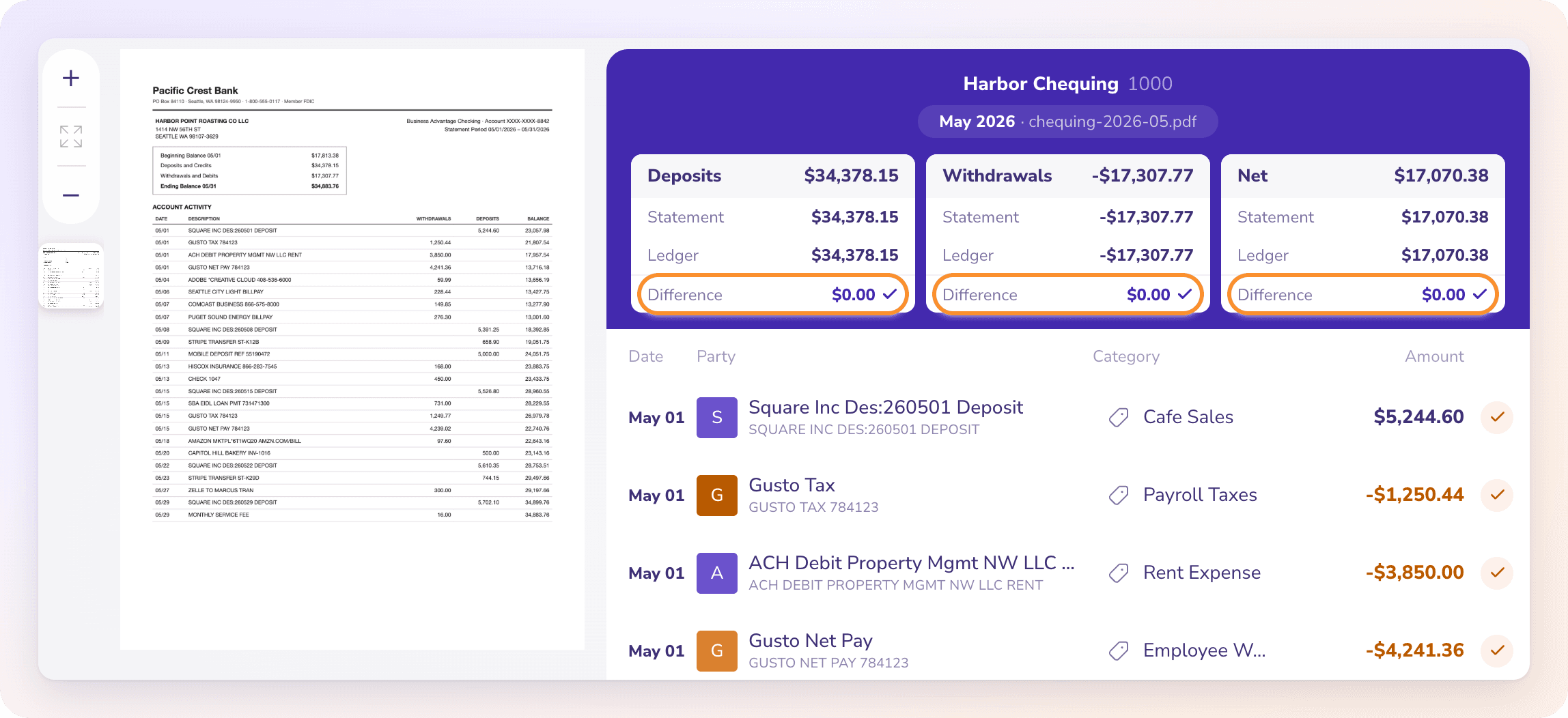
PDF or CSV, each to its own account. ZeraBooks checks that each statement adds up and follows on from the last one, so a missing month shows up.
- 3
Let the AI categorize
Card deposits go to sales and your food distributor’s charges to cost of food, informed by what you have reviewed before. Correct one line and apply it to similar ones.
- 4
Match cash deposits and post fees
Match each counter deposit to its Pay In, then add the monthly fee journal entry if your processor pays net.
- 5
Reconcile and close
Each account’s month ties when the ledger agrees with the printed closing balance. Close the month so nothing in it changes by accident. More on how that works in our bank reconciliation software.
Should a restaurant have more than one bank account?
It isn’t required, and each extra account is one more statement to reconcile. What it buys is clarity: a separate payroll account shows a shortfall before payday, and a separate sales tax account keeps the state’s money from being spent.
Why doesn’t my card deposit match my sales report?
Usually one of four things: the deposit covers a different sales day, card tips are included, the processor took its fees out first, or a refund came out of the batch. Compare by sales day and the remaining difference is usually fees.
Does ZeraBooks connect to my POS or my bank?
No. ZeraBooks has no POS connection and no bank feed. You upload each account’s statements as PDF or CSV, and keep your POS daily sales reports for matching deposits and recording cash.
Does ZeraBooks run payroll?
No. Payroll stays with your payroll provider. The transfers that fund payroll, and the payroll provider’s withdrawals, come in on your statements and are categorized with the rest.
Can a restaurant with two locations see each one’s numbers?
ZeraBooks has no location field on reports. Give each location its own bank account and its own sales and expense categories, and the Profit & Loss shows them line by line. If the locations are separate companies, add each as its own company in the same login.
I only need my statements in a spreadsheet. Can ZeraBooks do that?
Yes. The ZeraBooks bank statement converter turns each account’s PDF statements into Excel or CSV, checked against the printed balances, without keeping the books in ZeraBooks. The same subscription covers both.
How much does it cost?
$79 a month billed annually or $149 monthly, after a 7-day trial, however many bank accounts the restaurant has. See ZeraBooks pricing. A church or nonprofit with several accounts follows a similar routine; see our guide to church accounting software.
ONE-WEEK FREE TRIAL
Upload one month from every account.
See which deposits don’t match.
ZeraBooks reads each statement, pairs the transfers and shows each account’s month tied or not. Then $79 a month billed annually, or $149 monthly.
Last updated October 12, 2026 · Written by Damin Mutti, founder of ZeraBooks