General Ledger + Converter in one subscription.

See pricing
Skip to content
  1. Home
  2. Bank statement converter
  3. Nanonets alternative

ZERABOOKS VS NANONETS

Nanonets alternative:
a bank statement converter that does the review for you.

ZeraBooks is the Nanonets alternative for accountants and businesses converting bank statements. Nanonets’ own guide says to compare the extracted rows with the original PDF before you trust them. The ZeraBooks bank statement converter does that check by arithmetic, proving every account against its printed balances, and costs a published price per page.

7-day trial · card required, nothing charged for 7 days · 1,000 pages a month from $79/month billed annually

A real run in ZeraBooks Convert on 3 sample statements from Wells Fargo, Monzo and Navy Federal. Fictional sample documents.

WHAT NANONETS IS

What is the Nanonets bank statement converter?

Nanonets is an AI workflow platform. You build document workflows out of blocks, and each block run costs credits: $0.02 for a simple step, $0.10 for a standard AI step and $0.30 for a complex AI step such as data extraction. Its bank statement converter is one page on that platform. You upload a PDF, PNG or JPG up to 50MB and get the transactions back as Excel, CSV or JSON, sorted into types such as payments, transfers, deposits and fees.

Nanonets says the converter extracts with 99%+ accuracy. It doesn’t say how that was measured. Each extracted transaction links back to its place on the statement, which helps when you check it.

And checking is expected. In its own FAQ on converting a statement to CSV, Nanonets calls review and validation crucial: preview the data, compare the rows against the original PDF and correct errors by hand. That is honest advice. It is also the slowest part of the job.

Try it on your own documents. One-week free trial, both apps included.

THE REVIEW STEP

How long does it take to check a converted statement by hand?

Take the 3 sample statements in the run below: 45 transactions from three banks. Here is the same check done two ways.

StepComparing rows with the PDFZeraBooks proof
What is comparedEach of the 45 rows, field by field, with the line on the statementEach account’s rows, added up, with the opening and closing balances the bank printed
What it catchesAnything you noticeAny wrong amount, missed line, extra line or line read the wrong way round
What it reportsWhat you wrote downProven, or the account and the exact difference, such as “off by $50.00”
Who does itYou, every statementZeraBooks, before the download button shows the file

A balance proof doesn’t check dates or descriptions, because they don’t change the totals. Glance at those. For amounts, a gap equal to one line usually means that line was missed, and twice a line means it went the wrong way. The rules are in How Convert proves a statement.

SIDE BY SIDE

ZeraBooks Convert vs Nanonets for bank statements

Nanonets facts from its bank statement converter page and pricing page, checked November 5, 2026, in U.S. dollars.

FeatureOur pickZeraBooks ConvertNanonets
How you payPer page: 1,000 pages $149 a month or $79 billed annually; 2,500 pages $249; 5,000 pages $599Prepaid credits spent per block run; Starter $100 a month for 100 credits after $50 free; no per-page or per-statement price published
Checking the resultEvery account proven to the cent against its printed opening and closing balances, every cardholder against their printed totalSource links on each transaction; its FAQ says to compare rows against the original PDF and correct errors by hand
Several accounts in one PDFSplit by account, each proven on its ownNot stated on its converter page
Files inPDF, up to 50 MB and 500 pages, scanned or digitalPDF, PNG or JPG up to 50MB
Files outExcel or CSV: Standard, Money in and out, QuickBooks-ready, Xero-ready, Sage-ready, All detailsXLSX, CSV or JSON
Row typeTaken from the section the line was printed in: Deposit, Withdrawal, Check, Fee, Interest and othersAutomatic categorization by type: payments, transfers, deposits, fees
Also includedChecks, invoices, brokerage and financial statements, and the ZeraBooks General LedgerOther document workflows on the same platform

Competitor facts from their public pages, checked November 5, 2026: Nanonets bank statement converter · Nanonets pricing. Prices and features change; check each vendor before you buy.

ZERABOOKS ON THE SAME JOB

What does ZeraBooks do with three statements from three banks?

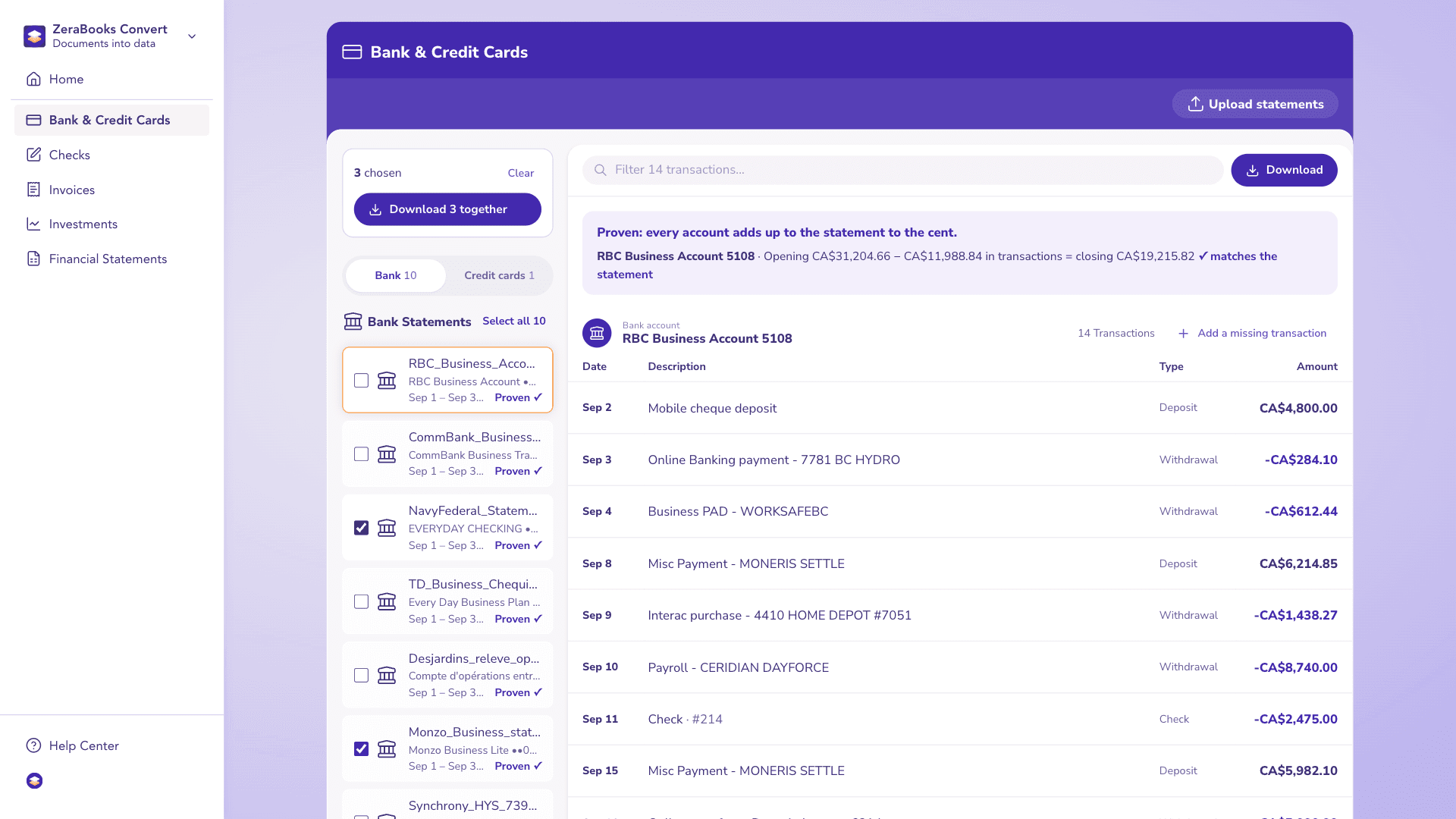
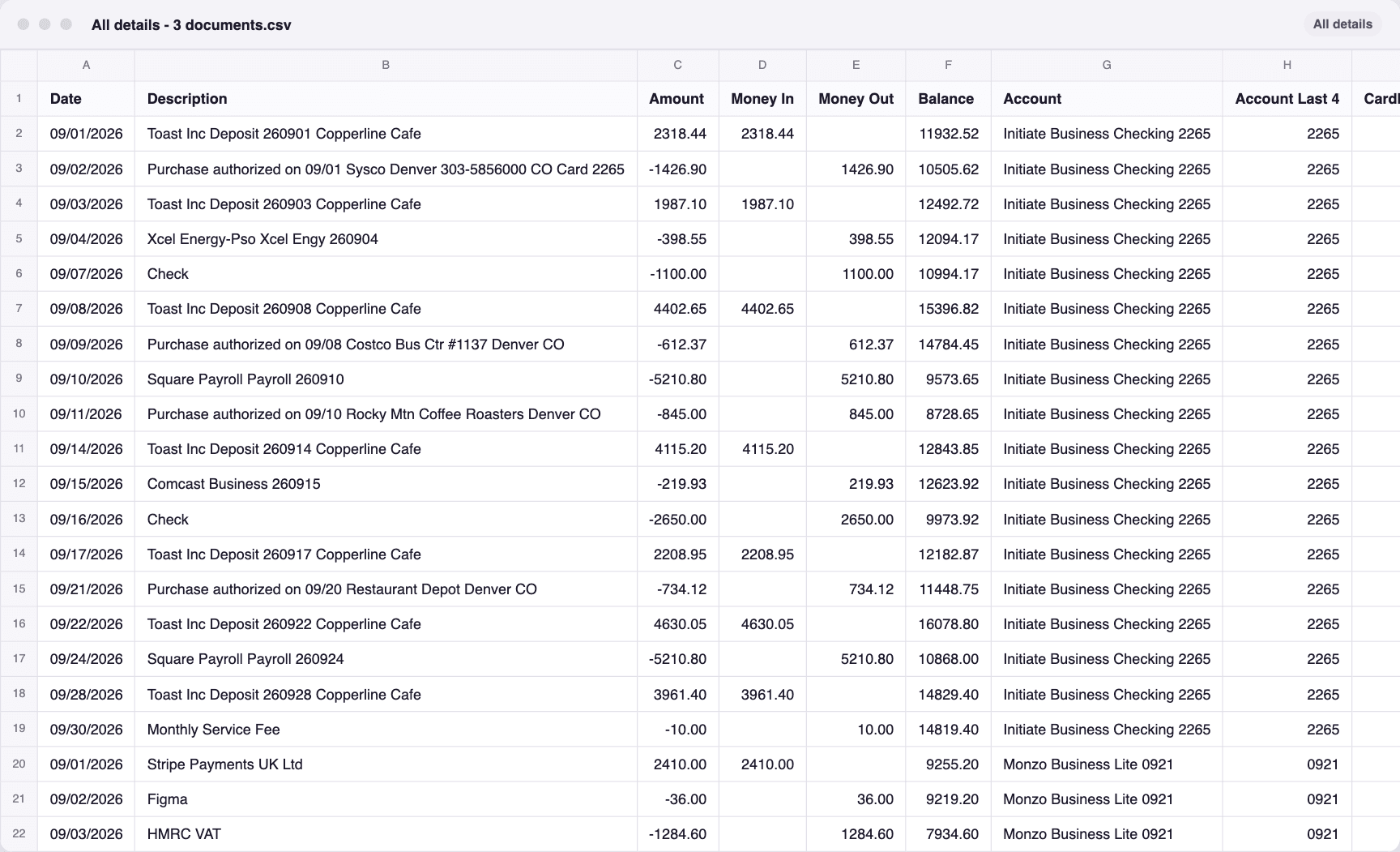
A real run in ZeraBooks Convert: 3 sample statements from Wells Fargo, Monzo and Navy Federal, fictional and each already proven to the cent against its printed balances. Nothing was compared by hand. Tick them, download once, and the file is All details - 3 documents.csv: 45 transactions in one sheet, with the account and source file on every row.

A real run in ZeraBooks Convert on 3 sample statements from Wells Fargo, Monzo and Navy Federal. Fictional sample documents.

Three statements, each Proven

ZeraBooks Convert with 3 sample statements from Wells Fargo, Monzo and Navy Federal, each marked Proven.

The one file that downloaded

The file downloaded from ZeraBooks Convert for 3 sample statements from Wells Fargo, Monzo and Navy Federal, opened: every row in one sheet.

WHAT ACTUALLY DIFFERS

Where ZeraBooks is the better fit

A PRICE YOU CAN QUOTE

You know what a statement costs before you upload it.

A 6-page statement uses 6 pages. On the 1,000-page plan that is about $0.15 a statement page billed monthly, or $0.08 billed annually, and pages that can’t be read never count. Nanonets prices by block runs inside a workflow, so the cost of one statement depends on how many blocks run; our DocuClipper vs Nanonets page walks through that model with a tax-season month.

CHECKED BEFORE YOU DOWNLOAD

The statement’s own balances do the checking.

ZeraBooks adds up each account and compares it with the balances the bank printed. Where the statement prints a running balance, a line read the wrong way round is turned back only when the account then ties. If anything is still off, you see the account and the difference, and fix the one row.

Fix a statement
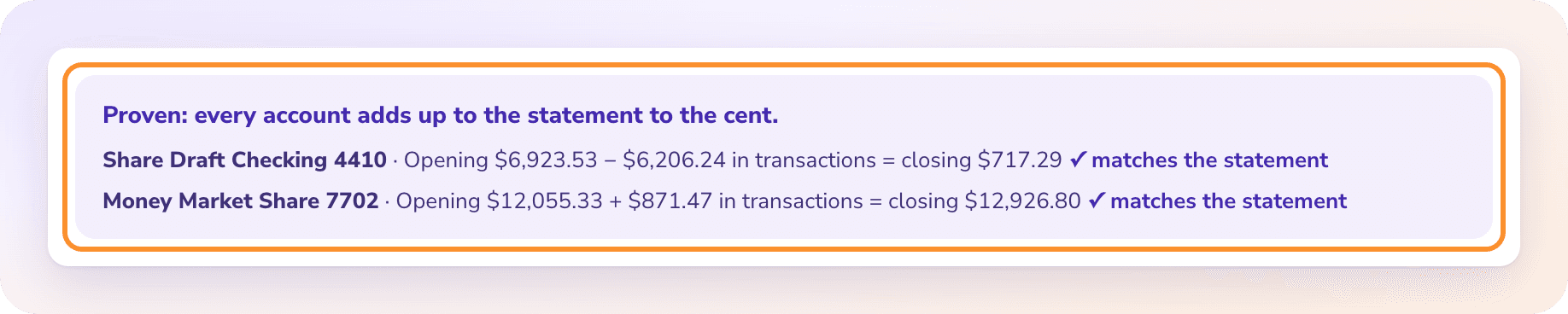
The statement proof: every account adds up to the statement to the cent, with the opening balance, transactions and closing balance for each account.

READY FOR YOUR SOFTWARE

Files in the columns your ledger imports.

QuickBooks-ready gives Date, Description and Amount for QuickBooks Online’s bank upload. Xero-ready and Sage-ready follow their imports. Tick several statements and they come down as one file, or one tab per account in Excel. See PDF to QuickBooks.

AFTER THE FILE

A general ledger comes with it.

The same subscription includes the ZeraBooks General Ledger, where Autopilot categorizes to your chart of accounts and reconciles each month. Teams at one of the 20 largest U.S. accounting firms use ZeraBooks. See AI bookkeeping.
HONEST LIMITS

What can Nanonets do that ZeraBooks doesn’t?

Worth knowing before you choose.

  • Image files

    Nanonets takes PNG and JPG. ZeraBooks takes PDFs only, so put photos into one PDF first. Scanned PDFs are fine; see scanned bank statement to Excel.

  • JSON and an API

    Nanonets exports JSON and sells API access. ZeraBooks downloads Excel or CSV from the app.

  • Custom workflows

    Nanonets lets you build your own document workflows. ZeraBooks uses fixed, ready-made formats.

  • No bank feeds either way

    ZeraBooks doesn’t connect to banks. You download the statement PDF and upload it.

THE VERDICT

Why ZeraBooks is the better Nanonets alternative for statements

If you are building a document pipeline for many kinds of paperwork, a workflow platform makes sense. If the job is bank statements, the work that matters comes after extraction: knowing the rows are complete and right. ZeraBooks does that part for you, against the bank’s own printed balances, and says exactly where a statement is off.

It does it at a price you can quote a client: 1,000 pages a month for $79 billed annually, with checks, invoices, brokerage statements and the ZeraBooks General Ledger included. Our team also offers done-for-you bookkeeping, and firms get custom builds at no charge.

More comparisons: ZeraBooks as a DocuClipper alternative, a Dext alternative or an AutoEntry alternative, and the best bank statement converter ranking. How reading itself goes wrong is on bank statement OCR.

MORE REVIEWS AND COMPARISONS

Other tools we have reviewed

QUESTIONS

Nanonets alternative: common questions

Ask Damin directly
Is the Nanonets bank statement converter free?

Nanonets’ pricing page gives every account $50 in free credits with no card. After that, its Starter plan is $100 a month for 100 credits. Credits are spent per block run, and the page doesn’t publish what one bank statement costs. Checked November 2026.

Is Nanonets accurate for bank statements?

Nanonets claims 99%+ accuracy and doesn’t publish how it was measured. Its own guide still tells you to compare rows against the PDF. ZeraBooks proves each account against its printed opening and closing balances, so a wrong amount is flagged with the difference before you download.

What is a good alternative to Nanonets for accountants?

ZeraBooks Convert: built for bank and card statements, checks and investment statements, priced per page at 1,000 pages for $79 a month billed annually, with QuickBooks-, Xero- and Sage-ready files and an AI general ledger included.

Can ZeraBooks read a photo of a bank statement?

Not as a photo file. ZeraBooks takes PDFs only. Save the photos as one PDF and upload that; a scanned PDF goes through the same way as a downloaded one.

Does ZeraBooks categorize transactions like Nanonets?

Convert gives every row a Type from the section the bank printed it in, such as Deposit, Check or Fee. Categorizing to your chart of accounts happens in the included ZeraBooks General Ledger.

ONE-WEEK FREE TRIAL

Skip the row-by-row check.
Upload a statement and read the proof.

Then 1,000 pages a month from $79 a month billed annually; see ZeraBooks pricing.

Last updated November 5, 2026 · Written by Damin Mutti, founder of ZeraBooks

BOOK A CALL

Talk to Damin, our founder.

30 minutes. Pick a time on the next screen.

What would you like to talk about?