WORKED EXAMPLE · COMMBANK
CommBank statement to Excel,
one real month followed start to finish.
To convert a CommBank statement to Excel, download the PDF from NetBank or the CommBank app, upload it to the ZeraBooks bank statement converter and download Excel or CSV. Below, one September business statement goes through every step: 13 transactions read, A$3,619.63 more out than in, and a closing balance that matches the PDF to the cent.
7-day trial · card required, nothing charged for 7 days · 1,000 pages a month from $79/month billed annually (USD)

THE EXAMPLE
The September statement, stage by stage
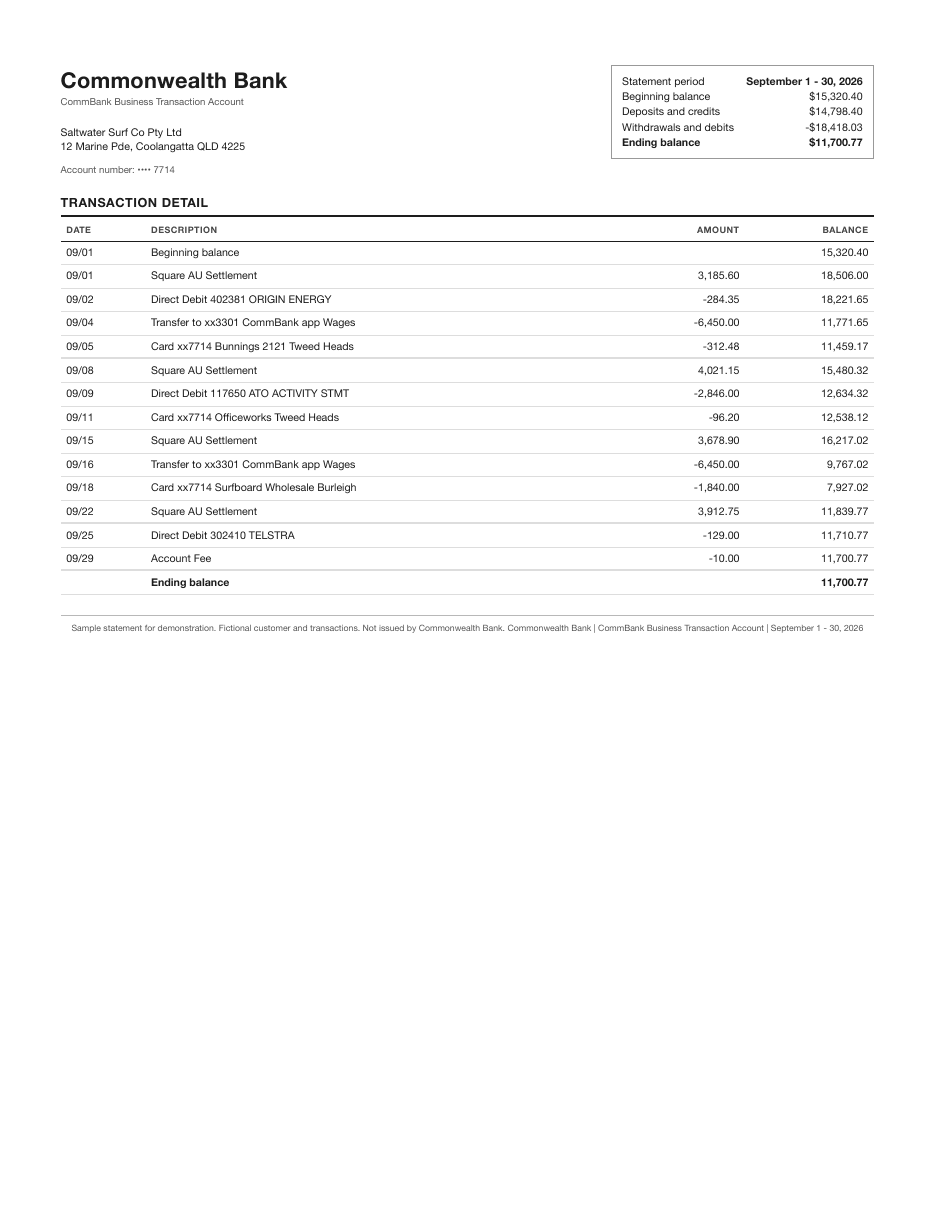
Saltwater Surf Co is a fictional surf shop on the Gold Coast. Its sample statement has the same parts a CommBank business statement has: a summary box, a running balance, card purchases, direct debits and wage transfers. The figures are made up; the arithmetic is real.
Stage 1 · The PDF
Download the statement
In NetBank, open the account and pick Download latest statement, or View all statements, then the financial year, tick the months and Download (PDF). In the CommBank app it is Accounts, the account, Manage, then View statement. Older versions of NetBank put it under View accounts, then Statements. CommBank keeps online statements for up to 7 years, and 2 years for a closed account.
- Pages
- 1
- Period
- 1–30 Sep 2026
Stage 2 · Read
Every line becomes a row
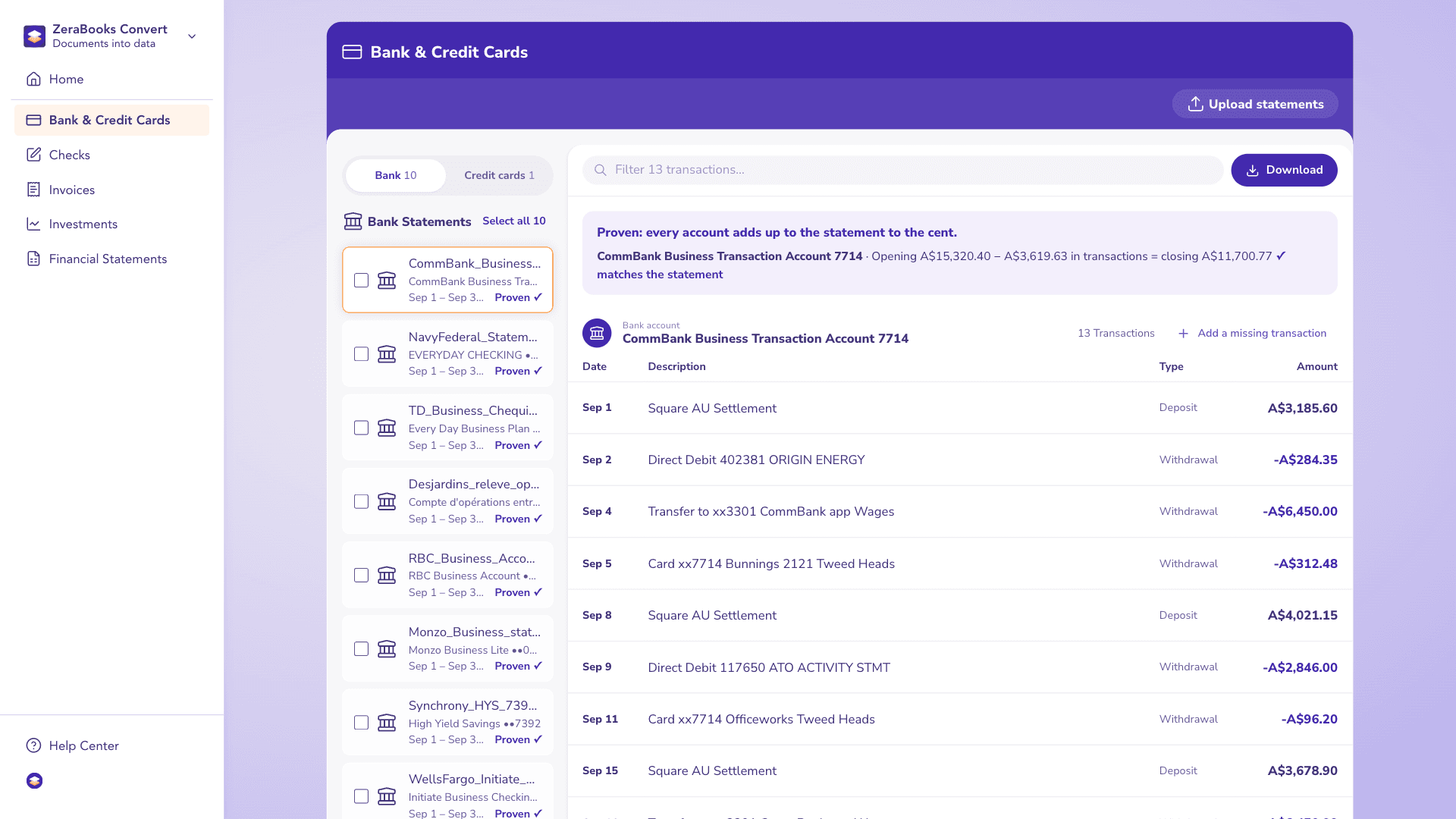
ZeraBooks reads the 13 transaction lines and skips the two balance lines (the Beginning balance row and the Ending balance row are not transactions). Money in stays positive and money out turns negative, so the four Square AU settlements land as credits and the wage transfers, ATO direct debit and card purchases land as debits.
- Rows read
- 13
- Credits
- 4
- Debits
- 9
Stage 3 · Prove
Check it against the printed balances
This is the step most converters skip. Opening A$15,320.40, plus A$14,798.40 in, less A$18,418.03 out, gives A$11,700.77. The PDF prints A$11,700.77, so ZeraBooks marks the statement Proven. If one line had been misread, say A$312.48 read as A$31.248, the sum would miss the printed closing balance and the statement would be flagged before you ever opened the file.
- Calculated closing
- A$11,700.77
- Printed closing
- A$11,700.77
- Difference
- A$0.00

Stage 4 · Download
Pick the format your software wants
Standard gives one Amount column. Money in and out splits it in two, the way Excel users usually want it. QuickBooks-ready and Xero-ready lay the columns out the way those imports ask for them, so the file can go into Xero as it is.
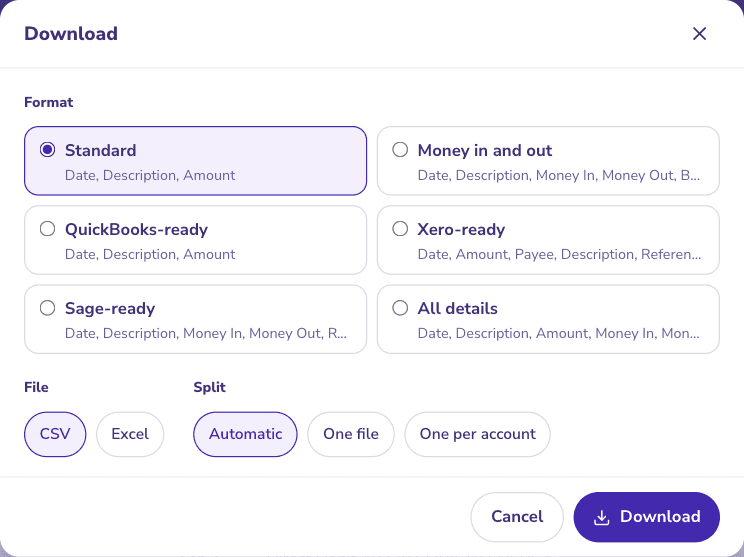
Pick a format and download CSV or Excel.
Try it on your own documents. One-week free trial, both apps included.
THE RESULT
What the Excel file holds
The 13 rows as they come out of the Money in and out format, with the running balance carried down so you can check any line against the PDF.
| Date | Description | Money in | Money out | Balance |
|---|---|---|---|---|
| 1 Sep | Square AU Settlement | 3,185.60 | 18,506.00 | |
| 2 Sep | Direct Debit 402381 ORIGIN ENERGY | 284.35 | 18,221.65 | |
| 4 Sep | Transfer to xx3301 CommBank app Wages | 6,450.00 | 11,771.65 | |
| 5 Sep | Card xx7714 Bunnings 2121 Tweed Heads | 312.48 | 11,459.17 | |
| 8 Sep | Square AU Settlement | 4,021.15 | 15,480.32 | |
| 9 Sep | Direct Debit 117650 ATO ACTIVITY STMT | 2,846.00 | 12,634.32 | |
| 11 Sep | Card xx7714 Officeworks Tweed Heads | 96.20 | 12,538.12 | |
| 15 Sep | Square AU Settlement | 3,678.90 | 16,217.02 | |
| 16 Sep | Transfer to xx3301 CommBank app Wages | 6,450.00 | 9,767.02 | |
| 18 Sep | Card xx7714 Surfboard Wholesale Burleigh | 1,840.00 | 7,927.02 | |
| 22 Sep | Square AU Settlement | 3,912.75 | 11,839.77 | |
| 25 Sep | Direct Debit 302410 TELSTRA | 129.00 | 11,710.77 | |
| 29 Sep | Account Fee | 10.00 | 11,700.77 | |
| Totals | 14,798.40 | 18,418.03 | 11,700.77 |
Fictional sample statement, not issued by Commonwealth Bank.
WHAT TO WATCH
What this example shows about CommBank statements
The ATO line is a tax payment, not an expense. A$2,846.00 to the ATO on an activity statement is usually GST and PAYG withholding going out, so it belongs against the liability accounts, not in a cost line. A converter can label it a debit; deciding where it posts is bookkeeping.
Wage transfers to another CommBank account show only the last four digits. Two A$6,450.00 transfers to xx3301 look identical. If xx3301 is the business’s own wages account, both are transfers between accounts and should net to zero across the two statements. Convert both statements and combine them to see that.
The Square settlements are net of fees. A$3,185.60 is what landed, not what was sold. If the books need gross sales and Square fees, those come from the Square payout report, not the bank statement.
A WHOLE YEAR
Twelve statements work the same way
Select every month of the financial year in NetBank, download them together and upload the lot. ZeraBooks proves each month on its own and checks that each opening balance equals the month before’s closing, so a missing month shows up instead of hiding. The CSV version of this guide covers the plain-text download.
See the bank statement converterMORE BANKS
Statements from other banks
- Chase bank statement to ExcelChase’s sections merged into one dated, checked sheet.
- Bank of America statement to ExcelCredits, debits and checks in one checked sheet.
- Wells Fargo statement to ExcelTwo amount columns made into one signed, proven column.
- Capital One statement to ExcelTransactions without the summary boxes, proven to the new balance.
- How to get a bank statementWhere the big U.S. and Canadian banks keep statement PDFs.
- Canadian bank statement converterRBC, TD, BMO, Scotiabank, CIBC, Desjardins: download and convert.
Can I export a CommBank statement straight to Excel?
CommBank statements download as PDF. NetBank also lets you export recent transactions, but a transaction export is not the statement: it has no printed opening and closing balance to check against. Converting the PDF gives you the statement’s own figures, proven.
How far back can I get CommBank statements?
CommBank says online statements are kept for up to 7 years, and up to 2 years for a closed account. Anything older has to be requested from the bank.
Does ZeraBooks read CommBank credit card statements too?
Yes. Card statements are uploaded on the Credit Card Statements page and proven the same way, against the previous and new balance printed on the statement. See credit card statement to Excel.
Are amounts kept in Australian dollars?
Yes. ZeraBooks reads the amounts as printed. Nothing is converted to U.S. dollars.

ONE-WEEK FREE TRIAL
See it on your own books.
Free for one week.
General Ledger and Converter, both included. $79 a month billed annually or $149 monthly after the trial.