ZERABOOKS VS HUBDOC
Hubdoc alternative:
statements from any bank, proven to the cent.
ZeraBooks is the Hubdoc alternative for bank statements. Hubdoc turns one English statement of up to 100 pages into a CSV of date, description and amount, and validates only listed banks. The ZeraBooks bank statement converter reads PDFs up to 500 pages from any bank, keeps the balance column, and proves every account against its printed balances.
7-day trial · card required, nothing charged for 7 days · 1,000 pages a month from $79/month billed annually
HUBDOC’S OWN RULES
What does Hubdoc need from a bank statement?
Hubdoc’s help article on statement extraction, dated September 24, 2025, lists these requirements. A file that misses one can fail or come back with errors.
Canada and the U.S., in English
Statement extraction is for organizations in Canada and the United States, and the statement must be written in English.
One statement, 100 pages, 35MB
The PDF must hold one statement and all of its pages, with a maximum of 100 pages and 35MB. A year of statements in one PDF has to be split first.
A clean, straight scan
At least 200 DPI, and scanned straight: Hubdoc says crooked or slanted scans can cause an error.
A bank on the list
Banks on Hubdoc’s supported list have validated extraction. For any other U.S. or Canadian bank there is “My bank is not listed”, which Hubdoc says may vary in accuracy and provides as is.
Try it on your own documents. One-week free trial, both apps included.
SIDE BY SIDE
ZeraBooks Convert vs Hubdoc for bank statements
Hubdoc facts from its pricing page, its Xero app listing and its help center, checked November 5, 2026, in U.S. dollars.
| Feature | Our pickZeraBooks Convert | Hubdoc |
|---|---|---|
| Price | $149 a month, or $79 a month billed annually, for 1,000 pages across every client | $12 a month per organization after a 30-day trial; included in Xero’s U.S. Early, Growing and Established plans |
| Banks | Any bank: Convert reads the layout from the statement itself | A supported list with validated extraction; other U.S. and Canadian banks through “My bank is not listed”, accuracy may vary |
| File size | Up to 500 pages and 50 MB per PDF | Up to 100 pages and 35MB, one statement per PDF |
| Several accounts in one PDF | Split by account, each with its own proof | One statement only per file |
| Columns you get | Six formats, up to Date, Description, Amount, Money In, Money Out, Balance, Account, Account Last 4, Cardholder, Type, Check Number and Source File | Debit statements: date, description, amount. Credit statements: posted date, transaction date, description, amount |
| When the totals don’t match | Needs a look, with the account and the exact difference in dollars; fix a row or add a missing one | An extraction error; tick Highlight extracted transactions to see which lines were picked up |
| Also included | Checks, invoices, brokerage and financial statements, and the ZeraBooks General Ledger | Receipts, bills and invoices, with sync to Xero and QuickBooks Online |
Competitor facts from their public pages, checked November 5, 2026: Hubdoc pricing · Hubdoc in the Xero App Store · Hubdoc: Extract bank statement data (CA, US). Prices and features change; check each vendor before you buy.
WHAT EACH ROW CARRIES
What does each tool’s file hold for one bank statement?
Hubdoc’s debit statement CSV is three fields per transaction. That is enough to import, and not enough to check. Here is what each file keeps from the same checking statement.
| Field | Hubdoc debit statement CSV | ZeraBooks Money in and out | ZeraBooks All details |
|---|---|---|---|
| Date | Yes | Yes, MM/DD/YYYY | Yes, MM/DD/YYYY |
| Description | Yes | Yes | Yes |
| Amount | One column | Money In and Money Out, both positive | Signed Amount, plus Money In and Money Out |
| Balance printed on the line | Not listed | Yes, when the statement prints one | Yes, when the statement prints one |
| Check number | Not listed | No | Yes |
| Account and last 4 | Not listed | Added when one sheet holds several accounts | Yes |
| Type (Deposit, Check, Fee…) | Not listed | No | Yes, from the section it was printed in |
| Source file | Not listed | No | Yes |
Hubdoc fields as listed in its help article; “not listed” means the article doesn’t name the field. The balance matters when someone asks you to prove a month: with it, any row can be checked against the line above. Full column lists for every ZeraBooks format are in Choose a download format.
FOR FIRMS
What does a firm pay to convert statements in Hubdoc vs ZeraBooks?
Hubdoc is priced per organization, so a firm pays once for every client it sets up, unless that client’s Xero plan already includes Hubdoc. ZeraBooks Convert is priced per page, whoever the statement belongs to. Below, each client sends one 4-page checking statement a month, and none is on a Xero plan.
| Clients | Statement pages a month | Hubdoc at $12 per organization | ZeraBooks, monthly | ZeraBooks, billed annually |
|---|---|---|---|---|
| 10 | 40 | $120 | $149 | $79 |
| 30 | 120 | $360 | $149 | $79 |
| 75 | 300 | $900 | $149 | $79 |
| 200 | 800 | $2,400 | $149 | $79 |
Hubdoc price from its pricing page, checked November 5, 2026. Firms with many organizations can ask Hubdoc about partner pricing; the full breakdown, including what “per user” means, is in Hubdoc pricing per user. Every row above fits inside ZeraBooks’ 1,000-page plan. For one business already on Xero, Hubdoc costs nothing extra, and the reasons to switch are the proof and the columns, not the price.
ZERABOOKS ON THE SAME KIND OF JOB
What does ZeraBooks give back for two statements from different banks?
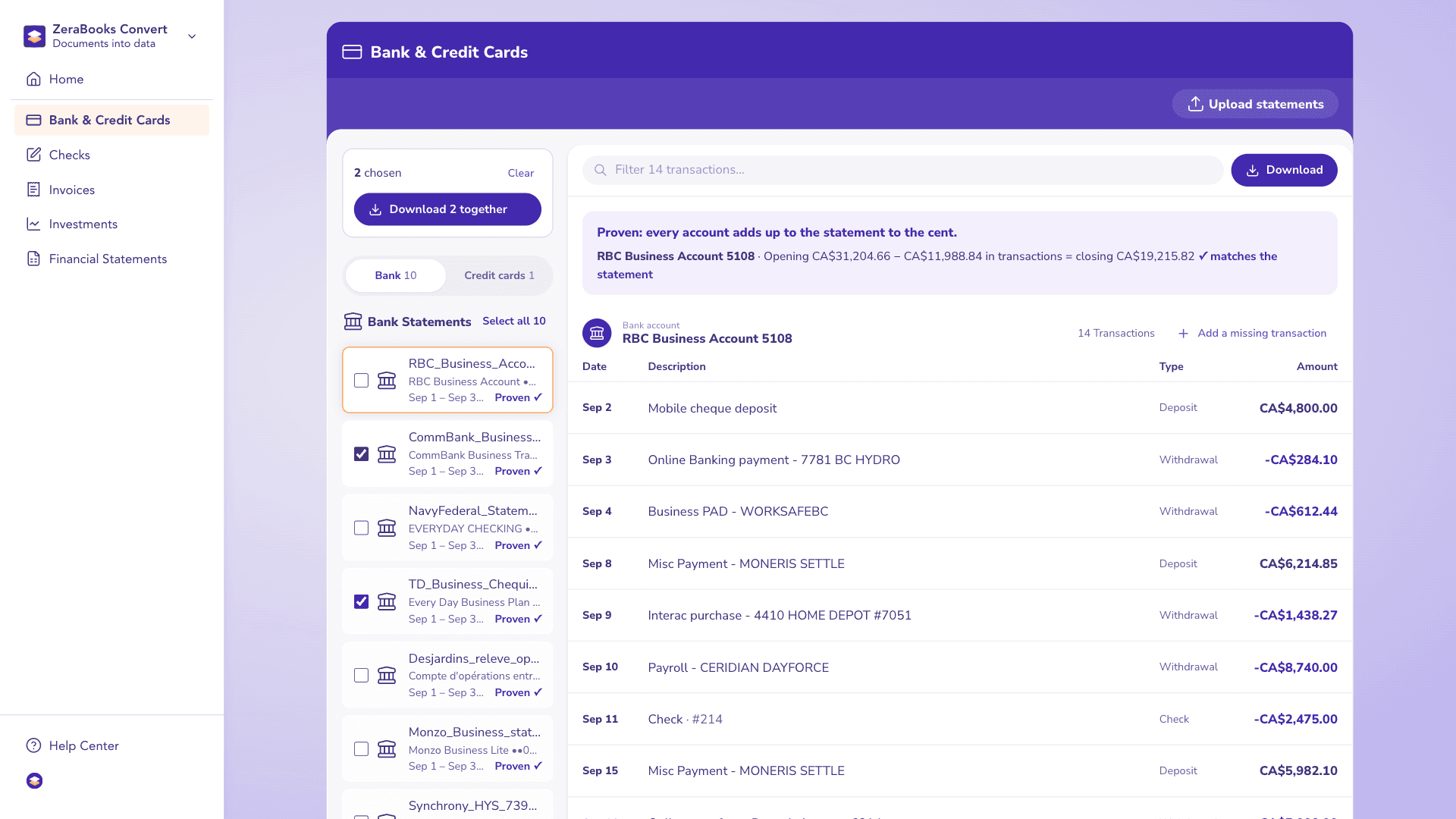
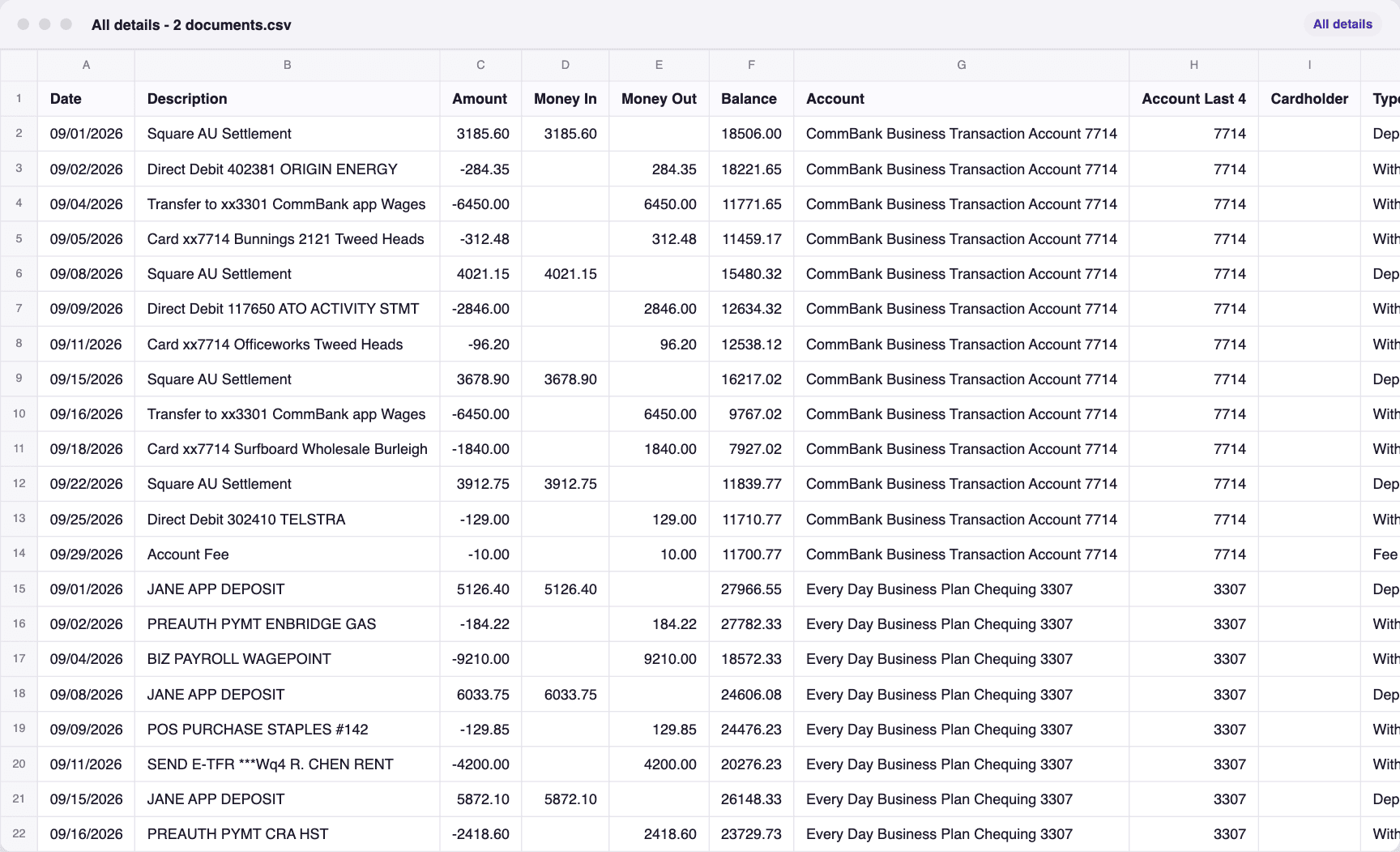
A real run in ZeraBooks Convert: 2 sample statements, one from TD and one from CommBank, fictional and each already proven to the cent against its printed balances. CommBank isn’t a U.S. or Canadian bank, so Hubdoc’s statement extraction wouldn’t take it. In Convert both are ticked and downloaded as one file, All details - 2 documents.csv: 25 transactions with the account and source file on every row.
Both statements, proven
One file for both
HONEST LIMITS
What does ZeraBooks not do that Hubdoc does?
Plainly, so nobody switches expecting the wrong thing.
No sync into Xero or QuickBooks
Hubdoc pushes documents into Xero and QuickBooks Online. ZeraBooks Convert makes a Xero-ready or QuickBooks-ready file that you import. If you want the books in one place instead, the ZeraBooks General Ledger is included; see AI bookkeeping.
No bank feeds
ZeraBooks never connects to a bank. Statements are PDFs you download and upload.
PDFs only
Convert reads PDF files, scanned or downloaded. Photos and image files are refused, so save them to one PDF first.
A 30-day list
Convert shows what you uploaded in the last 30 days. Download what you need to keep.
THE VERDICT
Why ZeraBooks is the better Hubdoc alternative for statements
Hubdoc is a sensible document inbox for a Xero business. For bank statements it stops at a validated bank list, one statement of up to 100 pages per file, and a three-field CSV. ZeraBooks takes any bank’s PDF up to 500 pages, splits every account in it, keeps the balance and check number, and proves each account to the cent against what the bank printed before you download.
For a firm, the price works the other way round from Hubdoc’s: one subscription, $79 a month billed annually for 1,000 pages, covers every client’s statements, with the General Ledger and a done-for-you bookkeeping service available from the same team. Firms with heavy volume get custom builds at no charge.
Related reading: how Dext vs Hubdoc handle the same statements, ZeraBooks as a Dext alternative, and the steps to import into Xero in bank statement to Xero.
MORE REVIEWS AND COMPARISONS
Other tools we have reviewed
- DocuClipper alternativeZeraBooks and DocuClipper side by side: price, files and proof.
- MoneyThumb alternativeZeraBooks and MoneyThumb side by side: pages versus statements, QBO files.
- ProperSoft alternativeZeraBooks and ProperConvert side by side: web versus desktop.
- RazorExtract vs ZeraBooksRazorExtract and the ZeraBooks converter, side by side.
- Dext vs AutoEntry for multi-currency statementsHow each handles statements in more than one currency.
- Dext alternativeBank statements moved off a receipts add-on, proven per account.
Is Hubdoc free with Xero?
Hubdoc’s Xero App Store listing says it is included in Xero Starter, Standard and Premium plans, which are Early, Growing and Established in the U.S. Without Xero, Hubdoc’s pricing page shows $12 a month after a 30-day free trial. Checked November 2026.
Why did Hubdoc give an error on my bank statement?
Hubdoc says extraction can fail when the totals don’t match, when no opening or closing date can be read, or when the file breaks its rules: over 100 pages or 35MB, under 200 DPI, more than one statement, not in English, or scanned crooked.
Can Hubdoc convert a statement from a bank that isn’t listed?
For U.S. and Canadian banks, yes, through “My bank is not listed”, which Hubdoc says may vary in accuracy and provides as is. ZeraBooks Convert reads any bank’s PDF the same way and proves it against the printed balances, so an unusual layout is checked, not trusted.
Does Hubdoc keep the running balance?
Hubdoc’s help article lists date, description and amount for debit statements. ZeraBooks keeps the balance printed on each line in the Money in and out and All details formats, when the statement prints one.
Can ZeraBooks make a CSV Xero accepts?
Yes. The Xero-ready format writes Date, Amount, Payee, Description and Reference, the columns Xero’s statement import takes, from a statement already proven to the cent. Steps are in the Xero bank statement import guide.
ONE-WEEK FREE TRIAL
Upload the statement Hubdoc rejected.
See whether it ties to the cent.
Then 1,000 pages a month from $79 a month billed annually; see ZeraBooks pricing. For a firm with many clients, ZeraBooks for accountants covers client books in the General Ledger.
Last updated November 5, 2026 · Written by Damin Mutti, founder of ZeraBooks