General Ledger + Converter in one subscription.

See pricing
Skip to content
  1. Home
  2. Bank statement converter
  3. AutoEntry alternative

ZERABOOKS VS AUTOENTRY

AutoEntry alternative:
bank statements without the 3-credit page.

ZeraBooks is the AutoEntry alternative for bank statements. AutoEntry charges 3 credits for every statement page, so 500 pages a month needs its $298 Diamond plan. The ZeraBooks bank statement converter converts 1,000 pages for $149 a month, or $79 billed annually, and proves every account against its printed balances before you download.

7-day trial · card required, nothing charged for 7 days · 1,000 pages a month from $79/month billed annually

Statements in, proven to the cent.

WHAT A MONTH COSTS

Which AutoEntry plan do your bank statements need?

AutoEntry charges 3 credits for each bank statement page, so your plan is set by pages times three. Below is the smallest AutoEntry plan that covers each monthly volume of statement pages, next to ZeraBooks, in U.S. dollars a month.

Product150 pages500 pages800 pages
Our pickZeraBooksmonth to month on the 1,000-page plan; $79 billed annually$149$149$149
AutoEntryexcl. VAT; 450, 1,500 and 2,400 credits used$103 (Platinum, 500 credits)$298 (Diamond, 1,500 credits)$469 (Sapphire, 2,500 credits)

At 150 pages a month, AutoEntry’s $103 is less than ZeraBooks month to month and more than ZeraBooks billed annually. Above that, the gap grows fast, because AutoEntry’s top published plan, 2,500 credits, covers 833 statement pages and anything beyond is a custom package. AutoEntry keeps unused credits for 90 days; ZeraBooks monthly pages reset each month, and a yearly plan gives all 12,000 pages upfront. What each AutoEntry plan works out to per page is in our AutoEntry review. Published prices, checked November 5, 2026: AutoEntry pricing.

Try it on your own documents. One-week free trial, both apps included.

SIDE BY SIDE

ZeraBooks Convert vs AutoEntry for bank statements

AutoEntry facts from its pricing page and its help article on bank statements, checked November 5, 2026.

FeatureOur pickZeraBooks ConvertAutoEntry
Price unitPages: 1,000 a month for $149, or $79 a month billed annuallyCredits: 3 per bank statement page, plans from 50 credits for $13 to 2,500 for $469 a month
Pages that countEvery page of a PDF that is read; a document that can’t be read uses noneEvery page uploaded, including blank pages, summaries and notes; rejected statements are refunded
Fields capturedDate, description, signed amount, money in and out, balance, account, last 4, cardholder, type, check number and source fileAccount number, date, description, debit, credit, balance and cheque number
Check against the statementEvery account proven to the cent against its printed opening and closing balances; the gap shown when it doesn’t tieNot stated in AutoEntry’s bank statement article
CategoriesIn the included ZeraBooks General Ledger: AI categorizes and asks when it isn’t sureNo nominal codes on bank statements; add them in the exported file
DownloadExcel or CSV in six formats, including QuickBooks-, Xero- and Sage-readyExcel or CSV
UsersOne subscription for your team’s statementsUnlimited users on every plan

Competitor facts from their public pages, checked November 5, 2026: AutoEntry pricing · AutoEntry: Upload a bank statement. Prices and features change; check each vendor before you buy.

ONE STATEMENT, BOTH WAYS

What happens to one 6-page statement in each tool?

A fictional business checking statement: 6 pages, of which pages 5 and 6 are the bank’s disclosures and a blank back page. 41 transactions, opening balance 7,906.12, closing balance 9,318.47.

AutoEntryZeraBooks Convert
Pages charged6 pages × 3 credits = 18 credits6 pages of the plan’s 1,000
Cost on the plan you would need at 500 pages a month18 × $298 ÷ 1,500 = $3.586 × $149 ÷ 1,000 = $0.89, or $0.47 billed annually
Columns backAccount number, date, description, debit, credit, balance, cheque numberWhichever format you pick, up to All details
Do the 41 rows reach 9,318.47?You add them upShown on screen: Proven, or the account and the difference
Ready for categoriesAdd nominal codes in the spreadsheetUpload to the General Ledger, or import the file into your own

Both tools count the disclosure and blank pages. AutoEntry suggests removing pages without transactions before you upload to save credits, and the same trick saves pages in ZeraBooks. Costs are rounded to the cent and assume the whole allowance is used.

WHAT CHANGES

What changes when bank statements move from AutoEntry to ZeraBooks?

PROOF FIRST

You stop adding up the export.

ZeraBooks compares each account with the balances the bank printed and marks the statement Proven only when it ties to the cent. A missed line shows as a gap the size of that line, so you know what to look for. See How Convert proves a statement.
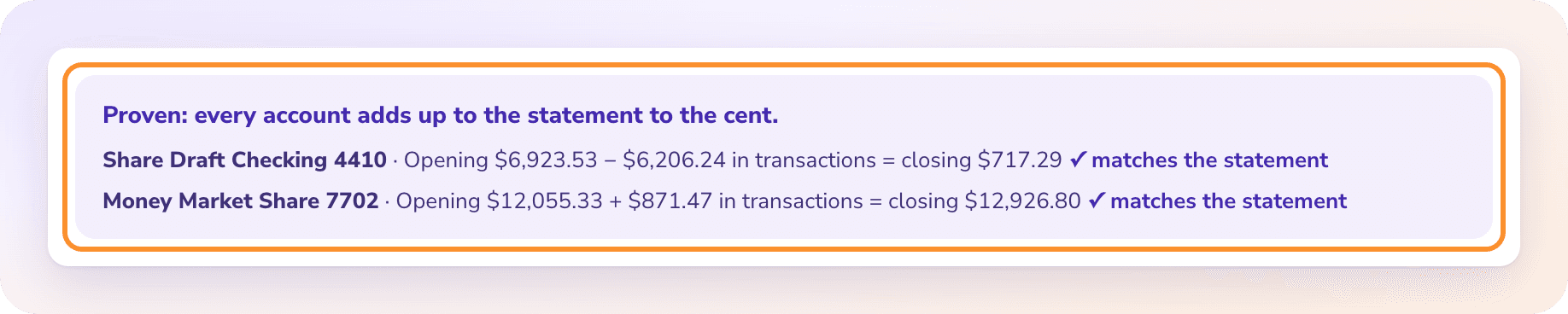
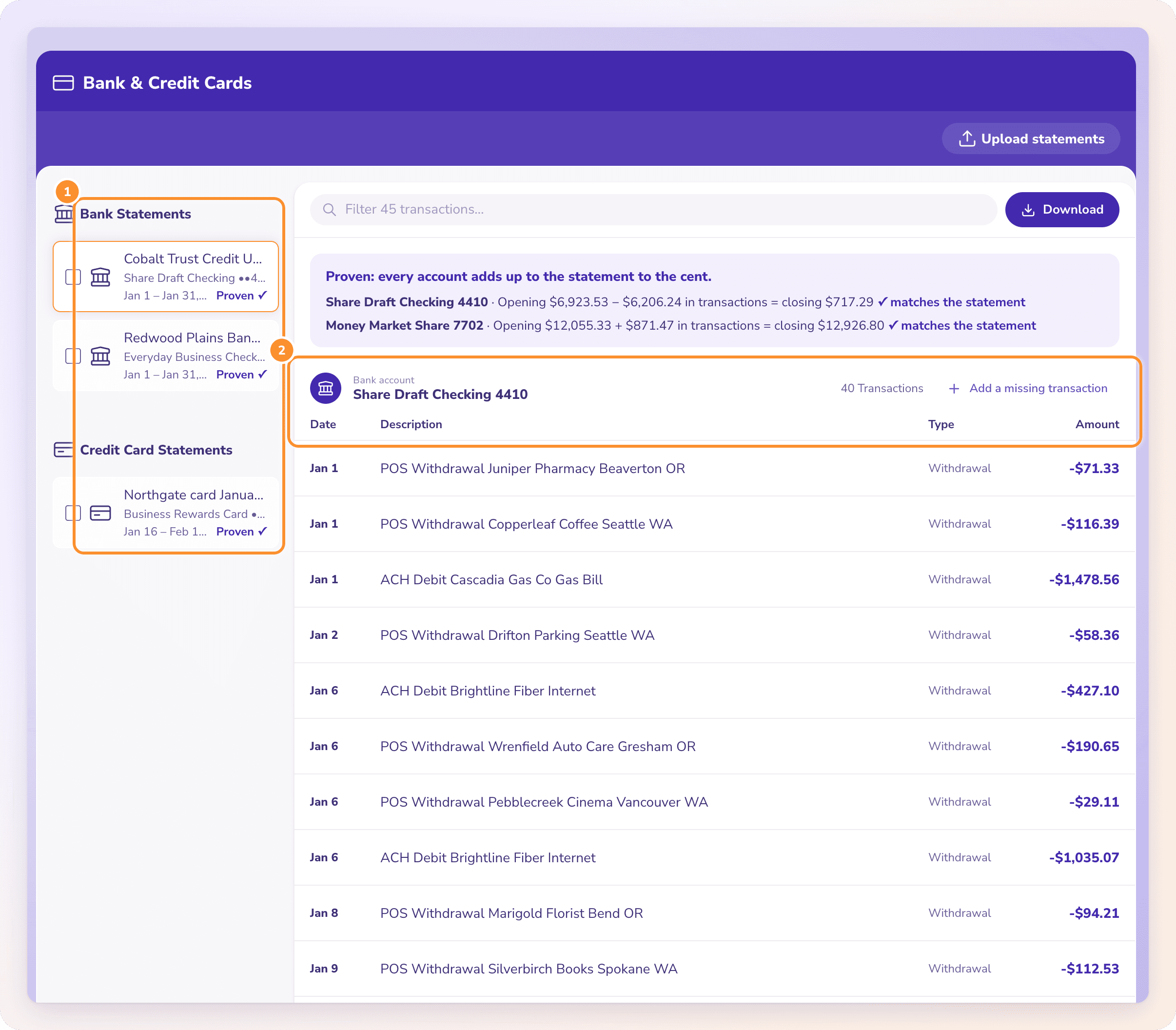
The statement proof: every account adds up to the statement to the cent, with the opening balance, transactions and closing balance for each account.

COMBINED STATEMENTS

Several accounts in one PDF are split for you.

Checking and savings in one PDF, or a card statement with five cardholders, come out with an Account or Cardholder column, or one tab per account in Excel. Each account is proven on its own.

A converted bank statement split into accounts, with date, description, type and amount for every transaction.

CATEGORIES

The categories come from the ledger, not a spreadsheet column.

AutoEntry leaves nominal codes on bank statements to you. In ZeraBooks, the same statements can go straight into the included General Ledger, where Autopilot categorizes them to your chart of accounts and asks one-tap questions when it isn’t sure. See AI bookkeeping.

INVOICES TOO

Bills and invoices go through the same subscription.

If you used AutoEntry for supplier invoices as well, ZeraBooks reads invoices to Excel with every line item, or as a bills import. See invoice PDF to Excel.

HONEST LIMITS

What should AutoEntry users know before switching?

  • No push into Sage, Xero or QuickBooks

    Convert makes files in the columns those imports take. You import the file. There is no .qbo file.

  • Pages reset monthly

    On monthly billing, unused pages don’t carry over, where AutoEntry keeps credits for 90 days. A yearly ZeraBooks plan gives the whole year’s 12,000 pages upfront instead.

  • The same PDF twice counts twice

    Uploading the same statement again reads it as a new document and counts its pages again.

  • PDFs only

    Photos and image files are refused; save them as one PDF first. Scanned PDFs are fine.

THE VERDICT

Why ZeraBooks is the better AutoEntry alternative for statements

Bank statements are AutoEntry’s most expensive document, at three credits a page. ZeraBooks is built for them: 1,000 pages a month for $149, or $79 billed annually, with every account proven against the bank’s own printed balances before any file is made.

The subscription also includes checks, investment statements and the ZeraBooks General Ledger, where the categorizing AutoEntry leaves to you gets done. Our team runs done-for-you bookkeeping if you want the books kept for you, and accounting firms get custom builds at no charge.

Also worth reading: Dext vs AutoEntry for multi-currency statements, ZeraBooks as a Dext alternative or a Nanonets alternative, and the best bank statement converter ranking.

MORE REVIEWS AND COMPARISONS

Other tools we have reviewed

QUESTIONS

AutoEntry alternative: common questions

Ask Damin directly
How many AutoEntry credits does a bank statement use?

Three credits per page, for every page uploaded, including blank pages, summaries and notes, according to AutoEntry’s help center. A 6-page statement uses 18 credits. Checked November 2026.

Is there a cheaper alternative to AutoEntry for bank statements?

Above about 150 pages a month, yes. 500 statement pages need AutoEntry’s Diamond plan at $298 a month; ZeraBooks covers 1,000 pages for $149 a month, or $79 billed annually, and proves each statement.

Does AutoEntry check bank statements against the balance?

AutoEntry’s bank statement article lists the fields it captures, including the balance, but doesn’t describe a check of the rows against the printed opening and closing balances. ZeraBooks runs that check on every account and shows the difference when it fails.

How many statement pages do AutoEntry’s free credits cover?

AutoEntry gives 25 free trial credits, which is 8 bank statement pages at 3 credits each. The ZeraBooks 7-day trial includes 1,000 pages; a card is needed at checkout and nothing is charged for 7 days.

Can ZeraBooks read the same statements AutoEntry reads?

Yes: digital and scanned PDFs of bank, credit card and debit card statements, from any bank. Convert reads the layout from the statement itself, so nothing is set up per bank.

Does ZeraBooks add nominal codes or categories?

The converter gives each row a Type from the statement, such as Deposit, Check or Fee. Categories to your chart of accounts come from the included ZeraBooks General Ledger.

ONE-WEEK FREE TRIAL

Upload the statements eating your credits.
See each one proven.

Then 1,000 pages a month from $79 a month billed annually; see ZeraBooks pricing. Want someone to keep the books? See bookkeeping services.

Last updated November 5, 2026 · Written by Damin Mutti, founder of ZeraBooks

BOOK A CALL

Talk to Damin, our founder.

30 minutes. Pick a time on the next screen.

What would you like to talk about?