GUIDE · SCANNED STATEMENTS
Scanned bank statement to Excel,
checked against the balances on the page.
To turn a scanned bank statement into Excel, upload the PDF to a bank statement converter that reads page images, such as ZeraBooks Convert, then check that the opening balance plus every row equals the printed closing balance before you download. A scan has no text to copy, so a digit can be misread; the balance check catches it.
7-day trial · card required, nothing charged for 7 days · 1,000 pages a month from $79/month billed annually
A 10-SECOND TEST
How can you tell if a bank statement PDF is scanned?
A digital PDF carries its text; a scanned one is a picture of paper. The difference decides which tools can work with it at all.
- 1
Try to select a line
Open the PDF and drag across a transaction. If the words highlight, the file has a text layer. If the whole page highlights as one block, or nothing happens, it is an image.
- 2
Search for a word you can see
Press Ctrl+F (Cmd+F on a Mac) and search for a payee printed on the page. No match means there is no text behind the picture.
- 3
Check the file size
A three-page statement downloaded from a bank is usually well under 1 MB. The same pages scanned often run to several MB, because every page is a photograph.
- 4
Look at the edges
A slight tilt, a grey border, a shadow from a phone or a hole-punch mark is a sure sign the statement went through a scanner or a camera.
Try it on your own documents. One-week free trial, both apps included.
WHY THE USUAL ROUTE FAILS
Why does Excel’s Get Data from PDF return nothing on a scan?
Excel’s Get Data, From File, From PDF looks for tables in the text a PDF carries. A scanned page carries no text, only an image, so the navigator usually lists no tables or a page with nothing in it. Copy and paste fails for the same reason.
Excel’s Data from Picture can read one image of a table at a time and asks you to review every cell it is unsure of. That is workable for a single page. For a year of statements it means hundreds of screenshots and no check that the totals add up.
ZeraBooks Convert reads the page itself with an AI model, so a scan with no text layer goes through the same way a downloaded statement does. It takes PDFs up to 50 MB and 500 pages each. On a digital PDF it also checks each account number against the text the file carries; a scan has no text, so that one extra check is skipped and the balance proof below carries the weight.
WHERE SCANS GO WRONG
Which characters get misread on a scanned statement?
Any reader, human or software, gets the same few things wrong on a faint or tilted scan. Each mistake leaves a tell-tale difference between the rows and the printed closing balance, which is why the difference is worth reading before you hunt line by line.
| Misread | Example | Difference it leaves |
|---|---|---|
| 8 read for 3, or 3 for 8 | 1,335.00 read as 1,385.00 | 5, 50 or 500, depending on the digit’s place |
| 7 read for 1, or 1 for 7 | 417.20 read as 477.20 | 6, 60 or 600 |
| 6 and 5, 0 and 8 | 2,506.00 read as 2,505.00 | 1, 10 or 100 for 6 and 5; 8, 80 or 800 for 0 and 8 |
| Decimal point lost | 45.00 read as 4500 | 99 times the true amount |
| Minus sign or parentheses lost | (250.00) read as 250.00 | Twice the amount, because money out became money in |
| A faint line skipped | A 15.00 service fee at the foot of page 2 | Exactly the missing line’s amount |
The same rules are in How Convert proves a statement: a difference equal to one line usually means that line was missed, and twice a line means it went the wrong way.
WORKED EXAMPLE
How do you prove a scanned statement converted correctly?
A fictional two-page scanned checking statement for March 2026. The first read took check 1043 as 1,385.00. The printed balances show it straight away.
| Line | Read from the scan | Corrected |
|---|---|---|
| Opening balance, 03/01/2026 (printed) | 12,480.16 | 12,480.16 |
| 03/02 Deposit | 4,200.00 | 4,200.00 |
| 03/04 Check 1043 | -1,385.00 | -1,335.00 |
| 03/09 ACH Payroll | -3,912.48 | -3,912.48 |
| 03/15 Deposit | 2,756.30 | 2,756.30 |
| 03/21 Rent (page 2) | -2,450.00 | -2,450.00 |
| 03/31 Service fee (page 2) | -15.00 | -15.00 |
| Opening plus rows | 11,673.98 | 11,723.98 |
| Closing balance, 03/31/2026 (printed) | 11,723.98 | 11,723.98 |
Off by 50.00, a single-digit gap in the tens place, so the place to look is a figure with an 8 or a 3 in it. Check 1043 on the scan reads 1,335.00. In Convert the account line reads “the statement says $11,723.98, off by $50.00”; open the row, use Correct a row, and the proof turns to Proven when it ties to the cent. Steps are in Fix a statement.
STEP BY STEP
How do you convert a scanned bank statement to Excel?
The same steps as a digital statement, with a check of the scan before and the proof after. The walkthrough for any PDF is how to convert a bank statement to Excel.
- 1
Scan it well, or download it again
If the bank still offers the statement online, download that PDF instead; it is cleaner than any scan. Otherwise scan at 300 dpi, in grayscale, with pages straight and no phone shadow across the figures.
- 2
Save it as one PDF
Convert accepts PDFs only, up to 50 MB and 500 pages each. A JPG, PNG or HEIC photo is refused with “Only PDF files can be converted.”, so save or print the pages to a single PDF first.
- 3
Upload to Bank & Credit Cards
Click Upload statements or drop the PDF on the page. Reading usually takes under a minute.
- 4
Read the proof and the notes
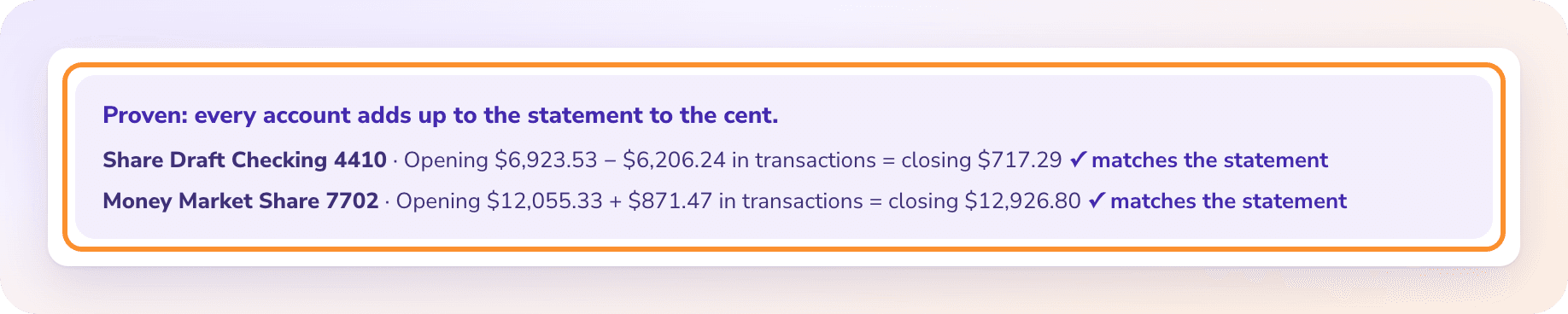
Proven means every account ties to its printed balances to the cent. Needs a look shows the account that is off, by how much, and notes such as “3 row amount(s) could not be read.”
- 5
Download Excel
Click Download, pick a format such as Standard or Money in and out, choose Excel and download. Your corrections are in the file.
OTHER SCANNED DOCUMENTS
What about scanned card statements and scanned checks?
Card statements
A scanned card statement is proven the same way, against the previous balance and new balance, with each cardholder checked against their printed total. The guide to credit card statement to Excel explains the signs and the extra blocks a card statement prints.
Check images
Pages of check images from the bank, or a stack of scanned checks, go through the check converter instead: number, date, payee, memo and amount, with the amount in words checked against the figures on every check.
Brokerage statements
A scanned investment or retirement statement goes through the investment statement converter, which checks account values, holdings and cash activity against the statement’s own figures.
Pages that can’t be read
A scan too faint to read shows Couldn’t read with the reason. Rescan it or download a fresh copy; see When a document can’t be read. Pages that couldn’t be read never count toward your plan.
Can ZeraBooks convert a photo of a bank statement?
Not as a photo file. Convert accepts PDFs only, so a JPG, PNG or HEIC is refused. Put the photos into one PDF (most phones and scanners can save straight to PDF) and upload that. Photos taken flat, in good light and without a shadow read best.
Do I need OCR software before uploading a scanned statement?
No. ZeraBooks Convert reads the page image itself, so you can upload the scan as it is. Running your own OCR first does no harm, but it doesn’t replace the balance check.
How accurate is a scanned statement conversion?
It depends on the scan, which is why ZeraBooks doesn’t ask you to trust a percentage. Every account is checked against the opening and closing balances printed on the statement, and a statement is marked Proven only when it ties to the cent.
What if my scanned statement has no balances printed?
Then there is nothing to prove it against, and the account line says the statement prints no balances to check against. It stays at Needs a look even when every line is right, so compare the rows with the scan before you use them.
Is there a page limit for long scanned statements?
Up to 500 pages and 50 MB per PDF, several files at once. Plans start at 1,000 pages a month for $79 a month billed annually; see ZeraBooks pricing.
Does ZeraBooks connect to my bank to fetch statements?
No. There is no bank connection and no .qbo file. You upload PDFs and download Excel or CSV, including a QuickBooks-ready CSV.
ONE-WEEK FREE TRIAL
Upload one scanned statement.
See the difference before you open Excel.
Then 1,000 pages a month from $79 a month billed annually. If the statements are for your own books, AI bookkeeping in the ZeraBooks General Ledger is part of the same subscription.
Last updated October 15, 2026 · Written by Damin Mutti, founder of ZeraBooks