MT940 bank statement converter guide: read the tags, then turn them into rows.
An MT940 is a SWIFT text format for end-of-day bank statements. Field :60F: holds the opening balance, each :61: line a transaction, :86: its description and :62F: the closing balance. To convert one to CSV, export CSV from the bank instead or run the file through an MT940 parser. When you have the PDF version, ZeraBooks converts it and proves it against the printed balances.
:60F:C261014EUR15420,50
:61:2610151015D1250,00NTRFNONREF//B26101500001
:86:RENT OCTOBER GRACHT PROPERTIES
:61:2610151015C4380,00NTRFINV-2207//B26101500002
:86:PAYMENT INVOICE 2207 DELTA TOOLS
:61:2610151015D89,90NDDTNONREF//B26101500003
:86:TELECOM DIRECT DEBIT OCT
:62F:C261015EUR18460,60
CSV
Date
Description
Amount
10/15/2026
RENT OCTOBER GRACHT PROPERTIES
-1250.00
10/15/2026
PAYMENT INVOICE 2207 DELTA TOOLS
4380.00
10/15/2026
TELECOM DIRECT DEBIT OCT
-89.90
DEFINITION
What is a MT940?
The SWIFT message type for a customer statement: a plain-text file a bank sends to a business, usually daily, listing one account’s opening balance, every booked transaction and the closing balance. Treasury and accounting systems read it automatically.
THE FIELD TAGS
What do the MT940 field tags mean?
Every line of an MT940 starts with a tag between colons. The tag set is standard; lengths, codes and the layout of :86: vary by bank, so keep your bank’s own MT940 description to hand. Converting turns each :61: and its :86: into one row; the balances become a check, not rows. When a long statement is split across several messages, banks use :60M: and :62M: for the intermediate balances and keep F (final) for the first opening and last closing balance. :28C: tells you which part you are reading.
MT940 tagCSV column
:20:Not carried overTransaction reference: the bank’s reference for this message, up to 16 characters
:25:Not carried overAccount identification: the account the statement is for, an IBAN or a local account number. Add an account column yourself if you combine accounts
:28C:Not carried overStatement and sequence number: statement number, then a slash and the page or sequence number, such as 00187/001
:60F:Not carried overOpening balance: C or D (credit or debit), the date as YYMMDD, a three-letter currency, the amount with a comma for decimals. It becomes the check, not a row
:61:Date, Amount, ReferenceStatement line: value date, entry date, C or D, amount, a transaction type code, your reference, then // and the bank’s reference. Debits get a minus sign
:86:DescriptionInformation to account owner: free-text detail for the :61: line above it, such as payee, invoice number or remittance text
:62F:Not carried overClosing balance: same layout as :60F:, for the end of the statement. The rows must net to closing minus opening
:64:Not carried overClosing available balance: optional, the funds available, which can differ from the booked balance
We set you up and catch up your past months for free. Then ZeraBooks keeps your books done.
What does a Desjardins statement look like after an All details Excel download?
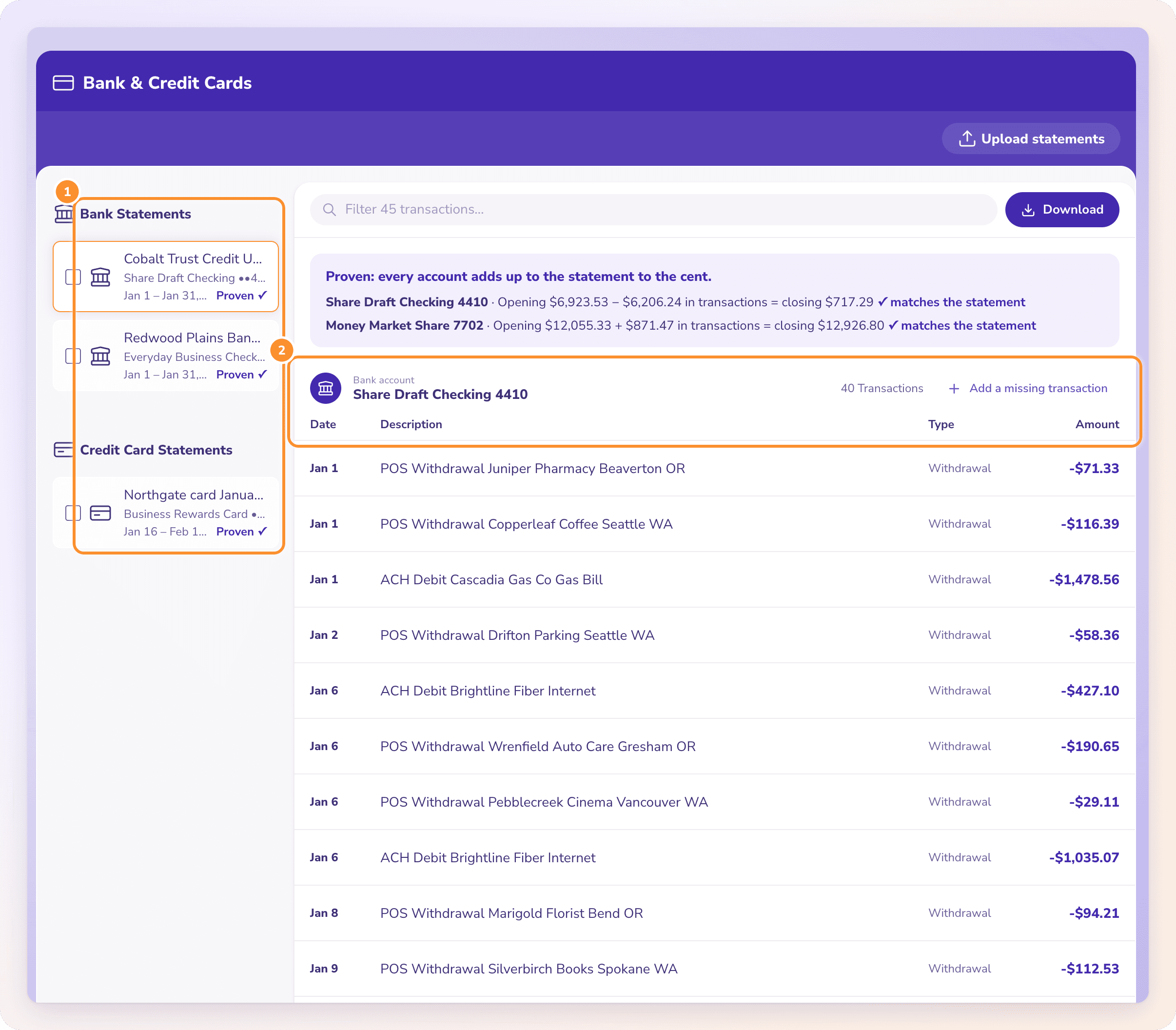
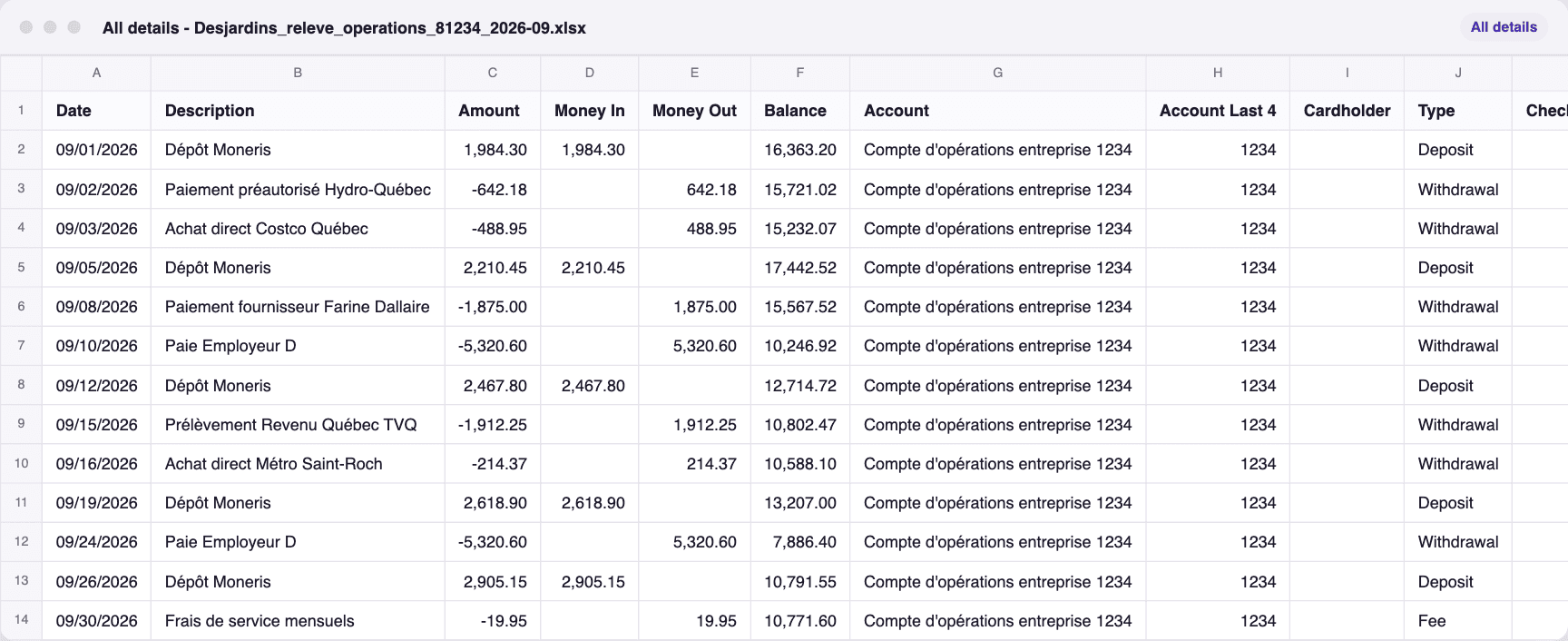
A real run in ZeraBooks Convert: the fictional Desjardins sample statement Desjardins_releve_operations_81234_2026-09.pdf, already proven to the cent, downloaded All details as an Excel file. The file that came out, All details - Desjardins_releve_operations_81234_2026-09.xlsx, has 13 rows with the columns Date, Description, Amount, Money In, Money Out, Balance, Account, Account Last 4, Cardholder, Type, Check Number, Source File.
A real export: the Desjardins sample statement downloaded All details. Fictional figures.
The format, picked in Convert
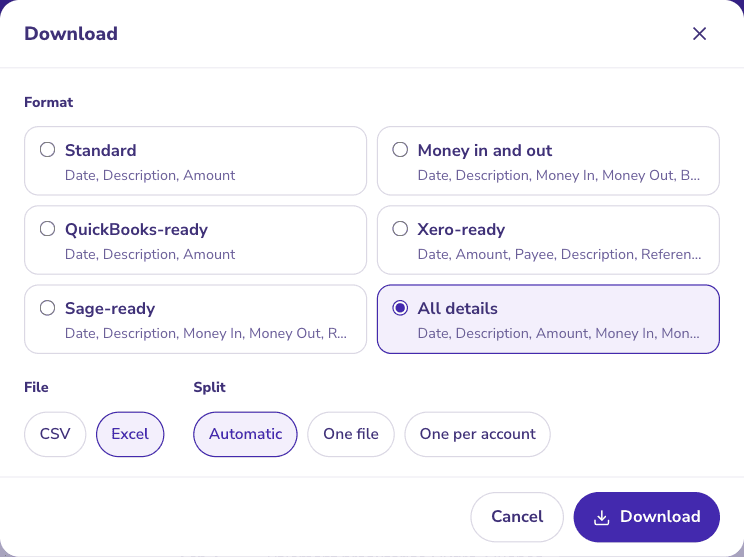
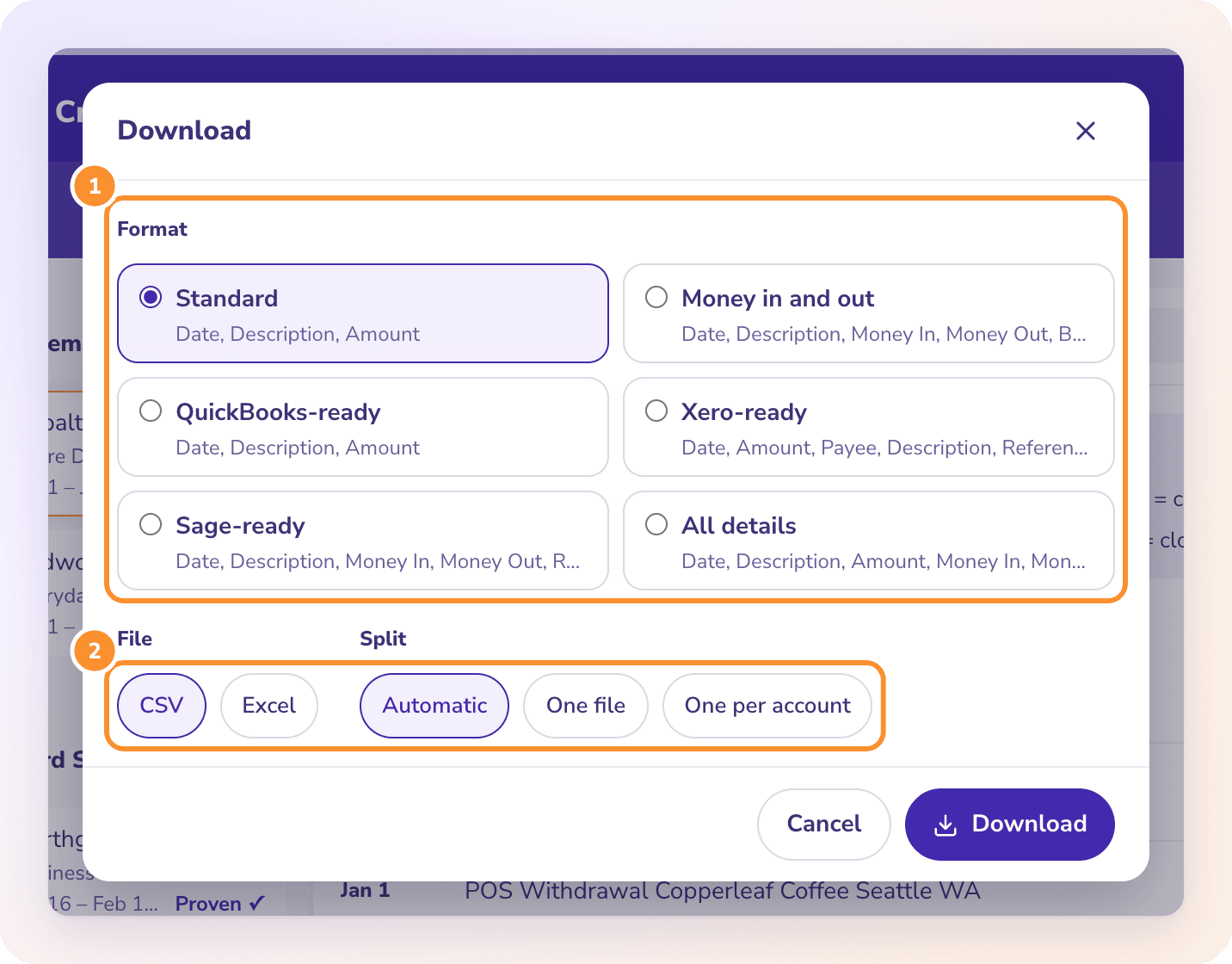
All details picked in the Download dialog.
The file that downloaded
The downloaded All details file, opened.
WORKED EXAMPLE
How do you read an MT940 statement, and what does it look like as CSV?
Kade Logistics is a fictional freight company. On the left, its MT940 for October 15, 2026: account 12345678, statement 187 part 1, an opening credit balance of EUR 15,420.50 on October 14, three transactions, and a closing credit balance of 18,460.60. On the right, the same statement as CSV: each :61: and its :86: become one row, and debits get a minus sign.
kade-2026-10-15.sta
:20:STMT261015
:25:12345678
:28C:00187/001
:60F:C261014EUR15420,50
:61:2610151015D1250,00NTRFNONREF//B26101500001
:86:RENT OCTOBER GRACHT PROPERTIES
:61:2610151015C4380,00NTRFINV-2207//B26101500002
:86:PAYMENT INVOICE 2207 DELTA TOOLS
:61:2610151015D89,90NDDTNONREF//B26101500003
:86:TELECOM DIRECT DEBIT OCT
:62F:C261015EUR18460,60
kade-2026-10-15.csv
Date,Amount,Reference,Description
10/15/2026,-1250.00,,RENT OCTOBER GRACHT PROPERTIES
10/15/2026,4380.00,INV-2207,PAYMENT INVOICE 2207 DELTA TOOLS
10/15/2026,-89.90,,TELECOM DIRECT DEBIT OCT
The check that matters: 15,420.50 − 1,250.00 + 4,380.00 − 89.90 = 18,460.60, the :62F: figure, so the rows net to 18,460.60 − 15,420.50 = 3,040.10. In :61:, 261015 is the value date (YYMMDD), 1015 the entry date (MMDD), D or C the direction, and the N codes such as NTRF and NDDT the transaction type. Watch two things when converting: the comma decimal (1250,00 must become 1250.00 for most U.S. software) and NONREF, which means no reference and should become a blank cell. Tomorrow’s :60F: should open at exactly 18,460.60; if it doesn’t, a day is missing.
YOUR OPTIONS
How do you convert an MT940 file to CSV or Excel?
Pick the first one that works for you. Each keeps the data exact, which retyping never does.
1
Ask the bank for CSV instead
Many business banking portals that offer MT940 also offer a CSV or spreadsheet export of the same account. If you only need a spreadsheet, this skips conversion entirely.
2
Import it where it is going
Treasury and ERP systems are the usual home of MT940, and some accounting software imports it directly. Check your software’s import list before converting anything.
3
Use a parser
For a developer or a repeat job, an open-source parser does it reliably. The mt-940 Python library (version 5.1.1, September 2026, BSD licence) reads MT940 into records you can write out as CSV or JSON.
4
Use a dedicated converter
Desktop and online MT940 converters exist. Before uploading bank files to one, check where the data is stored and test it on a statement you can tie out by hand, like the one above.
5
Use the PDF statement
If the bank gives you a PDF of the same statement, a PDF converter turns it into Excel or CSV. That is the route ZeraBooks covers; see below.
MT940 AND CAMT.053
Is MT940 being replaced by camt.053?
Yes, gradually. camt.053 is the ISO 20022 bank-to-customer statement: the same content as an MT940 written as XML, with room for longer remittance text and structured party details. MT940 and MT950 both map to it, and the intraday MT942 maps to camt.052.
Swift ended the coexistence period for cross-border payment messages in November 2025, but statements are on a later clock. J.P. Morgan’s ISO 20022 FAQ, checked October 22, 2026, cites Swift’s end of coexistence for statement and reporting messages as November 2028, and says its own MT9xx statements stay on MT until clients opt in to camt, with that opt-in planned from late 2026. Other banks set their own dates, so ask yours.
For a business reading statements, the practical change is the file, not the numbers. A camt.053 still has an opening balance, entries and a closing balance, and the same tie-out works. If you use MT940 because a system needs it, plan for that system to read camt.053 before your bank stops sending MT940. Other bank file formats are explained on what is an OFX file.
WITH ZERABOOKS
When you have the PDF, not the MT940.
ZeraBooks Convert doesn’t read MT940 or camt.053 files; it refuses anything that isn’t a PDF. Many banks issue a PDF of the same statement, and that is where it helps.
THE SAME TIE-OUT, DONE FOR YOU
Opening plus lines equals closing, to the cent.
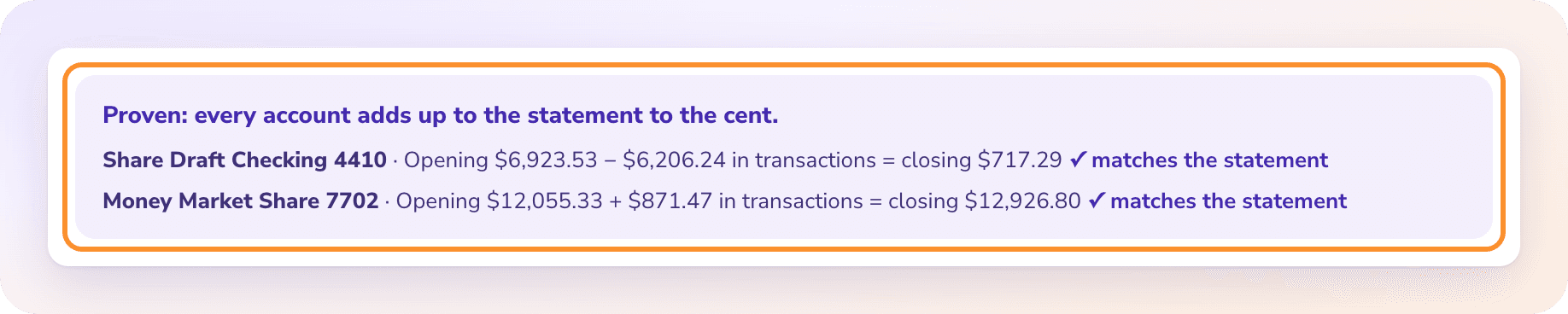
Convert reads the PDF, splits it by account and checks that the printed opening balance plus every line equals the printed closing balance: the :60F: to :62F: test from the example, on a document that has no tags. A statement that doesn’t tie is flagged with the difference. PDFs up to 50 MB and 500 pages.
Download Standard (Date, Description, Amount with money out as a minus), Money in and out, or a QuickBooks-, Xero- or Sage-ready CSV. Dates are written MM/DD/YYYY and amounts with a decimal point. Need a CSV for an import? See convert a bank statement to CSV.
A SWIFT-standard plain-text bank statement. It lists one account’s opening balance (:60F:), each transaction (:61: with detail in :86:) and the closing balance (:62F:), usually for one day. Banks send it to businesses’ treasury and accounting systems.
How do I open an MT940 file?+
Any text editor opens it, since it is plain text, but the tags are hard to read by eye. To work with it, import it into software that reads MT940 or convert it to CSV with a parser.
How do I convert MT940 to Excel?+
Ask the bank for a CSV or Excel export of the same account first. Otherwise use an MT940 parser or converter to turn each :61: line into a row, then check that the rows net to the closing minus the opening balance.
What is the difference between MT940 and MT942?+
MT940 is the end-of-day statement with final opening and closing balances. MT942 is an intraday report of transactions so far that day. In ISO 20022, MT940 maps to camt.053 and MT942 to camt.052.
Does ZeraBooks convert MT940 files?+
No. ZeraBooks Convert reads PDF statements only and refuses other files. If your bank offers a PDF of the same statement, Convert turns it into Excel or CSV and checks it against the printed balances.
How much does ZeraBooks Convert cost?+
1,000 pages a month for $149 a month, or $79 a month billed annually, after a 7-day trial. Larger page plans are on ZeraBooks pricing.
Damin founded ZeraBooks in 2025 and still talks to the bookkeepers, firms and owners who use it every week. He writes about what he sees in their statements and ledgers, and every page here is checked against the live product before it goes up.
Have the PDF statements? Get checked CSV or Excel back.
ZeraBooks Convert proves every statement against its printed balances before you download. 1,000 pages a month from $79 a month billed annually; see ZeraBooks pricing. The same subscription includes AI bookkeeping built on the statements you convert.