SIDE BY SIDE · EXCEL
ZeraBooks vs Excel’s own PDF import
for bank statements.
Excel can pull a PDF bank statement in with Data, Get Data, From PDF, but only in Excel for Windows: the Mac version has no PDF connector. It brings each page in as a separate table and never checks the totals. ZeraBooks reads the whole statement in a browser on any computer and proves it against the printed balances.
7-day trial · card required, nothing charged for 7 days · 1,000 pages a month from $79/month billed annually

THE EXCEL WAY
What importing a statement with Power Query involves
It works, on Windows, for a clean text PDF. This is what the job looks like for one three-page statement.
- 1
Data, Get Data, From File, From PDF
Pick the statement. The Navigator lists every table and page Excel found, often more than you expect.
- 2
Pick the transaction tables
Page 1’s table, page 2’s, page 3’s. The summary box shows up as its own table; leave it out.
- 3
Append them in the Power Query editor
Combine the page tables into one, then remove the header row repeated on each page and any "continued" lines.
- 4
Fix the columns
Set the date type, make withdrawals negative, merge descriptions that wrapped onto a second row, and keep long references as text so they don’t turn into E+17.
- 5
Check the total yourself
Opening balance plus the sum of the rows should equal the closing balance. Excel won’t tell you if a row went missing.
Try it on your own documents. One-week free trial, both apps included.
THE ZERABOOKS WAY
Upload, check, download
The same statement in ZeraBooks: upload the PDF, and the transactions come back as one list with the proof on top. Pick Excel or CSV in the bank statement converter and the file opens ready to sum.
The statement read as transactions
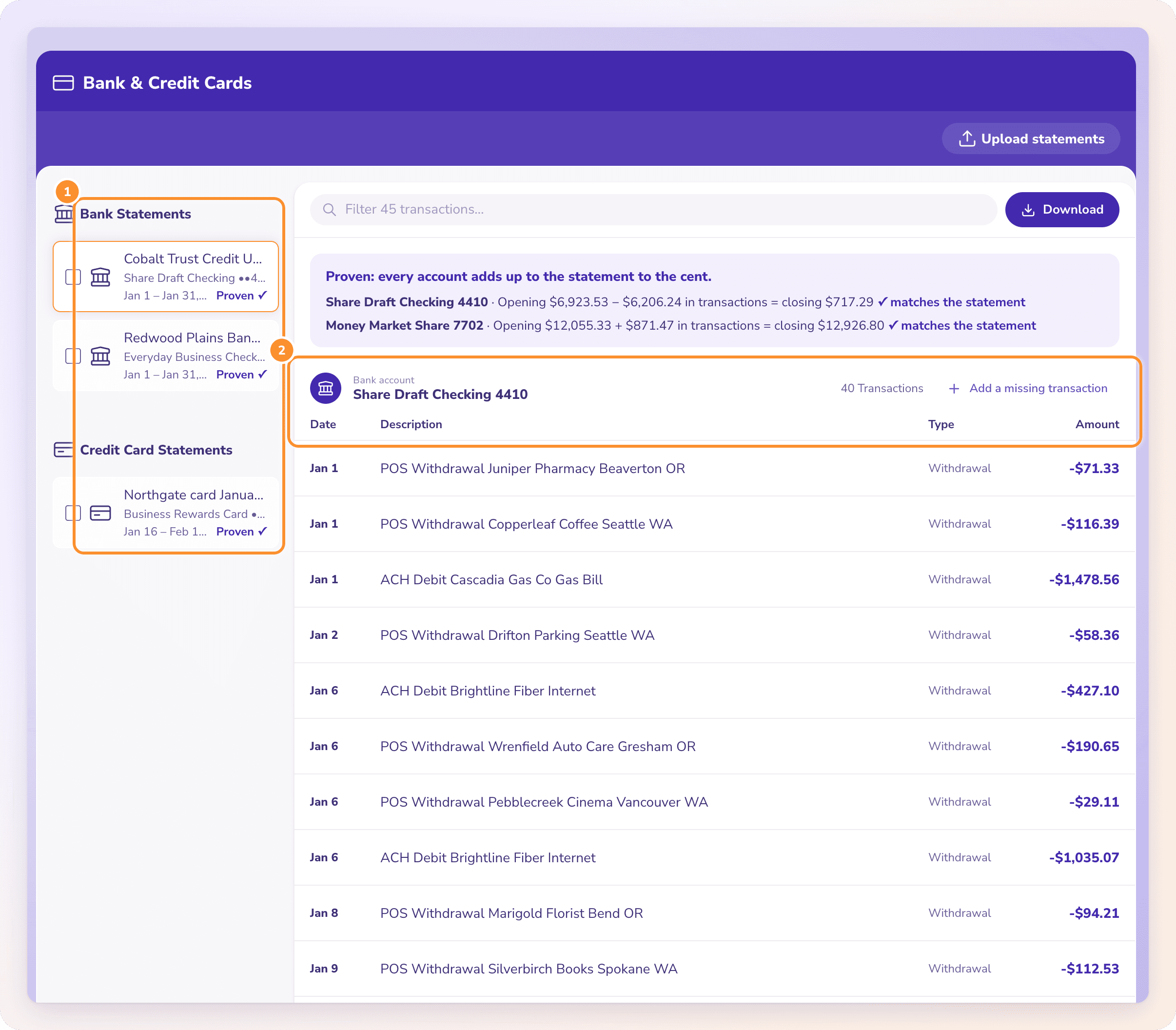
Proven against the printed balances

FAIR QUESTION
When is Excel enough?
Adobe Acrobat’s export has the same gaps; see ZeraBooks vs Adobe Acrobat. For one clean statement a year on a Windows machine, if you are comfortable in the Power Query editor and you remember to check the total, Excel’s import can do it.
Past that, the steps repeat for every statement and every bank lays its pages out differently, so the query you built for one bank breaks on the next. A year of statements from three banks is 36 imports. In ZeraBooks it is one upload, and each statement is checked. See convert a bank statement to Excel for the full walkthrough.
MORE REVIEWS AND COMPARISONS
Other tools we have reviewed
- DocuClipper vs NanonetsPage bundles against block runs, compared on real statements.
- MoneyThumb vs DocuClipperPer-account conversions against per-page pricing.
- Dext vs HubdocHow each handles bank statements, and what both miss.
- ZeraBooks vs Adobe AcrobatAcrobat’s Excel export against a proven statement.
- QuickBooks alternativeMove from QuickBooks to an AI-native ledger, step by step.
- Best AI accounting softwareAn honest comparison of the AI accounting tools worth a look.
Can Excel open a PDF bank statement?
Excel for Windows can import it with Data, Get Data, From File, From PDF. Excel for Mac has no PDF connector.
Why does my statement come in as several tables?
Power Query finds tables page by page. A statement that runs over several pages arrives as several tables that you append into one.
Does Excel check that nothing was missed?
No. It imports what it finds. Checking the rows against the opening and closing balance is up to you. ZeraBooks does it on every statement.
Sources and further reading

ONE-WEEK FREE TRIAL
See it on your own books.
Free for one week.
General Ledger and Converter, both included. $79 a month billed annually or $149 monthly after the trial.