How to undo a bank reconciliation, and when you shouldn’t.
To undo a bank reconciliation in QuickBooks Online, a primary admin or accountant user opens the reconciliation history and undoes it, which also undoes every later one. Xero unreconciles one transaction at a time. In ZeraBooks you remove the month’s sign-off and reopen the books if they’re closed. Undo only when the starting point was wrong.
7-day free trial · card required, nothing charged for 7 days · then $79/month billed annually or $149 monthly
BEFORE YOU UNDO
When should you undo a bank reconciliation?
Undoing is for a reconciliation whose starting point or ending point was wrong. Most other problems are one bad line, and that line can be fixed without touching the whole month.
Undo: the beginning balance is wrong
The account’s opening balance didn’t match the bank, so every reconciliation after it was forced to agree. Undo back to the first wrong month and redo forward.
Undo: it was finished with a forced adjustment
The difference wouldn’t clear, so someone saved it with an adjustment entry. The real cause is still in the books.
Undo: the wrong statement date or ending balance
The reconciliation was done to the wrong statement, so the cleared items don’t line up with any bank period.
Don’t undo: one transaction was ticked by mistake
Unreconcile that one transaction instead, and find the item it should have been.
Don’t undo: a category is wrong
Changing a category doesn’t change the bank balance, so the reconciliation stays valid. Just fix the category.
Don’t undo: the year is filed and closed
If tax returns or financial statements were issued from those months, talk to your accountant first. A correcting entry in the current period is often better than reopening a filed year.
Try it on your own documents. One-week free trial, both apps included.
How do you undo a reconciliation in QuickBooks Online?
Per Intuit’s help article (updated September 29, 2026), the primary admin, an accountant user or an in-house accountant can undo a whole reconciliation. Undoing one also undoes every reconciliation after it, can’t be reversed, and permanently deletes the related reports and attachments, so download them first.
1
Download the reconciliation reports
Save the report and any attachments for every month you are about to undo. They are deleted, not archived.
2
Open the history
Go to Reconcile, then History by account. Choose the bank account and a report period that includes the month to undo.
3
Undo the earliest wrong month
Find that reconciliation and choose undo from its Action column. QuickBooks lists what will change, including the new beginning balance. Tick the box to confirm.
4
Check what changed
Every later reconciliation is undone too. Transactions you marked reconciled by hand, outside a reconciliation, are not. Check the audit history for anything edited in the period.
5
Reconcile again, month by month
Start from the earliest undone month with the bank statement in hand, and reconcile each month forward until you are current.
ONE TRANSACTION AT A TIME
What if you can’t undo the whole reconciliation in QuickBooks?
Users who aren’t the primary admin or an accountant can’t use the whole-reconciliation undo. They can still change one transaction: open the bank account’s register, find the transaction marked R for reconciled, and click the status until it clears. QuickBooks warns that changing a reconciled transaction affects the reconciliation, and the next reconciliation starts from a different beginning balance.
This is the right tool for a single wrong tick, and the wrong one for redoing months. Clearing dozens of lines by hand is slow and easy to get wrong. If a whole period needs redoing, ask the primary admin or your accountant to run the undo.
XERO
How do you unreconcile in Xero?
Xero has no undo for a whole reconciliation, because it reconciles statement line by statement line. Per Xero Central, unreconciling removes the link between a transaction and its bank statement line and keeps both, so the line can be matched again.
1
Check for a lock date
A padlock on the transaction means it is in a locked or closed period. Remove the lock date, or open the period, before changing it.
2
Open the reconciled transaction
Find it in the bank account’s account transactions and open it.
3
Unreconcile it
Choose Options, then Unreconcile, and confirm. The statement line goes back to the Reconcile tab. If the transaction had been marked reconciled by hand, Xero deletes its statement line too.
4
Or remove and redo
If the line was matched to the wrong invoice or bill, Remove and Redo deletes the payment and returns the statement line to Reconcile, ready to match correctly.
5
Reconcile it again and reset the lock
Match the line to the right transaction, then put the lock date back.
WORKED EXAMPLE
What happens when you undo an older reconciliation?
A fictional QuickBooks Online checking account was reconciled January to June 2026. March was finished with a 48.20 adjustment because nobody could find the difference. Undoing March takes every later month with it:
Month
Status before
After undoing March
Work to redo
January
Reconciled
Reconciled
None
February
Reconciled
Reconciled
None
March
Reconciled with a 48.20 adjustment
Undone
Find the 48.20, reconcile again
April
Reconciled
Undone
Reconcile again
May
Reconciled
Undone
Reconcile again
June
Reconciled
Undone
Reconcile again
Four months to redo for one bad month. Before undoing, write down each month’s statement ending balance; they don’t change, and each redo has to land on them. 48.20 isn’t divisible by 9, so it isn’t a transposition; look for a missing or doubled line of that amount first. Our guide on how to do a bank reconciliation has the tricks for finding a difference, and a proof of cash finds offsetting errors a balance check misses.
IN ZERABOOKS
How do you reopen a reconciled month in ZeraBooks?
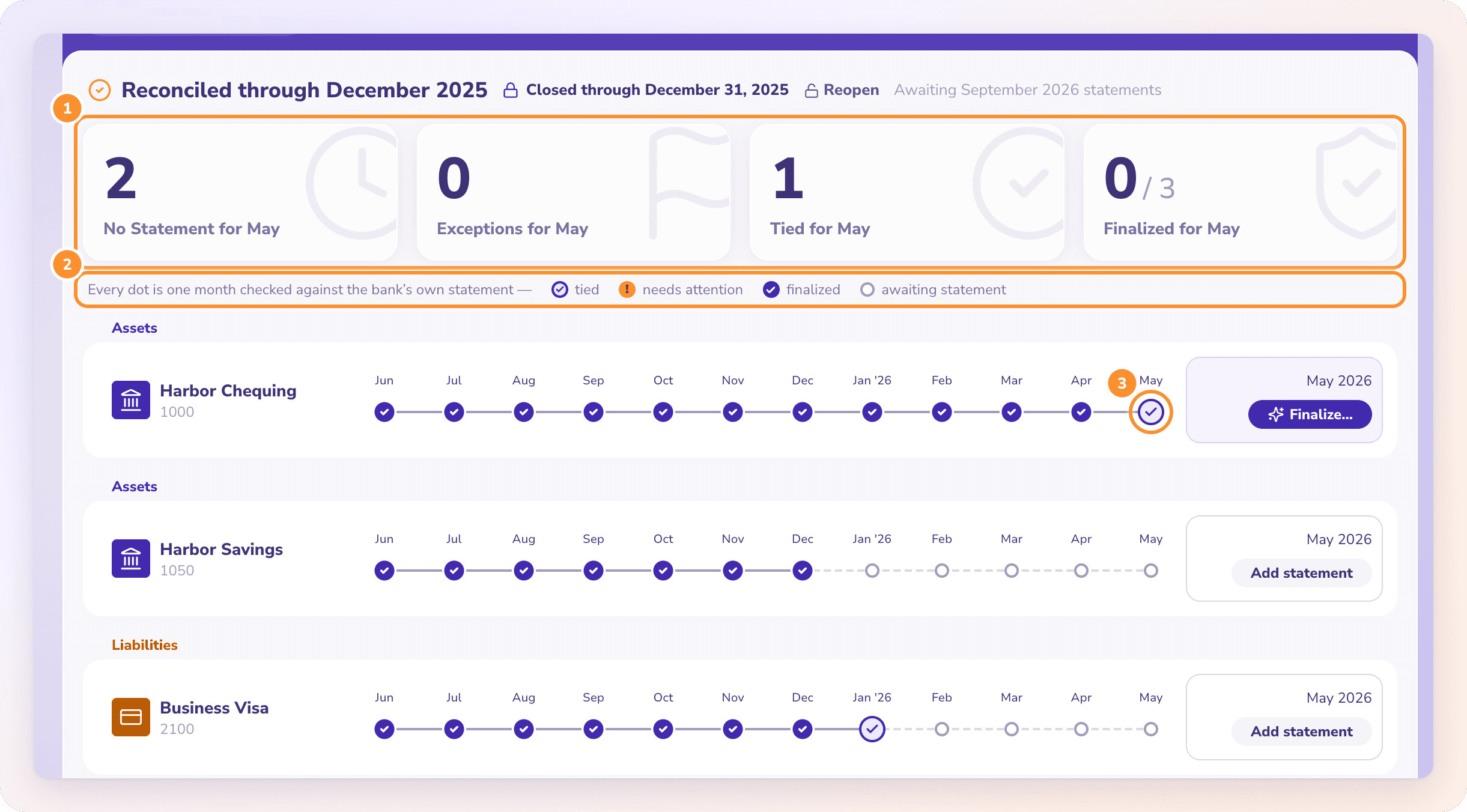
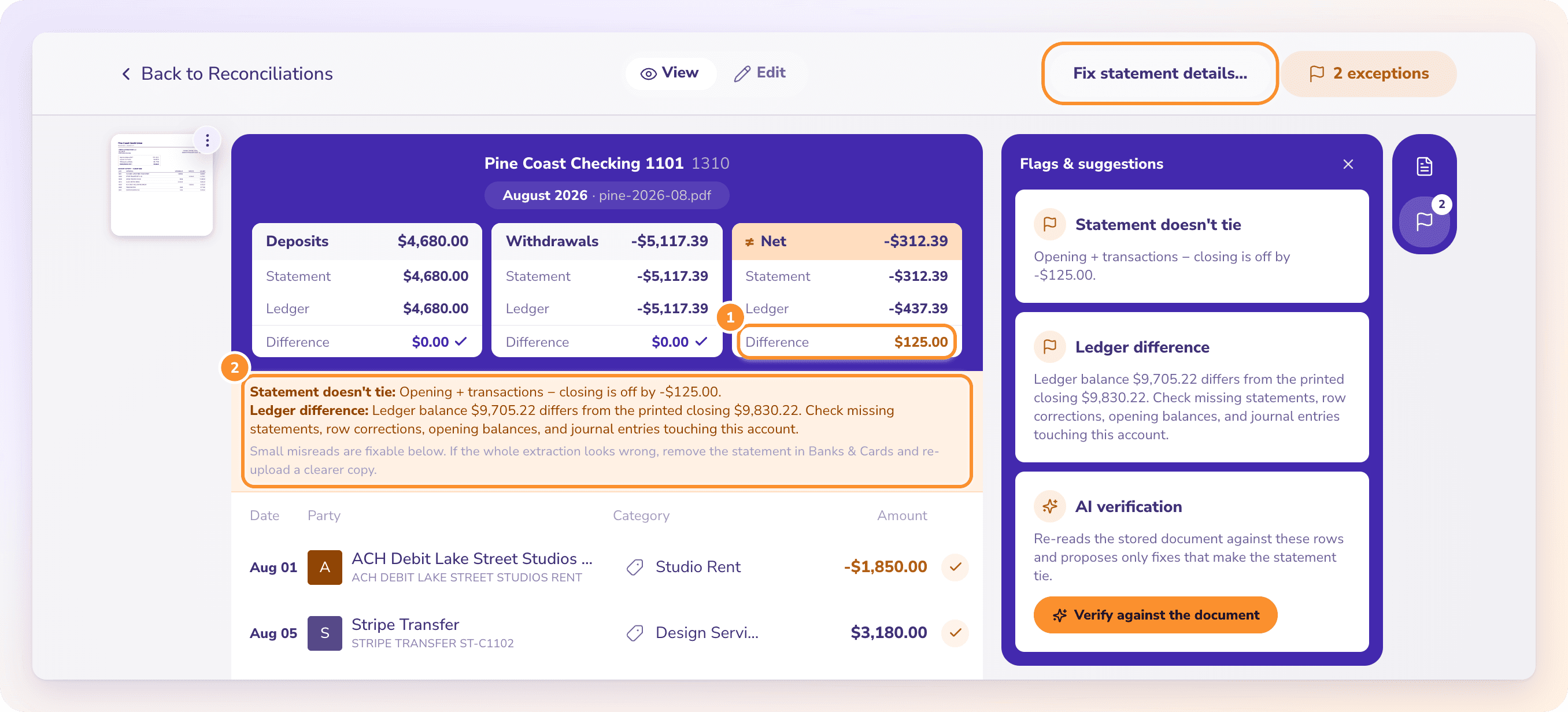
ZeraBooks reconciliation is a check against the statement, not a set of ticks, so there is nothing to untick. A month that ties is signed off, and closing the books locks it.
REMOVE THE SIGN-OFF
Take back one month, nothing else.
Open the finalized month in Reconciliations, click Finalized, then Remove sign-off. The month goes back in the open queue and nothing else in the books changes. If a finalized month’s numbers change on their own, because a statement or a balance moved, ZeraBooks reopens it for review and shows what drifted. Recategorizing doesn’t reopen a month. More on bank reconciliation software.
If the month is on or before the date the books are closed through, click Reopen in Reconciliations first, with the closing password if the business has one. Reopen clears the whole lock, so close the books again after the fix. If Autopilot signed off or closed the month, Undo in Done by AI takes it back.
Can I undo a reconciliation in QuickBooks Online without an accountant?+
Yes, if you are the company’s primary admin, according to Intuit’s current help article. Other users can only clear reconciled transactions one at a time in the register. Older answers online say only accountant users can do it; that has changed.
Does undoing a reconciliation delete transactions?+
No. In QuickBooks Online the transactions stay; they go back to uncleared, and the reconciliation reports and attachments for those months are deleted. In Xero, unreconcile keeps the transaction and the statement line, but Remove and Redo deletes the payment.
Can I undo just one month in the middle?+
Not in QuickBooks Online: undoing a month also undoes every month after it. In ZeraBooks you can remove the sign-off from one month; reopening closed books opens every closed date for editing, so close them again afterwards.
Why did my beginning balance change after undoing?+
The beginning balance of a reconciliation is the ending balance of the last one still in place. Undo March and April’s starting point becomes February’s ending balance. It should match the opening balance on March’s bank statement.
How do I avoid having to undo reconciliations?+
Never finish a reconciliation with an unexplained adjustment, reconcile every month in order, and check that each statement’s opening balance matches the last one’s closing balance. ZeraBooks checks that chain for every statement as it is uploaded. Prefer someone else to handle it? Our bookkeeping services team reconciles and closes each month.
Reconcile from the statement itself. Nothing to untick later.
ZeraBooks proves each month against the bank’s printed balances and lets you take back a sign-off in two clicks. Free for 7 days, then $79 a month billed annually; see ZeraBooks pricing.