FOR TRUCKING BOOKKEEPERS
Trucking bookkeeping automation,
every driver’s settlement posted without retyping.
Trucking bookkeepers automate client books by having each driver’s weekly settlement read, checked against its own printed totals and posted to that driver’s books without retyping. ZeraBooks builds this as a free custom setup for your practice. We built one for a bookkeeper whose clients are all truck drivers: every driver’s week posts to the cent.
A short call, then we show you the setup working 2 to 3 days later. Or call or text Damin at 604-780-5058.
THE WEEK, BEFORE AND AFTER
What does a trucking bookkeeper’s week look like once it is automated?
The bookkeeper we built for kept books for about 80 drivers. Every Monday meant one journal entry per driver, typed from the carrier’s settlement, then reports by class in QuickBooks. Here is the same week in ZeraBooks.
| Job | Done by hand | With the ZeraBooks setup |
|---|---|---|
| Getting the numbers in | Type every load, fuel advance, insurance and escrow line from each settlement | Upload the week’s settlement files from each carrier. Every settlement is read line by line |
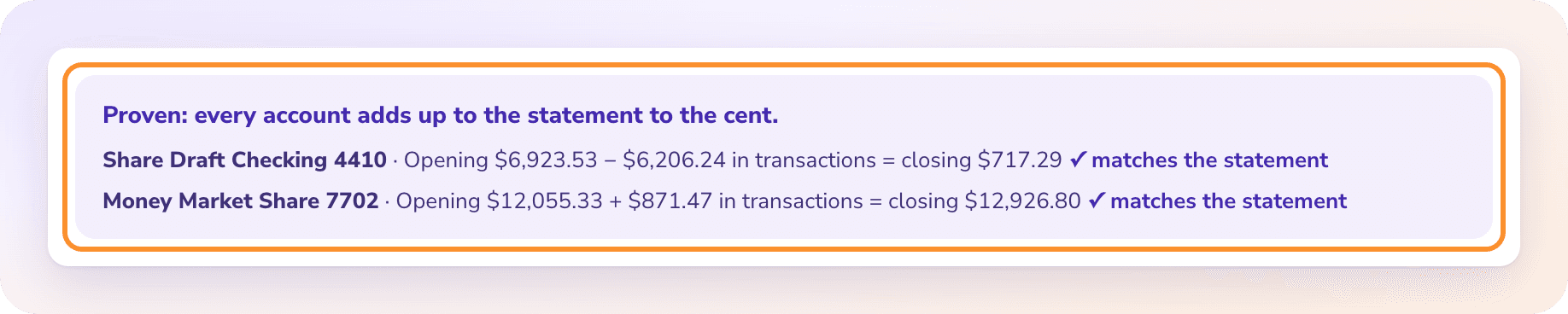
| Checking the numbers | Hope the typing matched the paper | Code adds the loads, subtracts the deductions and compares the result with the total payment printed on the settlement, to the cent |
| Finding the right driver | Open each driver’s file one at a time | Matched by driver name or truck number. Two drivers with the same name are told apart by truck |
| Dating the entry | Whatever date was typed | Posted to the driver’s books on the Friday they are paid |
| New deduction types | Decide again for each driver | Waits once, with an account suggested by AI. Your choice then applies to every driver |
| Reports | P&L and balance sheet by class, pulled and formatted | P&L by driver and balance sheet by driver, one column each, downloadable to Excel, plus a PDF package per driver |
Escrow and Form 2290 savings are booked as the driver’s own money (assets), never as expenses. A negative settlement sits on a payable until the carrier collects it on a later week.
Tell us how many drivers you keep books for and which carriers pay them. We reply within one business day.
WHAT WAITS FOR YOU
What stops a settlement from posting?
Automation only saves time if it refuses to post a wrong number. These are the cases where the setup stops and asks instead.
The printed total is off
If a carrier prints a total payment that is $10 more than its own lines add up to, the settlement waits with the difference shown. It never posts on a number that doesn’t tie.
A deduction nobody has seen
A toll charge or a new fee type appears for the first time. AI suggests an account from your chart, you check it and post. Escrow, 2290 savings and negative settlement amounts are never left to an AI pick.
A negative week
When deductions are bigger than the loads, the shortfall goes to a payable on that driver’s books instead of disappearing or turning into an odd expense.
The same file uploaded twice
A settlement that already posted is recognized and never posts a second time.
A pay period that hasn’t ended
A settlement whose pay period ends in the future waits until it is real, so nothing lands in the wrong week.
A REAL BUILD
What did ZeraBooks build for a bookkeeper whose clients are all truck drivers?
One practice, all owner-operators, paid weekly by their carriers. We built the setup around his settlement layouts and his account list.
A drivers board
Every driver on one screen with this week’s settlement: gross, deductions, net and year to date, with the net pay date across the fleet. Switch the week to see history.
His chart, his rules
Each deduction maps to the account he already used, and the choices he made once apply to every driver from then on.
Tested before go-live
We ran 648 settlement statements across 9 weeks against an answer key. Every one that posted matched to the cent; the rest waited for a decision.
His history kept
Opening balances come from his old balance sheet and P&L by class at the cut-over date, or from uploading the year’s past settlements.
Drivers who leave
A driver can be archived with their books kept, and restored later.
HOW THE FREE SETUP WORKS
How do you get a trucking setup built for your practice?
The same offer we make every trucking bookkeeper. You don’t send us anything before the call.
- 1
A 15 to 30 minute call
How many drivers, which carriers, how you book escrow and fuel, and which reports your drivers and their lenders ask for.
- 2
We build it
Your settlement layouts, your account names and your reports, set up in ZeraBooks.
- 3
You see it working, 2 to 3 days later
We walk you through it on settlements in your carriers’ layout, with every entry checked against the printed totals.
- 4
Agree terms, then go live
If it saves you the week, we agree terms for your practice and you start uploading real weeks. Drivers who keep their own books can use our bookkeeping for trucking service instead.
NOT ONLY TRUCKING
Does this work for bookkeepers outside trucking?
Yes. The pattern is the same anywhere a client sends the same document every week or month: read it, prove it against its own totals, post it to the right client. Our page on automated document processing covers other document types, and accounting firms that mainly need statements turned into spreadsheets can have the bank statement converter tailored to the firm for free.
For your own practice’s general ledger work, ZeraBooks is accounting software for accountants with every client company in one login. Referrals from top-10 U.S. accounting firms are available as references on request.
Is the trucking setup really free?
Yes. The call, the build and the walkthrough on settlements in your carriers’ layout cost nothing. If you want to use it every week, we agree terms for your practice after you have seen it work.
Does it connect to carriers, factoring companies or ELDs?
No. ZeraBooks reads the settlement files you upload. There is no carrier, factoring, ELD, fuel card or bank connection, and no QuickBooks sync. Reports download to Excel.
Is AI posting entries to my clients’ books?
AI reads the settlements. Code proves every number against the settlement’s own totals before anything posts. Categories follow your rules exactly; for a deduction type nobody has seen, AI only suggests an account and nothing posts until you click.
What should owner-operators track for me each month?
Settlements, fuel card statements, the truck loan statement and receipts for anything paid outside the settlement. Our owner-operator bookkeeping guide is written for drivers, and the trucking bookkeeping checklist lists the month-end steps.
Can I talk to someone who uses it?
Referrals from top-10 U.S. accounting firms are available as references on request. Ask on the call and we’ll arrange one.
FREE FOR TRUCKING BOOKKEEPERS
Every driver’s week, done in minutes.
We build your setup for free.
A short call, then you see it running on settlements in your carriers’ layout 2 to 3 days later. Nothing to send before the call.
Last updated November 4, 2026 · Written by Damin Mutti, founder of ZeraBooks