GUIDE · SEVERAL STATEMENTS, ONE FILE
Combine bank statements into one Excel file,
with no month missing and none counted twice.
To combine bank statements into one spreadsheet, upload them all to a bank statement converter such as ZeraBooks Convert, tick each statement in the list and click Download together. Choose One file to put every transaction in one sheet with an Account column, then check that each closing balance equals the next statement’s opening balance.
7-day trial · card required, nothing charged for 7 days · 1,000 pages a month from $79/month billed annually
STEP BY STEP
How do you merge several bank statements into one Excel file?
One upload, one tick per statement, one download. The page that lists statements is Bank & Credit Cards in ZeraBooks Convert.
- 1
Upload every statement
Click Upload statements or drop all the PDFs on the page at once. The list shows what was uploaded in the last 30 days, so upload the whole set together rather than spread over months.
- 2
Check each one is Proven
Each statement is added up against its own printed balances. Fix anything marked Needs a look first, because downloads are made from your corrected rows.
- 3
Tick the statements
Tick the box beside each one. Only statements that have been read have a box. The top of the list then says, for example, “12 chosen”, with Clear to start over.
- 4
Click Download 12 together
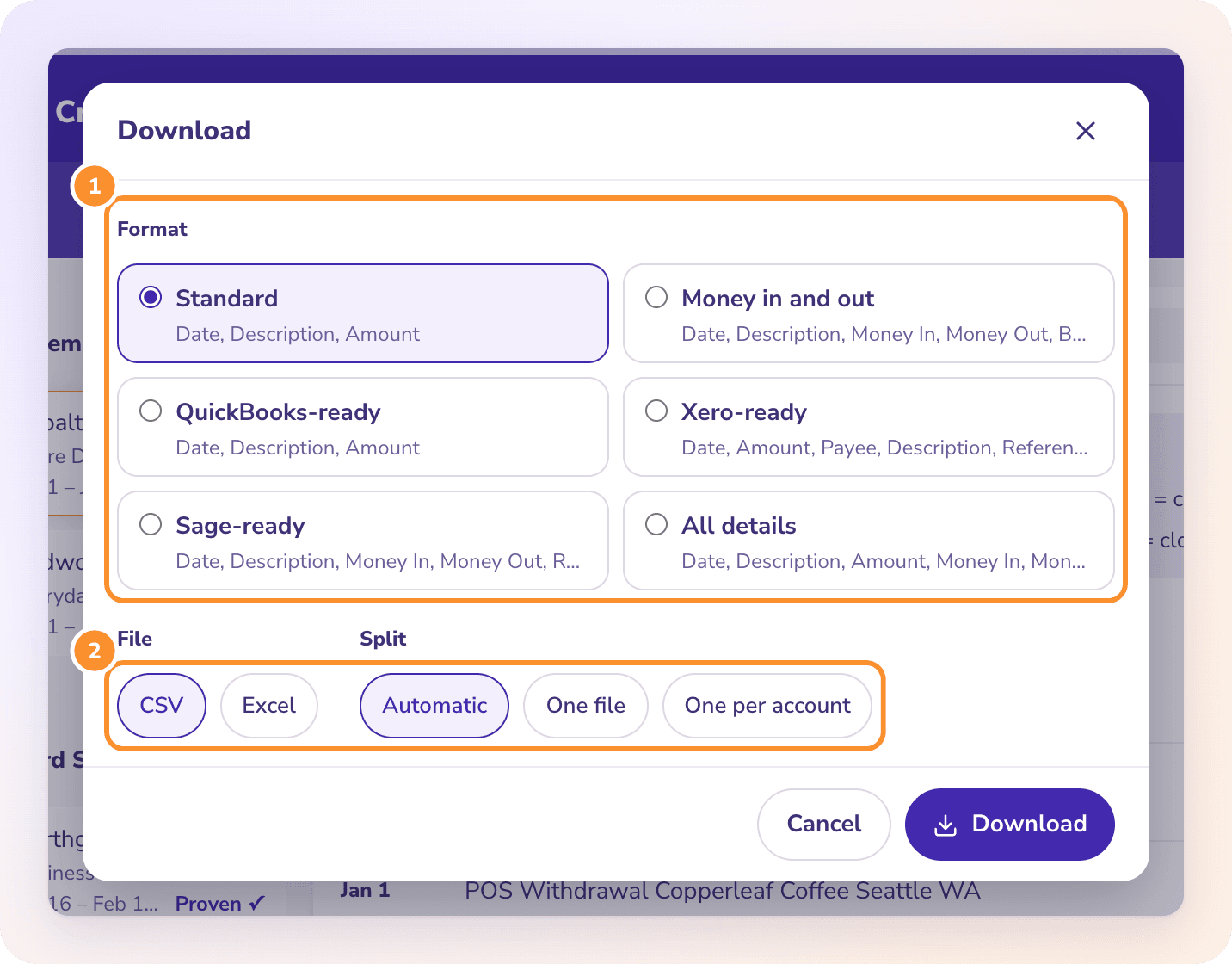
The number on the button follows how many you ticked. Choose a Format such as Standard or Money in and out, and choose Excel or CSV.
- 5
Pick the Split and download
One file puts everything in one sheet; One per account gives each account its own tab. The button reads Making the file… while it works.
Try it on your own documents. One-week free trial, both apps included.
ONE SHEET OR A TAB EACH
Should combined statements go in one sheet or one tab per account?
The Split option decides it. The same choices apply whether you tick two statements or forty. Details are in Download your data.
One file
Every transaction from every ticked statement in one sheet. When that sheet holds more than one account, an Account column is added so each row says where it came from. Best for a pivot table or a filter across everything.
One per account
A separate sheet for each bank or card account. In Excel that is one workbook with a tab per account; as CSV, one file per account inside a ZIP. Best when each account is going to its own place, such as a bank account in Xero.
Automatic
One per cardholder on a card statement with several cardholders, one per account when there are several accounts, otherwise one file. A year of one checking account comes out as a single sheet.
One per cardholder
Offered only when the statements have cardholders, such as an Amex with extra cards. Without it, a Cardholder column is added instead.
WORKED EXAMPLE
How do you check no bank statement is missing from the combined file?
Every statement is proven against its own balances, but nothing checks one statement against the next. That check is yours, and it takes a minute: each opening balance must equal the previous closing balance. A fictional operating account ending 3318 for 2025, with June never uploaded:
| Statement | Opening (printed) | Closing (printed) | Previous closing | Difference |
|---|---|---|---|---|
| January | 24,310.55 | 26,102.40 | first statement | |
| February | 26,102.40 | 25,487.15 | 26,102.40 | 0.00 |
| March | 25,487.15 | 27,930.62 | 25,487.15 | 0.00 |
| April | 27,930.62 | 29,014.08 | 27,930.62 | 0.00 |
| May | 29,014.08 | 28,276.91 | 29,014.08 | 0.00 |
| June | not uploaded | not uploaded | ||
| July | 30,540.37 | 31,118.04 | 28,276.91 | 2,263.46 |
| August | 31,118.04 | 29,865.70 | 31,118.04 | 0.00 |
| September | 29,865.70 | 32,407.19 | 29,865.70 | 0.00 |
| October | 32,407.19 | 33,950.88 | 32,407.19 | 0.00 |
| November | 33,950.88 | 33,102.45 | 33,950.88 | 0.00 |
| December | 33,102.45 | 35,620.09 | 33,102.45 | 0.00 |
| Whole year: December closing less January opening | 11,309.54 | |||
| Sum of the Amount column in the combined file | 9,046.08 |
July opens 2,263.46 above where May closed, so June is missing and that is its net change. The second check finds it with no table at all: the Amount column should add up to the last closing balance less the first opening balance, 35,620.09 − 24,310.55 = 11,309.54. It adds to 9,046.08, and 11,309.54 − 9,046.08 = 2,263.46. Upload June, tick it with the others and download again.
OVERLAPPING PERIODS
What happens when bank statement periods overlap?
Overlaps come from mixing a monthly statement with a custom date-range download, or a statement with a mid-month interim one. The rows still prove on each statement, so the doubles only show in the continuity check. A fictional March statement closes at 12,840.00 on 03/31; an extra download from 03/25 opens at 13,215.40, the balance on 03/24.
| Line in both files | Amount |
|---|---|
| 03/26 ACH payroll | -412.60 |
| 03/28 Customer deposit | 1,200.00 |
| 03/30 Card payment | -1,162.80 |
| Net of the doubled lines | -375.40 |
The second file opens 375.40 above the first one’s closing: 13,215.40 − 412.60 + 1,200.00 − 1,162.80 = 12,840.00. A gap can run either way, so read the dates to tell the two apart: if the next file starts before the last one ended, it is an overlap; if it starts more than a day after, a statement is missing. Convert doesn’t remove duplicate rows, so untick the overlapping file or delete the doubled dates before you use the totals.
ACCOUNTS OR MONTHS
Is combining several accounts different from combining several months?
Several months of one account
The continuity check above applies straight through. One file or Automatic both give one sheet. For a single statement on its own, the guide to convert a bank statement to Excel is shorter.
Several accounts
Run the continuity check per account, because each account has its own balances. In one sheet, filter on the Account column; with One per account, each tab is already separate.
A PDF with more than one account
Some banks print checking and savings in one statement. Convert splits it by account and proves each one, so it combines like two separate statements.
Bank and card statements together
Both live on Bank & Credit Cards, so they can go in one file. Checks, invoices and investment statements each have their own page, and a file holds one kind of document.
Combined for a spreadsheet or for software
For Google Sheets, import the CSV as the guide to bank statement to Google Sheets describes. For Xero, use One per account so each file goes into its own bank account; see bank statement to Xero.
DO IT YOURSELF
Can you combine bank statements in Excel without a converter?
Yes, if the bank gives you CSV files rather than PDFs. Put only those files in one folder, then in Excel choose Data, Get Data, From File, From Folder, pick the folder and choose Combine, then Combine & Load. Power Query stacks the files into one table and adds a Source.Name column with each file’s name, which does the job of an Account or month column.
The limits are real. Microsoft’s own guidance says every file needs the same columns and headers, so a bank that changed its export layout mid-year breaks the query. Any other file in the folder gets pulled in too. Power Query has no idea what a statement balance is, so it won’t notice a missing month or an overlap, and it can’t read PDF statements that hold the only copy of older months. Run the continuity check above whichever route you take.
How many bank statements can I combine into one file?
As many as you tick on Bank & Credit Cards; the list holds everything uploaded in the last 30 days. Each PDF can be up to 500 pages and 50 MB, and pages count toward your plan when a statement is read, so downloading it again in a combined file uses none.
Does ZeraBooks remove duplicate transactions when combining statements?
No. Each statement is proven against its own printed balances, and the combined file holds every row from every statement you ticked. Untick an overlapping statement, or use the continuity check to find the doubled dates.
Can I combine bank statements for a divorce or a loan application?
Yes. A year or more of every account in one file with an Account column is the usual ask. The guide to bank statements for divorce covers what lawyers and forensic accountants look for in them.
Why did my combined CSV download as a ZIP?
The split made more than one part, such as one per account, and a CSV file holds one sheet. Choose One file for a single CSV, or Excel for one workbook with a tab per account.
Can I add my own column for the month?
No. The formats are fixed. All details includes a Source File column, which tells you which PDF each row came from; a month column is one formula on the Date column in Excel.
What does it cost to combine statements with ZeraBooks?
Convert comes with the ZeraBooks subscription: $79 a month billed annually, 1,000 pages a month, after a 7-day trial. Pages are counted when a statement is read, not each time you download it. See ZeraBooks pricing.
ONE-WEEK FREE TRIAL
Upload a year of statements.
Download them as one file.
Then 1,000 pages a month from $79 a month billed annually. If the combined file is headed for your own books, keep the books in ZeraBooks instead: the AI General Ledger is part of the same subscription.
Last updated October 17, 2026 · Written by Damin Mutti, founder of ZeraBooks