Chime bank statement to Excel, Checking and Savings each in their own sheet.
To convert a Chime bank statement to Excel, download the PDF from Profile, then Documents, in the Chime app or on chime.com, upload it to the ZeraBooks bank statement converter and download Excel or CSV. One Chime PDF can hold Checking, Savings and Credit Builder; ZeraBooks splits it by account and proves each one against its own balances.
How do you download a Chime bank statement as a PDF?
Chime keeps statements under your profile, not under the account. Chime doesn’t mail paper statements, so this is the only copy. For general tips on getting statements from any bank, see Download statements from any other bank.
1
Sign in at chime.com or open the app
On a computer, several months are quicker to save one after another.
2
Open Profile, then Documents
On the web it is Log In, then Profile, then Documents. In the app it is the same path.
3
Pick the account and the month under Account statements
Checking and Savings run on calendar months. Credit Builder follows its own billing cycle, so its statement dates won’t line up with Checking.
4
Download the PDF
In the app, tap the export icon at the top right and save the file. If a month you need isn’t listed, ask Chime for it.
Try it on your own documents. One-week free trial, both apps included.
Chime’s help center says one statement holds a section for each Chime account you have, each with its own title. Copying it into one Excel sheet mixes the accounts together, and their balances stop making sense.
Part of the statement
What it holds
In the converted file
Checking Account Statement
Direct deposits, card purchases, transfers and Chime Checkbook payments for the month
Rows under the Checking account
Savings Account Statement
Transfers in from Checking, and interest
Rows under the Savings account
Credit Builder Secured Account Billing Statement
The secured card’s billing cycle: money moved in, purchases and payments
A card account, proven on its own billing period
Chime Card Secured Account Billing Statement
The same kind of billing section for the Chime Card
A card account, proven on its own billing period
Beginning and ending balance per section
Each account’s own opening and closing figure
Used for the proof, not rows
Partner bank line
The Bancorp Bank, N.A. or Stride Bank, N.A.
Not a row
Chime points out that one section can show $0 while money sits in another. That is normal: each section only reports its own account. ZeraBooks Convert reads every section as its own account, so a $0 Savings section next to a busy Checking section is proven on its own and never pulls numbers from its neighbour.
WORKED EXAMPLE
What does a converted Chime statement look like?
Jordan Reyes is a fictional delivery driver who gets paid into Chime Checking ending 4417 and keeps a Savings account ending 4425. October 2026, downloaded in the Standard format with One file chosen, so an Account column is added:
Date
Description
Account
Amount
10/06/2026
Uber direct deposit
Checking 4417
1,264.30
10/08/2026
Shell, debit card
Checking 4417
-64.20
10/09/2026
Transfer to Savings
Checking 4417
-300.00
10/09/2026
Transfer from Checking
Savings 4425
300.00
10/13/2026
DoorDash direct deposit
Checking 4417
588.75
10/14/2026
Chime Checkbook, rent
Checking 4417
-1,150.00
10/20/2026
Uber direct deposit
Checking 4417
1,198.42
10/24/2026
Verizon, debit card
Checking 4417
-85.40
10/29/2026
Shell, debit card
Checking 4417
-58.91
10/31/2026
Interest
Savings 4425
2.47
Checking ends 2,235.12, Savings ends 1,802.47
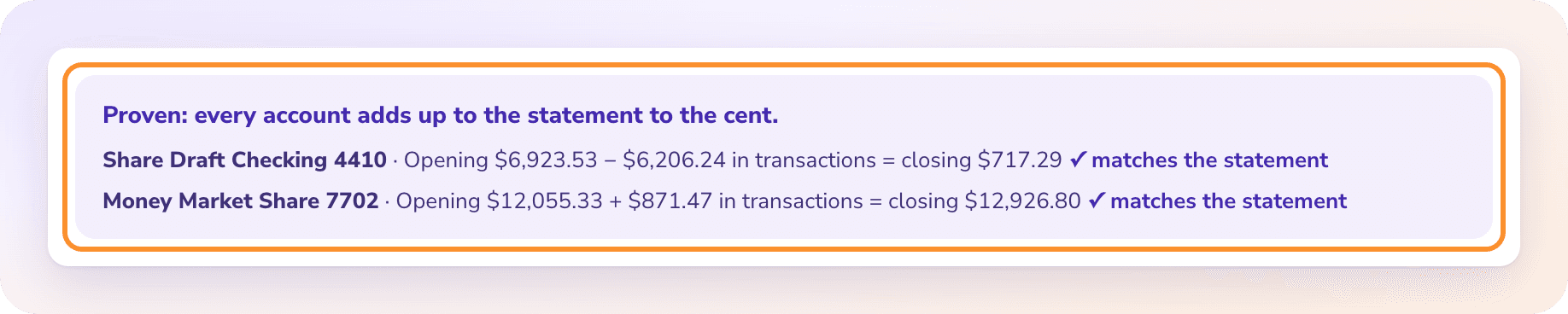
The proof for Checking: 842.16 + 3,051.47 − 1,658.51 = 2,235.12. For Savings: 1,500.00 + 300.00 + 2.47 = 1,802.47. Both match the ending balances Chime printed. The 300.00 transfer appears twice on purpose, out of one account and into the other. In a budget it is not spending, and in books it is a transfer between two accounts, so don’t count it as income on the Savings side.
A FINTECH, NOT A BANK
Why does a Chime statement name a different bank?
Chime is a financial technology company. The accounts are held at The Bancorp Bank, N.A. or Stride Bank, N.A., and the statement says which. If a lender, landlord or court asks for “bank statements”, the Chime PDF is the right document; the partner bank’s name on it is what they will look for.
There are no personal checkbooks. Rent or a bill paid by check goes through Chime Checkbook, where Chime mails the check for you, and it comes out of Checking like any other payment. When you reconcile, there is no stack of numbered checks to chase, just the line on the statement.
Gig work is where Chime statements often end up in a spreadsheet: a year of deposits from Uber, DoorDash, Instacart or Lyft for a tax return or a loan. Twelve monthly PDFs go into ZeraBooks at once and come out as one file. If those deposits are the business, owner-operator bookkeeping shows the same idea for drivers who run their own truck, and AI bookkeeping keeps the books from the statements.
WHAT GOES WRONG
Why does copying a Chime statement into Excel go wrong?
Most of the trouble comes from several accounts living in one PDF.
Accounts run together
Paste the whole PDF and Checking and Savings rows land in one column. Every transfer then counts twice, once as money out and once as money in.
Billing periods that don’t match
Credit Builder runs on a billing cycle, not the calendar month. Its rows sit next to October Checking rows but belong to a different period.
Section headers become rows
Each section starts with its own title and balance lines. Pasted, those are rows with amounts that get summed.
Long descriptions wrap
Card purchases and direct deposits can carry long merchant text that spills onto a second line. In a paste, that second line is a row with no date.
AFTER THE FILE
What can you do with a converted Chime statement?
ONE TAB PER ACCOUNT
Keep Checking and Savings apart.
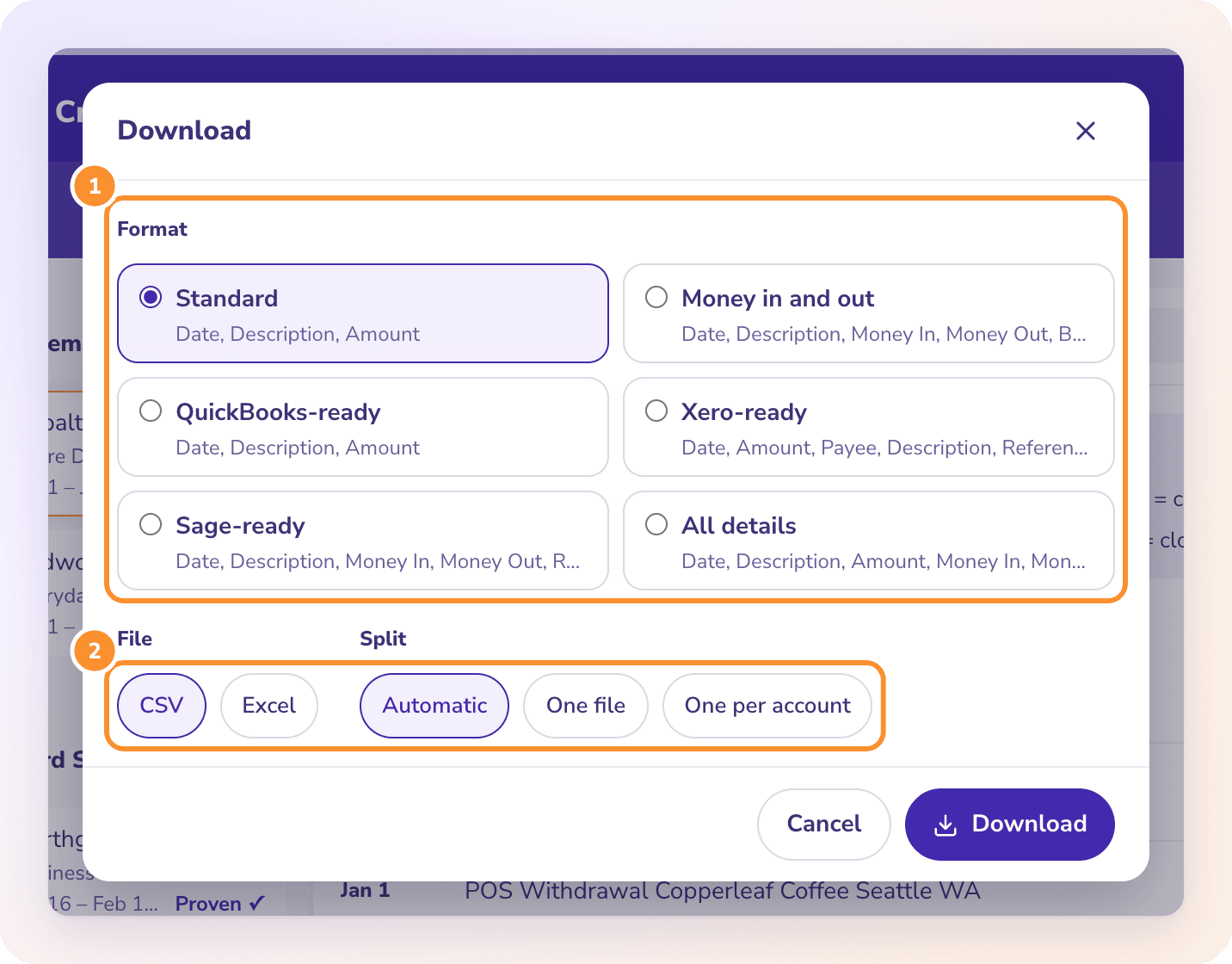
Choose One per account in the Download dialog and each Chime account gets its own tab in Excel, or its own CSV in a ZIP. Or tick several months and download them together as one file. More on joining months is in combine bank statements.
THE PROOF
Every section checked on its own.
Above the rows, Convert shows each account’s opening balance, transactions and closing balance, and marks the statement Proven when every one ties to the cent. A statement that doesn’t tie says which account and by how much.
Yes. Chime is not a bank itself, but the statement covers accounts held at The Bancorp Bank, N.A. or Stride Bank, N.A., and it shows the beginning balance, every transaction and the ending balance like any bank statement.
Can I convert a Chime Credit Builder statement?+
Yes. ZeraBooks reads the Credit Builder section as a card account and proves it on its own billing period, separate from Checking and Savings.
How far back can I get Chime statements?+
Chime’s help center doesn’t give a number of months. Statements you can’t find under Profile, then Documents, can be requested from Chime support.
Does ZeraBooks connect to my Chime account?+
No. ZeraBooks has no bank feeds and never asks for your Chime sign-in. You download the PDF and upload it.
What does converting Chime statements cost?+
Convert is part of the ZeraBooks subscription: 1,000 pages a month for $79 a month billed annually or $149 monthly, after a 7-day trial. A year of Chime statements is usually well under 100 pages. See ZeraBooks pricing.
Damin founded ZeraBooks in 2025 and still talks to the bookkeepers, firms and owners who use it every week. He writes about what he sees in their statements and ledgers, and every page here is checked against the live product before it goes up.