GUIDE · GOOGLE SHEETS
Bank statement to Google Sheets,
as rows you can sort and total.
Google Sheets can’t import a PDF bank statement directly. Convert the PDF to CSV first with a bank statement converter such as ZeraBooks Convert, then in Sheets choose File, Import, Upload, with the separator set to comma and text converted to numbers and dates. ZeraBooks has no Google Sheets connection; the CSV file is the bridge.
7-day trial · card required, nothing charged for 7 days · 1,000 pages a month from $79/month billed annually
YOUR OPTIONS
What are the ways to get a bank statement into Google Sheets?
There are four common routes. Which one fits depends on how far back you need to go and whether you need to show the numbers are complete.
| Route | Works when | Where it falls short |
|---|---|---|
| The bank’s own CSV download | The months you need are still in the bank’s online activity | Many banks only offer recent activity this way, and the file usually has no opening or closing balance to check against |
| A Sheets add-on from the Workspace Marketplace | You are happy to grant an add-on access to your Google account | Asks for permissions to your files; check what each one reads and keeps |
| Copy and paste from the PDF | One short, digital statement | Columns run together, scans paste nothing, and nothing tells you a line was dropped |
| Convert the PDF to CSV, then import | Any PDF statement, including old and scanned ones | Two steps instead of one, and no live link: a new statement means a new import |
Google Drive can open a PDF with Google Docs, which runs text recognition on it. What comes out is lines of text in a document, not cells, so it still has to be split into columns by hand.
Try it on your own documents. One-week free trial, both apps included.
STEP BY STEP
How do you import a converted bank statement into Google Sheets?
The walkthrough for the conversion itself is how to convert a bank statement to CSV. These steps start once you have the file.
- 1
Download the statement as CSV
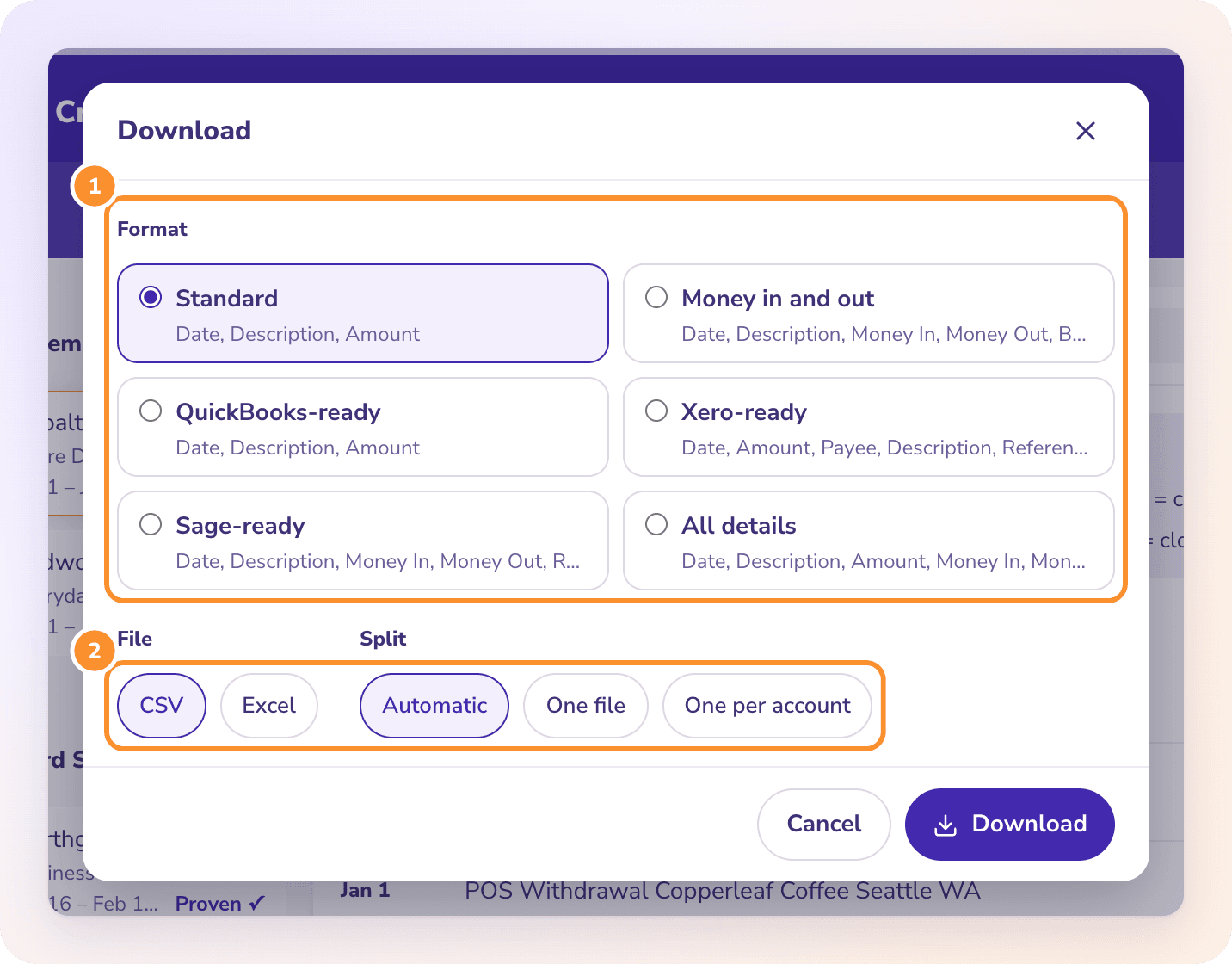
In ZeraBooks Convert, open the statement, check it shows Proven, click Download, choose Standard (Date, Description, Amount) or Money in and out, pick CSV and download. For several months, tick them in the list and click Download n together with One file; see Download your data.
- 2
Set the spreadsheet’s locale first
Open the sheet you’re importing into, go to File, Settings, and set Locale to United States. Convert writes dates as MM/DD/YYYY and amounts like -1234.56, and Sheets reads them by the spreadsheet’s locale.
- 3
Open the import dialog
Choose File, Import, then the Upload tab, and drop the CSV in. Pick an import location: Insert new sheet keeps your existing tabs; Append to current sheet adds a month under the last one.
- 4
Choose the separator and conversion
Set Separator type to Comma, or leave Detect automatically. Leave “Convert text to numbers, dates, and formulas” ticked so amounts arrive as numbers you can total.
- 5
Check the total before you work
Add the opening and closing balance from the statement and run the check formula in the table below. A result of 0.00 means every row arrived.
WHAT BREAKS
Which Google Sheets import settings break bank statement data?
Almost every broken import comes from one of these. The fix is to change the setting and import again, not to edit cells by hand.
| Symptom after import | Cause | Fix |
|---|---|---|
| 03/02/2026 shows as 3 February, and 03/14/2026 stays as text on the left | The spreadsheet locale reads dates day first (United Kingdom, Canada English, Australia and others) | File, Settings, Locale: United States, then import again |
| -1234.56 lands as text, or as 123456 | A locale that uses a comma as the decimal mark, such as Germany or France | Same fix: United States locale, then import again |
| SUM of the Amount column returns 0 | “Convert text to numbers, dates, and formulas” was unticked, so every amount is text | Import again with the box ticked |
| Everything sits in column A | Separator type set to Tab or Custom | Separator type: Comma |
| Descriptions split across two columns | A custom separator such as a space | Separator type: Comma; Convert quotes any description that contains a comma |
| The new month replaced last month | Import location was Replace current sheet | Use Append to current sheet or Insert new sheet |
ZeraBooks writes amounts with a period and two decimals and no thousands separator, so “1,234.56” never appears inside a number. A description that starts with = or + is written with a leading apostrophe so Sheets won’t run it as a formula.
A STARTER SHEET
Which formulas check and total a bank statement in Google Sheets?
For a Standard CSV imported at cell A1: Date in column A, Description in B, Amount in C. Type the statement’s printed opening balance in G1 and its printed closing balance in G2. Add your own Category column in D if you want totals by category.
| Put in | Formula | What it tells you |
|---|---|---|
| G3 | =ROUND(G1+SUM(C2:C)-G2,2) | The completeness check: 0 when the rows add up to the printed closing balance |
| E2, filled down | =$G$1+SUM($C$2:C2) | A running balance; the last row should equal G2 |
| G5 | =SUMIF(C2:C,">0") | Money in for the period |
| G6 | =SUMIF(C2:C,"<0") | Money out for the period, as a negative |
| G8 | =SUMIFS(C2:C,A2:A,">="&DATE(2026,3,1),A2:A,"<"&DATE(2026,4,1)) | Net for March 2026 when several months share one sheet |
| I1 | =QUERY(A1:D,"select D, sum(C) where C is not null group by D label sum(C) 'Total'",1) | Totals by your Category column |
Example: a statement with an opening balance of 8,412.90, deposits of 6,250.00 and withdrawals of 5,987.35 should close at 8,675.55. If G3 shows -48.20 instead of 0, a 48.20 deposit is missing or was imported as text. Downloaded in Money in and out, the Balance column carries the bank’s own running balance when the statement prints one, which makes the gap easy to find. Every format’s columns are listed in Choose a download format.
OTHER STATEMENTS
Does this work for card statements and Excel files too?
Credit card statements
Yes. Charges come out as negative amounts and payments as positive, so the same SUMIF formulas work. The check is previous balance and new balance instead of opening and closing; the guide to credit card statement to Excel walks through it.
An Excel download instead of CSV
Upload the .xlsx to Google Drive and open it with Google Sheets, or import it with File, Import. A workbook with one tab per account keeps its tabs. See how to convert a bank statement to Excel.
Several accounts in one sheet
Download them together with One file and an Account column is added to every row, so a QUERY or a filter can split them again in Sheets.
A whole year
Upload the twelve PDFs, tick them in the list and download them together in one CSV, then import once. The list shows statements uploaded in the last 30 days, so download soon after you upload.
Does ZeraBooks connect to Google Sheets?
No. There is no Google Sheets connection, add-on or Google sign-in permission involved. ZeraBooks Convert gives you a CSV or Excel file, and you import it into Sheets yourself.
Can Google Sheets import a PDF?
No. File, Import accepts CSV, TSV, text and spreadsheet files, not PDFs. The PDF has to be turned into one of those first.
Why are my dates wrong after importing a bank statement CSV?
Your spreadsheet’s locale reads dates day first. ZeraBooks writes MM/DD/YYYY, so 03/02/2026 is March 2. Set File, Settings, Locale to United States and import again.
How do I know no transactions were lost?
Compare against the balances printed on the statement: opening balance plus the sum of the Amount column should equal the closing balance. ZeraBooks runs that check on every account before you download and marks the statement Proven only when it ties to the cent.
Can I add a category column?
Yes, in Sheets after import. ZeraBooks Convert doesn’t categorize. If you want transactions categorized and reconciled as well, AI bookkeeping in the ZeraBooks General Ledger does that and is included in the same subscription.
How much does it cost?
1,000 pages a month are included for $79 a month billed annually or $149 monthly, after a 7-day trial. See ZeraBooks pricing for larger page plans.
ONE-WEEK FREE TRIAL
Convert one statement to CSV.
Import it into Sheets in a minute.
Then 1,000 pages a month from $79 a month billed annually. Pages from a document that couldn’t be read never count.
Last updated October 15, 2026 · Written by Damin Mutti, founder of ZeraBooks