GUIDE · CHART OF ACCOUNTS
A chart of accounts template,
numbered and ready to import.
A small business chart of accounts lists every account the books use, grouped by type and numbered in ranges: assets from 10000, liabilities 20000, equity 30000, revenue 40000, cost of revenue 50000, operating expenses 60000, other income 80000, other expenses 90000. Thirty to sixty accounts cover most businesses. The template below imports straight into ZeraBooks general ledger software.
7-day trial · card required, nothing charged for 7 days · then $79/month billed annually or $149 monthly
DEFINITION
What is a chart of accounts?
The full list of accounts a business files every transaction under, each with a name, a type and usually a number. The type decides whether the account appears on the balance sheet or the profit and loss, and the number keeps the reports in order.
ACCOUNT TYPES
What are the account types in a chart of accounts?
Accounting has five basic types: assets, liabilities, equity, revenue and expenses. ZeraBooks splits revenue into two and expenses into three, so the profit and loss can show gross profit and keep one-off items apart. That makes eight, each with its own number range.
| Type | Numbers from | What goes there | Report |
|---|---|---|---|
| Assets | 10000 | What the business owns: bank accounts, money owed to you, inventory, equipment | Balance sheet |
| Liabilities | 20000 | What it owes: credit cards, loans, sales tax collected, bills not yet paid | Balance sheet |
| Equity | 30000 | The owners’ stake: money put in, draws, retained earnings | Balance sheet |
| Revenue | 40000 | Income from the main business | Profit and loss |
| Cost of Revenue | 50000 | Direct costs of what you sell | Profit and loss |
| Operating Expenses | 60000 | Everyday running costs: rent, software, wages | Profit and loss |
| Other Income | 80000 | Income outside the main business, such as interest earned | Profit and loss |
| Other Expenses | 90000 | Costs outside the main business, such as interest paid | Profit and loss |
Revenue less cost of revenue is gross profit; less operating expenses is operating profit; then other income and other expenses give net income. That is the order a profit and loss statement reads in, and why the numbers run the way they do.
Try it on your own documents. One-week free trial, both apps included.
THE TEMPLATE
What should a small business chart of accounts look like?
A starter chart of 44 accounts for a small business that sells goods, services or both. Delete what you don’t use. Numbers go up by 100 so there is room to add accounts in between, and sub-accounts sit 10 apart under their parent.
| Number | Account | Type | What goes there |
|---|---|---|---|
| 10100 | Business Checking | Bank | Your main operating account, named after your bank. |
| 10200 | Business Savings | Bank | Cash set aside for taxes or a reserve. |
| 11100 | Inventory | Assets | Stock bought for resale at cost until it sells. |
| 11200 | Prepaid Expenses | Assets | Bills paid ahead for months still to come. |
| 11210 | Prepaid Insurance | Assets, under Prepaid Expenses | An annual policy paid up front and used up month by month. |
| 15100 | Equipment | Assets | Computers and machines kept for more than a year. |
| 15200 | Vehicles | Assets | Business vehicles at cost. |
| 15900 | Accumulated Depreciation | Assets | The part of equipment and vehicle cost already expensed. Carries a credit balance. |
| 20100 | Business Credit Card | Credit Card | One account per card you get statements for. |
| 22100 | Sales Tax Payable | Liabilities | Sales tax collected from customers and not yet paid to the state. |
| 22200 | Payroll Liabilities | Liabilities | Withholding and payroll taxes owed and not yet paid. |
| 22300 | Accrued Expenses | Liabilities | Costs already incurred but not yet billed. |
| 25100 | Business Loan | Liabilities | Loan principal owed. Only the interest is an expense. |
| 30100 | Owner Contributions | Equity | Money the owner puts into the business. |
| 30200 | Owner Draws | Equity | Money the owner takes out for personal use. Not an expense. |
| 40100 | Product Sales | Revenue | Sales of goods. |
| 40200 | Service Revenue | Revenue | Fees for work you do. |
| 40300 | Sales Returns and Refunds | Revenue | Refunds to customers. Kept apart so gross sales stay visible. |
| 50100 | Cost of Goods Sold | Cost of Revenue | The cost of the stock that sold this month. |
| 50200 | Freight In | Cost of Revenue | Shipping and duties to bring stock to you. |
| 50300 | Direct Subcontractors | Cost of Revenue | Outside workers paid to deliver a specific customer job. |
| 60100 | Advertising and Marketing | Operating Expenses | Ads and promotion. |
| 60200 | Bank Fees | Operating Expenses | Monthly account and wire fees. |
| 60300 | Merchant Processing Fees | Operating Expenses | Card and payment platform fees. |
| 60400 | Insurance | Operating Expenses | General liability and other business policies. |
| 60500 | Meals | Operating Expenses | Business meals. Kept apart because tax rules treat them differently. |
| 60600 | Office Supplies | Operating Expenses | Paper and small items used up in the office. |
| 60700 | Professional Fees | Operating Expenses | Outside advisers. |
| 60710 | Accounting and Bookkeeping | Operating Expenses, under Professional Fees | Your accountant and bookkeeper. |
| 60720 | Legal Fees | Operating Expenses, under Professional Fees | Your lawyer. |
| 60800 | Rent | Operating Expenses | Office or shop rent. |
| 60900 | Repairs and Maintenance | Operating Expenses | Keeping equipment and premises working. |
| 61100 | Software and Subscriptions | Operating Expenses | Monthly and annual software. |
| 61200 | Telephone and Internet | Operating Expenses | Phone and internet service. |
| 61300 | Travel | Operating Expenses | Flights and hotels for business trips. |
| 61400 | Utilities | Operating Expenses | Power and water for the premises. |
| 61500 | Vehicle Expenses | Operating Expenses | Fuel and upkeep for business vehicles. |
| 62100 | Wages and Salaries | Operating Expenses | Gross pay to employees. |
| 62200 | Payroll Taxes | Operating Expenses | The employer share of payroll taxes. |
| 62300 | Contract Labor | Operating Expenses | Freelancers not tied to a customer job. |
| 63100 | Depreciation Expense | Operating Expenses | The monthly share of equipment and vehicle cost. |
| 63200 | Taxes and Licenses | Operating Expenses | Business licenses and non-income taxes. |
| 80100 | Interest Income | Other Income | Interest earned on savings. |
| 90100 | Interest Expense | Other Expenses | Interest paid on loans and cards. |
Not in the list: Accounts Receivable, Accounts Payable, Undeposited Funds, Opening Balance Equity and Retained Earnings. ZeraBooks creates those five itself because the books need them, and they can’t be renamed or deactivated. The bank and card rows are placeholders: name them after your real accounts.
ADDING ACCOUNTS
When should you add a new account or sub-account?
Every account is a line someone has to read on every report. Add one only when it answers a question you actually ask.
Add an account when the total matters on its own
If you would look at the number every month, or your tax preparer asks for it at year end, it deserves an account. Meals are a good example: tax rules treat them differently from other costs.
Add a sub-account when you want the detail and the total
Accounting and Legal Fees under Professional Fees show each line and still roll up to one total. In ZeraBooks a sub-account takes its parent’s type, so it can’t end up in the wrong section of the reports.
Keep it in the memo when you only need to find it later
Which supplier, which trip, which customer: that belongs in the description, not a new account. A chart with one account per supplier is unreadable within a year.
Split revenue by how you earn it
One revenue account per stream (products, services, wholesale, online) shows which one is growing. Two or three lines is plenty for most businesses.
Deactivate instead of deleting
When you stop using an account, deactivate it. Its history stays on past reports and nothing new can be booked to it. ZeraBooks doesn’t delete categories at all.
COMMON MISTAKES
What are the most common chart of accounts mistakes?
Owner draws booked as expenses
Money the owner takes out is equity, not a cost of running the business. Booking it as an expense understates profit, and the tax return built on it is wrong. It goes to Owner Draws (30200 in the template).
Loan payments booked as expenses
Only the interest is an expense. The rest of each payment reduces the loan balance in liabilities. A $1,250.00 payment that is $1,020.00 principal and $230.00 interest is $1,020.00 to Business Loan and $230.00 to Interest Expense.
Too many accounts
Two hundred accounts make reports nobody reads and give the same cost three possible homes. Most small businesses need 30 to 60; start lean and add one when a question needs it.
Sales tax in revenue
Tax you collect belongs to the state. It goes to Sales Tax Payable, and paying the state clears it. In revenue, it inflates sales and the payment to the state looks like an expense.
Equipment expensed when bought
A $4,800.00 machine you will use for years is an asset, written off through depreciation. Your tax preparer may expense it on the return; the books should still show you own it.
Transfers booked as income
Moving money from savings to checking, or paying the credit card, is neither income nor an expense. In ZeraBooks the category of a transfer is the other account, so it stays off the profit and loss. See Transfers, credit-card payments and owner draws.
BY INDUSTRY
How does a chart of accounts change by industry?
The types and ranges stay the same. What changes is the detail inside revenue and cost of revenue, plus a few balance sheet accounts the industry needs.
Online stores
Revenue by channel, a clearing account for each platform’s payouts, merchant fees, and inventory with cost of goods sold. See bookkeeping for ecommerce.
Nonprofits
Revenue split into contributions, grants and program fees, with gifts tracked by donor restriction, and expenses read by program, management and fundraising. See bookkeeping for nonprofits.
Restaurants
Food and beverage sales apart, food and beverage cost apart, and tips and sales tax as liabilities. See bookkeeping for restaurants.
Contractors
Job costs laid out the way you bid them, plus retainage receivable and payable. See bookkeeping for contractors.
Service businesses
Often no inventory and no cost of goods sold at all. Cost of revenue holds the direct labor and subcontractors that deliver the work, or stays empty.
IN ZERABOOKS
How do you set up a chart of accounts in ZeraBooks?
A new company in ZeraBooks starts with Set up your chart of accounts, which offers three ways in. Two of them use this page. See Set up your chart of accounts.
- 1
Add your banks and cards first
Every path starts by asking for the bank accounts and credit cards you’ll upload statements for. ZeraBooks never invents them; it only uses the real accounts you add.
- 2
Import the template, or your old chart
Choose Import CSV, Excel, or PDF and drop the template, or a chart exported from QuickBooks, Xero, Sage or any spreadsheet. A file in the template’s format is read directly; anything else is read by AI. See Import a chart of accounts.
- 3
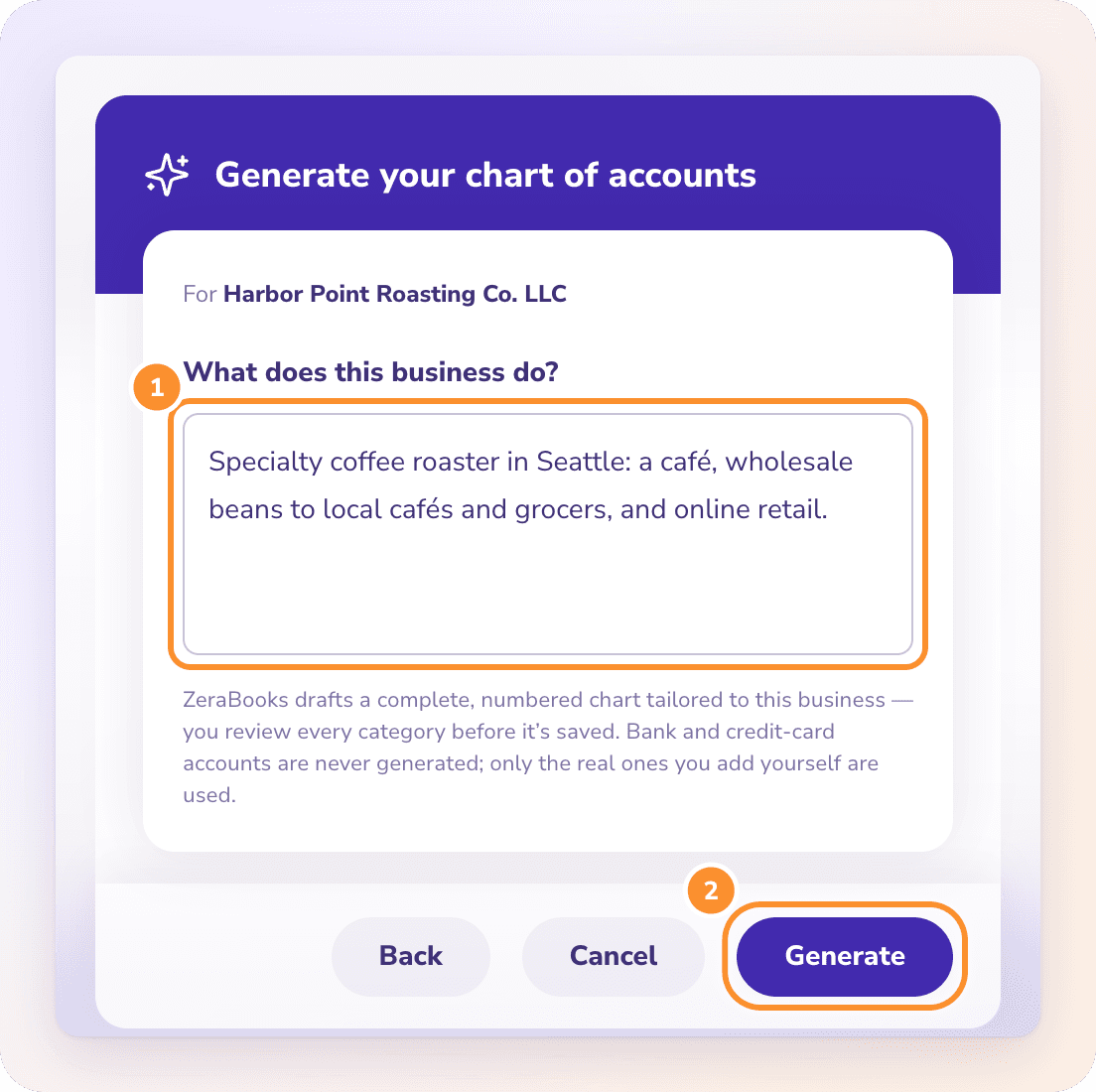
Or have Generate with AI draft one
Describe what the business sells, to whom and how, and ZeraBooks drafts a numbered chart in about 10 to 20 seconds. Name each way you earn money so each gets its own revenue category. See Generate categories with AI.
- 4
Review every row
Rows are grouped by type. Rename or remove anything before you click Import or Add. Nothing is saved until then, and importing only adds: existing categories are kept as they are.
- 5
Change it as the business changes
Add, rename, renumber or deactivate categories any time in the Category Manager. Leave a number blank and ZeraBooks assigns the next free one in the type’s range.
FREE TEMPLATE
Is there a chart of accounts template I can download?
The 44-account starter chart above as a CSV file, in the column layout the ZeraBooks import reads directly: Category Name, Category Number, Parent Name, Parent Category Number, Type, Status, Description. Open it in Excel or Google Sheets, delete what you don’t need and rename the bank and card rows.
Chart of accounts template (CSV)
Forty-four numbered accounts across all eight types, with two sub-accounts already set up under their parents. Free to use; no sign-up.
Using other software?
The columns are plain CSV, so the file also works as a starting list for any spreadsheet. Only Category Name and Type are required by the ZeraBooks import; the rest are optional.
Then keep it tidy
A quick look at the chart belongs in the monthly routine: any new account, anything sitting in Uncategorized, anything booked to the wrong type. The month-end close checklist shows where it fits.
How many accounts should a small business have?
Usually 30 to 60. The template has 44, plus the five ZeraBooks creates itself. Fewer accounts used consistently beat more accounts used loosely.
Do I have to number my accounts?
No, but numbers keep reports in a sensible order and make an account easy to find. In ZeraBooks, a category without a number gets the next free one in its type’s range.
Can I import my chart of accounts from QuickBooks or Xero?
Yes. Export the chart of accounts from QuickBooks, Xero or Sage as a spreadsheet or PDF and upload it as it is. ZeraBooks reads it, and you review every row before anything is saved. The import brings categories only, not balances or transactions.
Can AI build my chart of accounts?
Yes. Generate with AI drafts a numbered chart from a sentence or two about the business, for you to review before it is saved. It never creates bank or card accounts, and it is only offered while the chart is still empty.
Is a chart of accounts the same as a general ledger?
No. The chart is the list of accounts. The general ledger is every transaction posted to those accounts. The chart is the table of contents; the ledger is the book.
How much does ZeraBooks cost?
One subscription with the General Ledger and the Converter: $79 a month billed annually or $149 monthly, after a 7-day trial. See ZeraBooks pricing. Rather not keep the books yourself? Our bookkeeping services set up the chart and do the monthly work for you.
ONE-WEEK FREE TRIAL
Import the template and start your books.
Free for 7 days.
Drop the CSV into ZeraBooks, or describe the business and let AI draft the chart, then upload your statements. From $79 a month billed annually.
Last updated October 17, 2026 · Written by Damin Mutti, founder of ZeraBooks