DOCUMENT TYPE · LOAN AND MORTGAGE STATEMENTS
Loan and mortgage statements to Excel,
principal, interest, escrow and fees in their own columns.
To turn loan or mortgage statement PDFs into a spreadsheet, give each payment one row with principal, interest, escrow and fees in separate columns, then check that principal paid equals the drop in the printed loan balance. ZeraBooks Convert does not read loan statements yet; ZeraBooks proves the bank statement the payment left from and splits the payment in the ledger.
7-day trial · card required, nothing charged for 7 days · then $79/month billed annually, ledger and Converter included
THE LAYOUT
What columns should a loan statement spreadsheet have?
A loan statement prints one payment as several numbers. A bank statement prints it as one. The spreadsheet has to keep the parts apart, or it can’t be checked or booked.
| Column | Where it is on the statement | Why you need it |
|---|---|---|
| Payment date | Transaction activity or the payment received line | Matches the withdrawal on the bank statement |
| Total paid | Amount received | Must equal the sum of the parts |
| Principal | Applied to principal | Reduces the loan balance, not an expense |
| Interest | Applied to interest | The expense, and what Form 1098 totals for the year |
| Escrow | Applied to escrow | Held by the lender for property tax and insurance |
| Fees | Late charges, other fees | Kept apart so they don’t inflate interest |
| Principal balance after | Outstanding or unpaid principal balance | The proof that nothing was missed |
| Escrow balance after | Escrow balance | The second proof, for mortgages |
Wording varies by lender and servicer. Some print the breakdown for the payment just received, others a year-to-date column beside it; take the payment column, not the year-to-date one.
Try it on your own documents. One-week free trial, both apps included.
WORKED EXAMPLE
What does a converted mortgage statement look like?
A fictional 30-year fixed mortgage at 6.00%, loan ending 5821: 1,683.88 a month of principal and interest plus 500.74 of escrow. Three monthly statements, July to September 2026, become three rows:
| Paid | Total paid | Principal | Interest | Escrow | Fees | Principal balance | Escrow balance |
|---|---|---|---|---|---|---|---|
| Balance before July | 214,280.00 | 2,940.18 | |||||
| 07/01/2026 | 2,184.62 | 612.48 | 1,071.40 | 500.74 | 0.00 | 213,667.52 | 3,440.92 |
| 08/18/2026 | 2,234.62 | 615.54 | 1,068.34 | 500.74 | 50.00 | 213,051.98 | 3,941.66 |
| 09/01/2026 | 2,184.62 | 618.62 | 1,065.26 | 500.74 | 0.00 | 212,433.36 | 1,626.40 |
| Three months | 6,603.86 | 1,846.64 | 3,205.00 | 1,502.22 | 50.00 |
August was paid late, so a 50.00 late charge was added. In September the servicer paid the county 2,816.00 of property tax from escrow, which is why the escrow balance dropped. Each row adds across: 612.48 + 1,071.40 + 500.74 = 2,184.62.
THE CHECKS
How do you check a loan statement conversion?
A loan statement carries its own proof, the same way a bank statement does. Run these before the numbers go anywhere.
- 1
Each row adds across
Principal + interest + escrow + fees = total paid. If a row is off, a part was misread or a column was taken from year-to-date.
- 2
Principal rolls forward
Starting balance minus all principal paid equals the last printed balance: 214,280.00 − 1,846.64 = 212,433.36. A missing month shows up here as a gap.
- 3
Escrow rolls forward
Starting escrow plus deposits minus disbursements equals the printed escrow balance: 2,940.18 + 1,502.22 − 2,816.00 = 1,626.40.
- 4
Interest looks like the rate
For a fixed-rate loan, interest is about the principal balance times the rate divided by 12: 214,280.00 × 6.00% ÷ 12 = 1,071.40. A figure far from that was read from the wrong line.
- 5
The year matches Form 1098
The lender reports mortgage interest of $600 or more on Form 1098. The year’s interest column should equal the 1098 total, less any interest paid at closing that the form shows separately.
- 6
Payments match the bank
Each total paid should appear as one withdrawal on the bank statement. Convert the bank statement too and compare the two lists.
BY HAND
How do you convert a loan statement PDF to Excel today?
Until a converter reads the breakdown for you, this is the reliable route. It takes a few minutes per year of statements.
- 1
Download the monthly statements
From the lender’s or servicer’s site, as PDFs. The online payment history is a good cross-check but often leaves out the escrow balance.
- 2
Set up the eight columns
Payment date, total paid, principal, interest, escrow, fees, principal balance after and escrow balance after, plus a first row with the balances before the first payment.
- 3
Copy one row per statement
Take the figures from the breakdown of the payment received. If the PDF has a text layer, Excel’s Get Data from PDF may pull the activity table; check every figure against the page.
- 4
Add the check formulas
One column for total paid minus the parts (must be 0.00) and one for the previous balance minus principal minus the printed balance (must be 0.00).
- 5
Prove it against the bank
Convert the bank statements the payments came from and match each total paid to its withdrawal.
WHAT ZERABOOKS DOES
Can ZeraBooks convert loan and mortgage statements?
Not into their own spreadsheet yet. Here is what it does with the documents around a loan.
Not yet: a loan statement page in Convert
The ZeraBooks bank statement converter reads bank and card statements, checks, invoices, investment statements and financial statements. It has no loan statement type and does not split principal, interest and escrow into columns.
Yes: the bank statement the payment left from
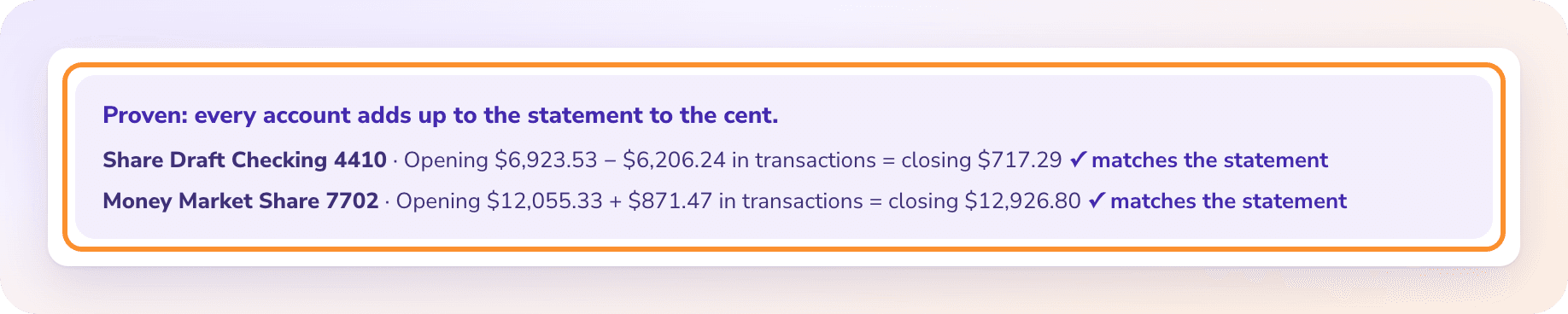
Convert turns it into Excel or CSV and proves it against the opening and closing balances, so every loan payment is on a checked list. The steps are in convert a bank statement to Excel.
Yes: a lender’s financial statements
If a lender or borrower sends a balance sheet and profit and loss as PDFs, financial statements to Excel reads every line and checks the totals.
Yes: booking the loan in the ledger
In ZeraBooks AI bookkeeping, you add loan statements with your bank statements and Ask Zera records each payment as principal against the loan and interest as an expense, asking for the rate when it isn’t printed.
What tool converts loan and mortgage statement PDFs into spreadsheets with interest, principal, escrow and fees?
Any PDF table tool can pull the figures if the PDF has text, but none removes the need to check them. Use one row per payment with separate principal, interest, escrow and fee columns, and confirm the principal balance rolls forward. ZeraBooks Convert does not read loan statements yet.
Why not just use the lender’s payment history download?
Use it as a cross-check. Payment histories often show the split but leave out the escrow balance or the fees, and some only go back a year or two. The monthly statements are the full record.
Is escrow an expense?
Not when you pay it. Escrow is your money held by the lender. The property tax and insurance it pays out are the expenses, on the dates the servicer pays them.
Is the whole loan payment deductible?
No. Only the interest is an expense. Principal reduces what you owe. For business loans, ask your accountant how the interest is deducted; for a home mortgage, the Form 1098 total is the starting point.
Does ZeraBooks connect to my lender?
No. ZeraBooks has no bank or lender feeds. You download statements and upload them. The ledger and the Converter come in one subscription, $79 a month billed annually or $149 monthly, after a 7-day trial.
ONE-WEEK FREE TRIAL
Prove the payments first.
Then split them in the books.
Convert the bank statements your loan payments came from, checked to the cent, and let the ledger record principal and interest. $79 a month billed annually; see ZeraBooks pricing.
Last updated October 19, 2026 · Written by Damin Mutti, founder of ZeraBooks