GUIDE · MONTH-END CLOSE
Month-end close checklist,
in the order the work happens.
A month-end close checklist for a small business runs in order: set the cut-off, reconcile every bank and card account to its printed statement, pair transfers, clear receivables and payables, post accruals, payroll and depreciation, check sales tax owed, compare the P&L with last month, then lock the period. The ZeraBooks general ledger reconciles and locks from uploaded statements.
7-day trial · card required, nothing charged for 7 days · then $79/month billed annually or $149 monthly
THE CHECKLIST
What are the steps of a month-end close?
Each step leans on the one before it. Adjusting entries made before the bank accounts tie usually have to be redone, so the reconciliations come early and the review comes last.
- 1
Set the cut-off
Decide which date ends the month, normally the last calendar day, and hold to it. A sale invoiced on the 31st belongs to this month; one invoiced on the 1st does not, even if the work was done the week before. Write down any exceptions you make.
- 2
Gather every statement
Bank, credit card, loan and merchant processor statements, plus the payroll provider’s register. Bank statements arrive in the first few days. Card statements close on their own cycle, often mid-month, so the card statement that ends inside the month is the one to reconcile now.
- 3
Reconcile each bank account to the printed statement
Your ledger balance for the account must equal the closing balance printed on the statement, after allowing for checks not yet cashed and deposits not yet credited. Use the statement, not the online balance on the day you sit down, which already includes next month’s activity.
- 4
Reconcile each credit card to its statement
Previous balance plus charges, fees and interest, minus payments and credits, must equal the new balance. If the card statement is only a PDF, our guide to credit card statement to Excel walks through reading one line by line.
- 5
Pair transfers and card payments
Money moved between your own accounts, and the payment from checking to the card, appear on two statements. Each pair should net to nothing on the P&L. A transfer recorded on only one side shows up as phantom income or expense.
- 6
Clear receivables
Match every customer deposit to the invoice it pays, then read the accounts receivable aging as of the last day. Anything 90 days past due needs a call, and anything you will never collect needs a write-off.
- 7
Enter unpaid bills
Bills dated in the month but not yet paid go into accounts payable, so this month carries the cost. Check the payables aging against the vendor statements you have.
- 8
Post accruals and prepaids
Accrue costs you incurred but haven’t been billed for, such as a utility bill that arrives on the 12th. Spread payments that cover several months, such as a $2,400 annual insurance premium, at $200 a month.
- 9
Record payroll from the register
The bank shows net pay and tax withdrawals. Gross wages, employer taxes and the withholdings you owe come from the payroll provider’s register, as a journal entry. Accrue wages for days worked but not yet paid if the amount matters.
- 10
Post depreciation and loan interest
Depreciate fixed assets for the month, and split each loan payment between interest expense and the loan balance. A payment booked entirely against the loan overstates profit by the interest.
- 11
Tie out sales tax
The sales tax payable balance should equal tax collected on the month’s taxable sales, less what you remitted. Sales tax collected is the state’s money, never revenue.
- 12
Review the P&L against last month
Put this month next to last month and read every line that moved by more than you can explain. Then scan the balance sheet for negative balances, an Uncategorized total and suspense accounts. The profit and loss statement guide shows what each line should hold.
- 13
Lock the period
Once the numbers have gone to anyone, close the month so a late edit can’t change them. Reopen deliberately if a correction is needed, then close again.
Try it on your own documents. One-week free trial, both apps included.
WHO AND HOW LONG
Who does each step, and how long does a month-end close take?
A fictional business with two bank accounts, one credit card, about 300 statement lines a month and a dozen customer invoices. The work itself is under a day; most of the calendar time is waiting for statements.
| Step | Usually done by | Working day | Time it takes |
|---|---|---|---|
| Cut-off and gathering statements | Owner or office manager | Days 1 to 5 | 30 minutes |
| Bank and card reconciliations | Bookkeeper | Days 3 to 7 | 1 to 2 hours |
| Transfers, receivables and payables | Bookkeeper | Days 3 to 7 | 1 hour |
| Accruals, prepaids, payroll, depreciation | Bookkeeper, with the payroll register | Days 5 to 8 | 1 hour |
| Sales tax tie-out | Bookkeeper | Before the return is due | 20 minutes |
| P&L review and questions | Owner and bookkeeper together | Days 8 to 10 | 45 minutes |
| Lock and send reports | Bookkeeper | Day 10 | 15 minutes |
A business that closes within 10 working days of month end is doing well. Businesses that skip months pay for it later: a reconciliation done six months late means finding a $40 difference among 1,800 lines instead of 300.
COMMON MISSES
What do small businesses most often miss at month end?
None of these is unusual. Each one makes the P&L wrong in a way that looks plausible, which is why they survive.
The card payment counted as an expense
The charges on the card are the expenses. The payment from checking to the card is a transfer. Booking both doubles the month’s card spending.
Reconciling to the wrong number
Comparing the ledger to the bank’s current online balance, or to last month’s ledger, proves nothing. The only balance that counts is the one printed on the statement for the last day of the period.
An annual payment hitting one month
A $6,000 software renewal expensed in March makes March look like a loss and the other 11 months look better than they were.
Payroll at net pay only
Recording only what left the bank leaves out withholdings and the employer’s share of taxes. Wages look low and the payroll tax liability is missing from the balance sheet.
Sales tax booked as sales
When a deposit includes sales tax and the whole deposit goes to revenue, profit is overstated and the tax owed is nowhere on the books.
Editing a month that was already reported
A recategorized line in a month the lender or accountant already has means two versions of the same month. Locking the period stops it.
IN ZERABOOKS
Which parts of the month-end close does ZeraBooks do?
ZeraBooks has no separate checklist screen. Reconciliation runs as each statement is uploaded, and month-end entries arrive in Autopilot for approval. Below is what it does and what it leaves to you.
Bank and card reconciliation
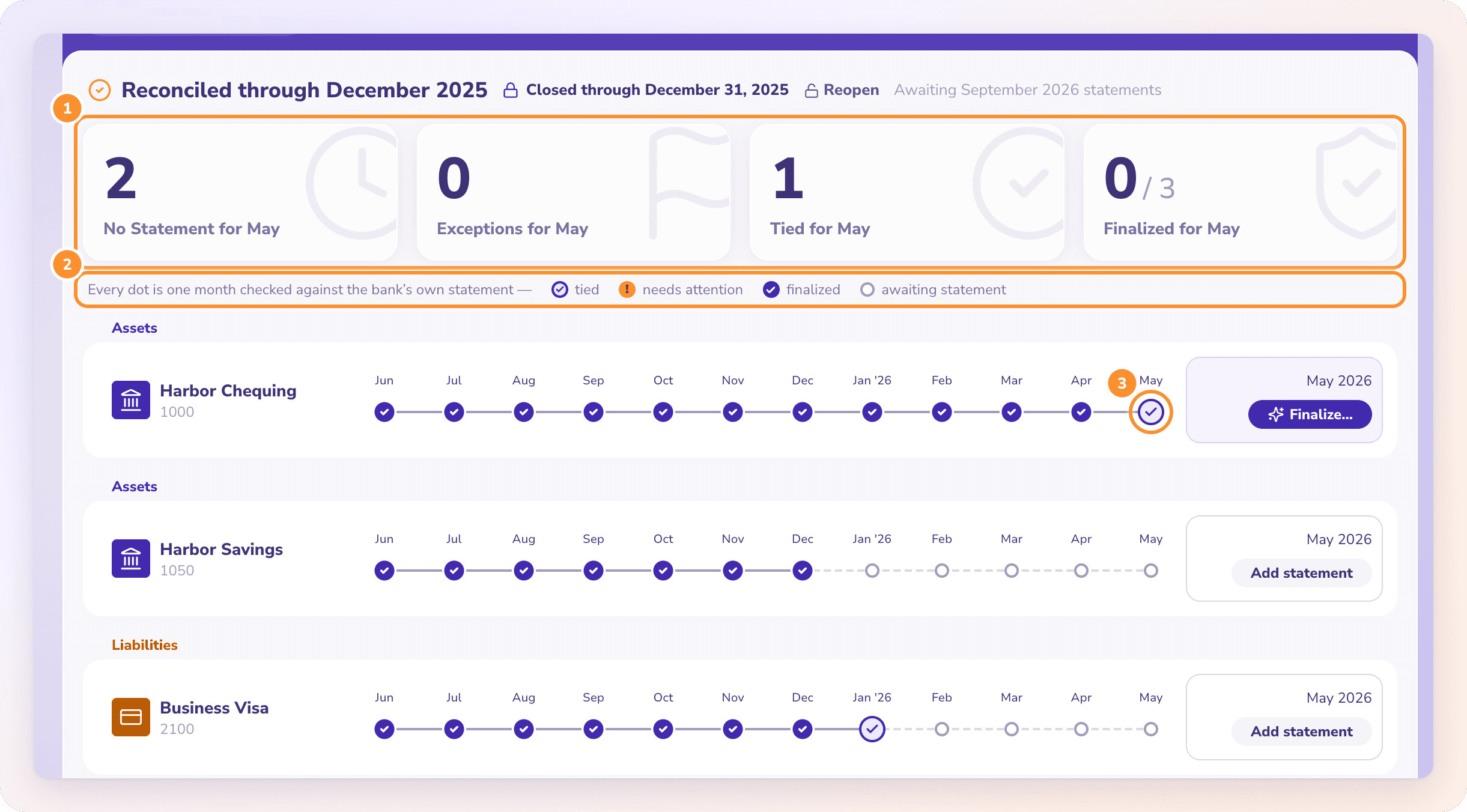
Every uploaded statement is checked three ways: the statement adds up, its opening balance meets the previous closing balance, and the ledger agrees with the printed closing balance. A month that ties can be finalized; one that doesn’t shows the difference. More in our bank reconciliation software page.
Transfers and card payments
A line becomes a transfer when its description names the other account, when it reads like a card payment and only one account fits, or when the same amount is on another of your accounts within 3 days.
Month-end entries from Autopilot
Straight-line depreciation, the interest part of loan payments at a rate you give it, and spreading prepaid expenses, each as a journal dated the last day of the month and undoable from the log. It also asks about monthly vendors that didn’t bill. How each works: Month-end entries.
Receivables and payables
Deposits are matched to open invoices and bill payments to their bills. A/R and A/P aging run as of the last day of any period, with a check that the total ties to the receivables or payables balance.
The review
The Autopilot page shows a monthly digest with the month’s income, expenses and result, and notes on categories that changed noticeably from the month before, such as “Software rose $120 to $480.” Every figure on the P&L opens to the transactions behind it.
Sign-off and the lock
Close books through a date and nothing on or before it can be added or changed until you reopen, with an optional closing password. With Sign off and close months turned on, Autopilot can close for you once every account is signed off with no open questions, at least 15 days after the month ended. See Close and reopen the books.
What stays with you
ZeraBooks doesn’t run payroll, file sales tax or connect to your bank. You record the payroll register as a journal entry, enter sales tax on invoice lines (it isn’t calculated for you), and upload statements as PDF or CSV. Other accruals are journal entries you record yourself or have Ask Zera record.
How long should a month-end close take for a small business?
For a business with a few bank and card accounts, the work is usually half a day to a day, finished within 10 working days of month end. Waiting for statements takes longer than the work. Much bigger delays usually mean last month wasn’t closed either.
What is the difference between reconciling and closing the month?
Reconciling proves each account agrees with its statement. Closing locks the period so nothing in it changes. In ZeraBooks, finalizing signs off one account’s month and reopens on its own if its numbers change; closing the books locks every date on or before the close date.
Do I need to close the books every month if I only file taxes once a year?
You can wait, but a year of statements reconciled in March is much harder than twelve months done one at a time, and you run the business all year without accurate numbers. A lender or buyer will also want monthly statements that already tie.
Should I reconcile my credit card to the calendar month or the statement period?
Reconcile it to its statement, because that is the only document with a printed balance. Charges after the closing date fall on the next statement. If a large one belongs to this month, accrue it with a journal entry.
Does ZeraBooks have a month-end close checklist screen?
No. Month-end entries arrive in Autopilot and months are signed off and closed in Reconciliations. The month-end report pack is built in Custom Reports, where Duplicate Report starts next month from this month’s layout. Reports aren’t scheduled. See Create a month-end report.
Can I change a month after I close it?
Yes, by reopening the books in Reconciliations. Reopening opens every closed date again, not just one month. Make the correction, then close through the same date again.
How much does ZeraBooks cost?
$79 a month billed annually or $149 monthly, after a 7-day trial, with the General Ledger and the statement Converter in one subscription. See ZeraBooks pricing. If you would rather someone else closed the month, ZeraBooks also offers done-for-you bookkeeping.
ONE-WEEK FREE TRIAL
Upload last month’s statements.
See which accounts tie and which don’t.
ZeraBooks checks each statement, pairs the transfers and drafts the month-end entries for your approval. Then $79 a month billed annually, or $149 monthly.
Last updated October 14, 2026 · Written by Damin Mutti, founder of ZeraBooks