A bank statement converter for accounting firms, tailored to your firm for free.
ZeraBooks tailors its bank statement converter to your accounting firm at no cost. We test it on the statements your clients actually send and set up a download layout that matches your workpapers or import template. Every statement comes out as Excel or CSV, checked against its printed balances. References from top-10 U.S. accounting firms are available on request.
A 30-minute call with Damin, the founder. Bring a sample statement.
WHAT THE TAILORING COVERS
What does the free tailoring include?
Light changes that make the Converter fit how your firm already works. It takes a call and a few sample documents, not a project.
Your clients’ statements, tested first
Send a few statements from the banks and card issuers your clients use most. We run them before your team does, and if a layout reads badly we fix how ZeraBooks reads it.
A download layout that matches your template
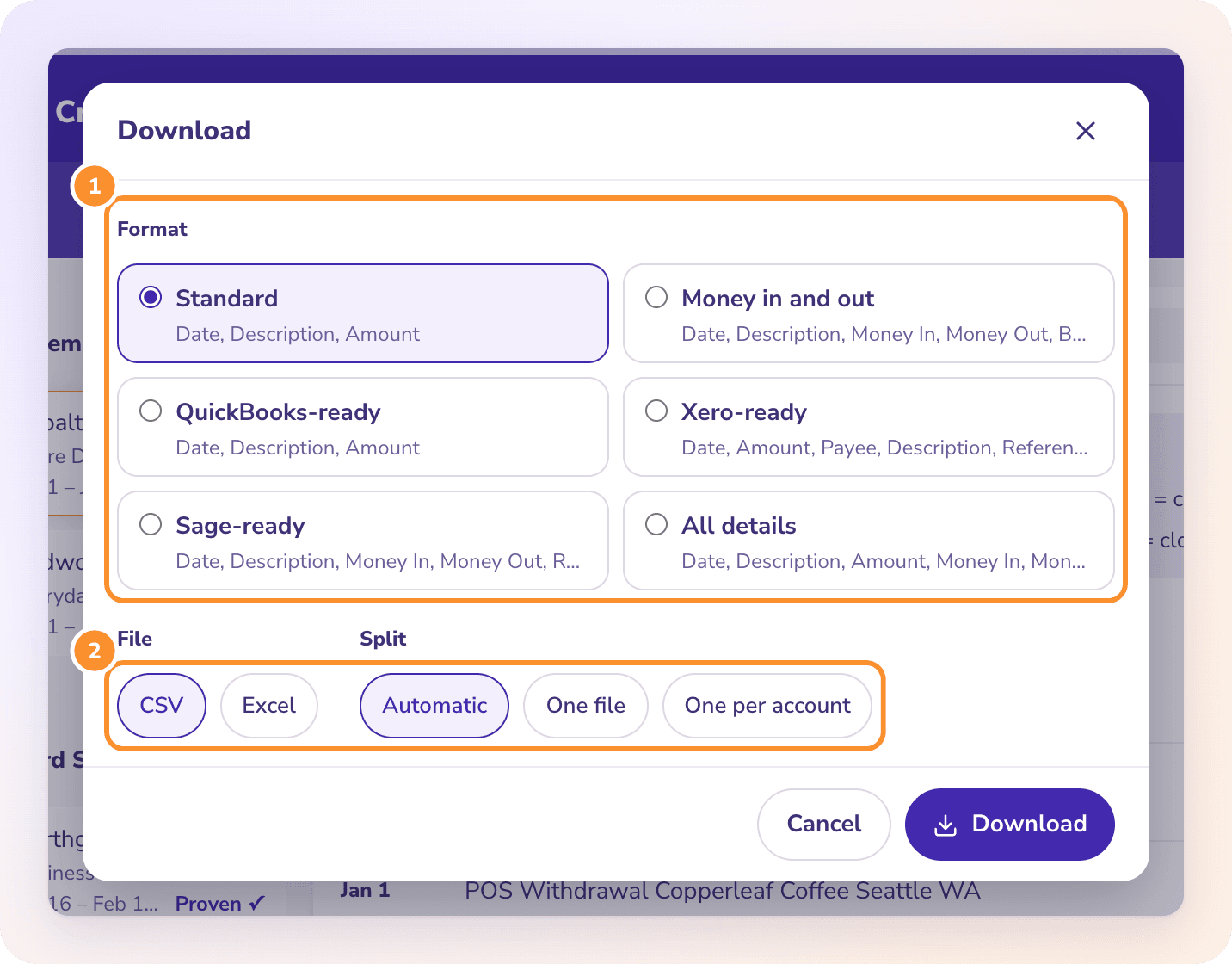
The public Converter has six ready-made formats for statements. For your firm we set up a layout in the column order and headings your workpapers or import template expect, so the file goes straight in.
A setup call with the founder
Damin walks your team through uploads, the balance check and downloads on your own documents, and you get a direct line to him afterwards.
What it doesn’t cover
New document types, a dedicated instance under your firm’s name, connections to your systems and volume above 5,000 pages a month are full custom work. That lives on ZeraBooks Enterprise, scoped and priced with each firm.
Tell us what your firm needs. You’ll pick a time with Damin right after.
Used for financial data extraction by teams at top-10 U.S. accounting firms. Customer references are available on request.
CHECKED TO THE CENT
Every statement checked before anyone downloads it.
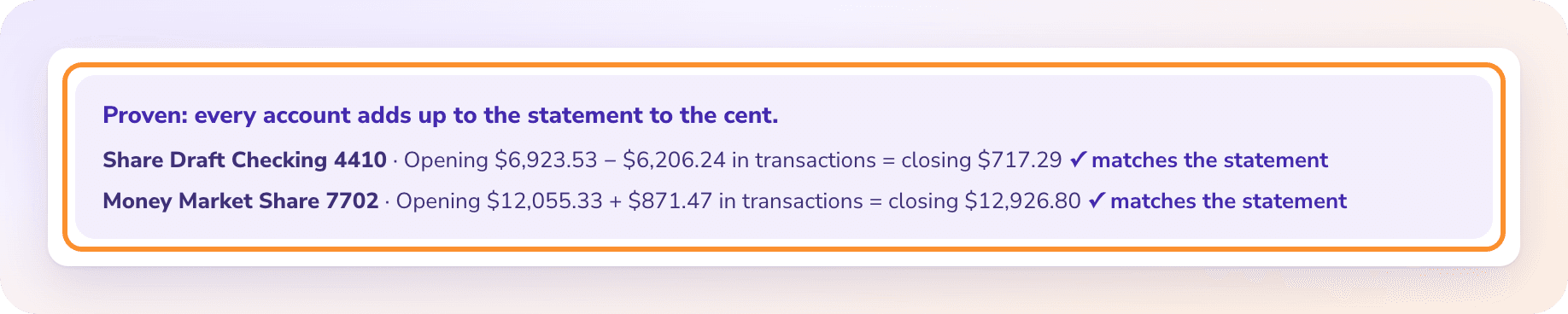
The Converter reads each bank and credit card statement, adds up its transactions and compares the result with the opening and closing balances printed on the statement. If it doesn’t tie, it says which account is off and by how much. Your staff review the exceptions instead of re-keying every line.
Download one statement or a whole client’s year as Excel or CSV, as one file or one per account or cardholder. Ready-made formats include QuickBooks-ready CSV, Xero-ready, Sage-ready and an all-details layout for workpapers. Need a workbook? See how to convert a bank statement to Excel.
No .qbo or IIF files
No QuickBooks or Xero connection: you import the CSV yourself
Checks, investment statements and invoices on their own pages
Check images become rows with number, date, payee and amount, with the amount in words compared to the figures. Brokerage and retirement statements become holdings and activity sheets checked against the account value. Each document type has its own page in the Converter.
Every document type on its own page.
WHICH ONE FITS YOUR FIRM
Free tailoring vs Enterprise vs the public plans
Most firms start with the free tailoring. If you need software that differs from the public app, that’s Enterprise.
Feature
Free tailoring
Enterprise
Public plans
Cost of the setup
Free
Scoped and priced with your firm
None
Your clients’ statements tested first
Yes
Yes
No
Download layout
One set up to your template
Built to every template you use
Six ready-made formats
Document types
The standard set
New types added for you
The standard set
Monthly volume
Up to 5,000 pages on a public plan
Priced for your volume
Up to 5,000 pages
Application
The public app
Public app or a dedicated instance
The public app
Contact
The founder, directly
The founder, directly
Help Center and email
HOW IT WORKS
How do we tailor the Converter for your firm?
1
Fill in the form
Two minutes: your firm, what you convert today and roughly how many pages a month.
2
Pick a time with Damin
The calendar opens on the same screen. On the call, show him a typical client statement and the template the data goes into.
3
Send sample documents
A handful of statements from the banks your clients use most, with anything confidential you’d rather not share removed.
4
See it on your documents
We run your samples and set up your layout, then show you the checked files before your team commits to anything.
5
Your team starts converting
On the plan that fits your volume. Changes after that go straight to the founder.
Yes. Testing your clients’ statements and setting up your download layout costs nothing. Your team then uses the Converter on a published plan: 1,000 pages for $149 a month or $79 a month billed yearly; 2,500 pages for $249 a month or $179 a month billed yearly; 5,000 pages for $599 a month or $449 a month billed yearly. See ZeraBooks pricing.
How is this different from ZeraBooks Enterprise?+
Free tailoring adjusts the standard Converter to your documents and one download layout. ZeraBooks Enterprise is for firms that need new document types, a dedicated instance, connections to their systems or more pages than the public plans offer, and it is scoped and priced per firm.
Does the Converter make .qbo files or sync with QuickBooks or Xero?+
No. It makes Excel and CSV files, including QuickBooks-ready, Xero-ready and Sage-ready CSV that you import yourself. There is no .qbo or IIF output and no connection to QuickBooks or Xero.
Which firms use ZeraBooks?+
Referrals from top-10 U.S. accounting firms are available as references on request. We don’t publish client names. Ask on the call and we’ll arrange a reference.
How do I know the converted data is right?+
Every bank and card statement is checked against its own printed opening and closing balances before you download it. When a statement doesn’t tie, the Converter shows the account and the difference so someone can look at that statement rather than all of them.
Do we need the General Ledger too?+
No. The Converter works on its own. Every plan also includes the ZeraBooks General Ledger, which is accounting software for accountants who keep client books, if your firm wants it later. For the rest of a firm’s software, see our guide to CPA tools.