How to import a PDF bank statement into QuickBooks, checked before a single line lands.
To import a PDF bank statement into QuickBooks Online, upload the PDF in Bank transactions with Upload from file and let QuickBooks read it, or convert it to a 3-column CSV (Date, Description, Amount) and upload that. ZeraBooks Convert makes the QuickBooks-ready CSV and first proves the statement against its printed balances. It doesn’t connect to QuickBooks.
7-day free trial · 1,000 pages a month from $79/month billed annually
Statements in, proven to the cent.
YOUR OPTIONS
Can you import a PDF bank statement into QuickBooks?
Yes, in QuickBooks Online, though not every route suits every statement. Intuit’s help article (updated August 24, 2026) lists PDF and image uploads alongside the file types banks export. Here is how the four routes compare:
Route
What you upload
Good for
Watch out for
The bank’s own download
QBO, QFX, OFX or CSV from online banking
Recent months
Most banks only offer the last few months this way
QuickBooks reads the PDF
The PDF statement, or a JPG, PNG or HEIC image
A few clean statements in English
You review what it read side by side; some go to Intuit’s team for review
Convert the PDF to CSV first
A 3- or 4-column CSV
Older months, scans, several accounts in one PDF, a year at once
Use a converter that checks the statement’s balances
Type it in
Nothing; enter each line
A handful of transactions
Slow, and typing errors don’t show until you reconcile
Whichever route you take, QuickBooks puts the lines in the For review list, where you categorize or match them. Nothing is reconciled until you reconcile the account against the statement.
Try it on your own documents. One-week free trial, both apps included.
QuickBooks Online’s bank upload takes a 3-column or a 4-column CSV. The same three fictional transactions in each:
Layout
Date
Description
Amount
Credit
Debit
3 columns
07/01/2026
Deposit, Harbor Supply
2,400.00
3 columns
07/03/2026
Rent, Bayview Properties
-1,850.00
3 columns
07/05/2026
Monthly service fee
-15.00
4 columns
07/01/2026
Deposit, Harbor Supply
2,400.00
4 columns
07/03/2026
Rent, Bayview Properties
1,850.00
4 columns
07/05/2026
Monthly service fee
15.00
In the 3-column layout money out is a minus. In the 4-column layout each line has an amount in Credit or Debit, never both, and the other cell is left blank, not 0.00. Intuit’s rules: the file is 350 KB or less, holds up to 1,000 lines, uses one date format throughout, and the Credit and Debit headers don’t contain the word “amount”. More layouts for other software are in convert a bank statement to CSV.
BEFORE YOU IMPORT
What should you check before importing a bank statement into QuickBooks?
An import can’t be checked once it is mixed into the register, so check the file first. A fictional example: checking ending 2290, July to September 2026 in one PDF.
1
The statement adds up
Opening balance plus deposits minus withdrawals equals the closing balance: 8,214.55 + 31,402.10 − 29,880.43 = 9,736.22. If your file doesn’t land on the printed closing balance, a line was missed or misread.
2
No overlap with what’s already in QuickBooks
Find the date of the last transaction already in the account and start the file the next day. Overlapping dates make duplicates in For review.
3
One account per file
A PDF with checking and savings, or two cardholders, needs one file per account so each goes to the right QuickBooks account.
4
Signs are right
Deposits positive, withdrawals negative in a 3-column file. A flipped sign doubles the error when you reconcile.
5
Under the limits
A year of a busy account can run past 1,000 lines. This example’s year has 1,640, so it goes in as two files, January to June and July to December.
6
Clean cells
No merged cells, subtotals, page headers or running balance rows in the middle of the data. Each line is one transaction.
STEP BY STEP
How do you upload a bank statement CSV into QuickBooks Online?
The steps from Intuit’s help article, with a converted file ready.
1
Open Bank transactions
In QuickBooks Online, go to Accounting, then Bank transactions, and select the account’s tile if it has one.
2
Choose Upload from file
Open the Link account dropdown and select Upload from file. Pick the CSV (or the PDF, if you are letting QuickBooks read it) and select Continue.
3
Pick the QuickBooks account
Choose the bank or card account the statement belongs to, or add a new one.
4
Map the columns
Match Date, Description and Amount (or Credit and Debit) to QuickBooks’ fields and confirm the date format.
5
Import and review
Select the transactions, import them, then categorize or match each one in For review.
6
Reconcile the month
Reconcile the account to the statement’s closing balance. If the file was proven before upload, it should tie on the first try.
WITH ZERABOOKS CONVERT
How ZeraBooks Convert makes the QuickBooks-ready CSV.
Convert reads the PDF, proves it, and hands you a file. Data goes out only as files you download.
PROVEN FIRST
Every account checked to the cent.
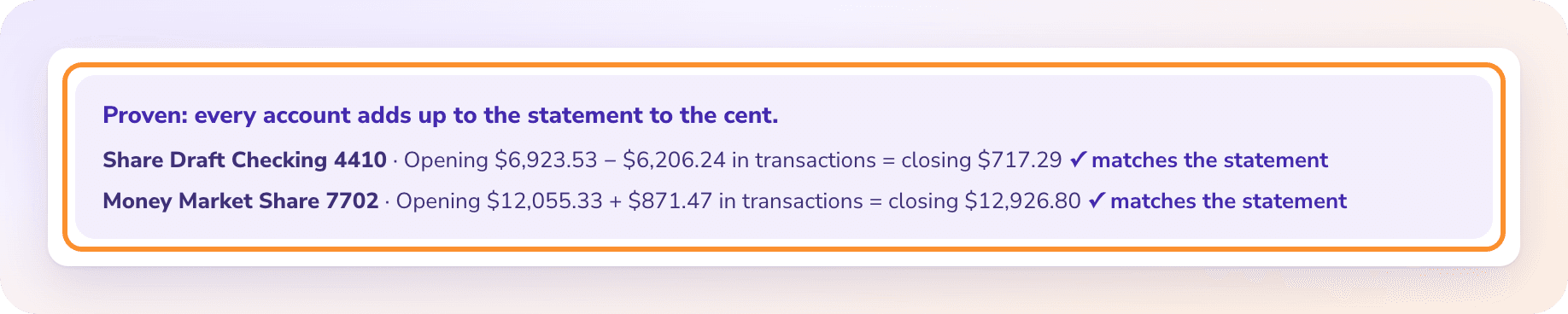
Every statement is checked against its printed opening and closing balance, to the cent; one that doesn’t tie is flagged for review before you download anything. ZeraBooks’ extraction engine is 99% accurate, and the balance check is what tells you a statement came through whole. It reads scans and multi-account PDFs and splits them by account and cardholder. The product page is PDF to QuickBooks.
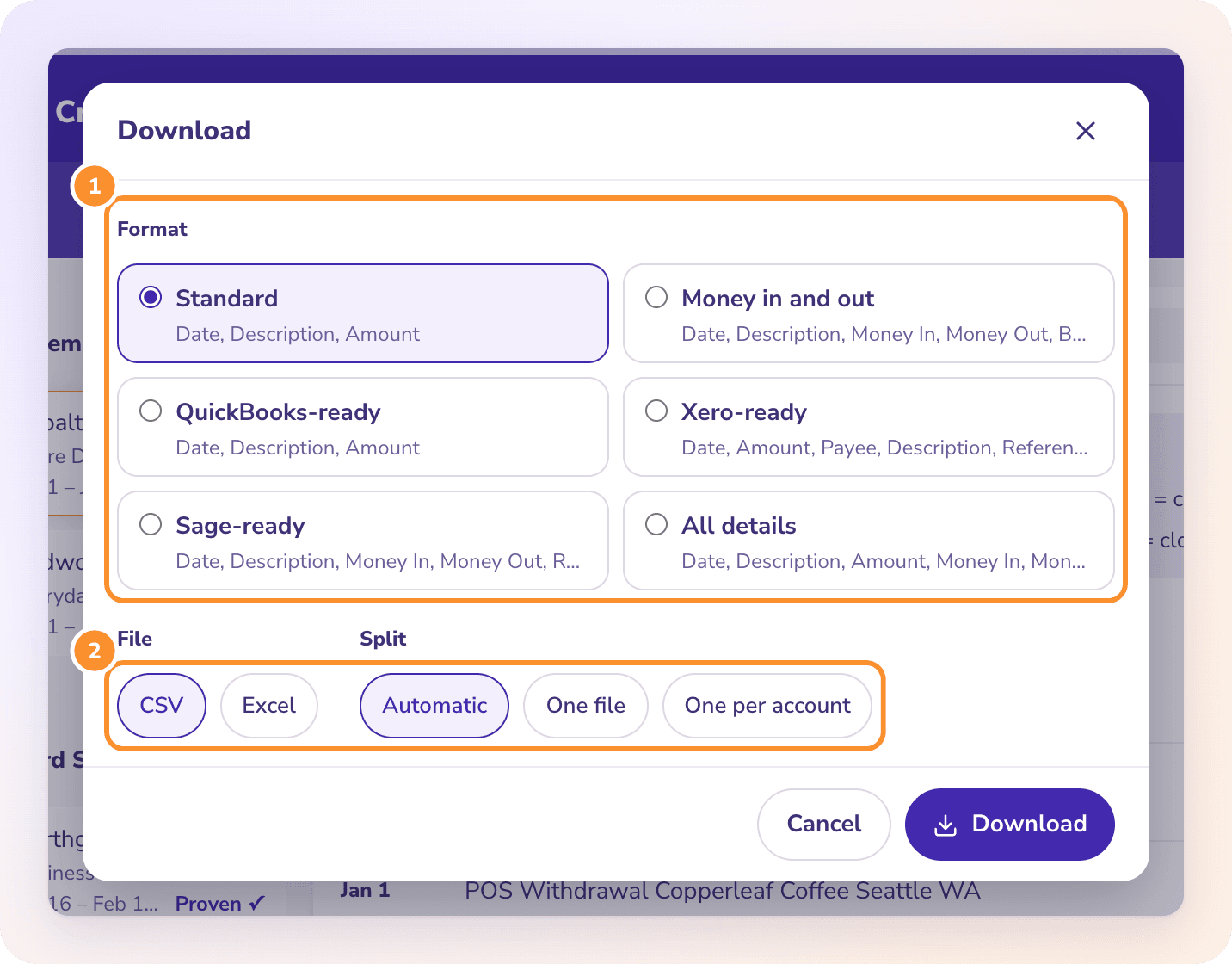
Click Download, choose QuickBooks-ready and CSV, and pick one file per account. Money out is a minus, which is the 3-column layout above. Convert makes CSV and Excel files only: no .qbo or IIF files, and no QuickBooks connection. It is part of the ZeraBooks bank statement converter.
QuickBooks Online’s PDF upload needs an English statement, and some statements go to Intuit’s team for review first. Scans, photos of printed pages and PDFs with several accounts are the usual trouble. Converting to a CSV first, with the balances checked, gets around all of them.
How do I import a PNC, Chase or other bank statement into QuickBooks?+
The same way for every bank: download the PDF, convert it or upload it, then map Date, Description and Amount. Where each bank keeps its PDFs is covered in our statement download guides, including PNC.
How far back can I import bank transactions into QuickBooks?+
As far back as you have statements. Banks usually offer only recent months as QBO or CSV downloads, but monthly PDF statements go back years, and converting them gives you a CSV for any month.
Can I import a PDF statement into QuickBooks Desktop?+
This guide covers QuickBooks Online. QuickBooks Desktop imports differ by version, so check your version’s import options before converting to CSV.
Does ZeraBooks connect to QuickBooks or make QBO files?+
No. ZeraBooks Convert has no QuickBooks connection or bank feed and doesn’t make .qbo or IIF files. It exports QuickBooks-ready and Xero-ready CSV. The Converter is included in the ZeraBooks subscription: 1,000 pages a month from $79 a month billed annually, after a 7-day trial.
Convert one statement for QuickBooks. Proven before you upload it.
Free for 7 days, then 1,000 pages a month from $79 a month billed annually; see ZeraBooks pricing. Rather skip QuickBooks? The AI bookkeeping ledger takes the same statements directly.