How to reconcile a bank account with AI, and which parts you should still check yourself.
To reconcile a bank account with AI, upload the statement, let the AI read and match each line, then review only the exceptions it flags: a misread amount, a payment counted twice, a missing statement. The ledger, not the AI, should do the arithmetic. ZeraBooks bank reconciliation software works this way and proposes document-backed fixes for you to apply.
7-day trial · card required, nothing charged for 7 days · then $79/month billed annually or $149 monthly
WHO DOES WHAT
What does AI actually do in a bank reconciliation?
A reconciliation is reading, matching, adding up and deciding. AI is good at the first two and at spotting the odd one out. Adding up should be plain arithmetic, and deciding is yours.
Job
Who should do it
What that looks like in ZeraBooks
Read the statement
AI
Each line and the printed opening and closing balances are read from the PDF or CSV
Pair transfers and card payments
Rules
A line naming another account’s number, card-payment wording, or a matching amount on another account within 3 days
Suggest matches to bills
AI
Payments offered for a bill with the reason: clears it exactly, same vendor, or quotes the bill’s number
Add it up
The ledger
Opening plus transactions must equal closing, to the cent
Flag exceptions
The ledger
Statement doesn’t tie, chain break, ledger difference, coverage gap, a payment or manual entry that may be counted twice
Find the misread line
AI
Verify against the document re-reads the PDF and proposes only fixes that make it tie
Accept fixes and sign off
You
Nothing changes until you click Apply; Finalize appears only once the month ties
A tool that lets the AI decide the totals can make a month look tied when it isn’t. Ask any vendor which of these jobs the model does.
Try it on your own documents. One-week free trial, both apps included.
Example: one month of a grooming salon’s checking account
Bluebird Pet Grooming is fictional. Its August 2026 statement prints an opening balance of 6,410.25 and a closing balance of 8,064.85. These are the lines on it:
Line on the statement
Money in
Money out
Card processor deposits, four weeks
9,870.00
Rent, August
1,250.00
Payment to Business Visa
2,000.00
Payroll
3,880.00
Grooming supplies
421.00
Pawsome Supply Co., bill 2291
642.40
Monthly service fee
22.00
Totals
9,870.00
8,215.40
The proof the bank printed: 6,410.25 + 9,870.00 − 8,215.40 = 8,064.85. The deposits are 2,310.00 + 2,465.50 + 2,580.25 + 2,514.25 = 9,870.00. The owner had already typed the rent in by hand as a Pay Out before the statement arrived.
FROM FLAGS TO TIED
How does the month go from two flags to tied?
Two things are wrong after upload: the 421.00 supplies line was read as 412.00, and the rent is in the books twice. Each stage below changes one thing.
Stage
Statement check
Ledger balance
Ledger difference
After upload
6,410.25 + 9,870.00 − 8,206.40 = 8,073.85; off 9.00
8,073.85 − 1,250.00 = 6,823.85
1,241.00
AI fixes the misread amount (412.00 → 421.00)
8,064.85; ties
8,064.85 − 1,250.00 = 6,814.85
1,250.00
Statement line matched to the manual rent Pay Out
8,064.85; ties
8,064.85
0.00
An off-by-9.00 difference is the classic sign of swapped digits (421 vs 412), which is what the AI re-read found. Notice the order: AI verification fixes the statement, but it can’t fix a ledger difference, because the rent duplicate isn’t a reading error. That one takes a match. The card payment and the supplier bill didn’t affect the tie at all; they decide where the money went, not how much.
STEP BY STEP
How to reconcile a bank account with AI in ZeraBooks
The same month, in the order you would click.
1
Upload the statement
In Banks & Cards, upload August’s PDF or CSV for the checking account. It is read, categorized and reconciled as it lands.
2
Open the month
Go to Accounting › Reconciliations. August shows an orange !. Click Review… on the account’s card.
3
Read the flags
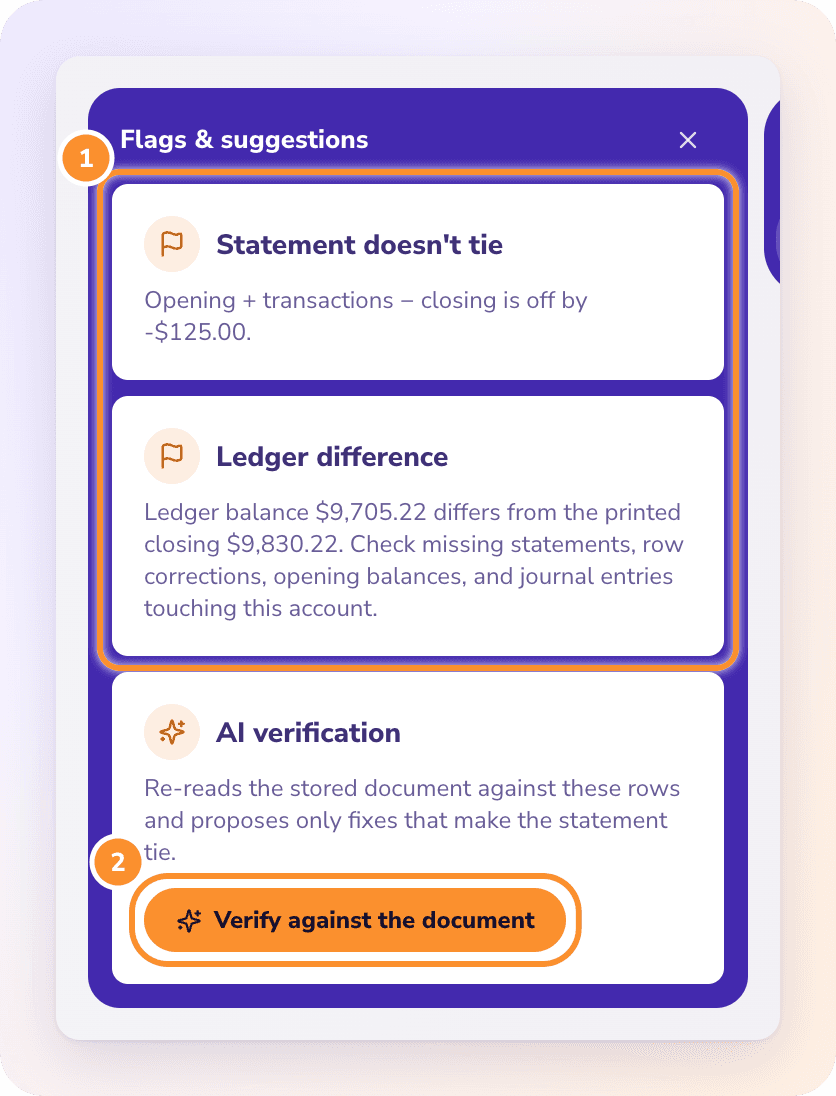
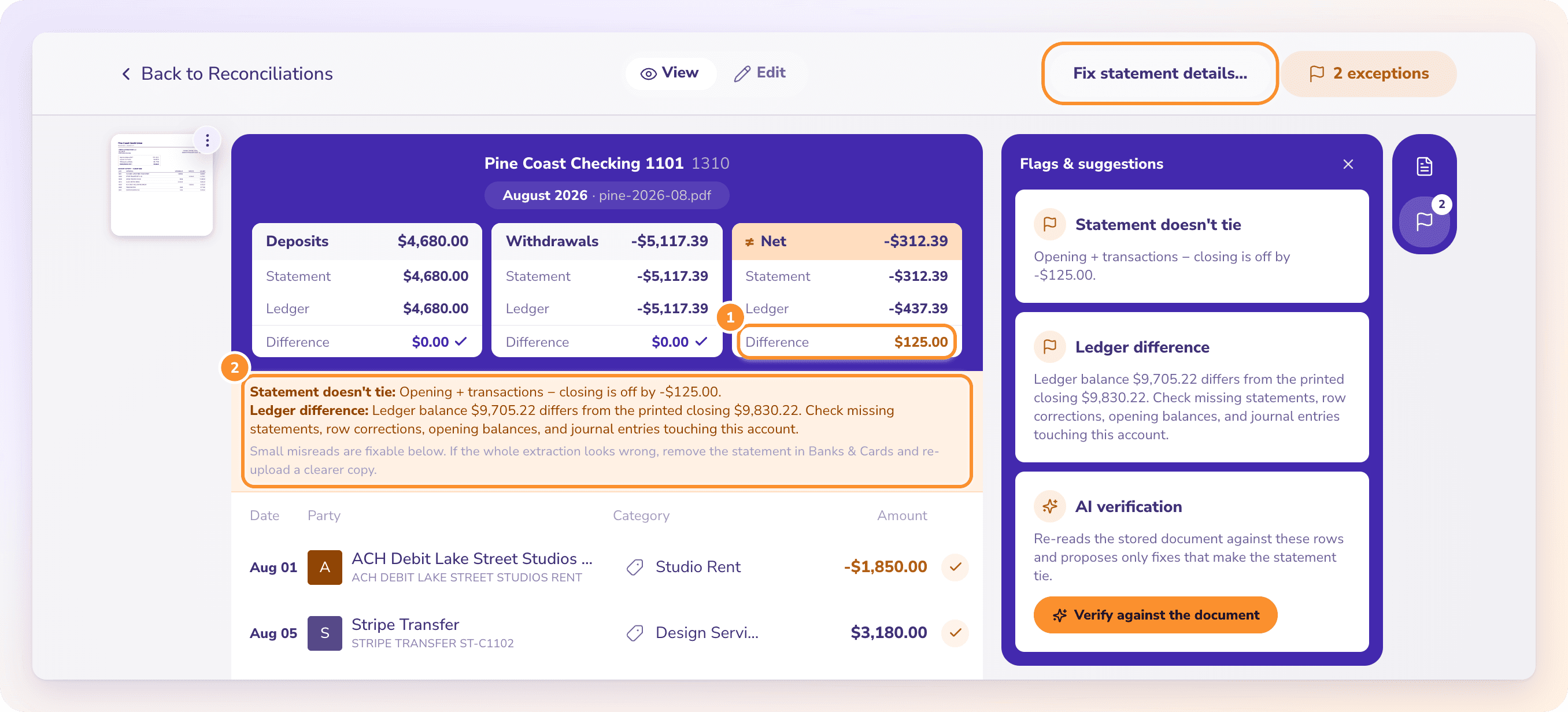
Open Flags & suggestions. Here it lists Statement doesn’t tie (off by 9.00) and a ledger difference, with a manual entry to review.
4
Let AI re-read the document
Under AI verification, click Verify against the document. It returns Amount misread, quoting the 421.00 line. Click Apply; the statement now ties.
5
Match the manual entry
In Banks & Cards, click Match manual transactions, choose the rent Pay Out on the 1,250.00 statement line, and click Save matches. The rent is now counted once.
6
Check the bill and the card payment
Open the Pawsome bill, click Outstanding, and apply the 642.40 payment offered as Clears it exactly. The Visa payment is already paired with the card statement as a transfer.
7
Finalize
The dot turns purple. Click Finalize…, then close the books through August so nothing reconciled can change by accident.
THE AI PARTS, UP CLOSE
Suggestions with receipts, never silent changes.
VERIFY AGAINST THE DOCUMENT
Every fix quotes the statement line.
The AI compares its own line-by-line transcription of the PDF with your rows and suggests a missed line, a phantom line, a flipped sign, or a misread amount, date or balance. When fixes only work as a set, it says so and offers Apply all. If it finds no fix that makes the statement tie, it says that too and you fix the month by hand. The manual version of the same hunt is in how to do a bank reconciliation.
For a bill, ZeraBooks lists bank and card lines that could settle it and why each was offered. Click Apply, or Not this payment so it isn’t offered again. With AI bookkeeping on Autopilot, bills and invoices that pass every check are approved and matched for you, and tied months can be signed off and closed.
AI makes reconciliation fast. These are the places it can still let a wrong month through.
A missing statement
If a month was never uploaded, the months around it can each look fine. Look for a coverage gap or a chain break, where one statement’s opening balance doesn’t meet the last one’s closing.
Matches accepted without reading
A suggested match with the same amount isn’t always the same payment. Two 1,250.00 lines in one month need a second look.
Manual entries plus a statement
Anything typed in before the statement arrived can be counted twice, as the rent was here. Match it or mark it separate.
Thinking categories affect the tie
They don’t. Recategorizing never fixes a month that doesn’t tie; only amounts, dates, missing or extra lines and printed balances do.
Offsetting errors
A balance check can pass while a deposit and a withdrawal are both wrong by the same amount. A four-column proof of cash catches that.
QUESTIONS
How to reconcile a bank account with AI: common questions
It can do most of the reading and matching and point at the exceptions. It shouldn’t decide the totals or sign off the month. In ZeraBooks the ledger does the arithmetic, the AI proposes fixes, and you apply them and finalize.
How does AI find a misread line on a bank statement?+
It reads the original document again, line by line, and compares that with the rows in your books. In ZeraBooks it only proposes changes that make the statement’s opening balance plus transactions equal the printed closing balance.
Does AI change my books without asking?+
Not in ZeraBooks reconciliation. Verify against the document only suggests fixes; nothing changes until you click Apply or Apply all. Autopilot actions elsewhere are logged and can be undone.
Why is my reconciliation off by an amount divisible by 9?+
Usually two digits were swapped, such as 421.00 entered as 412.00, a 9.00 difference. Look for a line where reversing two digits closes the gap. If the gap is a bank fee instead, such as a returned-check charge, see how to handle NSF fees.
Do I need bank feeds for AI reconciliation?+
No. ZeraBooks reconciles from uploaded PDF or CSV statements and has no bank feed. The statement’s printed opening and closing balances are what each month is proven against. FreshBooks also reconciles from statement CSVs; see FreshBooks bank reconciliation.
How much does AI bank reconciliation cost in ZeraBooks?+
It is part of the one subscription: $79 a month billed annually or $149 monthly, after a 7-day trial, with the general ledger and Converter included. See ZeraBooks pricing.