PDF BANK STATEMENT TO CSV
Convert a bank statement to CSV,
in the layout your import expects.
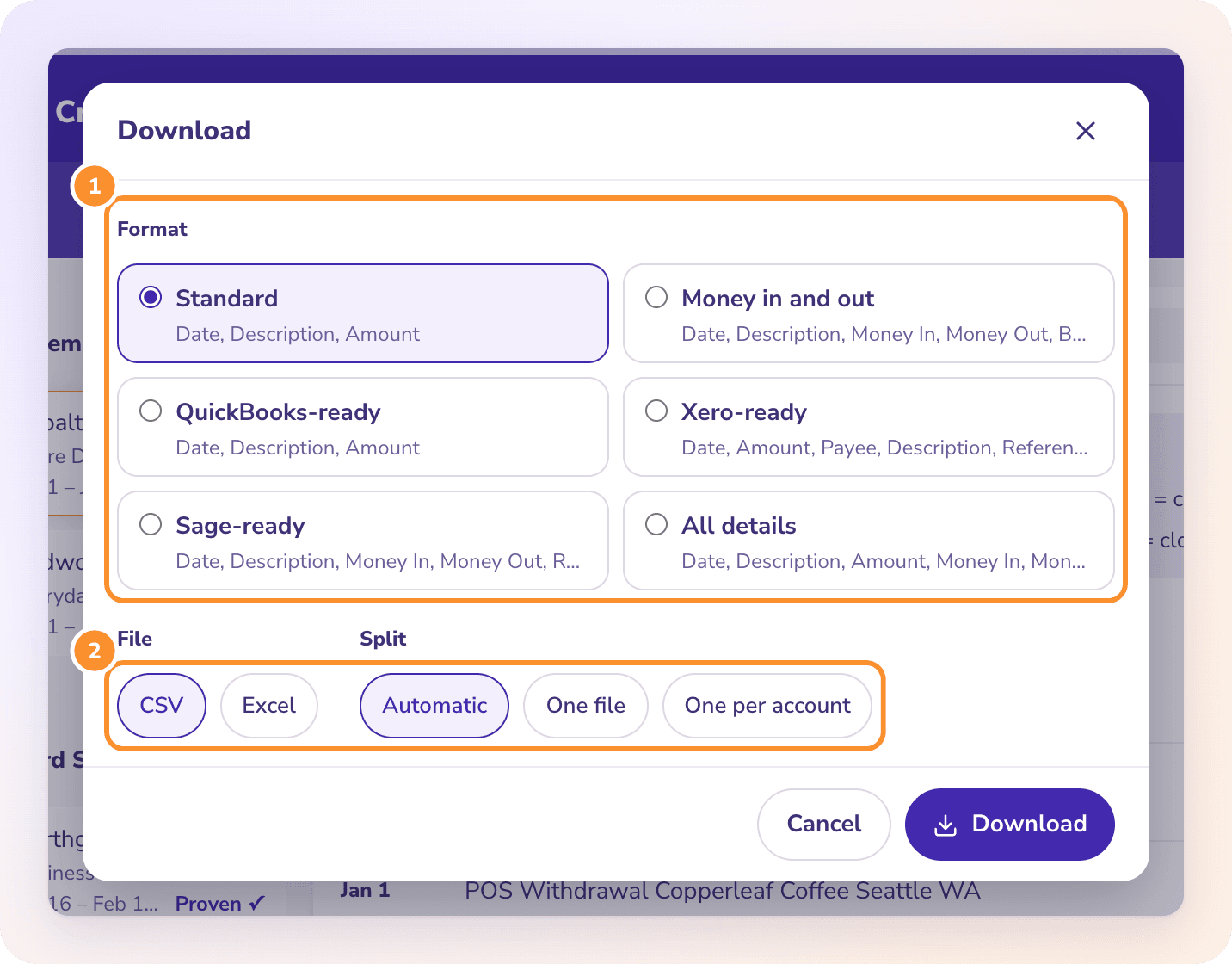
To convert a PDF bank statement to CSV, upload it to ZeraBooks Convert, confirm it’s Proven against the printed balances, then click Download, choose CSV and a format: Standard, QuickBooks-ready, Xero-ready, Sage-ready, Money in and out, or All details. Download one CSV for every account, or one per account.
7-day free trial · 1,000 pages a month from $79/month billed annually
DEFINITION
What is a CSV file?
A CSV (comma-separated values) file is a plain-text table where each line is a row and commas separate the columns. Accounting software such as QuickBooks Online, Xero and Sage imports bank transactions from CSV, as long as the columns are in the order it expects.
STEP BY STEP
How to convert a PDF bank statement to CSV
- 1
Upload the statement PDF
In ZeraBooks Convert, open Bank & Credit Cards and click Upload statements, or drop the PDFs on the page.
- 2
Check the proof
Each account is added up and compared with the printed balances to the cent. Fix any flagged row before you download.
- 3
Choose CSV and a format
Click Download, pick the format for where the file is going, and choose CSV.
- 4
Choose how to split
Automatic, one file, or one file per account. CSV files for several accounts come in one ZIP.
Try it on your own documents. One-week free trial, both apps included.
CSV LAYOUTS
Which CSV format to pick
QuickBooks-ready
Date, Description, Amount with money out as a minus: the columns QuickBooks Online’s bank upload takes.
Xero-ready
Date, Amount, Payee, Description, Reference: the columns Xero’s statement import takes.
Sage-ready
Date, Description, Money In, Money Out, Reference, in the order Sage’s bank import requires.
Standard
Date, Description, Amount. A simple file for any software or spreadsheet.
Money in and out
Date, Description, Money In, Money Out, Balance, both amounts positive.
All details
Every column, including account, last 4 digits, cardholder, type, check number and source file.
How do I convert a PDF bank statement to CSV?
Upload the PDF to ZeraBooks Convert, check that it’s Proven, then click Download, choose CSV and the format for your software, such as QuickBooks-ready or Xero-ready.
What date format does the CSV use?
Every ready-made format writes U.S. dates (MM/DD/YYYY).
Can I get one CSV for several statements?
Yes. Tick the statements in the list and click Download together to get a whole month in one CSV, or one per account.
Is CSV or Excel better for a bank statement?
Use CSV when the file is going into accounting software, which imports CSV. Use Excel when you’ll work in the spreadsheet yourself, especially for multi-table documents such as investment statements.
ONE-WEEK FREE TRIAL
See it on your own books.
Free for one week.
General Ledger and Converter, both included. $79 a month billed annually or $149 monthly after the trial.
Last updated October 1, 2026 · Written by Damin Mutti, founder of ZeraBooks