GUIDE · XERO STATEMENT IMPORT
Import a PDF bank statement into Xero,
and check it landed on the right balance.
Xero imports statements as CSV, not PDF. To import a PDF bank statement into Xero, first convert the bank statement to CSV, then in Xero go to Accounting, Bank accounts, open the account’s menu and choose Import a Statement. ZeraBooks Convert’s Xero-ready CSV has Date, Amount, Payee, Description and Reference, with money out as a minus.
7-day trial · card required, nothing charged for 7 days · 1,000 pages a month from $79/month billed annually
STEP BY STEP
How do you import a PDF bank statement into Xero?
Two halves: turn the PDF into a CSV Xero can read, then import that file into the matching bank account in Xero. There is no connection between the two, so the file is the hand-off.
- 1
Upload the PDF to Convert
In ZeraBooks Convert, open Bank & Credit Cards and click Upload statements, or drop the PDF on the page. The bank statement converter splits it by account and adds each account up against the printed balances.
- 2
Wait for Proven
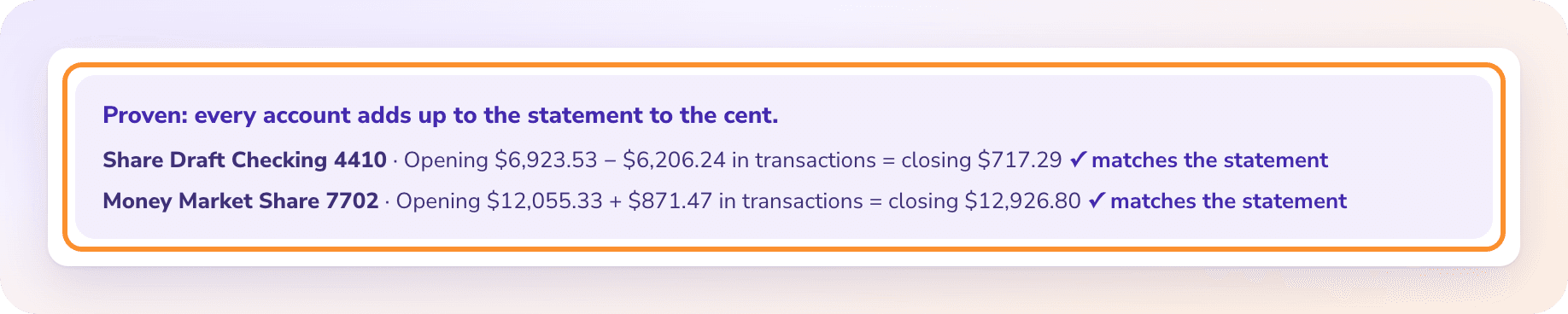
Proven means opening balance plus every row equals the printed closing balance, to the cent. If an account shows Needs a look, fix the row first; the steps are in Fix a statement.
- 3
Download Xero-ready as CSV
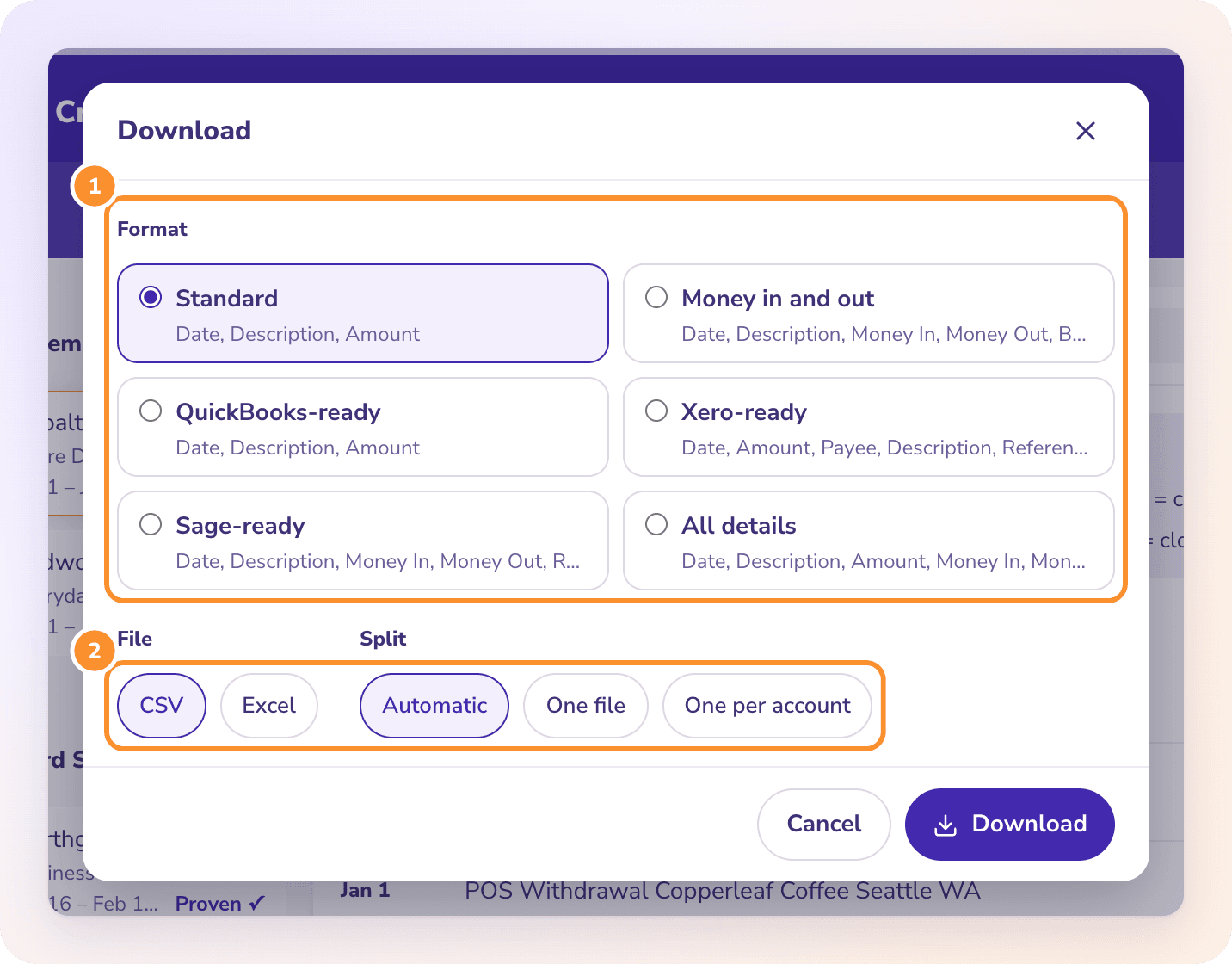
Click Download, choose Xero-ready, choose CSV, and set Split to One per account. Xero imports into one bank account at a time, so each account needs its own file. Several files come together in one ZIP.
- 4
Open Import a Statement in Xero
In Xero, go to the Accounting menu, then Bank accounts. Find the account the statement belongs to, open its menu and choose Import a Statement. Pick the CSV.
- 5
Assign the columns once
The first time, Xero asks which statement field each column fills. Match Date, Amount, Payee, Description and Reference to the fields of the same name and check the date format. Xero keeps the assignment for later imports with the same headings.
- 6
Review and import
Look over the lines Xero shows, then import. The new lines wait in the account for you to reconcile.
Try it on your own documents. One-week free trial, both apps included.
XERO CSV IMPORT FORMAT
What columns does Xero’s CSV import take?
Xero’s own template comes from the Import a Statement screen and its headings vary by region. These are the columns in ZeraBooks Convert’s Xero-ready format and how each one fills a Xero statement line.
| Column | What ZeraBooks writes | Xero rule it meets |
|---|---|---|
| Date | The transaction date as MM/DD/YYYY, for example 03/02/2026 | Xero reads dates in the format you confirm when you assign the columns |
| Amount | One signed number: 3250.00 for money in, -1180.00 for money out | Income positive, expenses negative, in a single column |
| Payee | The merchant or person, cleaned from the description; worth a glance before import | Match existing Xero contact names exactly, or Xero treats them as new |
| Description | The line as the bank printed it | Kept on the statement line for reconciling |
| Reference | The check number when the statement shows one, otherwise empty | Lets you match a check to its line when you reconcile |
There is no Balance column and no account number, which Xero tells you to strip because it works out the balance from the lines. Amounts carry no dollar sign and no thousands separator. Every format and its columns are listed in Choose a download format.
SAMPLE FILE
What does a Xero-ready bank statement CSV look like?
Five lines from a fictional March 2026 checking statement, account ending 2208, exactly as they appear in the downloaded file. The header row reads Date,Amount,Payee,Description,Reference.
| Date | Amount | Payee | Description | Reference |
|---|---|---|---|---|
| 03/02/2026 | 3250.00 | Northgate Supply | ACH CREDIT NORTHGATE SUPPLY | |
| 03/05/2026 | -1180.00 | Check | CHECK 2041 | 2041 |
| 03/11/2026 | -86.45 | Comcast Business | POS PURCHASE COMCAST BUSINESS 800-391-3000 | |
| 03/18/2026 | -2400.00 | Halvorsen Properties | ACH DEBIT HALVORSEN PROPERTIES | |
| 03/31/2026 | -12.00 | Monthly Service Fee | MONTHLY SERVICE FEE |
The rows add to −428.45. The statement prints an opening balance of 8,415.60 and a closing balance of 7,987.15, and 8,415.60 − 428.45 = 7,987.15, so the file ties before it goes anywhere near Xero.
WHAT BREAKS AN IMPORT
Why does a bank statement import into Xero go wrong?
Most failed or messy imports come down to a handful of causes. Each one leaves a sign you can spot before you start reconciling.
| Cause | What you see | Fix |
|---|---|---|
| Day and month swapped | In a UK, Australian or New Zealand organisation read as day first, 03/02/2026 lands on 3 February instead of 2 March; lines dated the 13th or later don’t fit a day-first date | Set the date format to month first when you assign the columns; Xero lets you change it later in its CSV import settings |
| Thousands separators or currency signs | An amount like "3,250.00" or $3,250.00 splits across columns or won’t read as a number | Import the file as downloaded. Opening it in Excel and saving it again can rewrite amounts and dates the way Excel displays them |
| Overlapping periods | Lines from days already imported appear twice, for example a mid-month export followed by the full statement | Import whole statements that start the day after the last one ended; clear doubles with Xero’s Find and remove duplicate bank statement lines |
| Opening balance mismatch | Every line is right, but the balance in Xero is off from the statement by the same amount month after month | The account in Xero didn’t start at the first statement’s opening balance; set the starting balance before blaming the lines |
| Several accounts in one file | An extra Account column Xero doesn’t expect, and other accounts’ lines in this one | Download with Split set to One per account and import each file into its own Xero account |
Combining several months first? Read combine bank statements for the gap and overlap check, then import the months for one account in date order.
THE CHECK TO RUN
How do you check the import matches the bank statement?
Xero works out the balance from the lines you import, so the test is plain arithmetic against the paper. The sample above is the example.
- 1
Prove the file before import
In Convert, Proven means opening plus rows equals closing, to the cent: 8,415.60 − 428.45 = 7,987.15. How this works is in How Convert proves a statement.
- 2
Count the lines
Five lines in the file should be five new statement lines in Xero. A shorter count means the review step left some out; a longer one means duplicates.
- 3
Compare the balance
After import, the balance Xero shows for the account through March 31 should be 7,987.15, the printed closing balance. A gap of exactly 8,415.60 means the account started at zero instead of the opening balance.
- 4
Read the size of any other gap
A gap equal to one line usually means that line is missing or doubled. A gap of twice a line means it went in with the wrong sign.
WHAT ZERABOOKS DOESN’T DO
Can ZeraBooks send a bank statement straight to Xero?
No. ZeraBooks has no Xero connection and no bank feed, and it doesn’t write OFX, QFX or QBO files. You download a Xero-ready CSV and import it yourself through Import a Statement. Xero does take OFX and QFX statements from banks that offer them; the difference is explained in what an OFX file is.
The Xero-ready file is also not Xero’s precoded format. A precoded CSV carries account codes so Xero can create spend and receive money transactions and reconcile them in one go. Convert reads and proves statements; it doesn’t assign categories, so the coding happens in Xero when you reconcile.
The same statement goes to QuickBooks Online through its bank upload with the QuickBooks-ready format; see PDF to QuickBooks.
Can I upload a PDF bank statement directly into Xero?
Not through Import a Statement, which takes CSV, OFX and QFX files rather than PDFs. Convert the PDF to a Xero-ready CSV first, then import that.
What date format does Xero need for a CSV import?
Xero reads the date format you confirm when you assign the columns. ZeraBooks writes MM/DD/YYYY in every format, so an organisation outside the U.S. should set month first for these files, or the 2nd of March comes in as the 3rd of February.
Does money out need a minus sign in a Xero CSV?
Yes, in a single Amount column: money in positive, money out negative. Xero also accepts brackets, such as (30.00). The Xero-ready download uses a minus sign.
How do I import a year of statements into Xero?
Upload the twelve PDFs, tick them in the list and click Download together with Xero-ready, CSV and One per account. Check first that each month’s closing balance equals the next month’s opening; the combine bank statements guide shows how.
Why do I see duplicate lines after importing into Xero?
Usually two files covered some of the same days, or the same file went in twice. Xero’s Find and remove duplicate bank statement lines compares dates and amounts so you can delete the extras.
How much does ZeraBooks Convert cost?
It comes with the ZeraBooks subscription: $79 a month billed annually or $149 monthly, with 1,000 pages a month and a 7-day trial. See ZeraBooks pricing.
ONE-WEEK FREE TRIAL
Turn one statement into a Xero-ready CSV.
Free for 7 days.
Upload the PDF, wait for Proven, download, import. Then 1,000 pages a month from $79 a month billed annually. If you’d rather not import into anything, keep the books in ZeraBooks with the AI General Ledger in the same subscription.
Last updated October 17, 2026 · Written by Damin Mutti, founder of ZeraBooks