General Ledger + Converter in one subscription.

See pricing
Skip to content
  1. Home
  2. Bank statement converter
  3. U.S. Bank statement to Excel

BY BANK · U.S. BANK

U.S. Bank statement to Excel,
with the year and the minus signs put back.

To convert a U.S. Bank statement to Excel, download the PDF from the documents area at usbank.com, upload it to the ZeraBooks bank statement converter and download Excel or CSV. U.S. Bank prints dates like “Jan 6” with no year and withdrawals with a trailing minus; ZeraBooks writes full dates and signed amounts, and proves the ending balance.

7-day trial · card required, nothing charged for 7 days · 1,000 pages a month from $79/month billed annually

Statements in, proven to the cent.

STEP 1 · DOWNLOAD

How do you download a U.S. Bank statement as a PDF?

Use the full website on a computer: some downloads aren’t in the mobile app. The full walk-through is in Download your U.S. Bank statements.

  1. 1

    Sign in at usbank.com

    Larger businesses on SinglePoint use that separate site and its statements or reports area instead.

  2. 2

    Open Accounts, then the documents area

    Statements are kept with your other documents.

  3. 3

    Choose statements and the account

    Business card statements are in the same place: pick the card account in the dropdown.

  4. 4

    Download the PDF

    U.S. Bank keeps up to 7 years online. Take the PDF, not a CSV or Quicken file, so the balances come with it.

Try it on your own documents. One-week free trial, both apps included.

HOW U.S. BANK LAYS IT OUT

How is a U.S. Bank statement laid out?

A U.S. Bank checking statement typically opens with a one-row account summary, then lists transactions by kind, each block with its own total. Three things set it apart from most banks: the dates, the signs and the card groups.

Part of the statementWhat it holdsIn the converted file
Statement periodOften mid-month to mid-month, such as Dec 22 through Jan 21The source of the year for every row
Account SummaryBeginning Balance on the first day, each block’s total, Ending Balance on the last dayUsed for the proof, not rows
Deposits / CreditsDeposits and incoming transfers, with Date, Description of Transaction, Ref Number and AmountRows, positive
Card WithdrawalsDebit card purchases, grouped under each card number with a subtotalRows, negative, with a Card column such as “Card ••0412”
Other WithdrawalsACH payments, transfers out and fees, printed with a trailing minusRows, negative
Balance SummaryDate and ending balance, only for days the balance changedNot rows

Layouts differ between U.S. Bank products and years, and some statements are a Uni-Statement covering more than one account. ZeraBooks Convert splits a statement with several accounts and proves each against its own balances.

WORKED EXAMPLE

What does a converted U.S. Bank statement look like?

Pinecrest Auto Detailing is a fictional customer with Silver Business Checking ending 2219. Its statement runs Dec 22, 2025 through Jan 21, 2026, so the same page prints “Dec 29” and “Jan 2” with no year on either. Two debit cards are on the account. Here are the rows as ZeraBooks Convert lists them, with the Card column it adds for debit card spending, and dates written the way every download writes them:

DateDescriptionCardTypeAmount
12/24/2025Mobile Check DepositDeposit1,200.00
12/29/2025Debit Purchase Chemical GuysCard ••0412Withdrawal-312.48
01/02/2026Debit Purchase Shell OilCard ••0412Withdrawal-61.20
01/06/2026Electronic Deposit From Square IncDeposit2,764.35
01/09/2026Debit Purchase Home DepotCard ••7781Withdrawal-145.90
01/15/2026Electronic Withdrawal To State FarmWithdrawal-286.00
01/21/2026Maintenance FeeFee-10.00
Beginning balance 3,845.10 + rows6,993.87

The proof: 3,845.10 + 3,964.35 − 519.58 − 296.00 = 6,993.87, the Ending Balance on Jan 21 that U.S. Bank printed. Card 0412’s two purchases also add up to its printed subtotal of 373.68. December rows get 2025 and January rows get 2026, because the year comes from the statement period, not from today. Steps for a spreadsheet are in convert a bank statement to Excel.

WHAT GOES WRONG

Why does copying a U.S. Bank statement into Excel go wrong?

Each of these breaks a total without any error message.

  • “Jan 6” is text, not a date

    Excel either leaves it as text or guesses the current year. On a statement that crosses New Year, half the rows land in the wrong year and a December close comes out short.

  • The trailing minus

    Withdrawals print as “286.00-”. Many spreadsheets read that as text or as a positive 286, so money out adds to the balance instead of taking from it.

  • Card subtotals look like rows

    Each card group ends with a subtotal line. Paste the block and every card’s spending is counted twice.

  • The period isn’t a month

    Dec 22 to Jan 21 doesn’t match a calendar month. For month-end books, keep the statements in order; the opening of each must equal the closing of the one before.

CSV, QUICKEN OR QUICKBOOKS

Should you use U.S. Bank’s CSV or QuickBooks download instead?

THE OTHER DOWNLOADS

Quick for recent activity, no balances to check.

From the full website, U.S. Bank lets you download transactions as CSV, Quicken or QuickBooks files. They usually carry no opening or closing balance, so nobody can show the month is complete. For books, a loan file or an audit, convert the statement PDF.
THE PDF ROUTE

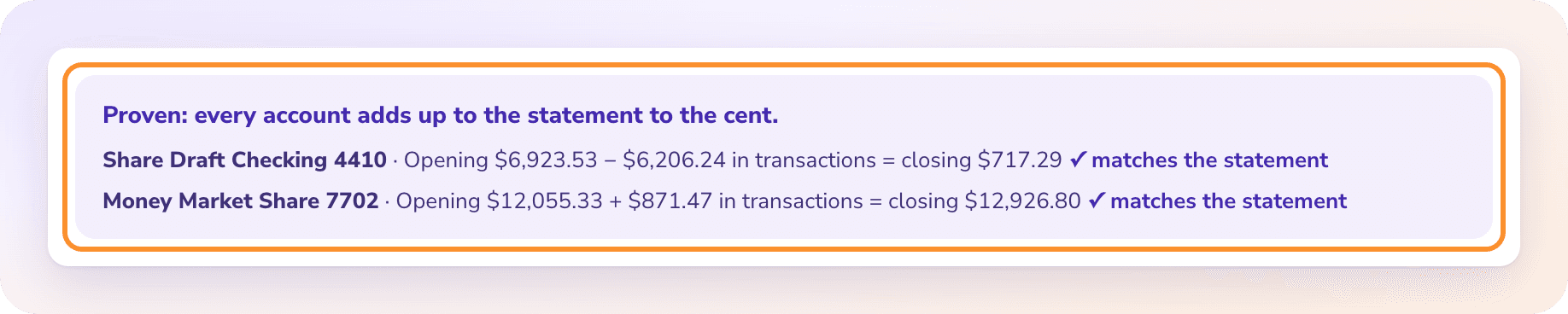
The statement proves itself before you import it.

ZeraBooks reads the Beginning and Ending Balance from the account summary and marks the statement Proven only when every row ties to them. Then pick QuickBooks-ready for QuickBooks Online’s bank upload; see bank statement to CSV for the import files.

The statement proof: every account adds up to the statement to the cent, with the opening balance, transactions and closing balance for each account.

MORE BANKS

Statements from other banks

QUESTIONS

U.S. Bank statement to Excel: common questions

Ask Damin directly
How far back can I download U.S. Bank statements?

Up to 7 years online, from the documents area at usbank.com. For older months, ask U.S. Bank.

Why do my U.S. Bank statements start on the 22nd?

U.S. Bank statement periods don’t always follow the calendar month. That is fine: upload each statement as it is, in order. ZeraBooks takes each row’s year from the statement period and checks each statement on its own balances.

Can I convert a U.S. Bank business card statement?

Yes. Upload it to the same page; it is proven as previous balance plus charges minus payments equals the new balance, with each cardholder checked against their printed total. See credit card statement to Excel.

Does ZeraBooks connect to my U.S. Bank account?

No. ZeraBooks has no bank feeds and never asks for your U.S. Bank sign-in. You download the PDF and upload it.

How much does it cost?

Convert comes with the ZeraBooks subscription: 1,000 pages a month for $79 a month billed annually or $149 monthly, after a 7-day trial. See ZeraBooks pricing.

ONE-WEEK FREE TRIAL

Upload a U.S. Bank statement.
Get real dates and signed amounts.

Proven against the ending balance, 1,000 pages a month from $79 a month billed annually. Other banks: TD Bank, Citi and Wells Fargo. The subscription also includes AI bookkeeping for the books themselves.

Last updated November 5, 2026 · Written by Damin Mutti, founder of ZeraBooks

BOOK A CALL

Talk to Damin, our founder.

30 minutes. Pick a time on the next screen.

What would you like to talk about?