General Ledger + Converter in one subscription.

See pricing
Skip to content
  1. Home
  2. Bank statement converter
  3. Bluevine bank statement to Excel

BY BANK · BLUEVINE

Bluevine bank statement to Excel,
the main account and every sub-account in one file.

To convert a Bluevine bank statement to Excel, open Documents & Reports, then Banking Statements, download the PDF for each account, upload them to the ZeraBooks bank statement converter and download Excel or CSV. Bluevine gives each sub-account its own statement; ZeraBooks proves each one and puts them in one file with an Account column.

7-day trial · card required, nothing charged for 7 days · 1,000 pages a month from $79/month billed annually

Statements in, proven to the cent.

STEP 1 · DOWNLOAD

How do you download a Bluevine bank statement as a PDF?

Bluevine keeps statements under Documents & Reports, one per account per month. The full walk-through is in Download your Bluevine statements.

  1. 1

    Sign in to Bluevine on a computer

    Statements are ready by the 5th of the following month.

  2. 2

    Open Documents & Reports, then Banking Statements

    It is in the left menu of the dashboard.

  3. 3

    Choose the account, then the year

    The dropdown lists the main account and each sub-account separately. Download each one you use, or the month won’t be complete.

  4. 4

    Click the month

    The PDF downloads. Line of credit documents are separate from checking statements.

Try it on your own documents. One-week free trial, both apps included.

WHAT BLUEVINE SENDS

What is in a Bluevine statement?

Bluevine is a financial technology company; banking services are provided by Coastal Community Bank, Member FDIC. A business with sub-accounts gets several statements a month, and some get an extra page about the sweep program.

Document or pageWhat it holdsIn the converted file
Main account statementThe month’s activity with the opening and closing balanceRows under the main account
Sub-account statementsOne statement per sub-account, such as a tax or payroll reserveRows under each sub-account, proven on its own
Sweep Program Monthly StatementWhere swept money sits through IntraFi, with the prior day’s balance and accrued interestNot rows: it reports a balance, it isn’t a list of payments
Footnotes about the sweepWhy the first page and the sweep page show different datesNot rows

Bluevine says the balance on a sweep statement’s first page is from the last business day of the month, while the Sweep Program Monthly Statement shows the prior day’s balance. So the two can differ by a day’s activity. ZeraBooks Convert proves the account against the first page, which is the account’s own opening and closing balance.

WORKED EXAMPLE

What does a converted Bluevine statement look like?

Copper Kettle Catering is a fictional caterer with a Bluevine main account ending 1180 and a Tax Reserve sub-account ending 1198. Both September 2026 PDFs were ticked in Convert and downloaded together in the Standard format, so an Account column is added:

DateDescriptionAccountAmount
09/03/2026Stripe payoutMain 11804,318.25
09/05/2026Transfer to Tax ReserveMain 1180-1,500.00
09/05/2026Transfer from MainTax Reserve 11981,500.00
09/11/2026Debit card, Restaurant DepotMain 1180-684.37
09/15/2026Gusto payrollMain 1180-3,912.48
09/22/2026ACH, client deposit for an eventMain 11802,750.00
09/30/2026InterestTax Reserve 119814.62
Main ends 13,611.40, Tax Reserve ends 6,514.62

The proof for the main account: 12,640.00 + 4,318.25 + 2,750.00 − 1,500.00 − 3,912.48 − 684.37 = 13,611.40. For the sub-account: 5,000.00 + 1,500.00 + 14.62 = 6,514.62. Both match what Bluevine printed. The 1,500.00 transfer is on both statements, out of one and into the other. The client deposit is for an event next month; in the books it waits as a deposit, not income, until the event happens.

THE CSV EXPORT

Should you use Bluevine’s CSV export instead?

BLUEVINE CSV

Handy, with limits.

Bluevine exports transactions from the Checking page as a CSV with Date, Description, Debit/credit and Balance, for any range of at least two days from 18 months back to yesterday. It isn’t available in the mobile app. For anything older than 18 months, or a file you need to prove complete for a lender or a tax return, use the statements.
THE PDF

The statement proves the month.

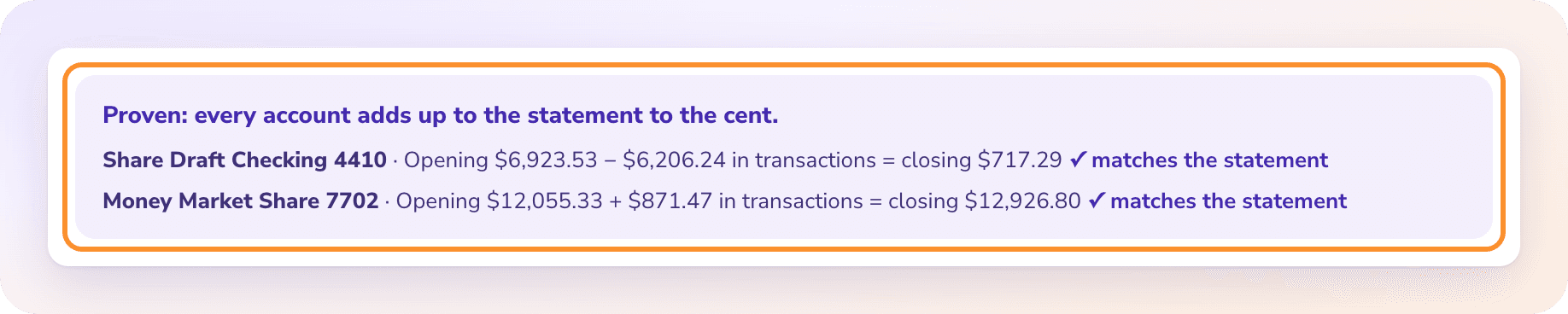
A statement has the opening and closing balance for its period, and ZeraBooks marks it Proven only when every row adds up to them. Several months and sub-accounts download as one file; see combine bank statements.

The statement proof: every account adds up to the statement to the cent, with the opening balance, transactions and closing balance for each account.

WHAT GOES WRONG

Why does a Bluevine month go wrong in Excel?

The statements are clean. The trouble is how many of them there are.

  • A sub-account left out

    Download only the main account and every transfer to a reserve looks like money that left the business.

  • Transfers counted twice

    Combine the statements by hand and each transfer is income on one side and spending on the other. In books, it is neither.

  • The sweep page read as activity

    The Sweep Program Monthly Statement has a balance and interest on it. Copy it in and the month gains a line that never happened.

  • A month before the 5th

    Statements are ready by the 5th of the next month. Converting on the 2nd means last month isn’t there yet.

SMALL BUSINESS BOOKS

Does the spreadsheet need to be the end of it?

Bluevine is a business account, so the statements usually end up in books. ZeraBooks can keep those books from the same PDFs: each sub-account is its own bank account in the ledger, AI categorizes the rest, and every month ties to the statement before it closes. See AI bookkeeping, or bookkeeping services if you would rather our team did it.

AI bookkeeping in ZeraBooks

MORE BANKS

Statements from other banks

QUESTIONS

Bluevine bank statement to Excel: common questions

Ask Damin directly
Does each Bluevine sub-account have its own statement?

Yes. Bluevine lists the main account and each sub-account separately under Banking Statements. Upload all of them; ZeraBooks proves each one and can put them in one file with an Account column or one tab each.

Why is this month’s Bluevine statement missing?

Bluevine makes statements available by the 5th of the following month. Until then, only the CSV export covers the current month, without a closing balance.

Is a Bluevine statement accepted as a bank statement?

It is the official statement for the account. Bluevine is a fintech, and the statement covers banking services provided by Coastal Community Bank, Member FDIC.

Does ZeraBooks connect to Bluevine?

No. ZeraBooks has no bank feeds and never asks for your Bluevine sign-in. You download the PDFs and upload them.

What does it cost to convert Bluevine statements?

Every account and sub-account counts against one allowance: 1,000 pages a month for $79 a month billed annually or $149 monthly, after a 7-day trial. See ZeraBooks pricing.

Also published on

Sources and further reading

  1. Fintech business bank statements: layout data (ZeraBooks on GitHub)
Damin Mutti, founder of ZeraBooks

About the author

Damin Mutti

Founder of ZeraBooks, Vancouver

Damin founded ZeraBooks in 2025 and still talks to the bookkeepers, firms and owners who use it every week. He writes about what he sees in their statements and ledgers, and every page here is checked against the live product before it goes up.

ONE-WEEK FREE TRIAL

Upload your Bluevine statements.
Main account and sub-accounts, proven together.

1,000 pages a month from $79 a month billed annually. Other fintech accounts: Chime. Business banks: Chase and Truist.

BOOK A CALL

Talk to Damin, our founder.

30 minutes. Pick a time on the next screen.

What would you like to talk about?