GUIDE · RUNNING A SMALL FIRM
CPA tools for a small firm,
sorted by the job each one does.
The CPA tools a small firm needs follow its work: tax software, a ledger for client books, something to turn client statements into spreadsheets, practice management, a secure client portal and payroll. ZeraBooks covers two of those jobs, with its bank statement converter and an AI general ledger for client companies. It does not prepare tax returns.
7-day trial · card required, nothing charged for 7 days · 3 client companies included
THE STACK
What tools does a CPA firm use, job by job?
A two to ten person firm doing tax and bookkeeping for small businesses usually ends up with one tool per row. The names are well-known examples in each category, not a ranking.
| Job | What the tool does | Common examples | Where ZeraBooks fits |
|---|---|---|---|
| Tax preparation | Prepares and e-files returns and rolls each client forward a year | Drake Tax, UltraTax CS, Lacerte, ProSeries, CCH Axcess Tax | Not offered |
| Client books | Keeps each client’s transactions, reconciliations and financial statements | QuickBooks Online Accountant, Xero, ZeraBooks | AI general ledger, each client its own company |
| Statement conversion | Turns PDF bank and card statements into Excel or CSV | DocuClipper, MoneyThumb, ProperSoft, ZeraBooks | Converter, checked against printed balances |
| Receipts and bills | Reads receipts and bills so nobody types them in | Dext, Hubdoc | Bills read from PDF and matched to payments, inside the ledger |
| Practice management | Deadlines, task lists, time and billing for the firm | Karbon, Canopy, TaxDome, Financial Cents | Not offered |
| Client portal and e-signature | Collects documents, organizers and signatures securely | TaxDome, SmartVault, ShareFile, Liscio, SafeSend | Not offered; clients have no ZeraBooks login |
| Payroll | Runs paychecks and files payroll taxes | Gusto, ADP, Paychex | Not offered |
| Workpapers and engagements | Trial balance, adjusting entries, review and compilation files | CaseWare, plus a lot of Excel | Not offered |
Product names belong to their owners. Many firms run several rows inside one suite from the same vendor, and smaller firms often cover practice management with a shared calendar and a spreadsheet until it stops working.
Try it on your own documents. One-week free trial, both apps included.
CHOOSING
How should a small CPA firm choose its tools?
Most firms don’t pick a stack in one go. They inherit one and replace the piece that hurts most each spring.
Choose tax software first
It is the hardest piece to change, because each client’s prior-year data rolls forward inside it. Everything else should export to it or sit next to it.
Follow your clients for the ledger
If most clients already keep their own books in QuickBooks Online or Xero, you work where they are. The choice is yours only for clients whose books you keep end to end, which is where an AI ledger saves the most time.
Price statement conversion by pages
Tax season brings stacks of statements for clients who keep no books at all. A converter priced by page, with a balance check on every statement, is cheaper than staff time spent re-typing or spot-checking.
Get documents out of email
Client statements and tax documents carry account and Social Security numbers. A portal with multi-factor sign-in is safer than attachments, and it gives you one place to look.
Write the security plan down
Firms that prepare returns must keep a written information security plan under the FTC Safeguards Rule. IRS Publication 5708 has a template sized for a small practice.
Fewer tools, better connected
Each extra tool is another login, another invoice and another place a document can hide. Drop one that overlaps before adding another.
WORKED EXAMPLE
Example: a client’s year of statements before tax prep
A sole proprietor hands over twelve checking statements and twelve Amex statements in March, and has kept no books. This is the job the statement conversion row exists for.
- 1
Collect the PDFs in the portal
Ask for statements, not screenshots or exported activity, because the printed opening and closing balances are what let you prove nothing is missing.
- 2
Convert the whole year at once
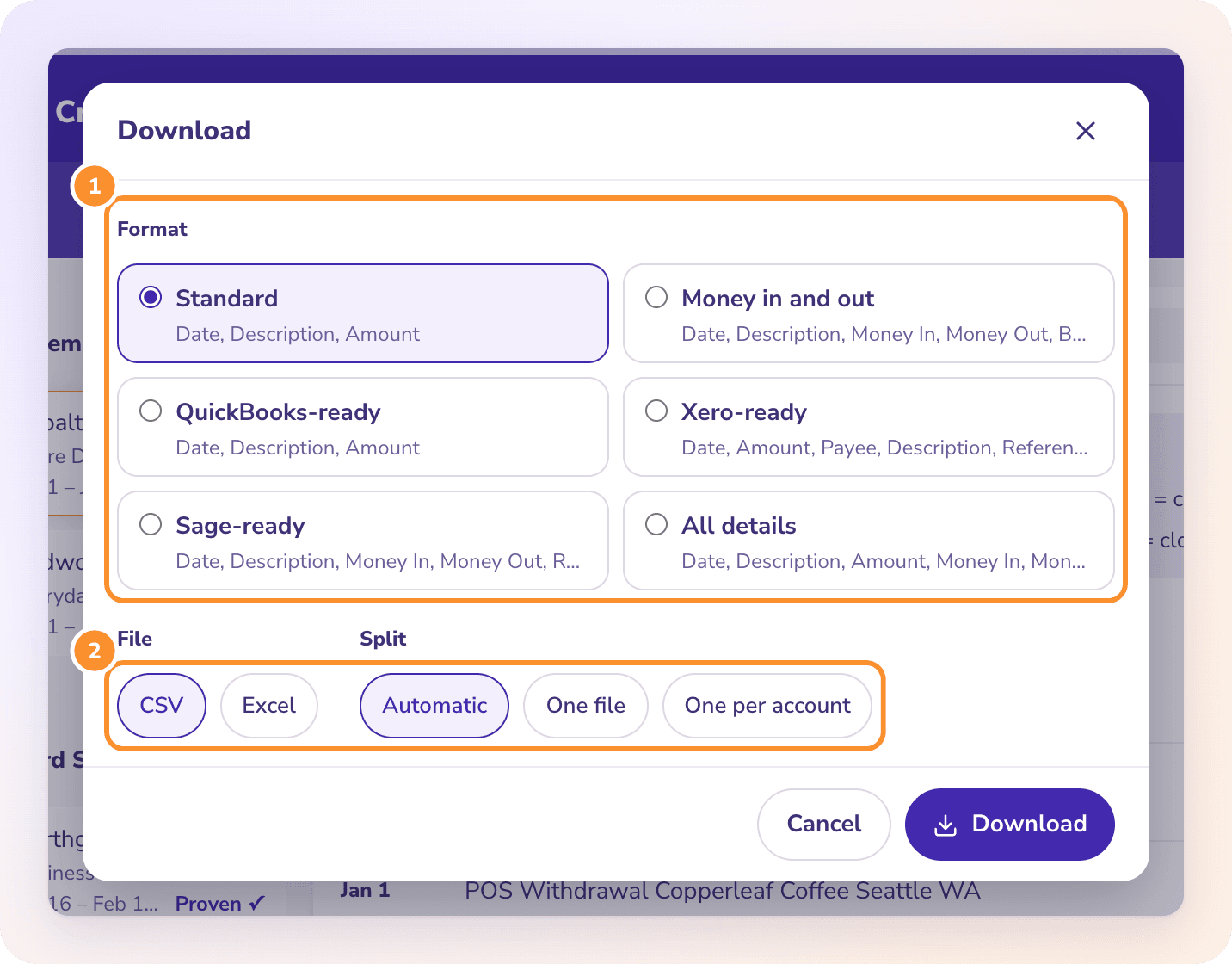
Upload all 24 PDFs to the ZeraBooks Converter and download the client’s year as one Excel file, or one file per account. The Amex charges come out with a cardholder column when the client has extra cards.
- 3
Look only at what doesn’t tie
Every statement is checked against its own balances. If one doesn’t tie, the Converter shows which account and by how much, so you open one statement instead of all of them.
- 4
Categorize in your workpaper
Sort by description and assign tax lines. For the card, our guide to American Express expense categorization covers the payment, the annual fee and rewards so nothing is counted twice.
- 5
Or keep the books for next year
If the client should have proper books from now on, add them as a client company in the ZeraBooks ledger instead and upload the same statements there. The AI categorizes and reconciles each month, and next March the profit and loss is already done.
AN HONEST FIT CHECK
Where does ZeraBooks fit in a CPA firm’s stack?
ZeraBooks sits in two rows of the table. For statement conversion, every subscription includes the Converter, and we tailor it for accounting firms at no cost: we test it on the statements your clients send and set up a download layout that matches your workpapers. Referrals from top-10 U.S. accounting firms are available as references on request.
For client books, ZeraBooks is accounting software for accountants who keep the books themselves. Each client is a separate company in one login with its own chart of accounts, and the AI reads statements, categorizes, reconciles and drafts month-end entries for you to review. 3 client companies are included, then $29 a month each.
What ZeraBooks does not do matters as much. It has no tax preparation, practice management, client portal, e-signature or payroll. It has no bank feed, does not sync with QuickBooks or Xero and does not make .qbo or IIF files; the Converter gives you QuickBooks-ready and Xero-ready CSV to import yourself. Firms that need ZeraBooks changed for their own document types or volume talk to us about ZeraBooks Enterprise.
What software do CPAs use for tax returns?
Small and mid-size firms mostly use professional tax packages such as Drake Tax, UltraTax CS, Lacerte, ProSeries or CCH Axcess Tax. ZeraBooks is not tax software; it prepares the books and statement data that go into the return.
Do CPA firms still use Excel?
Yes, every day. Workpapers, tie-outs, depreciation schedules and one-off client analysis still live in spreadsheets. That is why converting client statements to Excel well, with balances checked, saves real hours in tax season.
What is the best bank statement converter for a CPA firm?
One that reads your clients’ bank layouts, splits statements by account and cardholder, and proves each statement against its printed balances so staff check exceptions instead of every line. ZeraBooks does all of that and tailors the setup to your firm for free; DocuClipper, MoneyThumb and ProperSoft are the other names firms usually compare.
Can ZeraBooks replace QuickBooks Online for client books?
For clients whose books you keep end to end, often yes. You move each client over from a closing trial balance and upload statements each month, since there is no bank feed. For clients who do their own bookkeeping in QuickBooks Online, most firms stay where the client is.
Can clients log in to ZeraBooks?
No. Each ZeraBooks login belongs to one person, and there are no separate logins for clients or staff. You share results by publishing or emailing reports, and collect documents through your own portal.
How much does ZeraBooks cost for a firm?
$79 a month billed annually or $149 monthly, after a 7-day trial. That includes the ledger with 3 client companies, the Converter with 1,000 pages a month, and $29 a month for each extra client. See ZeraBooks pricing.
ONE-WEEK FREE TRIAL
Try it on one client’s statements.
Converted, or kept as books.
Upload a month of one client’s PDFs and see them proven against the balances. 3 client companies included, then $29 a month for each one you add.
Last updated October 13, 2026 · Written by Damin Mutti, founder of ZeraBooks