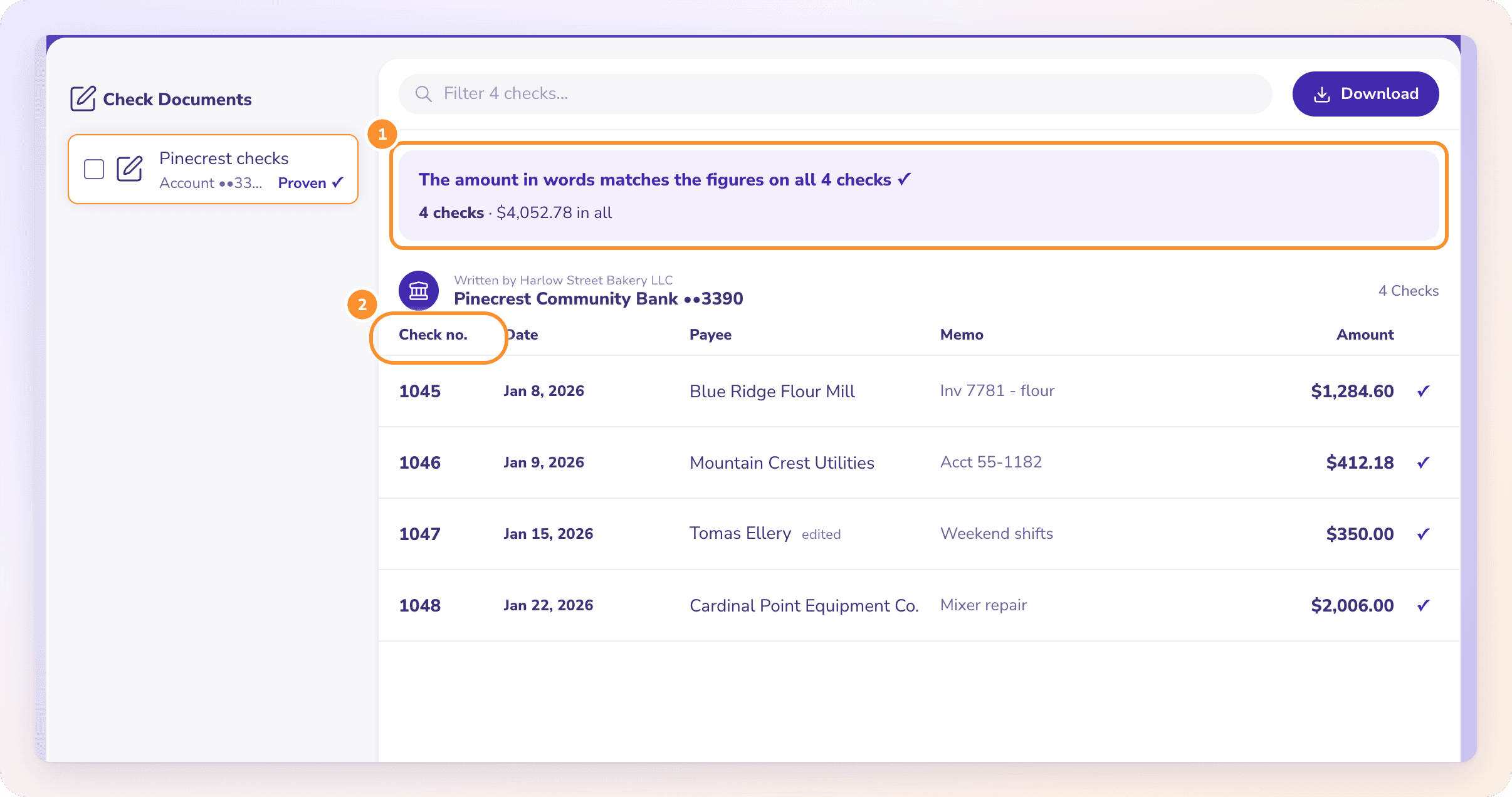
Scanned checks to a spreadsheet, every amount checked twice.
To turn checks into Excel, scan them to one PDF and upload it to ZeraBooks Convert, the same bank statement converter that reads statements. Each check becomes one row: check number, date, payee, memo, amount, bank and account. Every check prints its amount twice, in figures and in words, and Convert compares the two, so a misread amount is flagged before you download Excel or CSV.
7-day free trial · 1,000 pages a month from $79/month billed annually
Every document type on its own page.
HOW IT WORKS
Many checks in one PDF. One row each.
Checks are one of the documents Convert reads, alongside bank statements and brokerage statements in the investment statement converter.
WHAT’S READ
Everything on the check.
For each check: the check number, date, payee, memo and amount; the amount written in words; and the bank, the payer and the last 4 digits of the account it’s written on. One PDF can hold many checks, grouped by the account they’re written on.
Convert compares the amount in figures with the amount in words on every check. When they all match, the document is Proven with the number of checks and their total. When one doesn’t, it names the check and both amounts so you can fix it.
Try it on your own documents. One-week free trial, both apps included.
Two checks from the same scanned PDF, as they come out in the download. Check 1047 is read cleanly. On check 1048 the scan smudged a digit, so the figures were read as $1,824.60 while the words say one thousand two hundred eighty-four and 60/100. Convert holds that check back until you fix it.
Column in the download
Check 1047
Check 1048
Check Number
1047
1048
Date
Sep 12, 2026
Sep 19, 2026
Payee
Northside Plumbing Co
Alder Street Properties
Amount
415.00
1,824.60 as read, 1,284.60 after the fix
Memo
Invoice 3381
October rent, suite 4
Written By
Lakeview Dental PLLC
Bank
First Harbor Bank
First Harbor Bank
Account Last 4
6021
6021
Source File
september-checks.pdf
Amount in words (compared, not a column)
Four hundred fifteen and 00/100
One thousand two hundred eighty-four and 60/100
Proof
Words match the figures
Flagged: the words say $1,284.60, but the figures say $1,824.60
The names, dates and amounts are made up for the example. After you correct check 1048, Convert checks it against its words again and marks it edited. The document is Proven only when every check matches.
STEP BY STEP
How to convert checks to Excel
1
Scan or collect the checks as PDF
Scans saved as PDF work. One PDF can hold many checks.
2
Upload them on the Checks page
Click Upload checks or drop the PDFs on the page.
3
Review any flagged check
Fix a check whose words and figures disagree.
4
Download Excel or CSV
You get Check Number, Date, Payee, Amount, Memo, Written By, Bank, Account Last 4 and Source File.
WHY PEOPLE DO THIS
Why turn checks into a spreadsheet at all?
A bank statement shows a check as a number and an amount. It rarely shows who the check was paid to or what it was for. The payee and memo live on the check itself, so anyone categorizing those payments has to open each image and type it out. With the checks in a spreadsheet, you can sort by payee, total a vendor for the year, or match each check number to the line on the statement.
That comes up most when someone is catching up on a year of books that were never kept, when an accountant needs the payees behind a stack of checks for a review, or when a small office still pays rent and contractors by check. For the statement side of the same job, convert the bank statement to Excel; its All details layout has a check number column you can match on. Firms doing this for many clients can read about ZeraBooks for firms.
Yes, as long as the scan is saved as a PDF. Convert accepts PDFs only, up to 50 MB each.
What does the check converter extract?+
Check number, date, payee, memo, amount, the amount in words, and the bank, payer and last 4 digits of the account.
How does it know the amount is right?+
Every check prints its amount in figures and in words. Convert compares the two and flags any check where they disagree or the words can’t be read.
How many pages does a PDF of checks use?+
Pages are pages of the PDF you upload, so a 5-page scan uses 5 pages however many checks are on it. A document that can’t be read uses none. Plans start at 1,000 pages a month; see ZeraBooks pricing.
Can I fix a check that was read wrong?+
Yes. Click the check and correct its number, date, payee, memo or amount, then save. While you edit, the amount read in words is shown beside it so you can compare. You can’t add or remove checks; if some are missing, upload a clearer scan.
How do I get the checks into QuickBooks or another ledger?+
Download them as CSV or Excel and import the file into your software. ZeraBooks doesn’t connect to QuickBooks or send checks to it.
Does it read deposited check images from a bank statement?+
Upload the PDF on the Checks page; Convert reads the written checks it finds. If no checks are found, it says so. For the statement’s transactions, convert the bank statement to Excel.
Then 1,000 pages a month from $79 a month billed annually; see ZeraBooks pricing. Want to keep the books in ZeraBooks too? AI bookkeeping in the General Ledger is included.