How Convert proves a statement
Convert checks every account on a statement against the balances the bank printed, to the cent. Here is what the proof checks and what Proven and Needs a look mean.
What the proof checks
When ZeraBooks Convert reads a bank or credit card statement, it adds up the transactions it read and compares the result with the balances printed on the statement. This is plain arithmetic, done for every account on the statement:
| Account | The proof |
|---|---|
| Bank account | Opening balance + transactions = closing balance |
| Credit card | Previous balance, plus charges and minus payments = new balance |
| Cardholder (card statements that print a total per cardholder) | That cardholder's charges = their printed total |
Every figure must match to the cent. For a cardholder, the total may tie either as their charges less refunds or as their charges alone, because card issuers print it both ways.
Read the proof
The proof sits above the transactions on Bank & Credit Cards. Its first line gives the verdict, and there's one line per account under it.
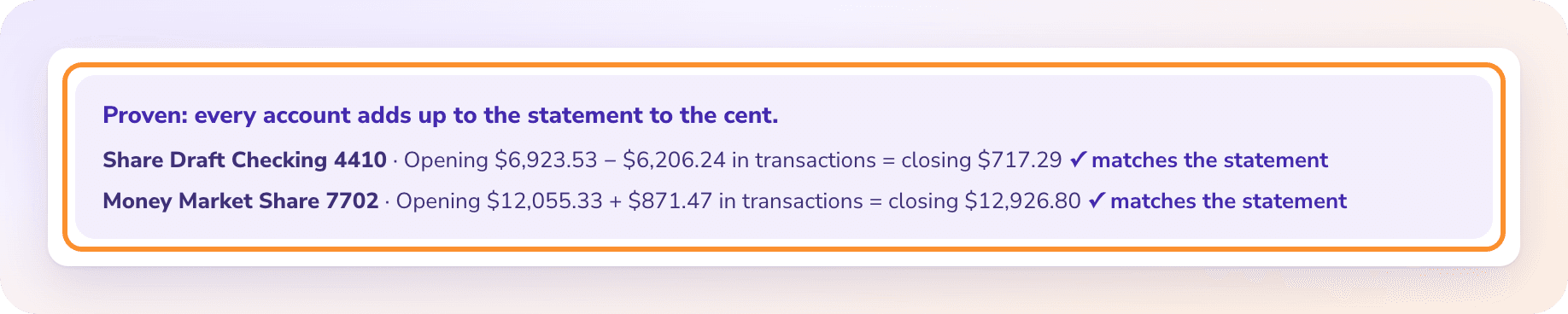
Proven: "Proven: every account adds up to the statement to the cent."
Not proven: "Needs a look before you download."
Each account's line shows the sum, for example "Business Checking 1234 · Opening $5,000.00 + $1,250.00 in transactions = closing $6,250.00", followed by one of:
"✓ matches the statement": this account adds up.
"— the statement says $A, off by $B. Fix a row or add a missing one.": the transactions read don't reach the printed balance. The difference is the amount you're looking for.
For card statements, the line reads "Previous balance … in charges and payments = new balance …". When every cardholder ties, you see "Cardholders · all n match their printed totals ✓". If one doesn't: "A cardholder's charges don't match their printed total (off by $X)."
Proven ✓ and Needs a look
A statement is Proven ✓ only when both are true:
Every account, and every cardholder with a printed total, ties to the cent.
There are no notes left to review.
Otherwise it shows Needs a look. Notes appear under the account lines, in the words Convert uses, for example "3 row amount(s) could not be read."
When a statement doesn't tie on the first read, Convert reads it again automatically, up to two more times, and keeps the best attempt. If it still doesn't tie, it's over to you: see Fix a statement. The proof is worked out again after every change you save.
Tip: When an account is off, open your PDF of the statement and compare its lines with the transactions for that account. A missed line usually shows up as a difference equal to its amount. A difference of twice a line's amount often means a line was read in the wrong direction (money in instead of money out).
Statements without balances
Some statements don't print an opening and closing balance for an account. Then there's nothing to prove that account against, and its line reads "{Account} · the statement prints no balances to check against."
A statement can only be Proven ✓ when every account has balances to check against. A statement without balances stays at Needs a look, even when every line was read correctly. Compare it with your PDF, then download it as usual.
Frequently Asked Questions
What does "Proven" mean?
Every account on the statement adds up to the balances the bank printed, to the cent, and nothing is left to review. The transactions you download match the statement.
Why is my statement "Needs a look"?
An account doesn't tie to the cent, an account has no printed balances, or there's a note to review, such as an amount that couldn't be read. The lines in the proof say which.
Can I still download a statement that needs a look?
Yes. Nothing stops the download, but the file may not match the statement. Fix it first where you can. See Fix a statement.
What changes the proof?
Amounts, and missing or extra lines. Correcting a date or description doesn't change the totals. The proof is worked out again every time you save a change.
Why does a credit card proof use "previous balance" and "new balance"?
That's how card statements print them. Charges raise what you owe and payments lower it, so the previous balance plus charges, minus payments, must equal the new balance.
Are checks, invoices and investment statements proven too?
Yes, each in its own way. Checks compare the amount in words with the figures, invoices check lines against their totals, investments check values and holdings, and financial statements check every total. See Checks, Invoices, Investment statements and Financial statements.
Learn more about Bank statement converter: Statements to checked Excel or CSV, split by account and cardholder.
Still stuck? A real person reads every message—come say hello.