Verify a statement with AI
When a statement doesn't tie, ZeraBooks can re-read the original document line by line and propose only the fixes that make it tie. You apply them with one click.
When to use it
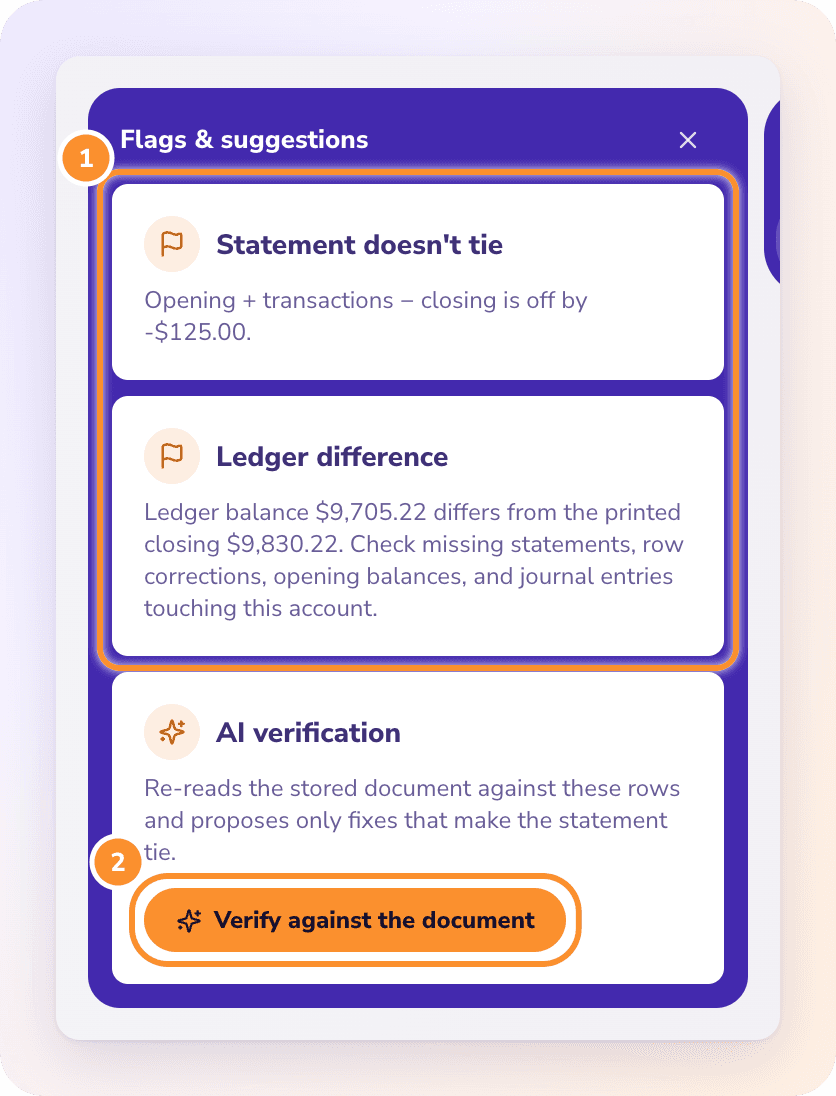
Use AI verification when a month shows an orange ! because the statement itself doesn't add up (the Statement doesn't tie flag) and you're not sure which line or balance was misread.
It's offered only while the statement is off by some amount. A statement that already ties shows "Available when the statement doesn't tie — this one has nothing to verify."
Run the verification
Go to Accounting › Reconciliations.
Click Review… on the account's card, or click the orange !.
On the right, open Flags & suggestions.
Under AI verification, click Verify against the document. The button reads Re-reading statement… while ZeraBooks transcribes the document line by line and checks it against your rows.
Read the suggestions
Each suggestion names the problem, explains the fix, and quotes the line from the document it's based on.
| Suggestion | What ZeraBooks found |
|---|---|
| Missed line | A line printed on the statement is missing from your rows |
| Phantom line | A row isn't on the statement |
| Sign flipped | Money in was read as money out, or the reverse |
| Amount misread | An amount doesn't match the document |
| Date misread | A date doesn't match the document |
| Balance misread | The printed opening or closing balance was read wrong |
ZeraBooks proposes only fixes that make the statement tie. If it finds none, it says so ("No document-backed fix found." or a note explaining why), and you can fix the month by hand. See Fix a month that doesn't tie.
Apply the fixes
One fix at a time: click Apply on a suggestion. A message confirms it, and says "The statement now ties." when it does.
Fixes that only work together: the panel says "These fixes tie only together — apply all." Click Apply all.
While Apply all runs, the panel shows Repairing statement… and a progress bar ("3 of 5 fixes written"). Each fix is re-checked against the statement as it lands.
Keep this screen open until the repair finishes. Leaving midway can leave the month half fixed, and your browser asks before you leave.
When every fix is written, the panel reads Statement repaired and the month's dot updates. If a fix fails, it reads Repair stopped; run Verify against the document again to see what remains.
Frequently Asked Questions
When is "Verify against the document" offered?
Only when the statement is off by an amount other than zero. A statement that already ties has nothing to verify.
Does AI verification change my books on its own?
No. It only proposes fixes. Nothing changes until you click Apply or Apply all.
Why is Apply missing on the suggestions?
The fixes only make the statement tie together, so they're applied as a set. Click Apply all at the top of the suggestions.
What does "Repair stopped" mean?
One of the fixes couldn't be written, often because the rows changed in the meantime. The fixes marked Fixed are saved. Click Verify against the document again to see what's left.
The verification found nothing. What now?
Check the printed balances with Fix statement details…, or add and remove rows in Edit. If the whole statement was read badly, remove it in Banks & Cards and upload a clearer copy. See Fix a month that doesn't tie.
Can AI verification fix a ledger difference?
No. It compares your rows with the statement document. A Ledger difference comes from something else on the account, such as a journal entry or an opening balance; the panel lists the journal entries touching the account that month.
Learn more about Bank reconciliation software: Every statement proven to tie before the month closes.
Still stuck? A real person reads every message—come say hello.