How reconciliation works
ZeraBooks checks every account, month by month, against the bank's own statement. Here is what the three checks are and what every dot on the timeline means.
What reconciliation checks
Every statement you upload in Banks & Cards is reconciled on its own, account by account and month by month. A month ties when all three checks pass:
The statement adds up. The opening balance plus every transaction on the statement equals the closing balance printed on it.
The chain holds. This statement's opening balance matches the previous statement's closing balance, so no money went missing between statements.
The ledger agrees. Your ledger balance for the account equals the closing balance printed on the statement.
When all three agree, the month is proven against the bank. There is nothing to tick off line by line.
Tip: Reconciliation runs as soon as a statement is uploaded. You don't start it; you only review the months that need a look and sign off the ones that tie.
Read the timeline
In the left navigation, click Accounting › Reconciliations (or press G then R).
Pick the month with the arrows at the top of the page.
Each account has one row. Every dot is one month checked against the bank's own statement.
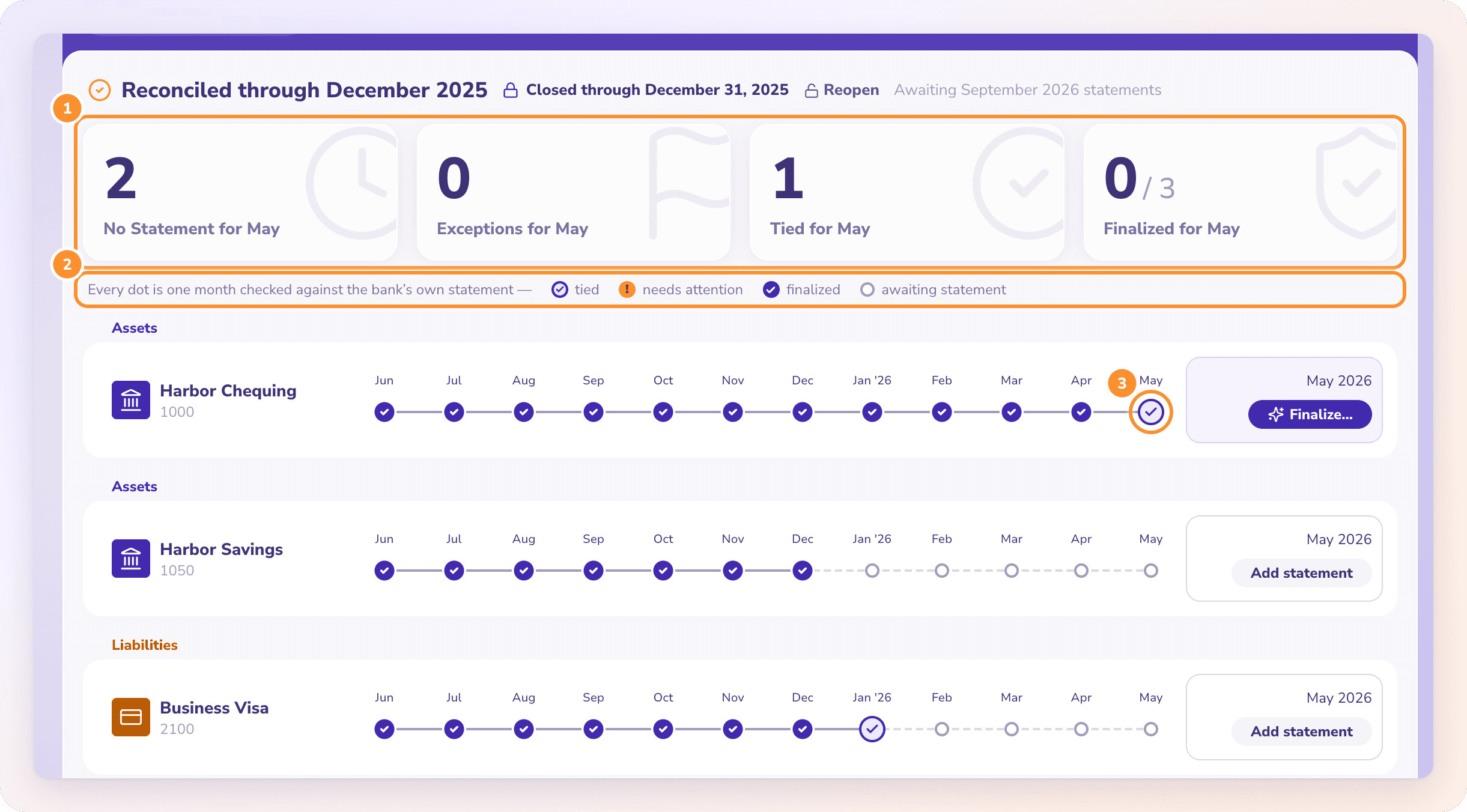
| Dot | What it means | What you can do |
|---|---|---|
| Purple outline with a check | The month ties: statement, chain and ledger all agree | Finalize… |
| Orange ! | The month does not tie | Review… |
| Orange warning triangle | No statement covers this month, between months that are covered | Upload statement |
| Solid purple check | The month is finalized (signed off) | Finalized, View |
| Check with an orange ↺ ring | Reopened: its numbers changed after sign-off | Reopened — review… |
| Empty grey ring | No statement uploaded yet | Add statement |
The four stat cards above the timeline (No Statement, Exceptions, Tied and Finalized for the month) each filter the timeline when you click them. Click an account's name to open it in Banks & Cards.
After a month ties
Finalize it to record that you checked it. See Finalize a month.
If it doesn't tie, open it and follow Fix a month that doesn't tie.
When every month up to a date is done, close the books so nothing on or before it can change.
Frequently Asked Questions
What does "tied" mean?
The statement's own math adds up, its opening balance meets the previous statement's closing balance, and your ledger balance equals the printed closing balance. All three must agree.
What is the orange warning triangle?
There's no statement for that month, but there are statements before and after it. Upload the missing statement to close the gap. Until you do, the months around it can tie while money in the gap goes unchecked.
Do I have to match every transaction to the bank?
No. ZeraBooks reconciles whole statements, not individual lines. The bank's opening and closing balances prove the month. You only look at lines when a month doesn't tie.
Can I upload a statement from Reconciliations?
Yes. Click an empty grey dot, then Add Statement, and choose a PDF or CSV. It is imported into that account exactly as if you had uploaded it in Banks & Cards.
Where are depreciation, loan interest and prepaid expenses?
Not on this page. Autopilot proposes those month-end entries for you. See Month-end entries.
Learn more about Bank reconciliation software: Every statement proven to tie before the month closes.
Still stuck? A real person reads every message—come say hello.