General Ledger + Converter in one subscription.

See pricing
Skip to content
  1. Home
  2. Bank statement converter

BANK STATEMENT CONVERTER

Bank statement converter:
PDF to Excel or CSV, checked to the cent.

Upload a bank or card statement PDF. Get every transaction back in Excel or CSV, checked against the printed balances.

7-day free trial · 1,000 pages a month from $79/month billed annually · General Ledger included

A real run in ZeraBooks Convert. Sample statement with fictional figures.

TRY IT FREE

Convert one statement now, no sign-up

Drop a PDF bank or credit card statement, up to 5 pages. You’ll see every transaction and the balance check, exactly as in ZeraBooks Convert.

ZeraBooks is a bank statement converter that turns PDF bank and credit card statements into Excel or CSV rows: date, description and amount. It splits each statement by account and cardholder, proves every one against the printed opening and closing balances to the cent, and downloads Standard, QuickBooks-, Xero- or Sage-ready files.

HOW IT WORKS

Upload a PDF. Download proven data.

ACCOUNTS AND CARDHOLDERS

One PDF, every account, split for you.

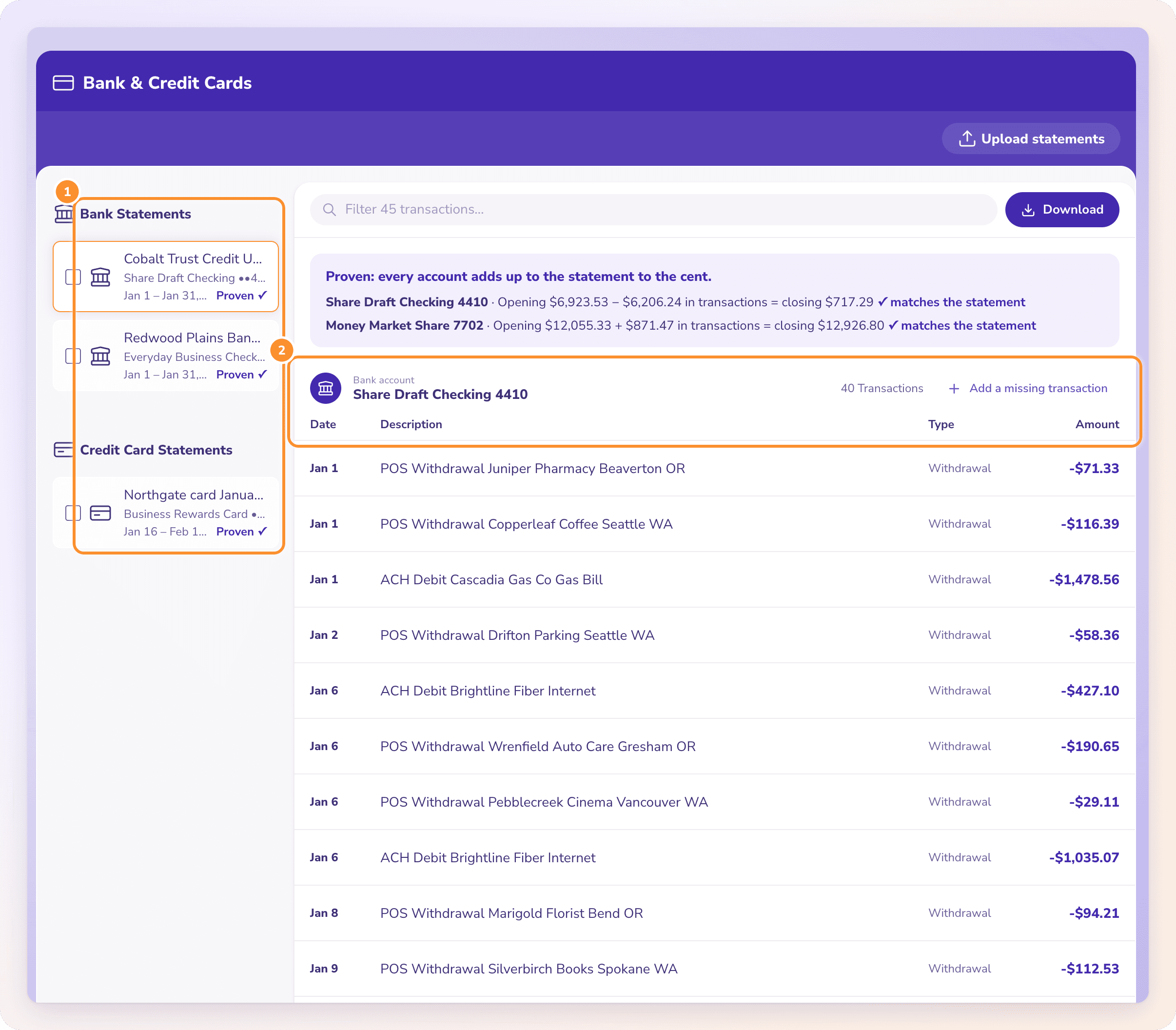
A statement that holds several accounts is split by account, each with its own transactions. A card statement with several cardholders, such as an Amex with extra cards, assigns every charge to its cardholder. Move a transaction to another account, correct a row or add a line the statement shows that wasn’t read.

Bank and credit card statements
A converted bank statement split into accounts, with date, description, type and amount for every transaction.

PROVEN TO THE CENT

Every account checked against the printed balances.

For a bank account, opening balance plus transactions must equal the closing balance. For a card, previous balance plus charges minus payments must equal the new balance, and each cardholder’s charges must match their printed total. A statement is Proven only when every figure matches to the cent; if it doesn’t, Convert reads it again automatically and shows you exactly how far off each account is.

How Convert proves a statement
The statement proof: every account adds up to the statement to the cent, with the opening balance, transactions and closing balance for each account.

FREE SETUP

Need it your way? We’ll set it up for you, free.

A bank with an odd layout, statements with several accounts, or a file your software needs in a set format? Book a quick call. We set ZeraBooks up for your documents for free and show you the result within a few days.

Book a call

DEFINITION

What is a bank statement converter?

A bank statement converter is software that reads a bank or credit card statement, usually a PDF, and turns every transaction on it into structured rows (date, description, amount and balance) in a format a spreadsheet or accounting system can import, such as Excel or CSV.

WHAT YOU GET

What does a converted bank statement look like?

A fictional business checking statement for September 2026: an opening balance of 4,210.55, five transactions printed across three sections, and a closing balance of 5,622.13. Converted in the Standard format, the sections become one dated list with a signed Amount, and the proof runs before you download.

DateDescriptionTypeAmount
09/02/2026Customer deposit, invoice 1184Deposit3,400.00
09/05/2026Check 2207, office rentCheck-1,650.00
09/12/2026ACH payment, payroll providerWithdrawal-2,118.42
09/19/2026Card settlement depositDeposit1,812.00
09/30/2026Monthly service feeFee-32.00
Opening 4,210.55 + rows = printed closingProven5,622.13

The check behind “Proven”: 4,210.55 + 3,400.00 − 1,650.00 − 2,118.42 + 1,812.00 − 32.00 = 5,622.13, to the cent. If one digit had been misread, the statement would show Needs a look with the account and the gap, before any file is made. Bank by bank, the layouts differ: see Chase, Bank of America and Wells Fargo.

TWO ACCOUNTS, ONE PDF

One statement, two accounts, two proofs

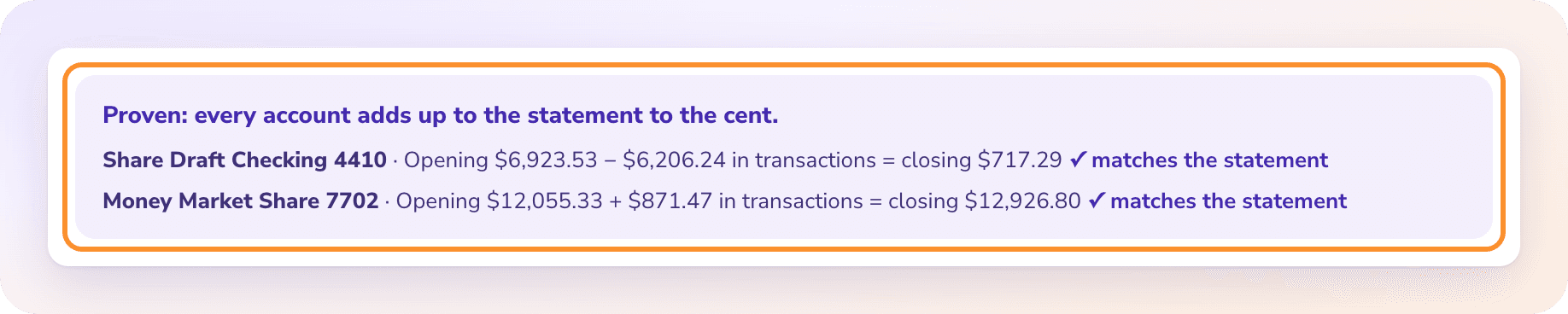
Credit unions often print checking and savings on the same statement. ZeraBooks splits them and proves each one on its own: Share Draft Checking opens at $6,923.53, loses $6,206.24 and closes at $717.29; Money Market opens at $12,055.33, gains $871.47 and closes at $12,926.80. Both match the printed balances. A single combined total would hide a misread line in either account. When a proof fails, the size of the difference points to the line.

The statement proof: every account adds up to the statement to the cent, with the opening balance, transactions and closing balance for each account.

MORE THAN BANK STATEMENTS

Every financial document, on its own page

Convert reads more than bank statements. Written checks go through the check converter, and brokerage and retirement statements through the investment statement converter.

BY BANK

Bank statement to Excel, bank by bank

Each bank lays its statement out differently. These guides show where to download the PDF, how that bank prints it and what the converted file looks like.

HOW WE COMPARE

How does ZeraBooks compare with other bank statement converters?

We ranked 12 bank statement converters on what they cost at 100, 1,000 and 2,500 pages, the files they write, and whether they prove each statement against its printed balances. ZeraBooks ranks first, and we make it, so the rankings show every rival price with the date we read it. Got one job to do? See the picks for PDF to Excel, accountants and scanned statements.

BEFORE YOU CONVERT

Questions people ask about converting documents

STEP BY STEP

How to convert a bank statement to Excel or CSV

Need the PDF first? Our guides show how to download bank statements from Chase, Bank of America, Wells Fargo, American Express and other banks.

  1. 1

    Start the free trial

    Create your account and start the 7-day trial. A card is needed at checkout; nothing is charged for 7 days.

  2. 2

    Upload the PDF

    Open Bank & Credit Cards and click Upload statements, or drop PDFs anywhere on the page. Up to 50 MB and 500 pages per file, several at once.

  3. 3

    Check the proof

    Reading usually takes under a minute. A Proven statement adds up to its printed balances to the cent; Needs a look shows which account is off and by how much.

  4. 4

    Download

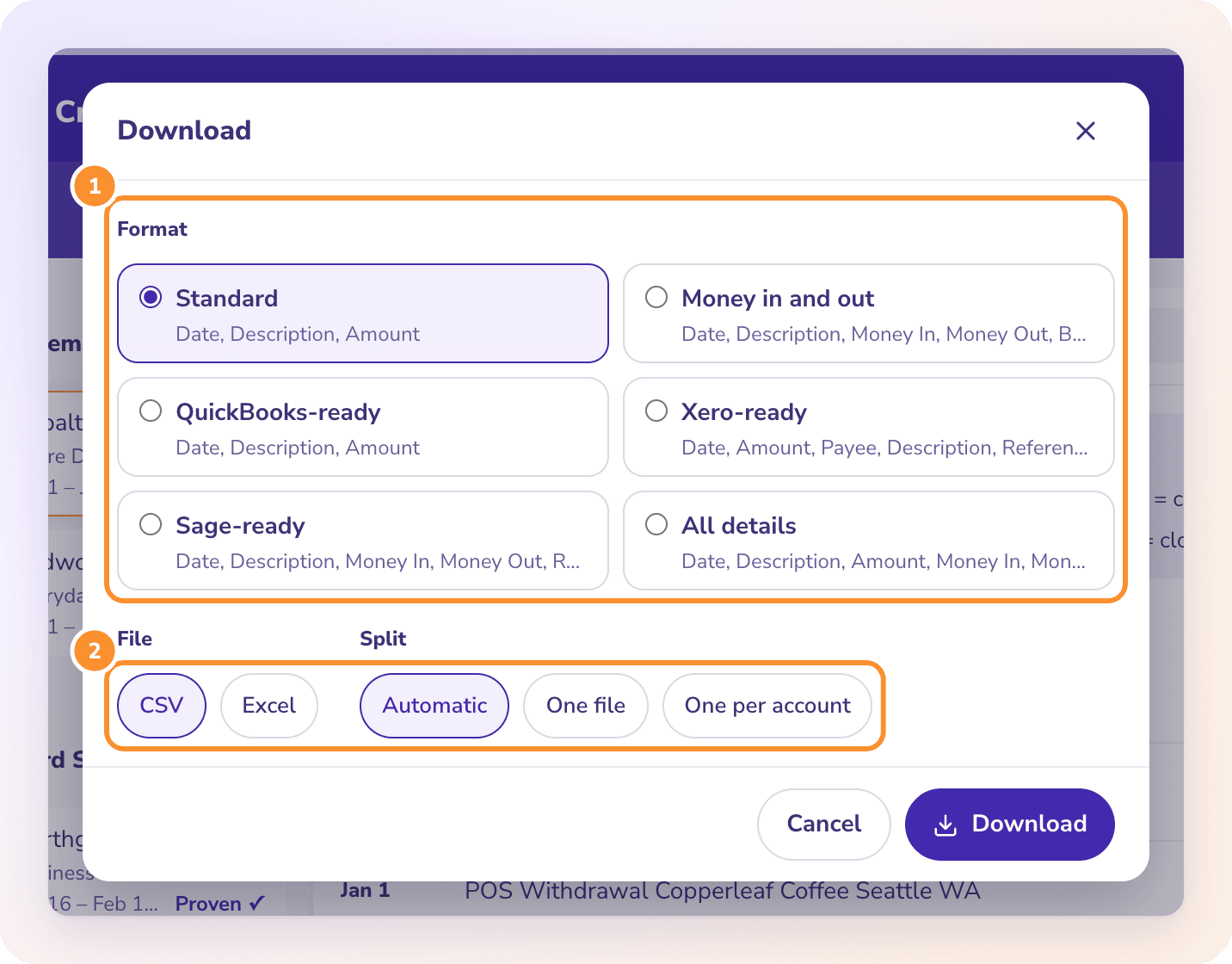
    Click Download, pick a format such as QuickBooks-ready, choose CSV or Excel, and download.

ZERABOOKS VS DOCUCLIPPER

ZeraBooks Convert vs DocuClipper

The longer side-by-side pages: ZeraBooks as a DocuClipper alternative, a MoneyThumb alternative or a ProperSoft alternative. Each one shows why ZeraBooks is the better pick, with every competitor fact sourced.

FeatureZeraBooks ConvertDocuClipper
Pages and price1,000 pages: $149/mo or $948/yr · 2,500 pages: $249/mo or $2,148/yr · 5,000 pages: $599/mo or $5,388/yrStarter 60 pages $29, Business 640 pages $159, Business 1,000 pages $219, Enterprise 1,800 pages $399 a month; 30% off billed annually
Free trial7 days (card needed at checkout)14-day free trial, no card required, up to 120 pages
Download filesExcel or CSV in Standard, Money in and out, QuickBooks-ready, Xero-ready, Sage-ready and All details formatsExcel, CSV, QBO, IIF, OFX, QFX, QIF
Statement proofEvery account and cardholder proven to the cent against the printed balancesSays it runs reconciliation checks on the output
Also includedThe ZeraBooks General Ledger, in the same subscription—

Competitor facts from their public pages, checked October 11, 2026: DocuClipper. Prices and features change; check each vendor before you buy.

QUESTIONS

Bank statement converter: common questions

Ask Damin directly
Do you work with trucking companies?

Yes. Trucking bookkeeping automation covers settlement statements for firms, and owner-operator bookkeeping covers a single truck, with a monthly trucking bookkeeping checklist.

Can I see a statement converted start to finish?

Yes. The CommBank worked example follows one September statement from the PDF to a proven Excel file, and why a converted statement doesn’t add up shows what a failed proof tells you.

What is a bank statement converter?

Software that turns a PDF bank or credit card statement into structured rows of data, such as date, description, amount and balance, that you can open in Excel or import into accounting software.

Is a bank statement converter legit and accurate?

A converter is only as good as its checks. ZeraBooks Convert proves every account against the balances the bank printed, to the cent, and marks a statement Proven only when everything ties. If something is off, it tells you which account and by how much before you download.

Is there a free and unlimited bank statement converter?

ZeraBooks Convert isn’t free or unlimited: it has a 7-day free trial, then plans by pages per month, starting at 1,000 pages for $79 a month billed annually. Pages from a document that couldn’t be read never count.

Can it convert credit card statements?

Yes. Card statements are proven as previous balance plus charges minus payments equals the new balance, and statements with several cardholders, such as Amex, are split by cardholder. Our guide to credit card statement to Excel shows the columns you get and how to check the new balance.

Does it work with scanned statements or images?

Convert reads PDFs, including scanned PDFs. Image, CSV and Excel files are refused; save or print them to PDF first. Our guide to scanned bank statement to Excel shows how to check the numbers on a scan.

Can I get a bank statement into Google Sheets?

Yes, through a file. There is no Google Sheets connection: download CSV and import it with File, Import. The guide to bank statement to Google Sheets covers the import settings that matter.

Can I put years of statements from several accounts in one spreadsheet?

Yes. Upload them, tick them in the list and download them together as one file with an Account column on every row. Family law and forensic work is the common case; see bank statements for divorce. The steps and the month-to-month balance check are in combine bank statements.

Does it connect to my bank or QuickBooks?

No. Documents come in only as PDFs you upload, and data goes out only as files you download, ready for QuickBooks, Xero, Sage or a spreadsheet. Want to keep the books in ZeraBooks instead? AI bookkeeping in the General Ledger is included in the same subscription.

How much does it cost?

1,000 pages: $149/mo or $948/yr · 2,500 pages: $249/mo or $2,148/yr · 5,000 pages: $599/mo or $5,388/yr. Yearly plans give the whole year’s pages upfront. There are no overage bills, and the General Ledger is included; see ZeraBooks pricing. Accounting firms can have the Converter tailored to their documents and download layout for free; for more volume or a custom build, ZeraBooks Enterprise builds custom solutions for accounting firms.
Also published on

Sources and further reading

  1. U.S. bank statement layouts (ZeraBooks on GitHub)
  2. Statement tie-out checklist (ZeraBooks worksheet)
Damin Mutti, founder of ZeraBooks

About the author

Damin Mutti

Founder of ZeraBooks, Vancouver

Damin founded ZeraBooks in 2025 and still talks to the bookkeepers, firms and owners who use it every week. He writes about what he sees in their statements and ledgers, and every page here is checked against the live product before it goes up.

FREE SETUP + CATCH-UP

Convert your first statement in a minute.
Free for 7 days.

Upload a PDF, check the proof, download a QuickBooks-, Xero- or Sage-ready file. Keeping books for clients? See ZeraBooks accounting software for accountants. Rather have the statements turned into finished books for you? See our bookkeeping services.

Book a call with Damin

Our founder. 30 minutes on Google Meet. Pick a time on the next screen.

About: Have us do your books