RANKING · PDF TO EXCEL · BANK STATEMENTS
The best PDF to Excel converter for bank statements
gives you rows, not a picture of the page.
The best PDF to Excel converter for bank statements is ZeraBooks, because it turns each statement into one row per transaction with a single signed amount, then proves every account against the printed balances. General PDF tools like Acrobat copy the page layout instead. The ZeraBooks bank statement converter costs $79 a month billed annually for 1,000 pages.
We make ZeraBooks · 7-day trial · 1,000 pages a month from $79/month billed annually

THE RANKING
Which PDF to Excel converters work best on bank statements?
Eight tools, ranked on the spreadsheet you get back from a real statement: whether each transaction is one row, whether money in and out share one column, and whether anything adds it up for you.
| # | Tool | What lands in Excel | Starts at | Adds it up |
|---|---|---|---|---|
| 1 | ZeraBooks | One row per transaction, signed amount, account on every row | $79/mo billed annually | Yes, per account |
| 2 | DocuClipper | Transaction rows; QBO and OFX too | $29/mo for 60 pages | Says it runs reconciliation checks on the output |
| 3 | ProperSoft | Rows you review on screen first | $19.99/mo, unlimited pages | You review, edit or exclude each transaction before converting |
| 4 | Lido | Fields you set up per document type | $29/mo for 100 pages | Not stated on its pricing page |
| 5 | AutoEntry | Date, description, debit, credit, balance | $13/mo for 50 credits (16 statement pages) | Not stated on its pages |
| 6 | Bank Statement Converter (bankstatementconverter.com) | XLS rows, a page or five a day | Free 1 to 5 pages a day | Not stated |
| 7 | Adobe Acrobat | A worksheet per table, page or document | Acrobat subscription | None: it exports what is on the page |
| 8 | Excel Power Query (Get Data from PDF) | Each table and page as its own query | Included in Excel for Windows | None |
Rival facts from each vendor’s own pages, checked between October 11 and November 8, 2026; dates per tool on the sources below.
We set you up and catch up your past months for free. Then ZeraBooks keeps your books done.
WHY GENERAL PDF TOOLS STRUGGLE
What has to change between the statement and the spreadsheet?
A statement is laid out for reading, not for sorting. These are the jobs a bank statement converter does that a general PDF to Excel export leaves to you.
Dates printed as “Sep 04” with the year only in the headerA full date in every row: 2026-09-04A description that wraps onto a second lineOne description cell per transactionPage-layout exports often split it into two rows.Separate Withdrawals and Deposits columnsOne Amount column, negative for money outTransactions running across several pagesOne continuous listAcrobat can put each page or table on its own worksheet; Power Query lists each page separately.Page headers, footers, totals and “continued” linesLeft out of the rowsOpening and closing balance in the summary boxA check: opening plus rows equals closingOnly a statement-aware converter runs it.A REAL EXPORT
What does a converted statement look like in Excel?
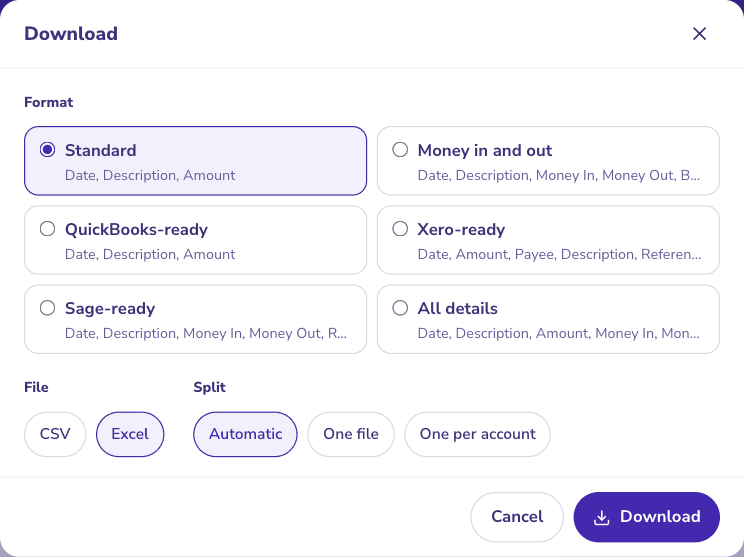
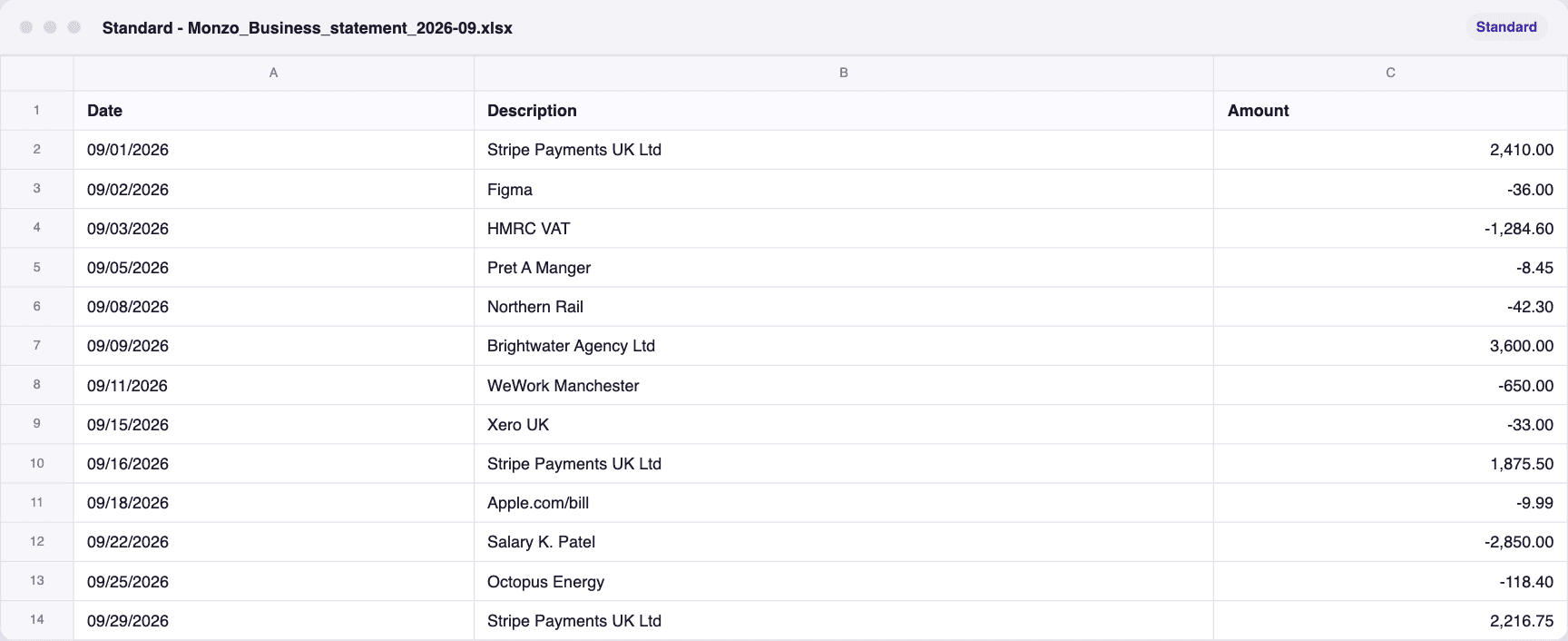
A fictional Monzo business statement, proven in ZeraBooks Convert and downloaded in the Standard layout, then opened as a spreadsheet: a header row and one line per transaction, nothing to clean up.
Standard picked in the Download dialog
The Excel file, opened
THE VERDICT
Which one should you use for bank statements?
- 1
ZeraBooks Convert
First, because the spreadsheet is finished when it downloads: one row per transaction, the account and source file on each row, and a proof that the rows reach the closing balance. The steps are on convert a bank statement to Excel.
From $79/mo billed annuallyExcel or CSVProven
- 2
DocuClipper
A statement converter, so rows come out as transactions rather than page layout. It costs more per page than ZeraBooks at 1,000 pages a month and says it runs reconciliation checks.
$29/mo for 60 pagesWeb
- 3
ProperSoft
Desktop software that shows each transaction for you to review, edit or exclude before it writes the file. The review is your time, page after page.
$19.99/mo, unlimited pagesWindows and macOS
- 4
Lido
Pulls fields from any document into a sheet, which helps when statements are one of many document types. Past 100 pages a month the next published plan is $7,840 a year.
$29/mo for 100 pages50 free pages
- 5
AutoEntry
Captures the balance column along with debits and credits, at 3 credits for every page uploaded.
$13/mo for 50 credits (16 statement pages)
- 6
Bank Statement Converter (bankstatementconverter.com)
Fine for a single short statement on the free daily allowance. Anything longer waits for tomorrow or a paid plan. Free tiers are compared on the best free bank statement converter page.
Free 1 to 5 pages a day
- 7
Adobe Acrobat
Exports the page as you see it, so a two-page statement can arrive as two worksheets with split descriptions. Tested side by side in ZeraBooks vs Adobe Acrobat.
Acrobat subscription
- 8
Excel Power Query (Get Data from PDF)
Free inside Excel for Windows and fine for one tidy digital PDF. There is no PDF connector on a Mac and nothing for it to read in a scan.
Included in Excel for Windows
BEFORE YOU TRUST THE SHEET
How do you check a bank statement in Excel?
Whatever tool you use, five checks catch nearly every bad conversion. ZeraBooks runs the first one for you on every account.
- Opening balance plus the sum of the Amount column equals the printed closing balance.
- The number of rows matches the transaction count, if the statement prints one.
- Every date falls inside the statement period, with the right year.
- No row is a page header, a subtotal or a “balance forward” line.
- Long reference numbers kept all their digits instead of turning into 1.23E+17.
MORE CONVERTER RANKINGS
Best bank statement converters, by job
- Best bank statement converterTwelve converters ranked on price, files and the balance check.
- Best PDF to CSV converter for bank statementsNine converters ranked on the CSV your software imports.
- Best Veryfi alternativesStatement files without an API, a 15-page limit or a minimum.
- Best Docsumo alternativesStatement tools with a price you can read before a call.
- Best Klippa alternativesKlippa is now Doxis; the self-serve options for statements.
- Best bank statement converter for accountantsFirm costs worked at 25, 60 and 150 clients.
- Best free bank statement converterThirteen free tiers, and which one checks its work.
- Best bank statement extraction softwareConverters and API platforms ranked on checked extraction.
- Best scanned bank statement converterWhich tools read scans, and which catch a misread.
- Best bank statement converter for QuickBooksThree routes into QuickBooks and the tools for each.
- Best AI bank statement converterWhat AI does in each converter, and who backs a claim.
Can I convert a bank statement PDF to Excel for free?
For a short statement, yes. Excel for Windows imports digital PDFs, Bank Statement Converter gives a few free pages a day, and ZeraBooks reads one statement free on its converter page. None of the free routes except ZeraBooks adds the rows up for you; see the best free bank statement converter.
Why does my converted statement show E+17 in Excel?
Excel keeps 15 significant digits, so a long reference number typed as a number loses digits. Format the column as text, or read the fix on E+17 in a bank statement in Excel.
Is Excel or CSV better for a bank statement?
Excel for reading and totals, CSV for importing into accounting software. ZeraBooks downloads both from the same proven statement; importing is ranked on the best PDF to CSV converter for bank statements page.
Does a PDF to Excel converter work on scanned statements?
Only one that reads images. Power Query can’t; ZeraBooks reads scans saved as PDF and still proves the balances. The best scanned bank statement converter ranking covers paper statements.
Sources and further reading

FREE SETUP + CATCH-UP
Open a proven statement in Excel.
One row per transaction.
Convert a statement you know during the 7-day trial and check it against the five tests above. All rankings are on the best bank statement converter hub, and the same plan keeps the books in AI bookkeeping.