Month-end entries
Autopilot proposes depreciation, the interest part of loan payments and prepaid-expense spreads, and asks about recurring bills that didn't show up. Here is how each one works.
Where month-end entries come from
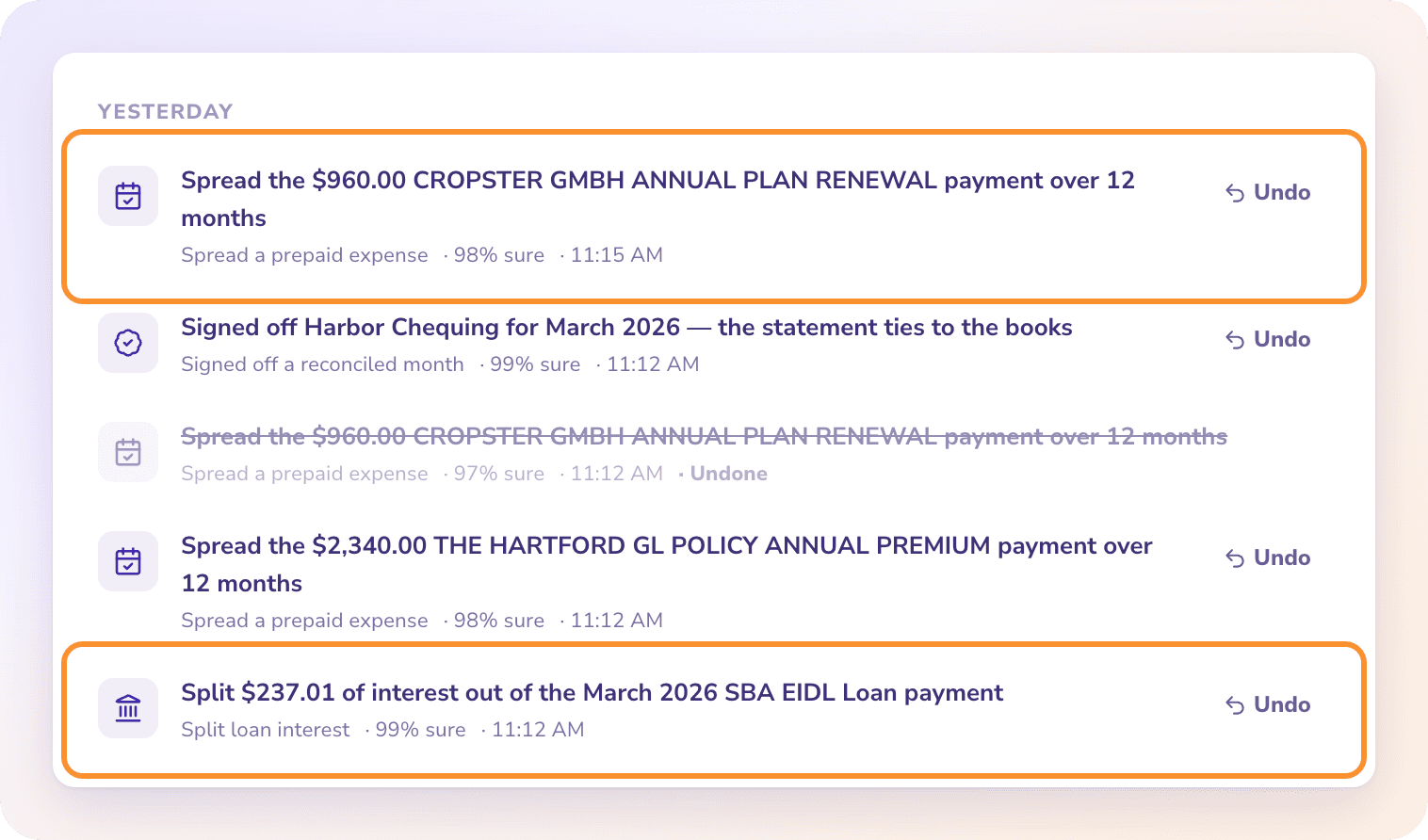
ZeraBooks has no separate month-end screen. Autopilot looks at your books on every pass and either records these entries or asks you about them in Needs you. Recorded entries appear in Done by AI with an Undo button.
Every entry is a journal dated the last day of the month. Its memo shows the calculation, and its reference starts with AUTO- (for example AUTO-DEP-2026-08). Months in a closed period are never touched.
Depreciation
When your books hold equipment or other fixed assets, Autopilot records straight-line depreciation each month.
It needs an Accumulated Depreciation category and a Depreciation Expense category. If either is missing, nothing is recorded until you add both in the Category Manager.
The useful life comes from what's already been written off against the assets. If there's no earlier write-off, a standard life is used, and the memo says which.
Assets bought later start depreciating the month after they were bought.
It never posts into a previous fiscal year.
If it isn't sure, it asks: "Record $… of depreciation for …?" Answer Yes, record it, or No, my accountant handles depreciation.
Loan interest
When loan payments were recorded entirely as paying down the loan, part of each payment is really interest, a business expense. Autopilot splits the interest out.
It asks "What interest rate does … charge?", offering 3.75% (SBA EIDL), 2.75% (SBA EIDL, nonprofit) and Enter the rate…. For any other loan, click Enter the rate…, type the annual rate from the loan agreement or lender statement (for example
6.5), then click Apply.With a rate, it moves each month's interest from the loan to Interest Expense: the balance owed × the rate ÷ 12.
Once you've answered, later months use the same rate without asking.
It needs an Interest Expense category. Months where you already booked interest yourself are left alone.
Prepaid expenses
A payment that covers several months, like an annual insurance premium or a yearly software plan, belongs to the months it covers.
Autopilot checks payments from the last 12 months and asks "Did the $… … payment on … pay for several months in advance?", with answers such as Yes, 12 months, Yes, 6 months, Yes, 3 months and No, it is this month's cost.
When spread, only one month's share stays in the month of payment. The rest moves to Prepaid Expenses and is expensed month by month on later passes.
If you have no Prepaid Expenses category, it asks you to add one first. Answer I added it — spread it now after adding it, or Keep it as this month's expense.
Missing recurring bills
If a vendor you pay every month doesn't appear in a month whose statements are in, Autopilot asks "Did … bill you in …?" Answer Yes — I'll add the bill or payment, No bill this month or I stopped using them. It asks about at most five vendors per pass.
Tip: Reconciliation itself isn't a month-end entry. Statements are checked in Reconciliations as soon as they're uploaded. See How reconciliation works.
Can't split the interest? ZeraBooks needs to know how much was borrowed. If the loan's balance (the amount you received, or its opening balance) isn't on the loan account, your answer is refused with a message saying so and the question stays in Needs you. Record the balance, then answer again. It also needs an Interest Expense category; add one in Category Manager if it's missing.
Frequently Asked Questions
Who books depreciation and loan interest?
Autopilot does, from your books. It records them on its own when it's sure enough for your mode, and otherwise asks you first in Needs you.
I don't want ZeraBooks to record depreciation. What do I do?
Answer No, my accountant handles depreciation when asked. If it was already recorded, click Undo on the entry in Done by AI; an undone entry isn't recorded again on its own.
How do I undo a month-end entry?
Click Undo on the entry in Done by AI. The journal is deleted. For a prepaid spread, every journal the spread created is removed.
Why wasn't depreciation recorded?
Your chart needs both an Accumulated Depreciation and a Depreciation Expense category, and the assets must have a balance. Months in a closed period or a previous fiscal year are never posted.
My loan isn't an SBA EIDL. What do I pick?
Click Enter the rate… and type the annual interest rate printed on your loan agreement or lender statement, between 0.01% and 40%. ZeraBooks never splits interest from a guessed rate, so nothing is recorded for that loan until you give it the rate.
Is there a separate month-end close checklist?
No. Month-end entries arrive in Autopilot. You sign off and close months in Reconciliations, or Autopilot does it for you when Sign off and close months is on. See Finalize a month and Close and reopen the books.
Learn more about AI bookkeeping: Autopilot and Ask Zera keep the books inside a real general ledger.
Still stuck? A real person reads every message—come say hello.