RANKING · FOR QUICKBOOKS ONLINE AND DESKTOP
The best bank statement converter for QuickBooks
imports rows that already tie to the bank.
The best bank statement converter for QuickBooks is ZeraBooks, because its QuickBooks-ready CSV carries only rows already proven against the statement’s printed balances, so the reconciliation in QuickBooks starts from a statement that ties. It fits QuickBooks Online’s bank upload exactly. Plans for the ZeraBooks bank statement converter start at $79 a month billed annually, with 1,000 pages.
We make ZeraBooks · 7-day trial · 1,000 pages a month from $79/month billed annually

THREE WAYS IN
How do bank statements get into QuickBooks?
Every tool below uses one of three routes. Which one you need depends on your QuickBooks.
| Route | What you upload | Tools that make the file |
|---|---|---|
| QuickBooks Online bank upload | A CSV with Date, Description and Amount | ZeraBooks (QuickBooks-ready layout); Hubdoc (CSV for QuickBooks); DocuClipper, ProperSoft and AutoEntry (CSV) |
| Web Connect file | A .QBO file | DocuClipper, MoneyThumb, ProperSoft, AutoEntry |
| QuickBooks’ own bank feed | Nothing; the bank connects to QuickBooks | QuickBooks itself, for connected banks; statements fill the months a feed misses |
From each vendor’s own pages; Hubdoc reads U.S. and Canadian statements only, and AutoEntry’s .qbo download asks you to confirm the currency. QuickBooks Desktop users importing a CSV can follow import a CSV file into QuickBooks Desktop.
We set you up and catch up your past months for free. Then ZeraBooks keeps your books done.
THE RANKING
Which bank statement converter is best for QuickBooks?
Ranked on what QuickBooks receives: rows you can reconcile without fixing, in a file it accepts first time.
- 1
ZeraBooks Convert
First. Each account is proven before the QuickBooks-ready CSV is written, and the import is step by step on import a PDF bank statement into QuickBooks. ZeraBooks makes no .QBO file and has no QuickBooks connection.
From $79/mo billed annuallyQuickBooks-ready CSVProven
- 2
- 3
MoneyThumb
Makes .qbo Web Connect files for QuickBooks, priced per account per month.
$24.95/mo for 5 conversions
- 4
ProperSoft
Desktop software writing QBO, IIF and QBJ for QuickBooks, with unlimited pages per device.
$19.99/mo, unlimited pages
- 5
Hubdoc
Turns U.S. and Canadian statements into a CSV for QuickBooks, at $12 per organization.
$12/mo per organization
- 6
AutoEntry
Downloads a .qbo file or CSV for QuickBooks at 3 credits a statement page.
$13/mo for 50 credits (16 statement pages)
- 7
Dext
Extracts statements to CSV, but statements can’t be published to accounting software from Dext.
$13/mo add-on for 50 statements
- 8
Lido
A general CSV export to shape into QuickBooks’ columns yourself.
$29/mo for 100 pages
A REAL QUICKBOOKS FILE
What does a QuickBooks-ready file look like?
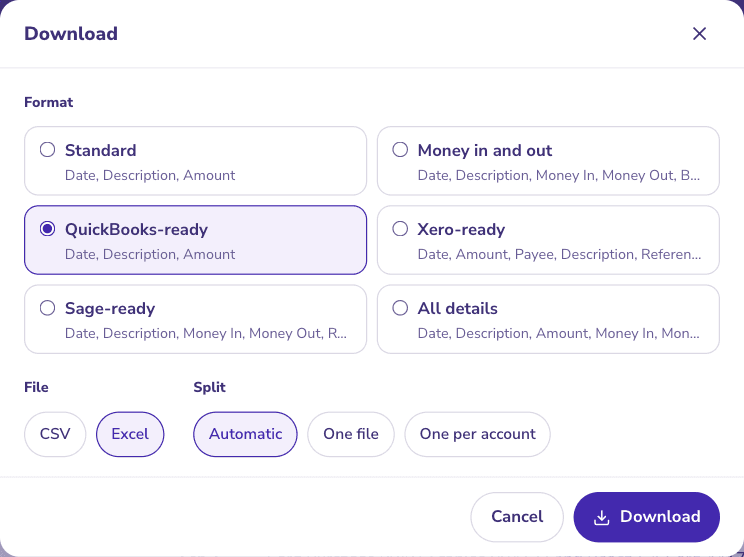
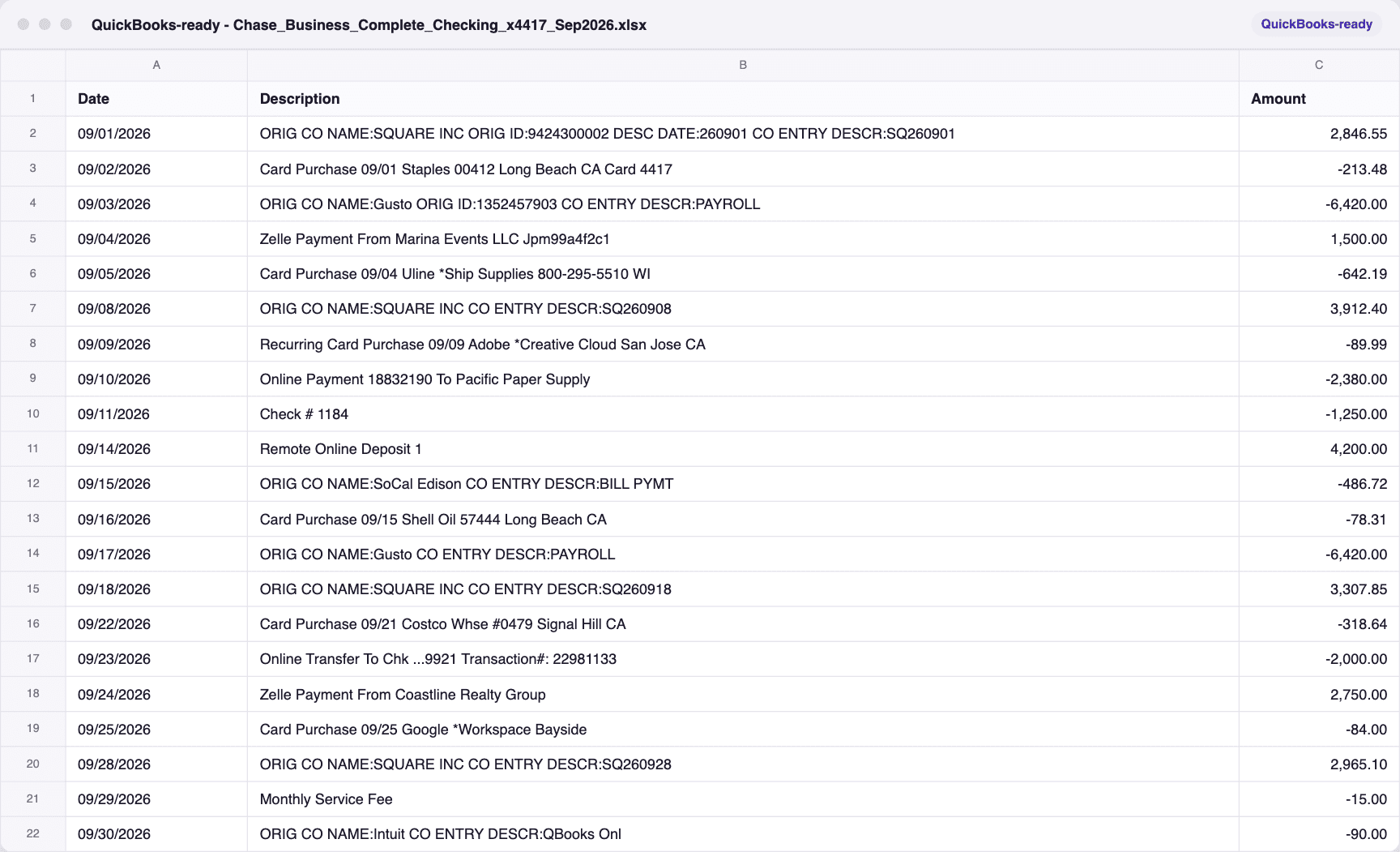
A fictional Chase business statement proven in ZeraBooks Convert, downloaded QuickBooks-ready and opened: the three columns QuickBooks Online’s bank upload takes.
QuickBooks-ready chosen
The file QuickBooks will read
CSV OR .QBO?
Does a .QBO file matter?
Only if your QuickBooks setup insists on Web Connect. QuickBooks Online’s bank upload takes a CSV, and a CSV of proven rows reconciles faster than a .QBO of unchecked ones. The formats themselves are explained on what is a QFX file, and turning a PDF into a QuickBooks file on PDF to QBO converter.
MORE CONVERTER RANKINGS
Best bank statement converters, by job
- Best bank statement converterTwelve converters ranked on price, files and the balance check.
- Best PDF to Excel converter for bank statementsEight tools ranked on the spreadsheet a statement turns into.
- Best PDF to CSV converter for bank statementsNine converters ranked on the CSV your software imports.
- Best Veryfi alternativesStatement files without an API, a 15-page limit or a minimum.
- Best Docsumo alternativesStatement tools with a price you can read before a call.
- Best Klippa alternativesKlippa is now Doxis; the self-serve options for statements.
- Best bank statement converter for accountantsFirm costs worked at 25, 60 and 150 clients.
- Best free bank statement converterThirteen free tiers, and which one checks its work.
- Best bank statement extraction softwareConverters and API platforms ranked on checked extraction.
- Best scanned bank statement converterWhich tools read scans, and which catch a misread.
- Best AI bank statement converterWhat AI does in each converter, and who backs a claim.
Can QuickBooks import a PDF bank statement directly?
QuickBooks Online reads a CSV, QBO, QFX or OFX file in its bank upload, not the PDF itself. A converter turns the PDF into one of those first.
Does ZeraBooks connect to QuickBooks?
No. You download the QuickBooks-ready CSV and upload it in QuickBooks Online. Many businesses skip the import by keeping the books in ZeraBooks instead; see the QuickBooks alternative page.
Why won’t my CSV import into QuickBooks Online?
Usually a date QuickBooks can’t read, money in and out split across two columns it wasn’t told about, or extra header lines. The QuickBooks-ready layout avoids all three.
Which converter is best for Xero or Sage instead?
ZeraBooks makes Xero-ready and Sage-ready layouts too; imports for every package are ranked on the best PDF to CSV converter for bank statements page, and every tool on the best bank statement converter hub.
Sources and further reading

FREE SETUP + CATCH-UP
Upload a statement QuickBooks will reconcile.
Seven-day trial.
Convert last month’s statement, upload the QuickBooks-ready file, and watch the reconciliation tie. Or keep the books in AI bookkeeping on the same plan.