Reading your Financials
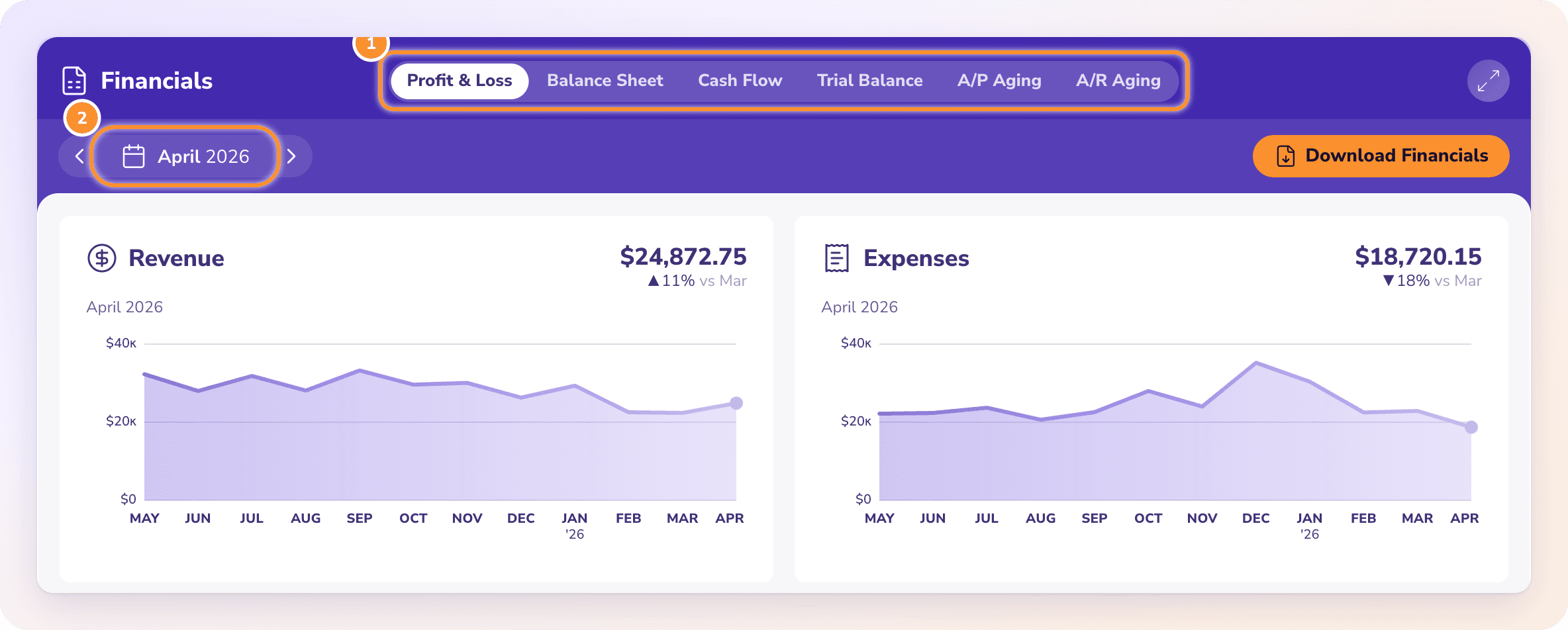
Financials holds your Profit & Loss, Balance Sheet, Cash Flow, Trial Balance and aging reports, all calculated from your ledger. Here is how the tabs, dates and month columns work.
Open Financials
In the left navigation, click Financials (or press G then F).
Choose a statement from the tabs at the top.
Pick the period with the period picker. Financials opens on the last complete month and remembers your choice for each company until you close the browser tab.
Every statement is calculated from your ledger each time you open it. There is nothing to run or refresh: change a transaction and the statements follow.
The six tabs
| Tab | What it shows | Dates |
|---|---|---|
| Profit & Loss | Income, cost of revenue and expenses, and your net income | Over the period |
| Balance Sheet | What the business owns, owes and the owner's equity | As of the period's last day |
| Cash Flow | Where cash came from and went | Over the period |
| Trial Balance | Every category's debit or credit balance, with totals | As of the period's last day |
| A/P Aging | Unpaid bills by vendor and how overdue they are | As of the period's last day |
| A/R Aging | Unpaid invoices by customer and how overdue they are | As of the period's last day |
"As of" means the report shows balances on one date, not activity over a range. Pick March 2026 and the Balance Sheet shows balances at the close of March 31, 2026. For the aging tabs, see A/R and A/P aging.
Trend cards
Above the statement, two cards chart the last 12 months up to the end of your period:
Profit & Loss: Revenue and Expenses.
Balance Sheet: Assets and Liabilities.
Cash Flow: one chart of Money in and Money out.
Choose how many months to show
When you pick a single month, pills above the Profit & Loss, Balance Sheet and Cash Flow set how many months appear side by side: 1 mo, 3 mo (the default), 6 mo or 12 mo. The month you picked is the latest month column.
The icons beside the pills fold the statement: Collapse Sections, Collapse Parent Sections and Expand Sections. Click the arrow on any section to open or fold just that one.
Go further
Click any amount to see the transactions behind it. See Drill into any number.
Click Options to change number format, add comparisons or percentages. See Statement options.
Download or email the statements. See Download reports and Email financial statements.
At your fiscal year-end month, a Year-end review card appears. See Year-end review and 1099 candidates.
Note: If a statement in the period hasn't reconciled, Financials still includes its transactions as imported. The download and email dialogs show a note with Review in Reconciliations →. See Fix a month that doesn't tie.
Frequently Asked Questions
Why do older columns show a dash?
Those months are before your books start date. ZeraBooks holds opening balances for that time, not individual transactions, so period figures aren't available. The notice at the top says "Detailed activity begins…" with Review opening books.
Why don't I see the 1 mo / 3 mo / 6 mo / 12 mo pills?
They only appear when you pick a single month, and not on the Trial Balance or aging tabs. With a quarter or a year picked, the columns follow that period.
Does Financials warn me when the Balance Sheet doesn't balance?
No. There is no out-of-balance warning on any report. Every statement is built from a double-entry ledger, where each entry's debits equal its credits. To prove your figures against the bank, use Reconciliations.
What does "Your financials start with your books" mean?
The company hasn't finished setup, so there is nothing to report yet. Follow the setup steps on Dashboards first.
Why does the Trial Balance say "No balances yet"?
Nothing has been posted yet. Upload statements in Banks & Cards to fill it. See Upload a statement.
Will an unreconciled month stop me from downloading?
No. You see a note in the download and email dialogs, but nothing is blocked.
Why does Financials say "Could not load the financials"?
The figures couldn't be fetched. Check your connection and click Retry financials.
Learn more about AI-native general ledger: A double-entry ledger where statements become proven transactions.
Still stuck? A real person reads every message—come say hello.