Statement options
Change number format, the change column, percentages and comparisons on your Profit & Loss, Balance Sheet and Cash Flow, and why there is no cash or accrual switch.
Open Statement Options
Go to Financials and open the Profit & Loss, Balance Sheet or Cash Flow tab.
Click Options at the top of the statement. The Statement Options panel opens beside it.
Change what you need. The statement updates as you click.
Click the check mark (Done) to close the panel.
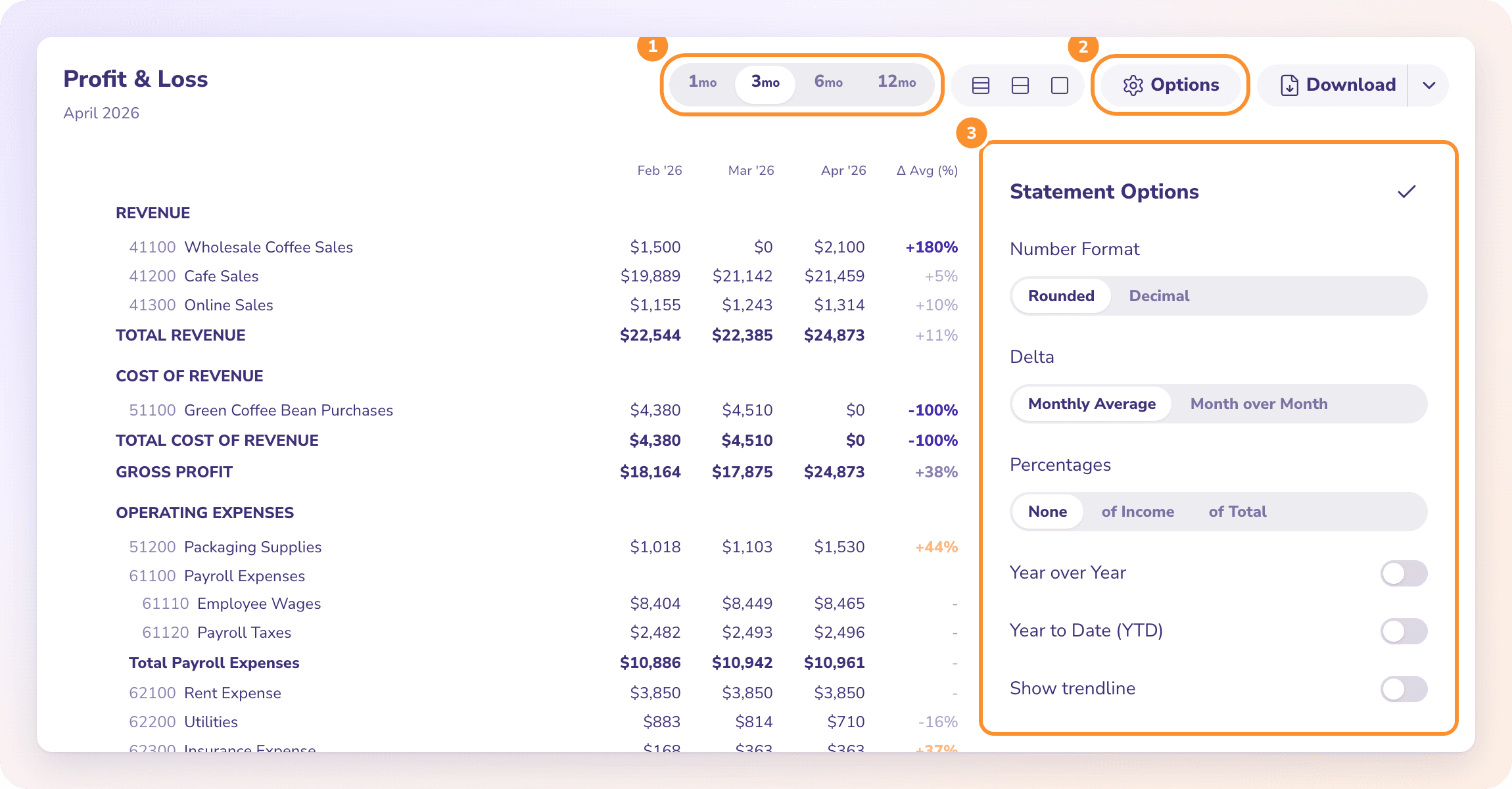
Every option
| Option | Choices | What it does |
|---|---|---|
| Number Format | Rounded (default), Decimal | Whole dollars, or dollars and cents. |
| Delta | Monthly Average (default), Month over Month | The change column. Monthly Average compares the latest month with the average of the earlier months shown, headed Δ Avg (%). Month over Month compares it with the month before, headed Δ MoM (%). |
| Percentages | None, of Income, of Total | Adds each line as a percentage of total income, or of its own section's total. |
| Year over Year | On / off | Adds the same period a year earlier beside the one you picked. |
| Year to Date (YTD) | On / off | Adds a column from the start of your fiscal year to the end of your period. |
| Show trendline | On / off | Adds a small chart on each line. Only offered when the statement has more than one column. |
A change shows as a dash when there isn't enough history to compare, for example a category that only started this month.
Tip: Options aren't saved. They go back to the defaults each time you open Financials. The period you picked is remembered.
Why there is no cash or accrual switch
Many accounting apps let you flip a report between cash basis and accrual basis. ZeraBooks doesn't: Statement Options has no basis setting, and your statements always show your ledger exactly as it is posted.
Bank and card transactions post on the date the money moved.
If you use Bills and Invoices, an approved bill posts to accounts payable and an approved invoice to accounts receivable when you approve it. The payment clears it later. That is accrual accounting.
Month-end entries that Autopilot proposes, such as depreciation or spreading a prepaid expense, are accrual entries too. See Month-end entries.
So there is one set of numbers, not two views of it. If your books come only from bank and card statements, income and expenses are recorded when money moves. When you need to know what is still unpaid, the A/R and A/P aging reports list every open invoice and bill.
Frequently Asked Questions
Can I switch my reports between cash and accrual basis?
No. ZeraBooks has no basis switch. The statements show your ledger as posted: approved bills and invoices are included when approved, and bank transactions on the date they cleared.
How do I compare this year with last year?
Click Options and turn on Year over Year. A column for the same period a year earlier appears beside yours, and it carries into your downloads.
How do I show each expense as a percentage of revenue?
Click Options and set Percentages to of Income.
Why can't I find Show trendline?
It only appears when the statement has more than one column. Pick a single month and choose 3 mo, 6 mo or 12 mo, or turn on a comparison.
Can I break statements down by department, class or location?
No. ZeraBooks doesn't have departments, classes or locations on its statements.
What does the Δ Avg (%) column mean?
It's the change between the latest month and the average of the earlier months shown. Switch Delta to Month over Month to compare with the month before instead.
Learn more about AI-native general ledger: A double-entry ledger where statements become proven transactions.
Still stuck? A real person reads every message—come say hello.