Download reports as PDF, CSV or Excel
Download your Profit & Loss, Balance Sheet, Cash Flow or Trial Balance as a PDF, a CSV or an Excel workbook, and what each file contains.
Download a statement
Go to Financials and open the Profit & Loss, Balance Sheet or Cash Flow tab.
Pick the period, and set any statement options you want in the file.
Click Download to get a PDF straight away, or click the arrow beside it (More download options) and choose a format:
Download PDF
Download CSV
Download XLSX (an Excel workbook)
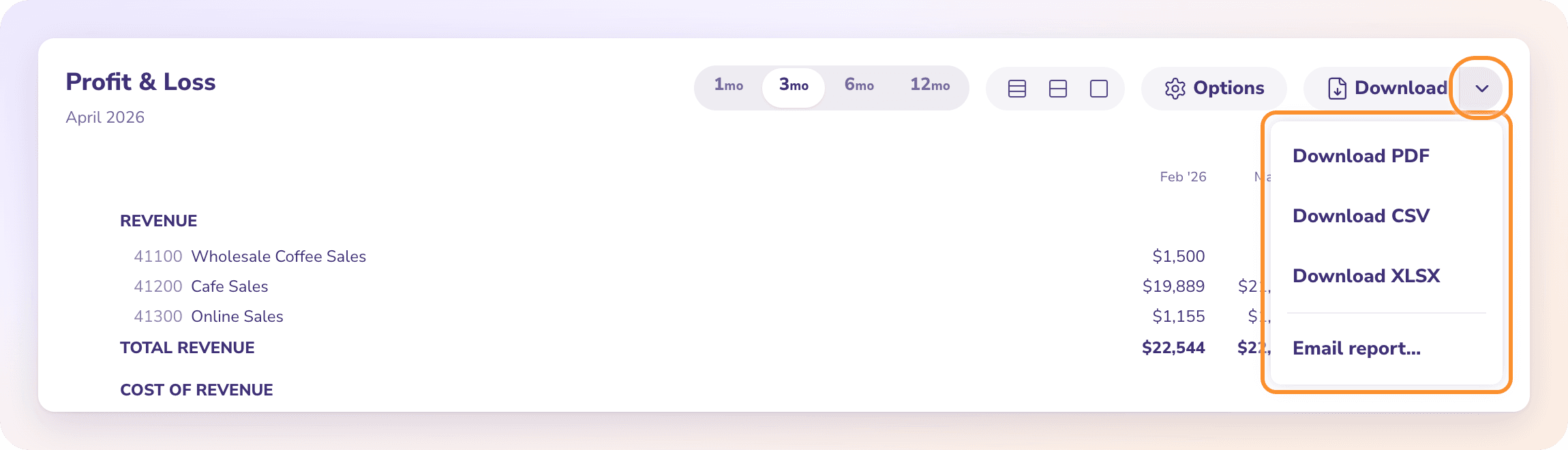
The same menu has Email report…. See Email financial statements.
Download the Trial Balance
On the Trial Balance tab, click Download. It saves a CSV. To get the Trial Balance as a PDF, use Download Financials (see Download the Financial Package) or email it.
What's in each file
| Format | Contains |
|---|---|
| The statement, formatted for printing, with up to the latest 6 columns. The Cash Flow PDF shows only the period you picked. | |
| CSV | The statement's lines and columns as plain text, for any spreadsheet or import. |
| XLSX | The statement as an Excel sheet. |
Files are named after the company, the report and the period, in the form "Company - Report - Period". Columns you add with Year over Year carry into the CSV, XLSX and PDF.
Tip: The PDF fits at most 6 columns on a page. If you show 12 mo on screen, the PDF has the latest 6 months; use CSV or XLSX for all 12.
Other downloads
Every statement at once: click Download Financials at the top of the page. See Download the Financial Package.
Transactions: export an account's transactions from Banks & Cards. See Export transactions.
A branded report with your charts and notes: see Create a month-end custom report.
Frequently Asked Questions
Why does my PDF have fewer months than the screen?
Because a PDF shows at most the latest 6 columns so the numbers stay readable. Download CSV or XLSX to get every column.
Why is the Trial Balance download a CSV?
The Download button on that tab saves CSV only. Get a PDF of the Trial Balance through Download Financials or Email report….
What does "Could not build the PDF." mean?
The PDF couldn't be generated. Wait for the statement to finish loading and try again. The CSV and XLSX show "Could not verify and export the report. Please retry." and "Could not build the workbook." for the same kind of problem.
Will an unreconciled month block my download?
No. Downloads are never blocked. Check Reconciliations first if you need figures that are proven against the bank.
Learn more about AI-native general ledger: A double-entry ledger where statements become proven transactions.
Still stuck? A real person reads every message—come say hello.