Drill into any number
Click an amount on your Profit & Loss, Balance Sheet or Cash Flow to see how it changed, its 12-month history and the transactions behind it.
Open the detail for an amount
Go to Financials and open the Profit & Loss, Balance Sheet or Cash Flow tab.
Click the amount you want to understand, in any month column. A detail card opens next to it.
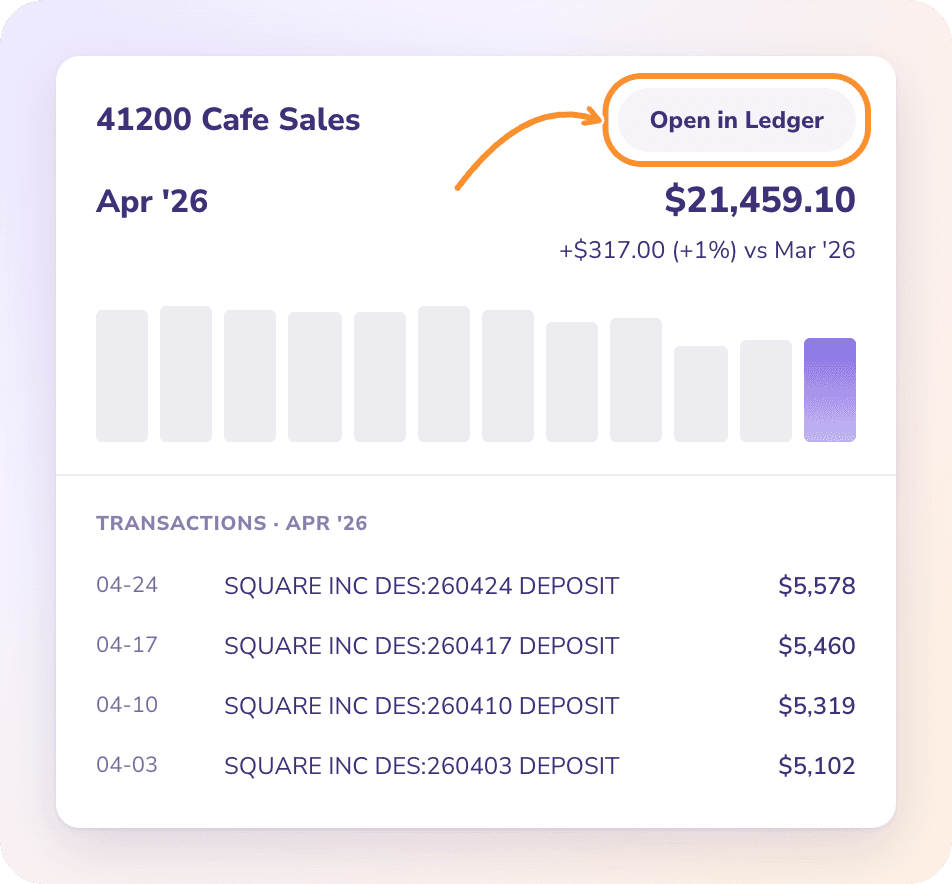
What the detail shows
The category and amount for the column you clicked.
The change from the column before it, for example "+$1,240 (+8%) vs Mar 2026".
A 12-month chart ending at the month you clicked, which is highlighted.
Transactions for that column (for example Transactions · Apr 2026): the 12 largest transactions in that category for that column, with date, description and amount. If there are none, it reads "No transactions in this period."
Open in Ledger: every transaction behind the amount.
The card closes when you click elsewhere, press Esc, scroll or resize the window.
See every transaction in the Ledger
Click Open in Ledger. The Ledger opens filtered to that category and to the dates of the column you clicked, so you see every transaction behind the amount. From there you can open any transaction to see its details. See Navigate the Ledger.
Tip: Found a transaction in the wrong category? Fix its category in Banks & Cards and the statement updates straight away. See Review and fix categories.
Other places to drill down
On Dashboards, click a row in Top Expense Categories to open the Ledger for that category and period.
On Expenses, Revenue and Cost of Revenue, click a category row to open the Ledger for the whole window shown. See Explore Expenses, Revenue and Cost of Revenue.
Frequently Asked Questions
How do I see all the transactions behind a number on my P&L?
Click the amount, then Open in Ledger. The detail card lists only the 12 largest; the Ledger lists them all.
Why does the detail say "No transactions in this period"?
The category has no transactions in that column's dates. On the Balance Sheet an amount can still show, because it's a balance carried from earlier months.
Why is there no change shown?
There is no earlier column to compare with, or the earlier column is before your books start date.
Can I edit a transaction from the detail card?
No. Click Open in Ledger, then open the transaction there.
Learn more about AI-native general ledger: A double-entry ledger where statements become proven transactions.
Still stuck? A real person reads every message—come say hello.