A/R and A/P aging
See who owes you, who you owe and how overdue each invoice and bill is, on any date, with a check that the total ties to your receivables or payables balance.
Open an aging report
Go to Financials.
Click A/R Aging for what customers owe you, or A/P Aging for what you owe vendors.
Pick a period. Aging is measured on the last day of that period. For the August 2026 period, it shows what was unpaid at the end of August 31, 2026.
If All Time is selected, the page shows "Choose a reporting date for A/R Aging" (or A/P Aging), because All Time has no end date. Click Use last month, or pick a period.
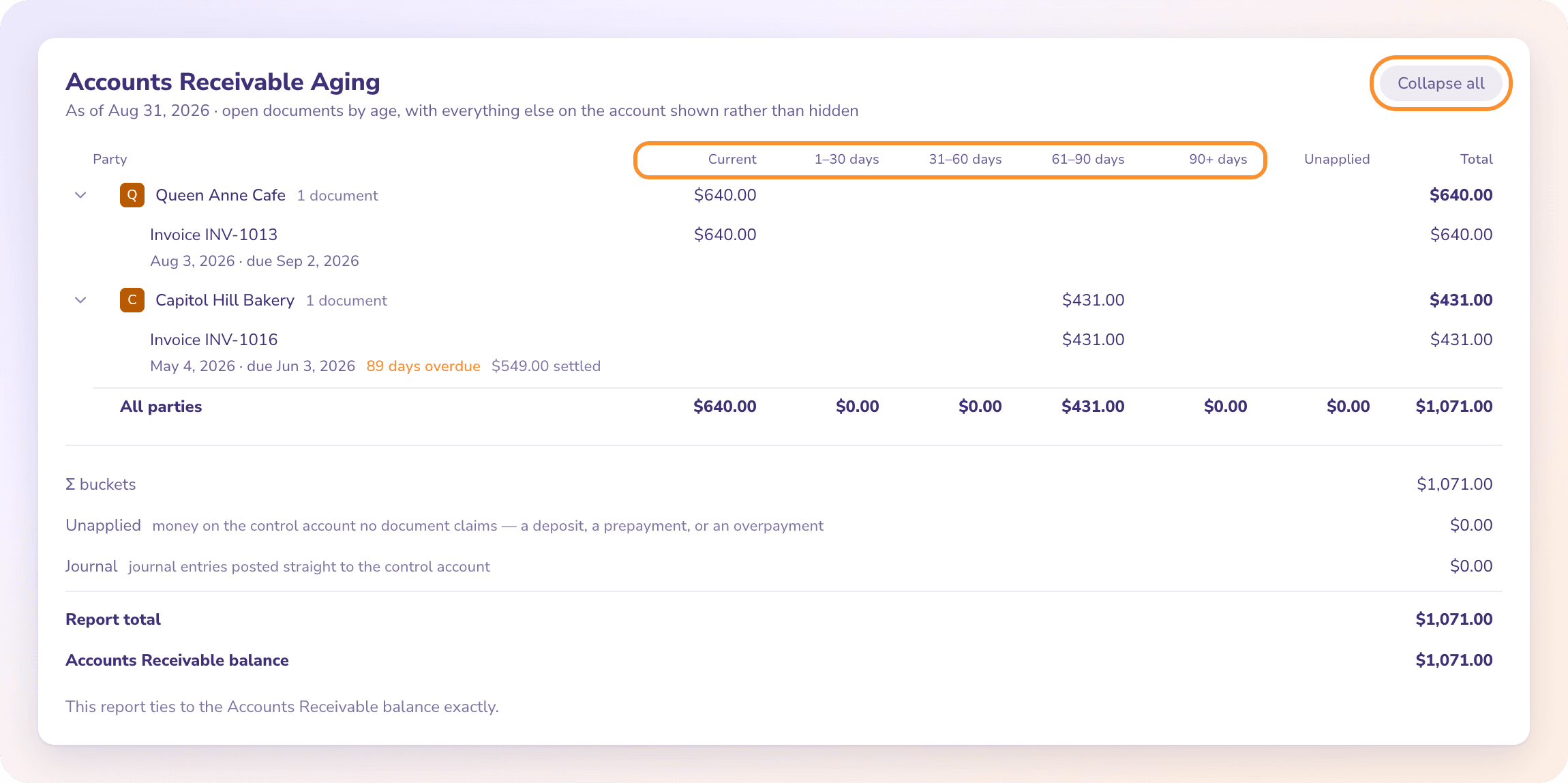
Read the table
Each row is a customer (on A/R) or a vendor (on A/P) with their unpaid amounts spread across the columns:
| Column | What it holds |
|---|---|
| Current | Not yet due |
| 1–30 days | 1 to 30 days past the due date |
| 31–60 days | 31 to 60 days past due |
| 61–90 days | 61 to 90 days past due |
| 90+ days | More than 90 days past due |
| Unapplied | Money on the account that no invoice or bill claims, such as a prepayment or an overpayment |
| Total | Everything that party owes, or is owed |
The last row, All parties, totals every column.
Click a party to see its open invoices or bills, each with its date, due date, days overdue and unpaid amount. A part-paid document shows only what is still unpaid.
Click Expand all to open every party at once, and Collapse all to close them.
A negative amount is a credit, such as a credit memo, not an error.
Tip: When an invoice or bill has no due date, ZeraBooks treats it as due 30 days after its date.
Check the total against your books
Under the table, a short check shows how the report ties to your Accounts Receivable or Accounts Payable balance:
| Line | Meaning |
|---|---|
| Σ buckets | The total of the five age columns |
| Unapplied | Money on the account that no document claims: a deposit, a prepayment or an overpayment |
| Journal | Journal entries posted straight to the account |
| Report total | The three lines above added together |
| {Account} balance | The account's balance in your ledger on the same date |
When they agree, the report says "This report ties to the Accounts Receivable balance exactly." When they don't, it says how far apart they are: "Something is posting to that account outside the subledger." Look in the Ledger for entries on that account that don't come from an invoice, a bill or a payment.
What appears in aging
Aging lists open invoices and bills: ones you have approved that aren't fully paid, voided or deleted. Drafts and invoices or bills still in review aren't posted yet, so they don't appear. See Approve an invoice and Approve or reject a bill.
Frequently Asked Questions
Why isn't an invoice I created showing on A/R Aging?
It isn't approved yet, or it's already fully paid. Only approved, unpaid invoices appear. Approve it on the Invoices board.
How are the age buckets calculated?
By days past the due date on the report date. An invoice or bill with no due date is treated as due 30 days after its date.
What is Unapplied?
Money on your receivables or payables account that no invoice or bill claims, for example a customer paying before you invoice them. Apply it to a document to clear it. See Record payments, partial payments and credits.
Why doesn't my aging total match Accounts Receivable?
Something posts to that account without an invoice or payment behind it, usually a journal entry. The check under the table shows the difference; find the entry in the Ledger filtered to that account.
Can I download or email the aging report?
No, not yet. The aging tabs have no download or email controls.
What does "Nothing outstanding on Accounts Receivable" mean?
Every approved invoice was paid by the report date. The check under the table still shows the account balance.
Learn more about AI-native general ledger: A double-entry ledger where statements become proven transactions.
Still stuck? A real person reads every message—come say hello.