Give Zera statements, bills and receipts
Drop up to 20 statements, bills, receipts and invoices onto any page and Ask Zera reads each one, matches it to the right account, vendor or customer, and adds it to your books. You can also type a bill or invoice in plain words.
How do I give Zera a file?
There are three ways to hand Zera a file:
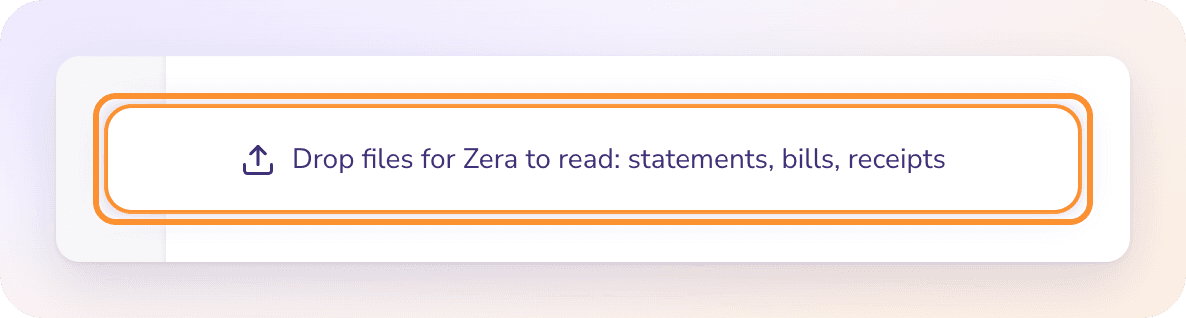
Drag files onto any page. A drop zone appears: "Drop files for Zera to read: statements, bills, receipts". Let go and the files wait in the bar.
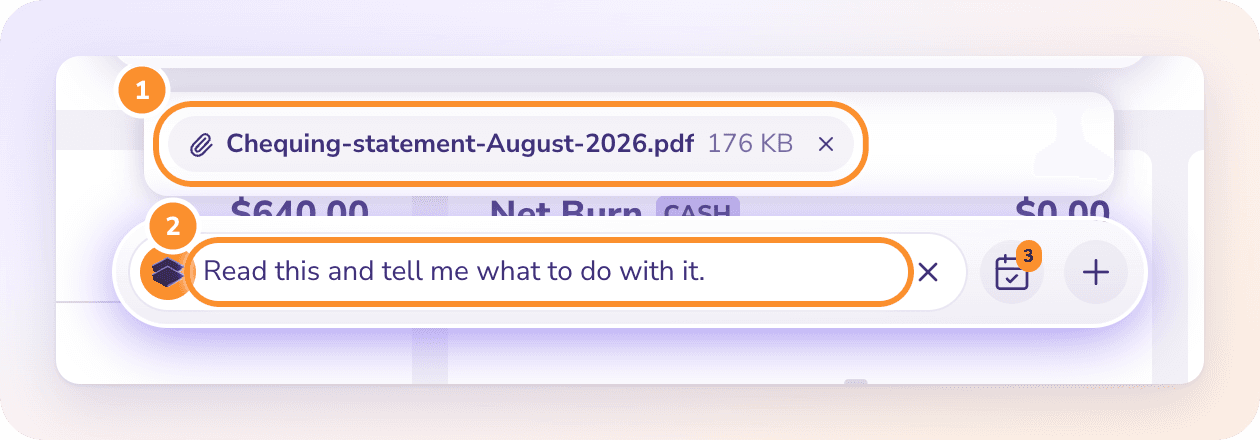
Use the + menu. Click + on the bar, then Upload Bill… (Zera fills in "Create a bill from this.") or Upload Document… (Zera fills in "Read this and tell me what to do with it.").
Paste. Copy a file or a screenshot and paste it into the bar.
Each file waits in the bar as a chip with its name and size. Click the × on a chip to remove it. Nothing is uploaded until you send the message. Add a few words if you like ("These are the Visa statements for Q1"), then press Enter.
You can send up to 20 files in one message. If you have more, send the rest in a second message.
Note: On pages with their own upload area, such as a statement upload in Banks & Cards or the Bills inbox, a file dropped on that area goes to the page, not to Zera.
What Zera reads
Zera reads each file and says what it is and what it shows:
| Kind | What Zera picks out |
|---|---|
| Bank or credit card statement | The bank, the last 4 digits of the account, the period, the opening and closing balances, and roughly how many transactions |
| Bill | The vendor, bill number, date, due date and total |
| Receipt | The merchant, date and total paid |
| Invoice you issued | The customer, invoice number, date, due date and total |
| Anything else | A one-line summary. Zera tells you it isn't accounting paperwork. |
A second AI check confirms the kind of document. When the two readings disagree, or the check isn't sure, Zera asks you instead of guessing.
What happens to each kind?
By default (Ask first), each change waits as a card for your Approve. With Auto-approve on, it's applied as Zera makes it. See Let Zera apply changes by itself (Auto-approve).
Statements: imported into their bank or card account exactly as an upload in Banks & Cards: every transaction is read, categorized and matched to bills and invoices. Several statements go on one card and import one after another, oldest first. The card shows its progress, for example "Importing 3 of 20…", and each statement is checked against its own printed opening and closing balances. See Upload a bank or card statement.
Bills and receipts: read into a bill, as an upload in Bills does. Zera links or adds the vendor printed on it, approves the bill and matches its payment on your statements. See Upload a bill for AI reading.
Invoices you issued: read into an invoice for the printed customer, approved, and matched to the customer's payment. See Upload an invoice for AI reading.
After new statements or documents arrive, Zera runs Autopilot on them, which files what it's sure of and links vendors and customers.
Can I type a bill or invoice instead of attaching it?
Yes. Tell Zera the details in plain words:
"I invoiced Rainier 980 on Apr 10."
"We got a $420 bill from Pacific Linen on May 2, due in 30 days."
Zera adds the invoice or bill, approves it and matches it to its payment. Partial payments are handled: if Rainier paid $1,215 against a $1,240 invoice, the invoice shows $25 still owed. If a detail is missing, such as the amount, Zera asks one short question for it.
If the company is new and has no bank or card accounts yet, Zera creates each one from its statements: the name, the last 4 digits and the opening balance. See Start from zero with Ask Zera.
How does Zera know which account a statement is for?
Zera matches a statement to one of your bank or card accounts:
If the last 4 digits printed on the statement appear in exactly one account's name or number, that account is used.
If you have only one bank or card account, and it's the same type as the statement, that one is used.
Otherwise the AI picks the most likely account from the bank's name, the last 4 digits and whether it's a card. If it isn't confident, Zera asks which account the statement is for.
Name the account in your message ("this is the Savings statement") and Zera uses it.
When Zera stops and asks
Zera checks each file before proposing anything, and tells you when:
| Situation | What Zera does |
|---|---|
| The document is addressed to another business | Asks whether it really belongs in these books |
| An account already has a statement covering part of the same period | Won't import it, because the transactions would be counted twice. If the earlier statement was wrong, remove it in Banks & Cards first. |
| A bill or invoice is already in the books | Recognizes it, says so and doesn't add it again |
| The same file was already imported | Says so; nothing changes |
| A file reads as the wrong kind (an invoice you issued sent as a bill) | Checks with you before continuing |
| A photo of a statement | Asks for the PDF or CSV from the bank |
A document dated in a closed month isn't a problem: Zera opens that month just for the change and closes it again to the same date.
File types and limits
| Limit | |
|---|---|
| File types | PDF; images (PNG, JPG, WebP, HEIC); CSV, TSV or TXT; Excel (XLSX, XLS) |
| Size | 14 MB per file |
| Statements | 10 MB per file. Split a larger statement by month. |
| Files per message | Up to 20 |
Statements: import from a PDF, CSV or spreadsheet export, not a photo.
Bills, receipts and invoices: read from a PDF or a photo, not a spreadsheet.
A file whose contents don't match its extension (a renamed file) is refused before it's read.
Frequently Asked Questions
Can I send Zera a photo of a receipt?
Yes. Photos (PNG, JPG, WebP or HEIC) of receipts and bills are read into a draft bill. Photos of bank statements can't be imported; download the statement from your bank as a PDF or CSV.
What does "isn't a PDF, image, CSV or spreadsheet" mean?
The file type isn't one Zera reads. Save or export it as a PDF, an image, a CSV or an Excel file and attach it again.
What does "doesn't look like a real file. Export it again and retry." mean?
The file's contents don't match its extension, for example a Word file renamed to .pdf. Export it again from the original program and attach the new copy.
My statement is over 10 MB. What do I do?
Statements import up to 10 MB each. Download each month as its own file from your bank and attach them together, up to 20 at a time.
Can I attach several months of statements at once?
Yes, up to 20 files in one message. Zera matches each to its account and imports them one after another, oldest first, checking each against its printed balances. For more than 20, send the rest in a second message.
Can I tell Zera about an invoice without attaching a file?
Yes. Type it, for example "I invoiced Rainier 980 on Apr 10." Zera adds the invoice, approves it and matches it to the customer's payment, including a partial payment.
Why won't Zera import a statement for a month I already have?
Importing it would count those transactions twice. If the statement already in ZeraBooks is the wrong one, remove it first in Banks & Cards, then attach the right one. See Remove a statement.
What does "could not be read. Try a clearer copy." mean?
Zera couldn't read the file, often because it's a blurry scan or password-protected. Attach a clearer copy, or the original PDF from the bank or vendor without a password.
Learn more about AI bookkeeping: Autopilot and Ask Zera keep the books inside a real general ledger.
Still stuck? A real person reads every message—come say hello.