What Ask Zera can do
Ask Zera is the bookkeeper built into ZeraBooks. Ask in plain words and it answers from your books or does the work, from a quick fix to catching up months of books, using ZeraBooks' own tools and checks. Here is how to open it and what to ask.
What is Ask Zera?
Ask Zera is the bookkeeper built into ZeraBooks. Tell it what you need, for example "How is my business doing?", "Move these four deposits to Cafe Revenue" or "I'm behind 6 months, here are my statements, do my books". Zera reads your books and answers from them. When a job needs a change, Zera does it with the same tools and checks as the ZeraBooks pages.
It does whole jobs. From one message, Zera can import a stack of statements, categorize, add bills and invoices, reconcile every month, sign off what ties and close the books. See Do your books with Ask Zera.
Quick requests get quick answers. A small fix or question gets just what it needs and a one- or two-sentence reply. Every figure comes from the same reports as Financials, not from the AI's own arithmetic.
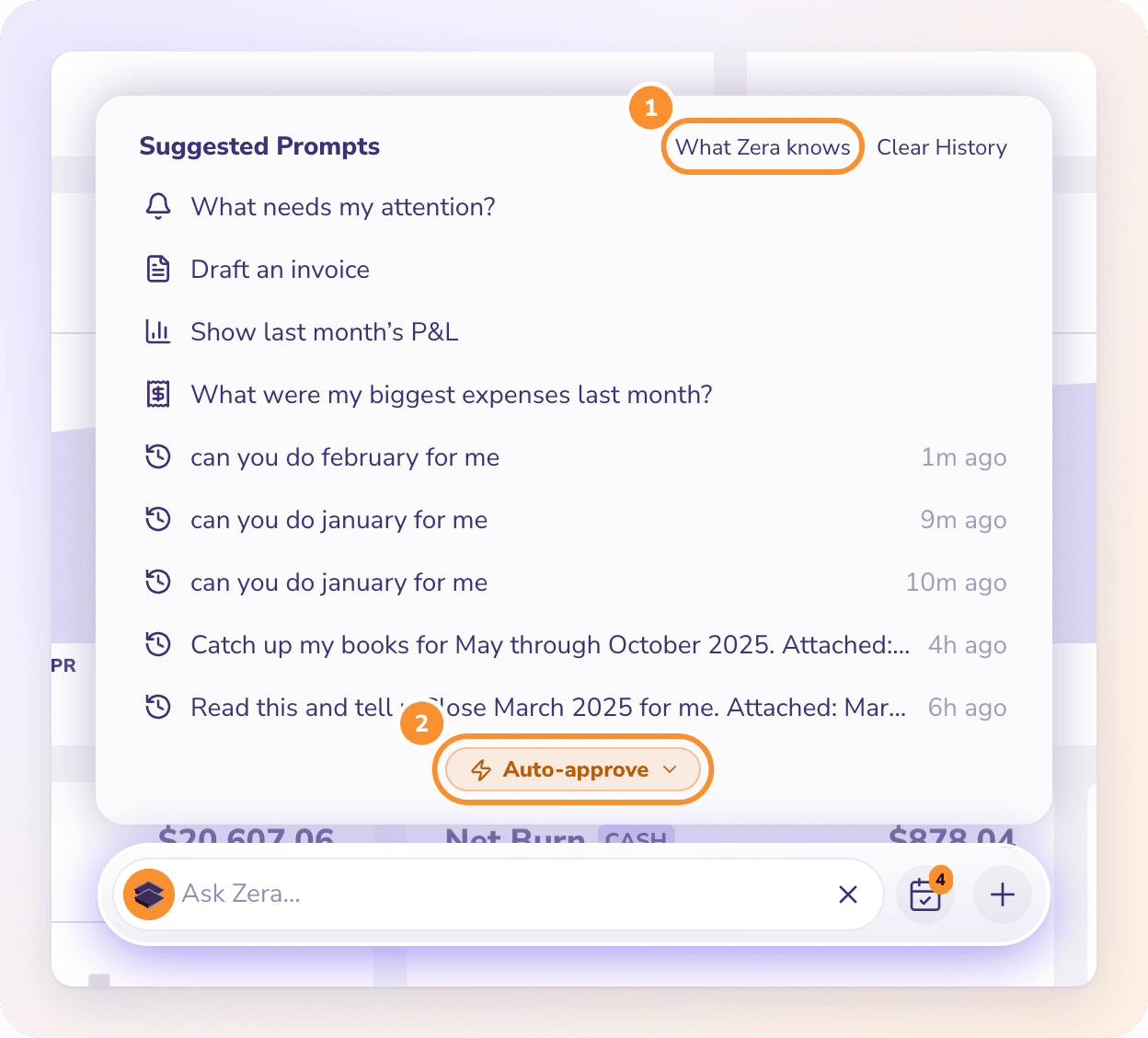
You choose how changes are approved. By default (Ask first) each change waits as a card for your Approve. With Auto-approve, changes apply as Zera makes them; anything that can't be undone still asks. See Let Zera apply changes by itself (Auto-approve).
It keeps working without you. Approved work runs on ZeraBooks' servers, so you can close the chat or change page, and the bar shows its progress.
It remembers your business. What you tell Zera, it keeps for the company. See What Zera knows about your business.
It works in the company you have open. Switch company and the bar starts fresh for that company.
Here is Zera doing a month from one message, with Auto-approve on:
How do I open Ask Zera?
The Ask Zera… bar sits at the bottom of every page in the General Ledger.
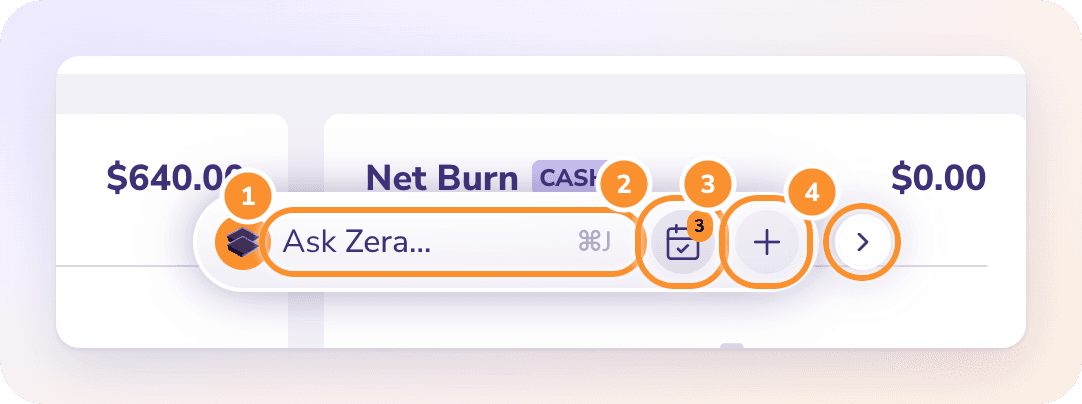
You can open it in five ways:
| How | What happens |
|---|---|
| Click the bar | The bar widens and shows Suggested Prompts |
| ⌘ J (Mac) or Ctrl J (Windows) | Opens or closes the bar from any page |
| Ask Zera in the left navigation, near the bottom | Opens or closes the bar |
| ⌘ K, then Ask Zera… | Opens the bar. If you type a question in the search box, choose Ask Zera: followed by your question to send it straight away. |
| Ask Zera why on a number in Financials | Click any amount, then Ask Zera why. Zera explains what drove it. |
Type your request and press Enter to send it. Press Shift Enter for a new line. Press Esc, or click anywhere on the page, to close the bar. Your chat is kept for the next time you open it.
The two round buttons on the right of the bar:
Checklist opens Autopilot. Its orange badge counts the questions Autopilot is waiting on.
+ opens the quick actions (see below).
Suggested Prompts and recent chats
When you open the bar without a chat in progress, Suggested Prompts lists four requests that fit the page you're on, followed by your recent chats. For example, on Reconciliations it offers "What's left to close last month?" and "Why doesn't last month tie?".
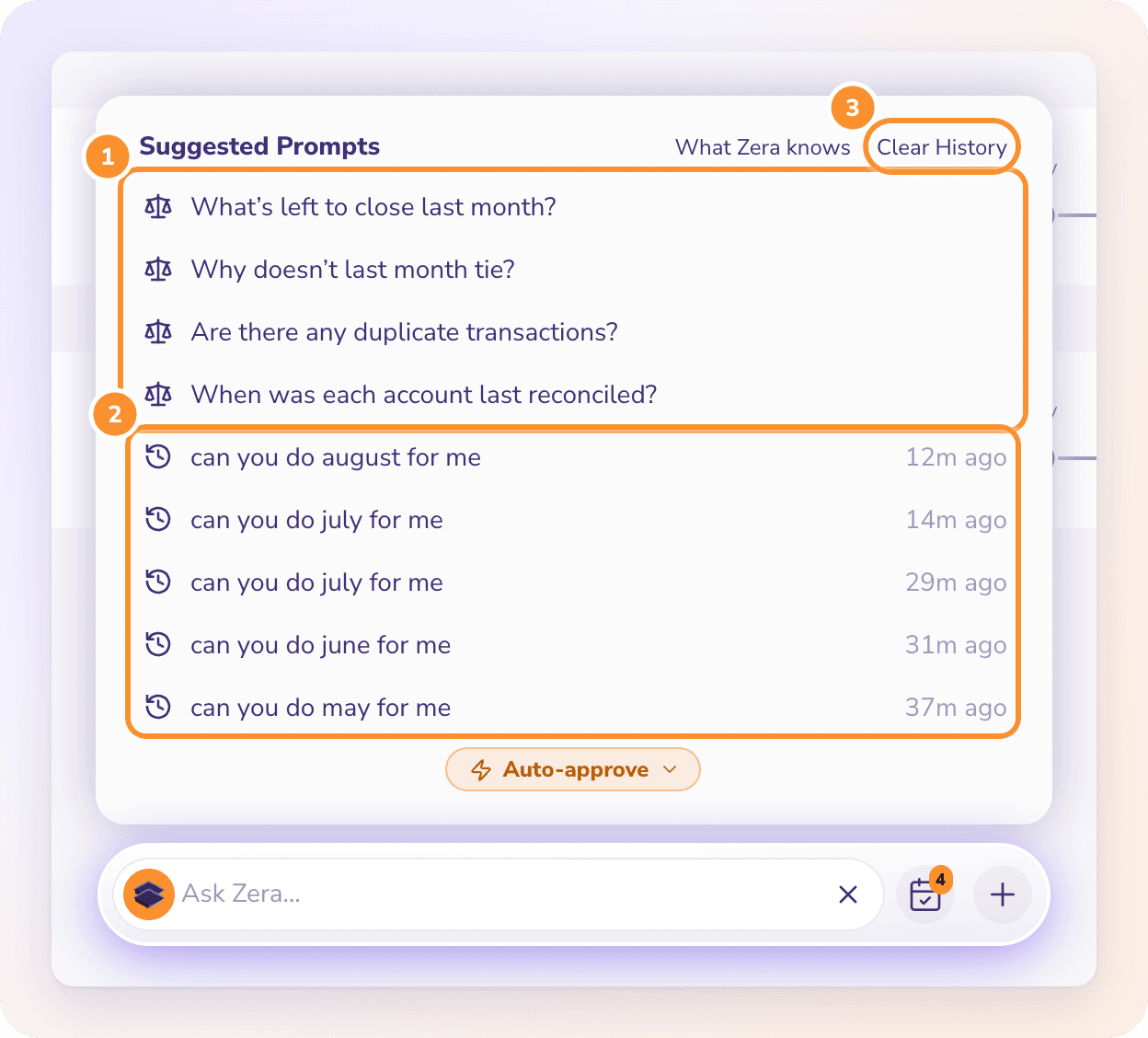
Click a prompt to send it.
Click a recent chat to reopen it where you left off.
What Zera knows shows what Zera has learned about this company. See What Zera knows about your business.
Clear History hides your recent chats for this company. See Ask Zera safety, privacy and limits.
Read an answer
Zera's answers are short. Lists of figures come as a table, and answers link to the page where you can see the detail, such as Ledger or Financials.
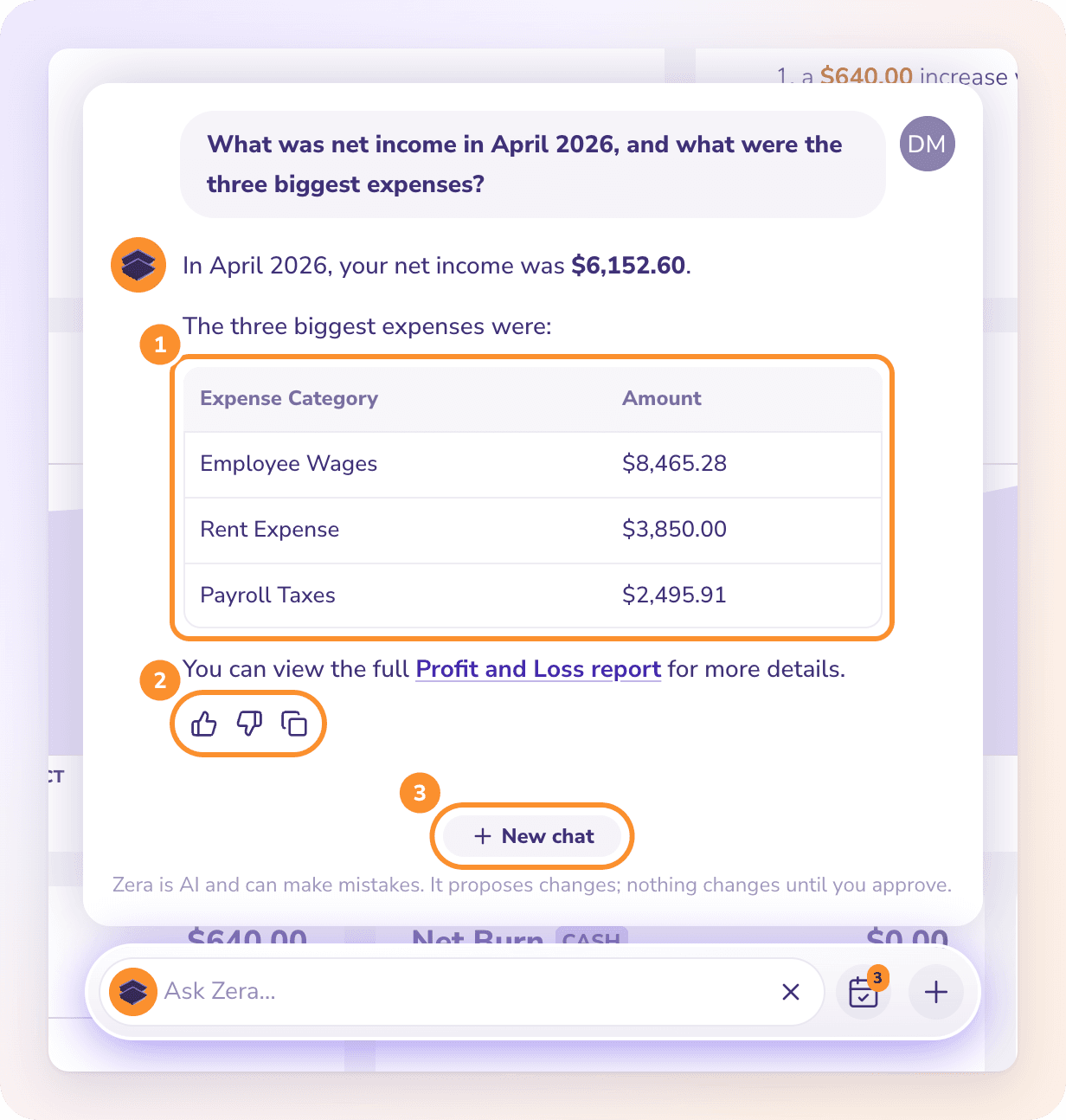
Under each answer:
The thumbs up (Good answer) or thumbs down (Bad answer) rates the answer.
Copy copies the answer's text.
While Zera works, it shows what it is doing ("Thinking…" or the step it is on). Click Stop Answering to stop; the message "Stopped. Nothing was changed." confirms nothing was written. Click New chat to start over on a new topic.
Does a new chat lose my progress?
No. When you click New chat, Zera re-reads where your books stand before it works: each account's statements and sign-offs, what's uncategorized, open bills and invoices, and how far the books are closed. It sees the work and waiting cards from earlier chats, picks up an unfinished plan, and knows everything you've taught it. Past chats stay in the list on Suggested Prompts, and long chats stay fast.
Quick actions
Click + on the bar for six shortcuts. The four with a key also work from any page without opening the menu.
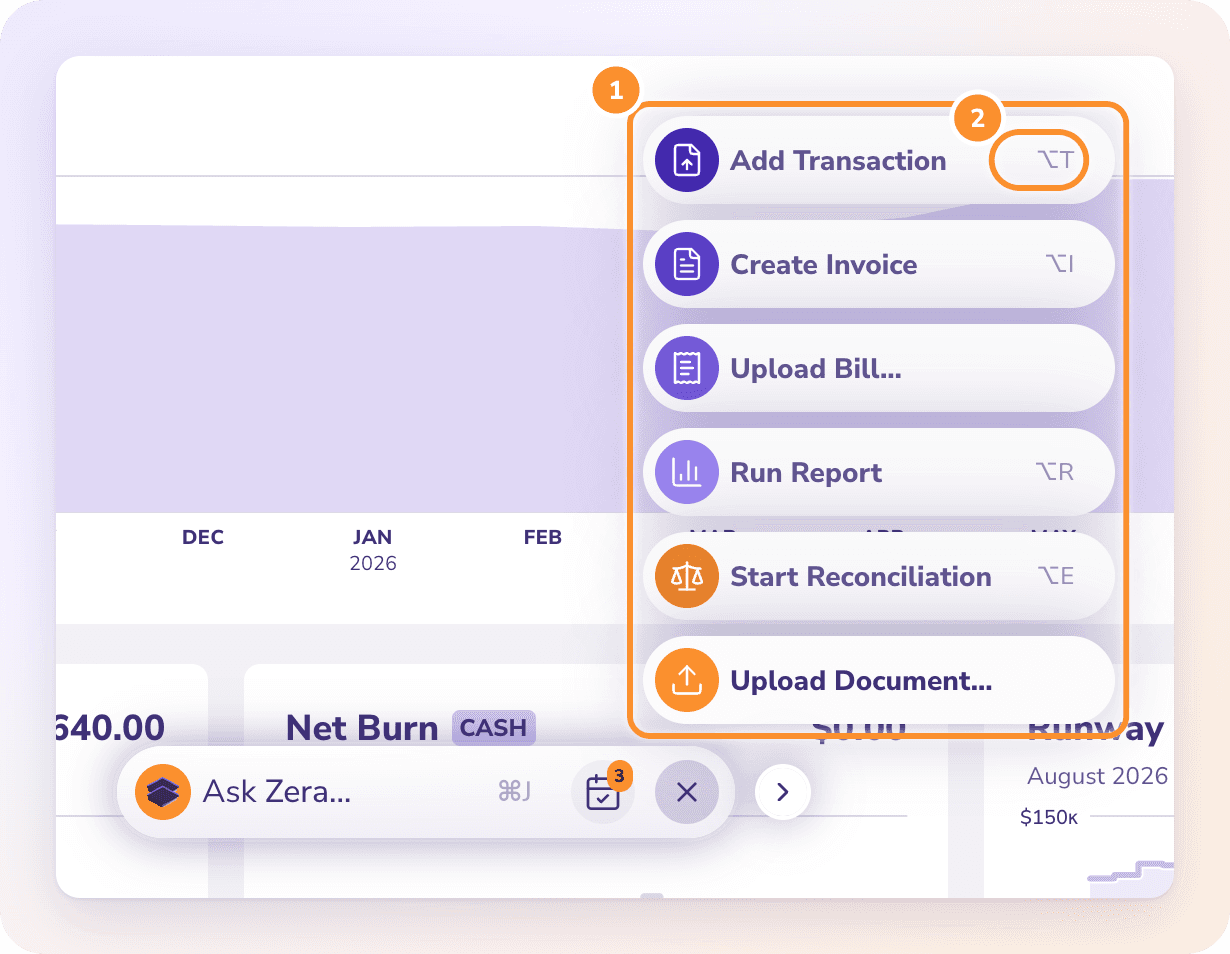
| Quick action | Shortcut | What it does |
|---|---|---|
| Add Transaction | ⌥ T | Opens the Ledger with a new transaction ready to fill in |
| Create Invoice | ⌥ I | Opens a new invoice in Invoices |
| Upload Bill… | None | Picks a file and asks Zera to create a bill from it |
| Run Report | ⌥ R | Opens Financials |
| Start Reconciliation | ⌥ E | Opens Reconciliations |
| Upload Document… | None | Picks a file and asks Zera what to do with it |
On Windows, use Alt in place of ⌥. The shortcuts pause while you type in a field or have a dialog open.
Move the bar to the corner
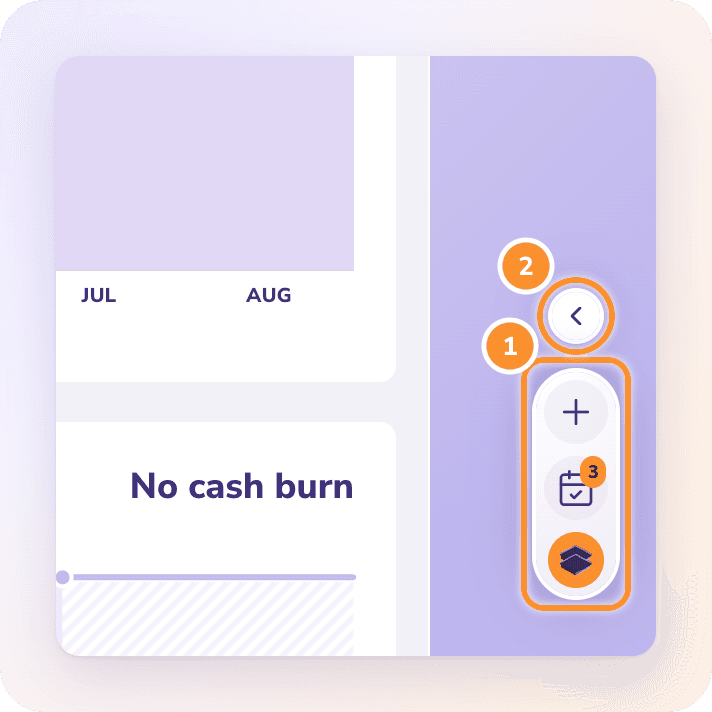
If the bar covers something you need, hover over it and click > on its right. It becomes a small pill in the bottom-right corner, with Zera's mark, the checklist and +. Click Zera's mark to open it. Hover over the pill and click < to move it back to the middle. ZeraBooks remembers your choice in this browser.
What you can ask
Zera covers the whole General Ledger. Some examples:
| Area | Try asking |
|---|---|
| Reports and answers | "Show last month's P&L", "What's my cash balance?", "Who owes me the most?" |
| Doing the books | "I'm behind 6 months, here are my statements, do my books", "Do my books for January to June", "Categorize everything uncategorized in March" |
| Starting from zero | "Set up my books", with your statements attached. Zera creates the categories and the bank and card accounts it needs. |
| How the business is doing | "How is my business doing?" Zera answers from your latest complete period: net income, revenue and your biggest costs. |
| Statements, bills and receipts | Drop a file on the page: "Import this statement", "Create a bill from this" |
| Reconciliation and month-end | "What's left to close March?", "Why doesn't April tie?", "Close the books through June" |
| Transactions | "Record a $450 journal entry to accrue September utilities", "Move the Adobe charges to Software" |
| Bills and invoices | "I invoiced Rainier 980 on Apr 10", "Draft an invoice for Northwind: 12 hours at $95", "Which bills are due this week?", "Send a friendly reminder for invoice 1042" |
| Vendors, customers, products | "Merge these two vendors", "Add a customer", "Create a product called Espresso, $18" |
| Autopilot | "Answer Autopilot's questions", "Run Autopilot now", "Undo what Autopilot did to the Uber charges" |
| Reports to share | "Email last month's financial statements to my accountant", "Export the Ledger CSV to the Vault", "Create a custom report for Q2" |
| Teaching Zera | "Jorge is a 1099 contractor", "Uber rides are business travel" |
| Settings and clients | "Change our invoice footer", "Switch Autopilot to Cautious", "Add a client called Maple Dental" |
| How-to | "How do I finalize a month?" Zera answers from this Help Center and links the article. |
What Ask Zera won't do
Guess what only you know. Whether a charge is personal, what a cash withdrawal was for, a loan's rate: it asks.
Anything that can't be undone without asking, such as emailing a customer, even with Auto-approve on.
Passwords, sign-in and security, including the closing password on your books. Books with a closing password are reopened and closed by you in Reconciliations.
Billing and payment details. See Billing, your trial, and cancelling.
Deleting a company or its data. Zera can archive or restore a client, but deleting one is done in All Clients. See Archive, restore or delete a client.
Moving money. Like the rest of ZeraBooks, it records what was paid; it doesn't pay bills or connect to your bank.
Tax or legal advice. Ask your accountant.
Frequently Asked Questions
Is Ask Zera a chatbot that only explains things?
No. Zera reads your books and does the work: it imports statements, categorizes transactions, adds bills and invoices, fixes reconciliations, signs off months and closes the books. By default each change is a card that waits for your Approve; with Auto-approve on, changes apply as Zera makes them.
Does Zera keep working if I close the chat?
Yes. Approved work runs on ZeraBooks' servers. Close the chat, change page or reload, and it carries on. The Ask Zera… bar shows its progress, for example "Importing 5 of 20…".
How do I open Ask Zera with the keyboard?
Press ⌘ J on a Mac or Ctrl J on Windows, from any page. Press it again, or Esc, to close it.
Where do the numbers in Zera's answers come from?
From ZeraBooks' own reports and ledger, the same code the Financials page uses. Zera never calculates or estimates an amount itself.
Does Ask Zera know which page I'm on?
Yes. It knows the page and the period it shows, so "this month" means the month on screen and "last month" the one before it. On a bill or invoice, "this invoice" means the one you have open.
Can Zera see my other companies?
No. It works only in the company you have open. Switch company and the bar starts again for that company.
How long can a message be?
Up to 32,000 characters, enough to paste a long list or a vendor's email. For documents, attach the file instead of pasting its text. See Give Zera statements, bills and receipts.
Does Ask Zera pay my bills or connect to my bank?
No. ZeraBooks doesn't move money or connect to banks. Zera records payments and imports the statements you give it. See Give Zera statements, bills and receipts.
Learn more about AI bookkeeping: Autopilot and Ask Zera keep the books inside a real general ledger.
Still stuck? A real person reads every message—come say hello.