Archive, restore or delete a client
Archive a client you no longer work with to keep its books but hide it. Restore it any time. Delete a client only when you want everything stored for it gone.
Archive or delete?
| Archive | Delete | |
|---|---|---|
| The client's books | Kept, unchanged | Permanently removed |
| Where it goes | All Clients under Inactive | Gone |
| Company menu | Hidden | Gone |
| Can you undo it? | Yes, with Restore | No |
Your own books, marked Your books, can be edited but never archived or deleted.
Archive a client
Open All Clients: click the business name at the top of the left navigation, then View All Clients.
Click the client's ⋮ menu, then Archive.
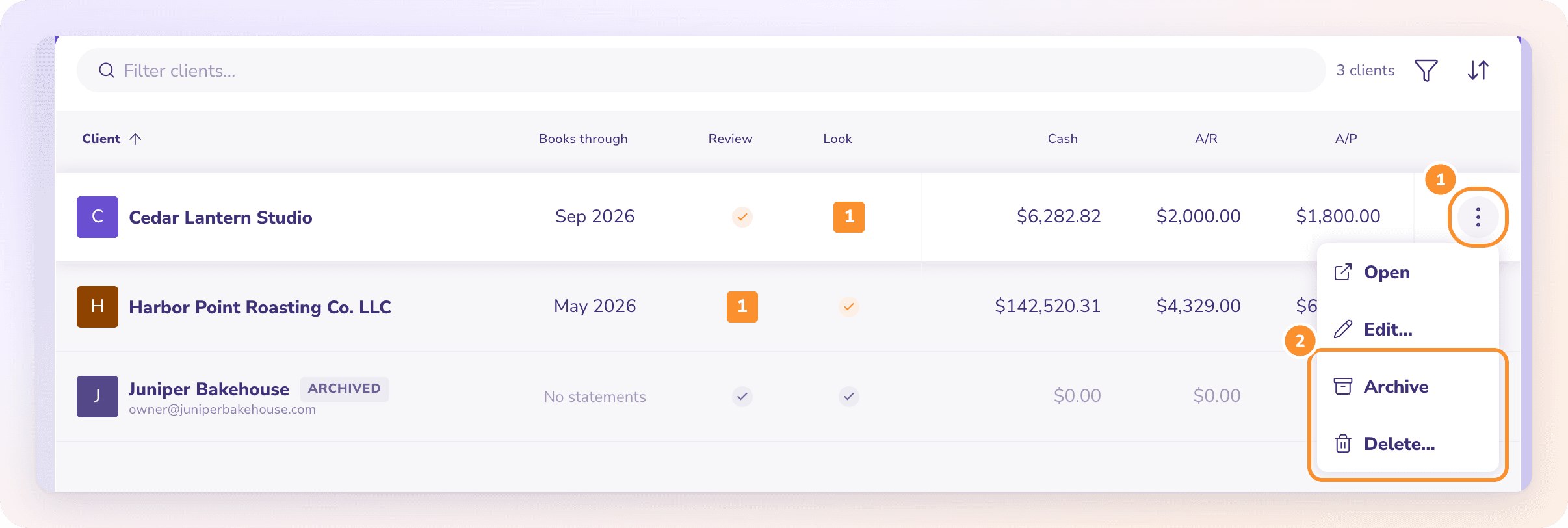
ZeraBooks shows "Client archived — find it under Inactive". The client keeps all its books and is marked Archived in the list.
Restore a client
In All Clients, set the filter to Inactive (or All).
Click the client's ⋮ menu, then Restore.
ZeraBooks shows "Client restored", and the client is back in the company menu.
Delete a client
Important: Deleting a client permanently removes everything stored for it, such as its statements, transactions and documents. This can't be undone. If you might need the books again, archive the client instead.
In All Clients, click the client's ⋮ menu, then Delete….
The dialog lists what the client holds and will be removed.
Under Type the client’s name to confirm, type the client's name exactly.
Click Delete client. Leave the window open until it finishes; ZeraBooks then shows "Client deleted".
A client that holds no records at all can be deleted without typing its name.
Frequently Asked Questions
What's the difference between archiving and deleting a client?
Archiving hides the client under Inactive and keeps its books, so you can restore it. Deleting removes everything stored for the client, permanently.
Why can't I archive or delete my own books?
Your own books, marked Your books, always stay active. You can rename them with Edit…, but not archive or delete them.
Am I still charged for an archived client?
Archived clients never count toward your plan. If the client was one of your additional clients, archiving it stops its charge from your next renewal; there are no mid-period refunds. Restoring it counts it as active again.
Can I still open an archived client?
Yes. Find it under Inactive in All Clients and click it, or choose Open from its ⋮ menu.
Learn more about For accountants: Run every client’s books in one ledger with AI doing the routine work.
Still stuck? A real person reads every message—come say hello.